Open File by Magic Date
approvedby simplgy
Define a hotkey and Moment.js pattern for the file that is most important to you (eg: your daily/weekly/monthly note).
Obsidian - Open File by Magic Date
Plugin for Obsidian
Summary
A quick way to open files that match a date pattern.
If you're trying to open a "weekly note" file or something similar, you're in the right place. This plugin has some flexibility that I couldn't find elsewhere.
My use case: Open the note for "most recent monday". But, you can use it for any datestamped filename.
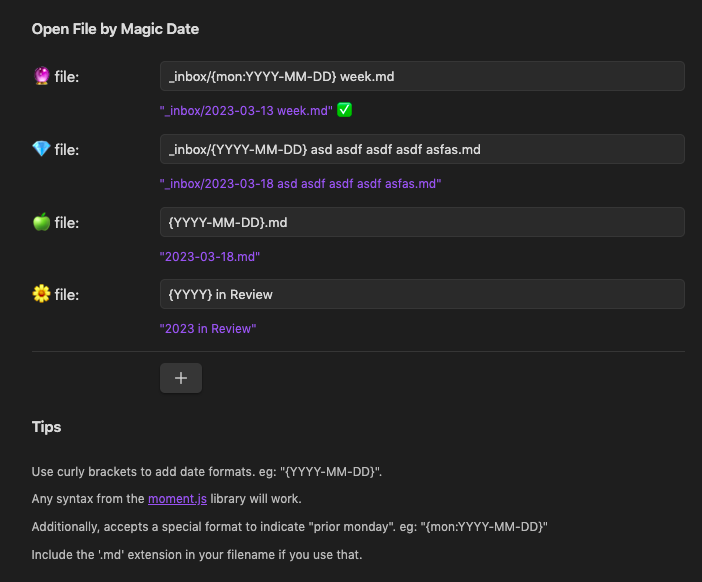
Use Cases
- Open a file by any date pattern you can think of -- eg:
{YYYY-MM-DD} foo.md - Open files with a single keystroke
- Support anchoring on arbitrary days of the week, like "most recent monday". eg:
weekly notes/{mon: YYYY-MM-DD} week.md - Support multiple files. eg:
{MMMM} monthly noteand{YYYY} yearly note - Support specifying a search query, then open the first file that matches the query
Installing
- Open settings -> Third party plugin -> Disable Safe mode
- Click "Browse community plugins" -> Search for "Magic File Hotkey"
- Install it, then click "enable"
Technical Details
The key piece of code is here, where the input file pattern is parsed by moment.js either against today's date or a different one:
// send anything in curlies "{mon:...}" to moment.format for the preceeding monday
// eg: `Weekly Notes/{mon:YYYY-MM-DD} week.md`
str = str.replace(/{mon:(.*)}/g, (match, captured) => priorMonday.format(captured));

// send anything in curlies "{...}" to moment.format
// eg: `Daily Notes/{YYYY-MM-DD}.md`
str = str.replace(/{(.*)}/g, (_match, captured) => now.format(captured));
Developing
Building
# npm install
npm run dev
(for auto refreshing) install git clone https://github.com/pjeby/hot-reload.git and turn it on
TODOs
- Support multiple files, different hotkeys for each
- when a filespec is removed, remove the associated hotkey command -- might not be possible
- Fix: the hotkey does not rename correctly when you edit the path (requires Obsidian restart)
- Fix: the hotkey does not stick around correctly when you edit the path (requires choosing a hotkey again after restart)
- Detect when the file exists, to help people check their syntax easily. (example implementation of file.exists from the templater plugin)
Releasing
- Update the version in
package.json(only) npm run versiongit push
This will trigger
.github/workflows/release.yml.verify the workflow is running here. Verify releases here
- (you're done) simply doing a github release and running release.yml will make the new version of the plugin available on the Obsidian marketplace. Nice!
Thanks and credit
Originally forked and learned from Hotkeys for specific files. Thank you, Vinzent03.
Similar Plugins
- Homepage - open a specific note on startup
- Hotkeys for starred files
- Hotkeys for specific files
For plugin developers
Search results and similarity scores are powered by semantic analysis of your plugin's README. If your plugin isn't appearing for searches you'd expect, try updating your README to clearly describe your plugin's purpose, features, and use cases.