Tidy Footnotes
approvedby charliecm
Tidy your footnotes seamlessly.
Obsidian Tidy Footnotes
Adds a command in Obsidian that tidies your footnotes so they're easy to follow:
- Consolidates all footnote definitions into one place, sorted by appearance
- Re-indexes numbered footnotes (e.g.,
[^1][^4][^2]becomes[^1][^2][^3])
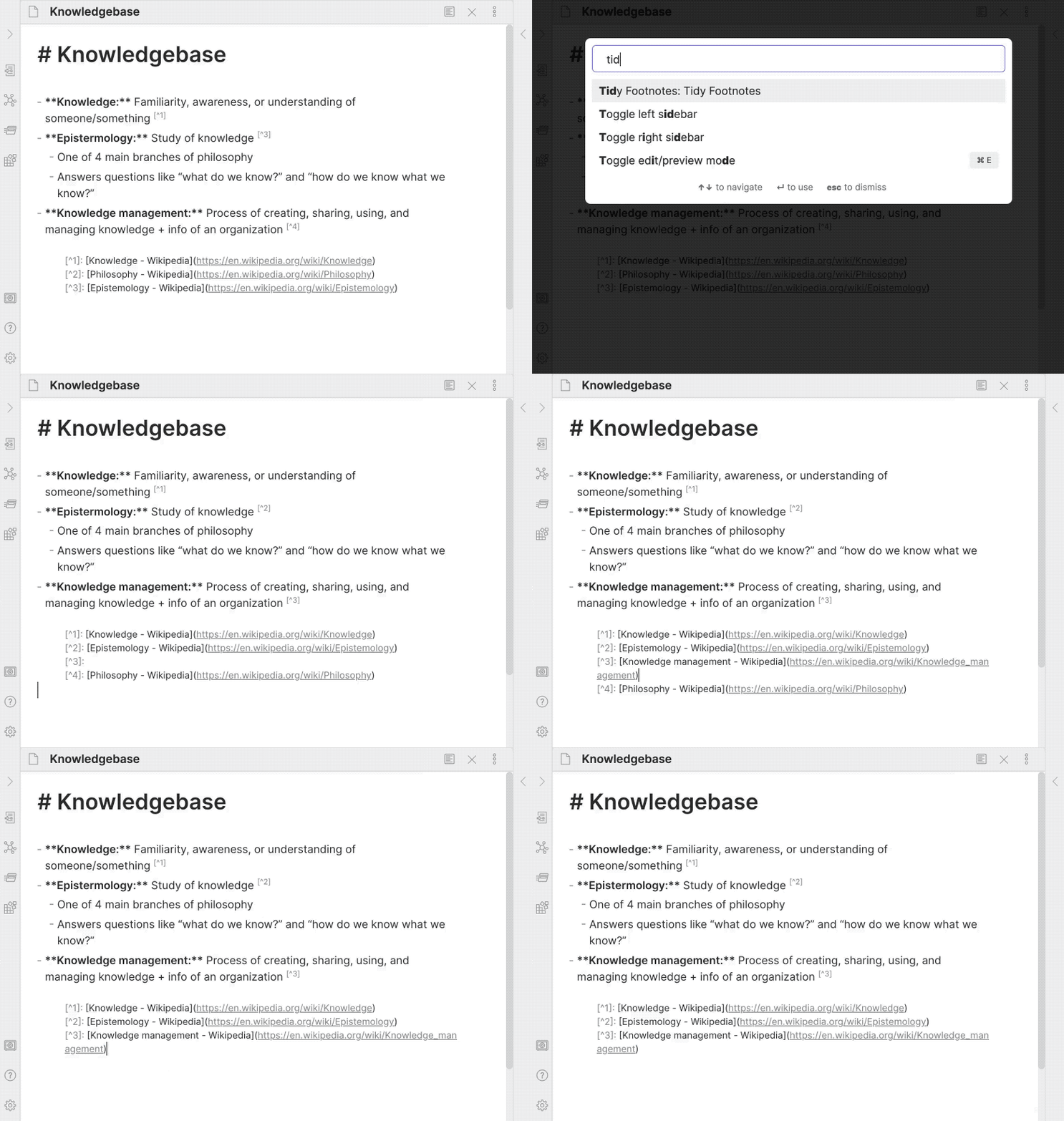
Inspired by obsidian-footnotes plugin.
How to Install
From inside Obsidian:
- Go to Settings → Community plugins.
- Disable Safe mode.
- Click Browse, search for Tidy Footnotes, and click Install.
- Click the toggle button to enable the plugin.
For manual installation, download this repo and copy over main.js and manifest.json to your vault: VaultFolder/.obsidian/plugins/obsidian-tidy-footnotes/.
How to Use
Run Tidy Footnotes: Tidy Footnotes from the Command Palette. Or, set it as a hotkey from Settings → Hotkeys.
Caveats
- Currently, footnotes in code blocks are also parsed instead of being ignored.
- The original positions of footnote definitions are not maintained. The plugin will always move all definitions to where the first definition is found.
- Non-numbered foonotes (e.g.,
[^abc]) doesn't affect the re-indexing of numbered footnotes.
Development
- Clone this repo.
yarnto install dependencies.yarn devto start compilation in watch mode.bash install-built.sh /path/to/your/vault -dto create symbolic links of built files to your vault for quick development.
Note: CodeMirror is imported for testing with the Doc interface. It may break in the future if the version no longer matches what Obsidian uses.
Release
- Run
yarn build. - Run
npm version [patch/minor/major]to bump version inmanifest.jsonandversions.json. - Add changes in
CHANGELOG.md. - Add a new version tag and push it.
git tag -a 1.0.1 -m "1.0.1" git push origin 1.0.1 - Go to “Releases” in GitHub and edit the latest release (created by GitHub Actions). Insert the changelog texts in the description and ensure
main.jsandmanifest.jsonare attached. - Click “Publish release”.
Support
If you really like this plugin and want to support its development, please consider buying me a coffee 🙂 Thanks!

For plugin developers
Search results and similarity scores are powered by semantic analysis of your plugin's README. If your plugin isn't appearing for searches you'd expect, try updating your README to clearly describe your plugin's purpose, features, and use cases.