Text to Speech
approvedby Johannes Theiner
Hear your notes.
🗣️Text to Speech
Plugin for Obsidian

Features:
- Start playback for note from statusbar and ribbon
- Only speaking selected text in edit mode:
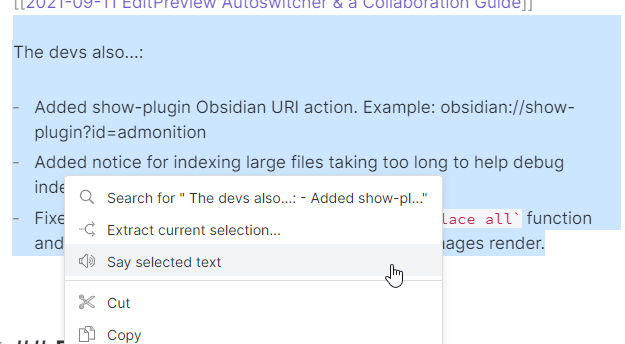
- usable with other plugins (currently RSS Reader)
You can create language specific voices,
the plugin will try to identify the language used.
If it is not identified correctly you can overwrite this behaviour
by having
lang: {languageCode}
in the Frontmatter. The language code can be seen in the
settings and is a two letter ISO 639-1 code.
This plugin will NOT work on android due to this bug in the Webview.
Adding languages
This plugin uses the native API of your Operating System, to add a new language reference the documentation accordingly:
Installing the plugin
Settings > Community plugins > Community plugins > Browseand search forText to Speech
API
You can use this plugins API to add Text to Speech capabilities to your plugin.
This uses the @vanakat/plugin-api package.
You can find the API documentation here: API Documentation
const tts = pluginApi('tts');
await tts.say(title, text, language);//language is optional, use a ISO 639-1 code
tts.pause();
tts.resume();
tts.stop();
tts.isSpeaking();
tts.isPaused();
For plugin developers
Search results and similarity scores are powered by semantic analysis of your plugin's README. If your plugin isn't appearing for searches you'd expect, try updating your README to clearly describe your plugin's purpose, features, and use cases.