by Vedant Mahajan
Sync notes between devices in realtime. Each note is encrypted on the device before it is sent.
Sealed Sync
Live, end-to-end encrypted sync for Obsidian. Open the same note on your laptop and your phone and type on either one. Every keystroke shows up on the other device as you type, with its cursor, and the server only ever sees ciphertext.



- Google Docs-style live editing. Edits merge letter by letter through a CRDT, so typing on two devices at once never overwrites either one. Each device's cursor and selection are shown, labelled with its name.
- Encrypted before it leaves the device. Notes, keystrokes, cursors, and file names are sealed with AES-256-GCM on your device. The vault key never leaves your devices.
- Automatic. There is no Sync button. Open notes update as you type, and every other file in the vault follows within moments.
- Pair a phone by scanning a QR code. No account, no Tailscale, no copying
main.jsaround, and no need to be on the same Wi-Fi. - Safe by default. A file deleted on another device goes to your trash, not into the void. If one device edits a note that another deletes, both are kept and you choose.
Plugin id obsisync · Display name Sealed Sync · Community page · Needs Obsidian 1.6.6 or later
An older community plugin named Vaultbridge is a different project. Install this one by the id
obsisyncor the repositoryVedant817/obsisync.
Contents
- Quick start
- Live editing
- How the encryption works
- How it compares
- Settings
- Status bar
- Devices, recovery, and conflicts
- Limits
- Network and privacy
- Self-hosting
- Development
Quick start
1. Install
From Obsidian: Settings → Community plugins → Browse, search for Sealed Sync, then install and enable it.
Newest build, with BRAT: install BRAT from Community plugins, choose Add beta plugin, enter Vedant817/obsisync, then enable Sealed Sync. BRAT installs from the latest GitHub release.
The server address is already filled in. You don't need an account.
2. Create a vault on your first device
Open Settings → Sealed Sync → Or start a new vault, paste a one-time setup token, and click Create vault on this device. Then write down the recovery phrase it shows. That phrase is the only way to unlock the vault's key.
The server hands out setup tokens so that strangers can't fill it with vaults. For the hosted server, ask the maintainer by opening an issue. On your own server, you make the token yourself (see Self-hosting).
3. Add your other devices
Install Sealed Sync on the other device. On the first device, click Create a pairing code. The code works once and expires after ten minutes. Then connect the other device either way:
- Scan. Point the other device's camera at the QR code. Obsidian opens and joins on its own.
- Type. Enter the invite ID, pairing code, and recovery phrase under Or type the codes, then click Join vault. If your camera copies the link instead of opening Obsidian, paste it into Pairing link and click Join from link.
That's it. The status bar reads Sealed Sync live, and Live editing in settings says Connected over WebSocket.
Live editing
Open the same note on two devices and type. The other device usually shows the change in a fraction of a second, without reloading the note and without moving your cursor.
| Merging | Edits are applied through Yjs, a CRDT. Simultaneous typing at the same spot keeps both edits; neither device wins. |
| Cursors | Each device's cursor and selection appear in its own colour, labelled with the name set under Device name. The status bar shows how many other devices are in the note. |
| Offline | Edits made offline are sent when the device reconnects, and merge with whatever changed in the meantime. |
| Edits from outside the editor | When another app, a template, or a script changes a note while it is closed, the change is folded into the live note the next time it opens. |
| Split panes | One pane per note is bound to the live session, so a note open twice on the same device is never applied twice. |
| What is live | Markdown and text notes under 1 MB that are open in an editor. Attachments, canvases, and closed notes sync as whole files. |
Turn off Edit open notes live to sync open notes as whole files only.
How the encryption works
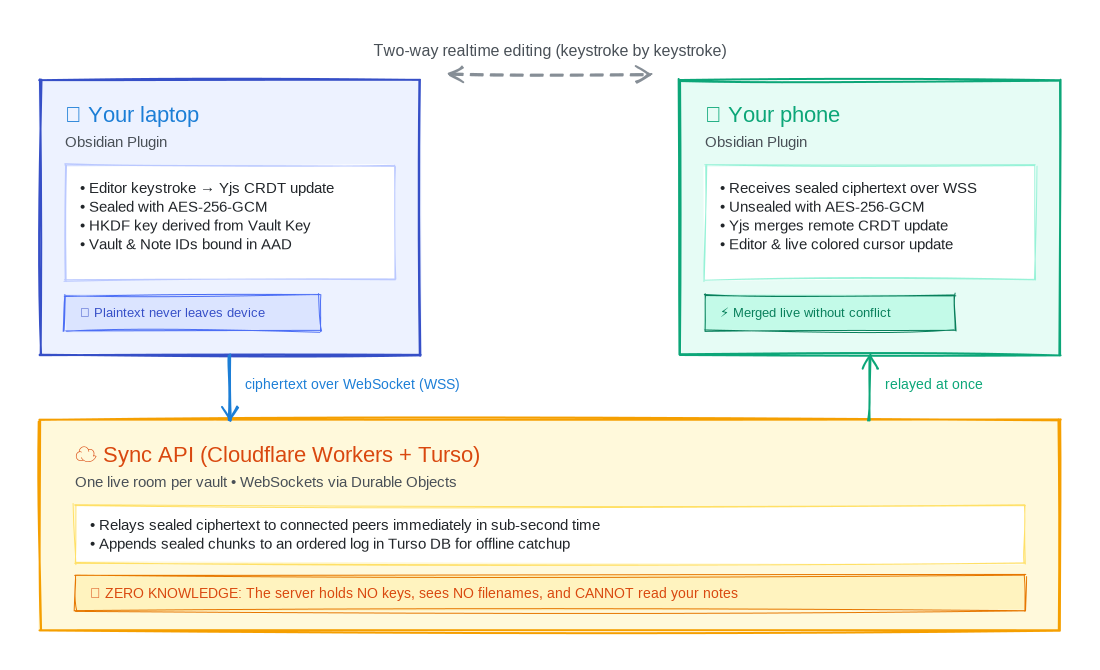
Diagram source: assets/encryption-flow.excalidraw (viewable and editable on Excalidraw).
- A random vault key is created on your first device. It is stored only wrapped: once by a device secret, and once by your recovery phrase.
- Separate keys for file contents, the file manifest, and live editing are derived from the vault key with HKDF. Each sealed message carries its vault and file or note as authenticated data, so the server can't move ciphertext between notes undetected.
- Live notes are addressed by an id derived from the note's path with a keyed HKDF. The server can't turn it back into a name.
- Pairing hands the new device the wrapped key and the recovery phrase that opens it. The server never sees the unwrapped key.
| The server can see | The server can't see |
|---|---|
| That a vault exists, its device ids, and when they connect | Note contents, keystrokes, or attachments |
| Opaque note ids, ciphertext sizes, and timing | Note names, folder names, or paths |
| How many devices are editing a note | Cursor positions or device names |
How it compares
| Sealed Sync | Obsidian Sync | Relay | Self-hosted LiveSync | Remotely Save | Syncthing | |
|---|---|---|---|---|---|---|
| Price | Free plugin and hosted server | Standard $4/mo billed yearly ($5 monthly); Plus $8 ($10) | Free for up to 3 users, with no cloud storage for attachments; Hobby $5/mo | Free; you run CouchDB or a relay | Free; you bring S3, Dropbox, WebDAV… | Free |
| End-to-end encryption | Always on | On by default; some sync metadata isn't end-to-end encrypted | Not described as end-to-end; private if you self-host on a private network | When you enable it | Optional | No server copy to protect |
| Typing on two devices at once | Merged live, with cursors | Merged when the file syncs | Merged live, with cursors | Near real time, no cursors | Conflicts at sync time | Conflict copies |
| New phone | Scan a QR code | Sign in | Sign in, join a shared folder | Connect to your server | Connect your storage | Pair on the network; no official iOS app |
| Built for | One person's devices | One person's devices | Teams sharing folders | One person's devices | One person's devices | Devices online together |
| Where it stops | 25 MB per attachment; no version-history viewer | Storage and file size follow the plan | Attachments need a paid plan | You patch and back up the server | Sync isn't continuous | Both devices must be reachable |
Pick Sealed Sync for encrypted, live sync across your own devices without running a server or paying a subscription. Pick Obsidian Sync for the official app, version history, and support. Pick Relay to edit live with other people. Pick LiveSync or Remotely Save to keep the ciphertext in storage you already control. Pick Syncthing when every device can reach the others and you want no server at all.
Run only one sync tool on a vault. Sealed Sync warns you when Obsidian Sync is also on, because two sync tools overwrite each other.
Prices and features of other tools are from their public pages, checked in 2026 (Relay in November 2026). Recheck them before you compare a bill.
Settings
| Setting | What it does |
|---|---|
| API address | The sync server. Set to the hosted server by default. Reload Obsidian after you change it. |
| Recovery phrase | Unlocks the vault on this device. Also included in the pairing QR code. |
| Create a pairing code | Makes a one-time code and QR code, valid for ten minutes, to add another device. |
| Pause sync | Holds uploads and downloads until you turn it off. |
| Edit open notes live | Live editing with cursors. When off, open notes sync as whole files. |
| Device name | The label on your cursor in other devices' editors. Sent encrypted. |
| Conflicts | Notes edited on one device and deleted on another. Choose Keep mine or Keep theirs. |
| Refresh vault info | Shows device count and storage, and lets you Revoke a lost device. |
Status bar
| Text | Meaning |
|---|---|
Sealed Sync live | Connected and up to date. |
… · starting | The plugin is loading. |
… · syncing | Files are uploading or downloading. |
… · retrying | A file didn't go through. Sync tries again on its own; the reason is under Sealed Sync settings. |
… · offline | The server can't be reached. Changes wait on the device and go out when it reconnects. |
… · conflict | A note needs you to choose a version. Open settings → Conflicts. |
… · paused | Pause sync is on, or a file is over the 25 MB limit. |
… · locked | This device is signed in but needs the recovery phrase. |
… · set up | This device hasn't joined a vault yet. |
Devices, recovery, and conflicts
- Closing Obsidian doesn't sign a device out. Its login lives in the plugin's
data.json, inside your vault's configuration folder. Opening Obsidian again picks up where it left off. - Lost a device? Open Refresh vault info on another device and click Revoke. The lost device can no longer sync.
- Deleted the plugin folder or
data.json? That device is signed out. Pair it again from a device that is still signed in. - Wrong recovery phrase while joining? That pairing code is used up. Create a new one, then revoke the extra device from Refresh vault info.
- Keep the recovery phrase safe, and keep one device signed in. The phrase unlocks the key, and a signed-in device is needed to pair new ones. Nobody, including the server, can recover a vault without them.
- Deleted files go to the trash you chose under Obsidian's Files and links → Deleted files, so a delete from another device can be undone. Obsidian's
.trashfolder is never synced. - Conflicts. A note open on both devices merges live, keystroke by keystroke. A note changed on disk while it was closed is merged into the live note when it opens. For files that aren't open, the newer edit wins. A note edited on one device and deleted on another is kept, and you choose under Conflicts. A file is never renamed, and an identical file is never saved twice.
Limits
| Attachment size | 25 MB per file |
| Live editing | Markdown and text notes up to 1 MB |
| File sync while connected | Instant on change, with a safety check every 30 seconds |
| File sync without the WebSocket | About every second on desktop, every 5 seconds on mobile |
| Excluded from sync | The vault's configuration folder (usually .obsidian) and .trash |
Network and privacy
Sealed Sync talks to one server, https://obsisync-api.mediclarity-voice-agent.workers.dev, unless you point it at your own. While Obsidian is open, it keeps one WebSocket open for live edits, cursors, and a short "a device saved a file" notice. If the WebSocket can't connect, it falls back to HTTPS polling.
The server stores ciphertext and sync metadata in Turso. File names travel inside the encrypted manifest. There are no analytics, no ads, and no telemetry, and the plugin doesn't add an account login or sell a subscription.
Vault access. On each sync cycle, the plugin calls vault.getFiles() to list every file except the configuration folder and .trash. That's how it notices a note added, edited, or deleted on this device. The list never leaves the device unencrypted.
The pairing QR code contains the recovery phrase, so keep that screen private.
Self-hosting
Either way below, you need a Turso database. Put its TURSO_DATABASE_URL and TURSO_AUTH_TOKEN in apps/worker/.env, then set up the tables and make your first setup token:
npm ci
npm run migrate -w @vaultbridge/worker
This writes a one-time setup token to apps/worker/.bootstrap-credential. Paste it into Or start a new vault on your first device.
Cloudflare Workers (recommended, includes live WebSockets). In apps/worker/wrangler.toml, change name and account_id to your own, then:
cd apps/worker
npx wrangler secret put TURSO_DATABASE_URL
npx wrangler secret put TURSO_AUTH_TOKEN
npx wrangler deploy
Docker (Node). Build the Dockerfile, then run it with TURSO_DATABASE_URL, TURSO_AUTH_TOKEN, HOST=0.0.0.0, and PORT. The Node server has no WebSocket room, so live editing runs over HTTPS polling and is slower.
Put your server's HTTPS address in API address on every device, then reload Obsidian. GET /v1/health reports whether the server is up.
Development
npm ci
npm run qa       # typecheck, test, and build everything
npm run build:plugin   # writes packages/plugin/main.js
| Path | What it is |
|---|---|
packages/plugin | The Obsidian plugin: settings, the vault adapter, and the CodeMirror live-editing binding |
packages/live-core | Live editing: Yjs documents, sealing, the WebSocket transport, and the offline queue |
packages/sync-core | File sync: scan, reconcile, push, pull, and conflict handling |
packages/crypto | AES-256-GCM, HKDF key derivation, and the recovery phrase |
packages/protocol | Request, response, and WebSocket message shapes shared by the plugin and server |
apps/worker | The sync API: a Cloudflare Worker with one Durable Object per vault, plus a Node server for Docker |
tests | Multi-device tests against an in-memory server, including live editing over fake sockets |
Releases are built by GitHub Actions. Pushing a tag such as 0.3.2 builds main.js, attests it, and publishes main.js, manifest.json, and styles.css as separate assets. To verify a download:
gh attestation verify main.js --repo Vedant817/obsisync
Every push to main that touches the server redeploys the hosted API.
See CONTRIBUTING.md before opening a pull request. To report a vulnerability, follow SECURITY.md; please don't open a public issue.
Pairing QR codes use qrcode-generator (MIT). Live editing uses Yjs and y-codemirror.next (MIT).
License
MIT © Vedant Mahajan
For plugin developers
Search results and similarity scores are powered by semantic analysis of your plugin's README. If your plugin isn't appearing for searches you'd expect, try updating your README to clearly describe your plugin's purpose, features, and use cases.