Octo Agent
approvedby open-octo
Embeds the Octo Agent coding assistant in your vault. Your vault becomes its working directory, giving it capabilities for file reads and writes, search, bash commands, and multi-step workflows. - This plugin has not been manually reviewed by Obsidian staff.
Octo Agent


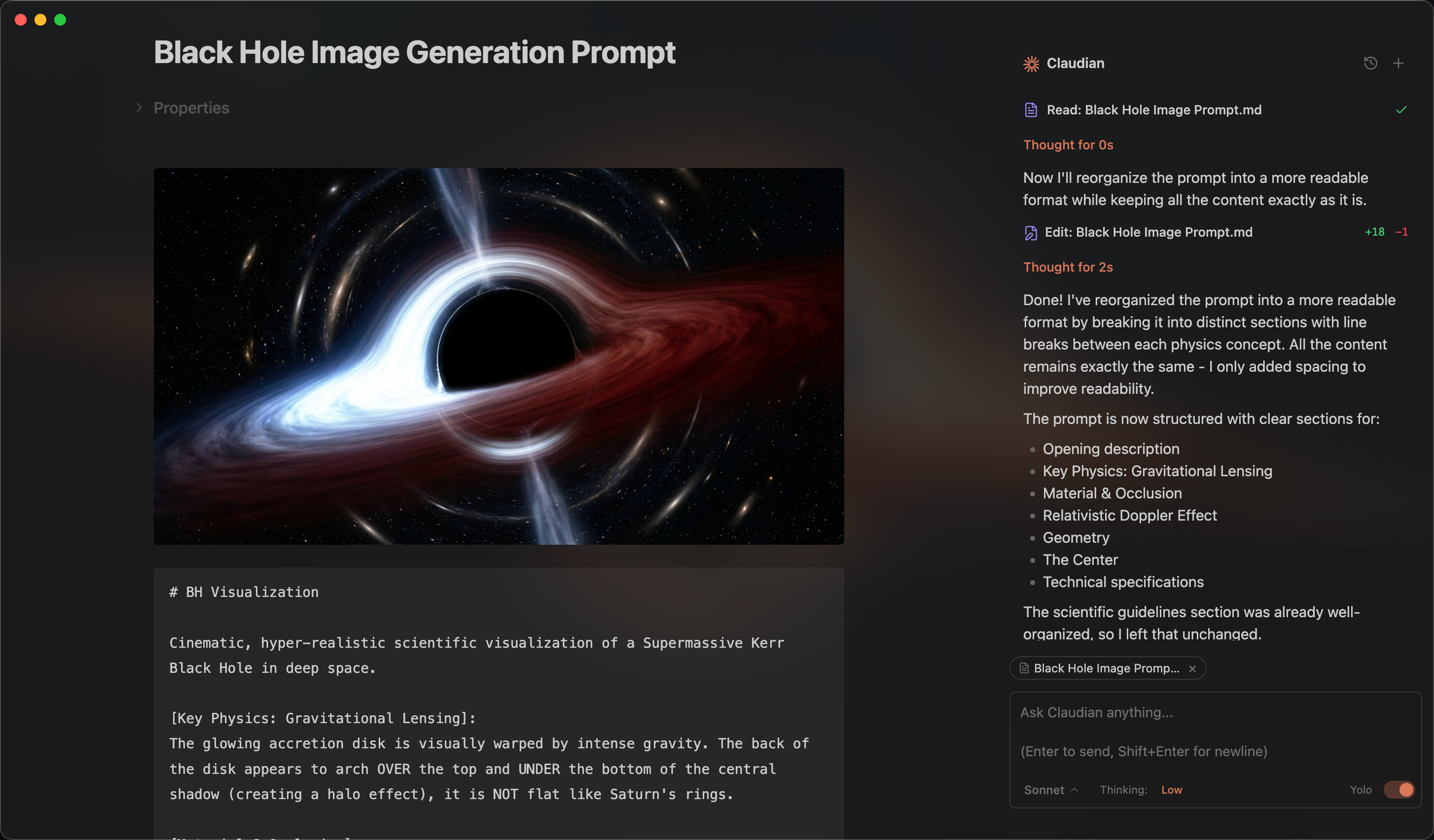
An Obsidian plugin that embeds the Octo Agent coding assistant in your vault. Your vault becomes the agent's working directory — file read/write, search, bash, and multi-step workflows all work out of the box.
Features & Usage
Open the chat sidebar from the ribbon icon or command palette. Select text and use the hotkey for inline edit. Talk to the agent, and it reads, writes, edits, and searches files in your vault.
Inline Edit — Select text or start at the cursor position + hotkey to edit directly in notes with word-level diff preview.
Slash Commands & Skills — Type / or $ for reusable prompt templates or Skills from user- and vault-level scopes.
@mention - Type @ to mention anything you want the agent to work with, vault files, or files in external directories.
Instruction Mode (#) — Refined custom instructions added from the chat input.
Multi-Tab & Conversations — Multiple chat tabs and conversation history.
Requirements
- The Octo Agent CLI/server installed and reachable (defaults to
octoon127.0.0.1:8088; configurable in Settings). - Obsidian v1.7.2+
- Desktop only (macOS, Linux, Windows)
Installation
From Obsidian Community Plugins (recommended)
- Open Obsidian → Settings → Community plugins → Browse
- Search for "Octo Agent" and click Install
- Enable the plugin
Or install directly from the community plugin page.
From GitHub Release
- Download
main.js,manifest.json, andstyles.cssfrom the latest release - Create a folder called
octo-agentin your vault's plugins folder:/path/to/vault/.obsidian/plugins/octo-agent/ - Copy the downloaded files into the
octo-agentfolder - Enable the plugin in Obsidian:
- Settings → Community plugins → Enable "Octo Agent"
From source (development)
-
Clone this repository into your vault's plugins folder:
cd /path/to/vault/.obsidian/plugins git clone https://github.com/open-octo/octo-obsidian.git octo-agent cd octo-agent -
Install dependencies and build:
npm install npm run build -
Enable the plugin in Obsidian:
- Settings → Community plugins → Enable "Octo Agent"
Development
# Watch mode
npm run dev

# Production build
npm run build
Privacy & Data Use
- Sent to API: Your input, attached files, images, and tool call outputs, sent to the Octo Agent server configured in provider settings.
- Local storage: Plugin settings and session metadata in
vault/.claudian/. - Environment variables: The Octo Agent process inherits the Obsidian process environment plus any variables you configure in Settings. This is needed for CLI authentication, proxies, certificates, and PATH resolution.
- Background activity: The plugin does not run telemetry beacons. UI polling timers read local Obsidian/editor selection state only. Network activity is limited to explicit Octo Agent server calls needed to answer your requests.
Troubleshooting
If you run into bugs or have a feature request, please submit a GitHub issue.
Architecture
src/
├── main.ts                      # Plugin entry point
├── app/                         # Shared defaults and plugin-level storage
├── core/                        # Provider-neutral runtime, registry, and type contracts
│   ├── runtime/                 # ChatRuntime interface and approval types
│   ├── providers/               # Provider registry and workspace services
│   ├── auxiliary/               # Shared provider auxiliary services
│   ├── bootstrap/               # Plugin bootstrap wiring
│   ├── security/                # Approval utilities
│   └── ...                      # commands, mcp, prompt, storage, tools, types
├── providers/
│   └── octo-agent/              # Octo Agent server adaptor, runtime, storage
├── features/
│   ├── chat/                    # Sidebar chat: tabs, controllers, renderers
│   ├── inline-edit/             # Inline edit modal and provider-backed edit services
│   └── settings/                # Settings shell with provider tabs
├── shared/                      # Reusable UI components and modals
├── i18n/                        # Internationalization (10 locales)
├── types/                       # Shared ambient types
├── utils/                       # Cross-cutting utilities
└── style/                       # Modular CSS
License
Licensed under the MIT License.
Acknowledgments
- Obsidian for the plugin API
For plugin developers
Search results and similarity scores are powered by semantic analysis of your plugin's README. If your plugin isn't appearing for searches you'd expect, try updating your README to clearly describe your plugin's purpose, features, and use cases.