Ogenda
approvedby jiang198012
Two-way calendar sync (CalDAV/iCloud) with an agenda view. - This plugin has not been manually reviewed by Obsidian staff.
Ogenda





简体中文 | English
Ogenda 是一个 Obsidian 社区插件,为 Obsidian 增加专门的日历/议程面板。它把事件保存在 Vault 内的本地 Markdown 月度笔记中,同时与 CalDAV / iCloud 双向同步——日历可随身携带,笔记始终留在你的仓库里。
⚠️ 桌面端与移动端均支持。需要 Obsidian 1.7.2+。CalDAV 同步需要可访问的服务器地址。
⭐ 如果你觉得 Ogenda 有用,欢迎 Star 这个仓库,帮助更多人发现它。
功能亮点
| 能力 | 能带来什么 |
|---|---|
| 双向同步 | 从 CalDAV / iCloud 拉取事件,把本地修改推回服务器;服务器变更与你的手动笔记合并,绝不覆盖 |
| 本地 Markdown 存储 | 事件按月存入 Vault 的月度笔记,可在事件块下方附加你自己的文字 |
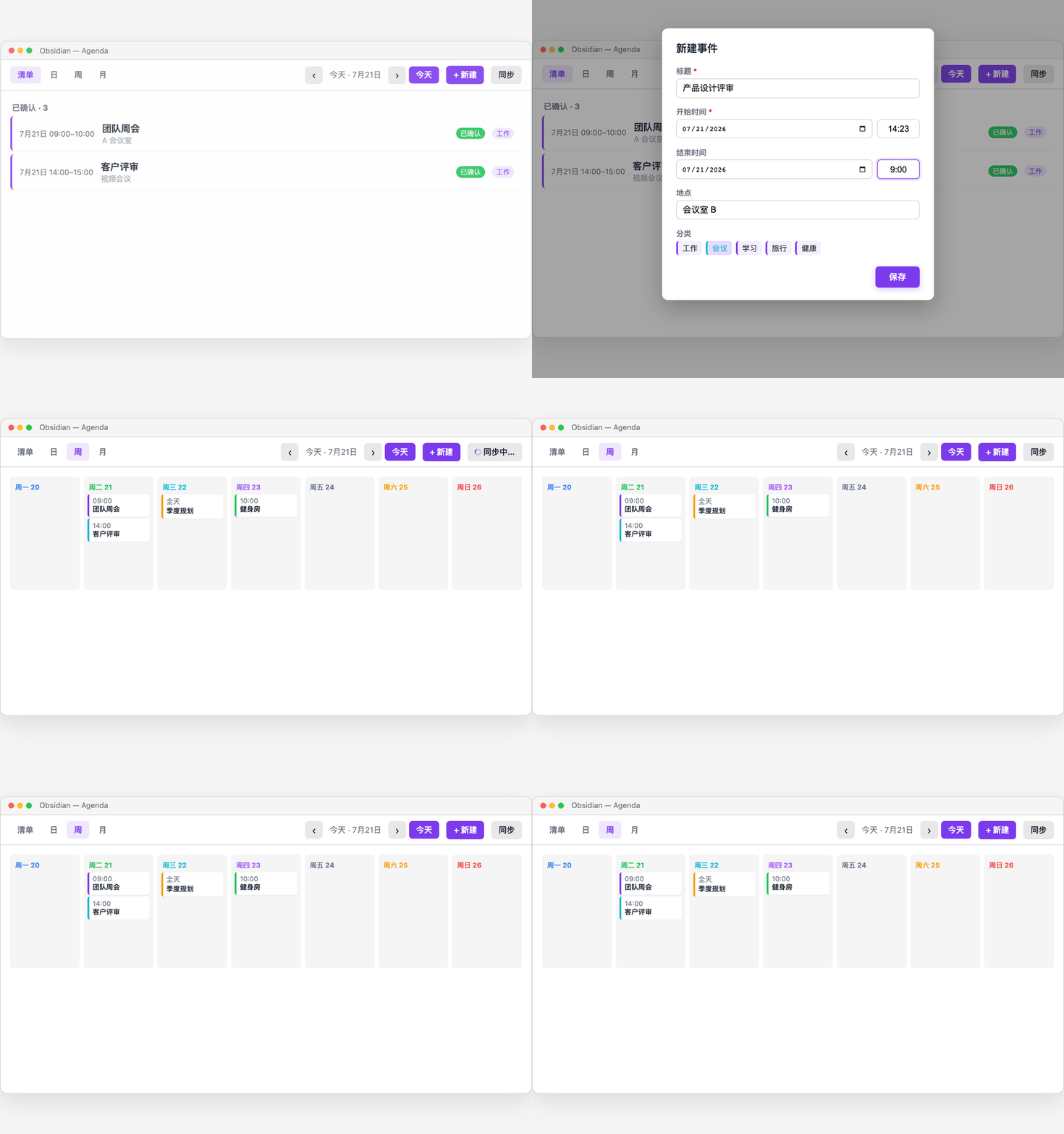
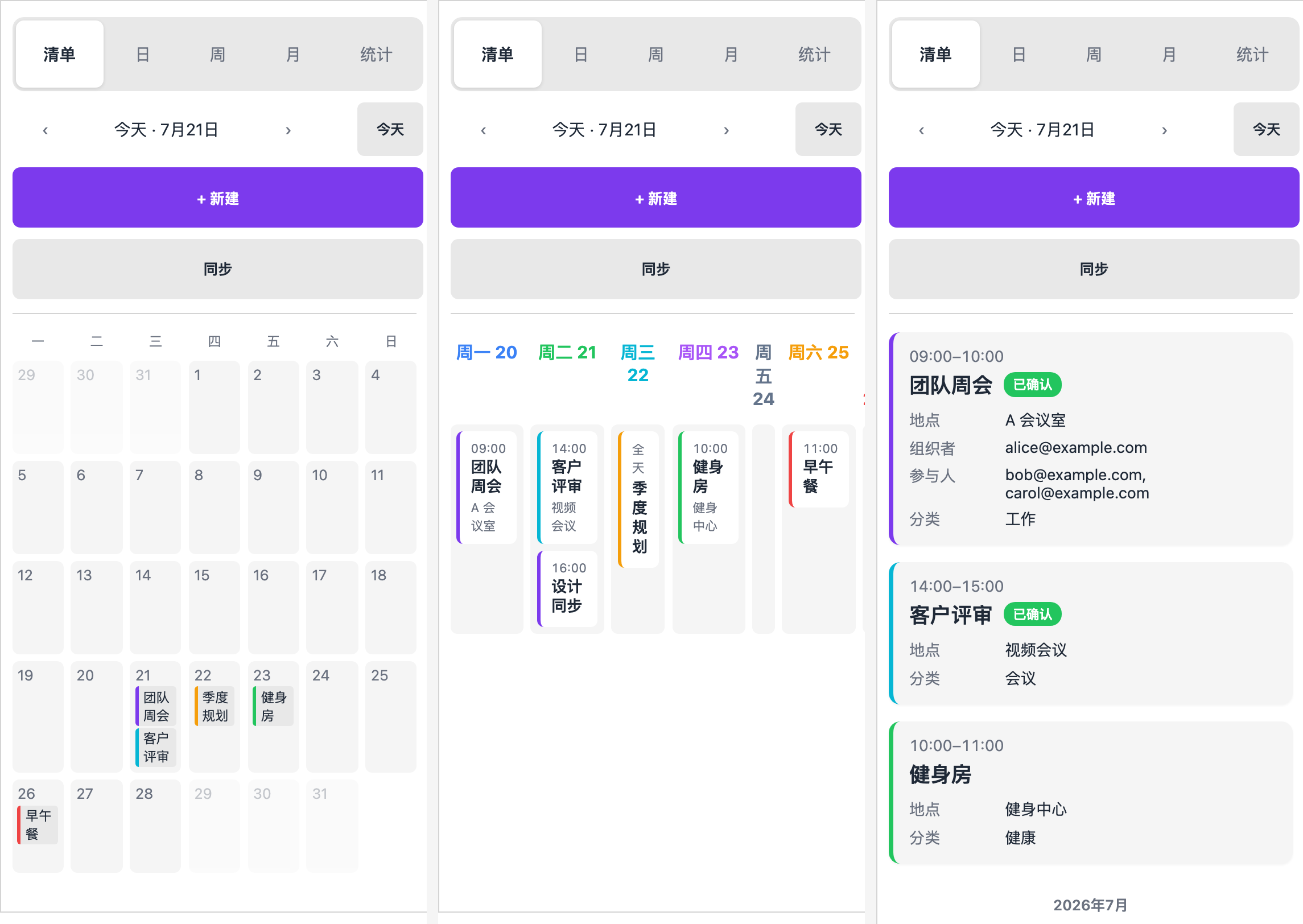
| 五种视图 | 列表 / 日 / 周 / 月 / 统计仪表盘 |
| 事件编辑器 | 分类标签、状态、地点、组织者、参与者、重复规则、提醒 |
| 重复事件 | 表单预设每天/每周/每月等规则,支持自定义 RRULE;点击实例可选「仅本次 / 全部 / 跳过本次」 |
| 提醒通知 | 支持多个带单位的提前时间,写入多个 VALARM 与 CalDAV 互通,到点弹通知(可关闭) |
| 日视图时间格 | 00:00–24:00 时间格:点击空白新建、拖拽划范围、拖卡片移动、拖底部调时长 |
| 周视图时间格 | 7 列 × 24 小时:事件按时间定位,与日视图一致的拖拽操作,支持跨列拖动 |
| 时间线分区 | 设置里自定义时间段与填充色,日/周视图时间格铺半透明色带,一眼看清时间区间 |
| 24 小时制时间输入 | 告别 12:00 AM 歧义;1423、900 边打边格式化,键盘输入丝滑 |
| 自然语言快速创建 | 命令「快速新建事件」:一句话解析出日期/时间/时长/标题,如 明天下午3点 和经理开会 |
| 移动端友好 | 桌面、平板、手机自适应,窄面板 480px 以下自动适配 |
| 双语界面 | 中文 / English 随 Obsidian 语言或插件设置即时切换 |
安全与权限
Ogenda 会同步你的日历数据,把它能做什么讲清楚:
会访问什么?
- 你配置的 CalDAV / iCloud 凭据(仅保存在 Obsidian 本地设置中)
- 读写 Vault 内你指定的月度事件笔记
- 联网直连你配置的 CalDAV 服务器(iCloud / Nextcloud / Fastmail 等)
什么时候触发?
- 点面板的 Sync、进行面板操作、或开启「启动时同步」时。插件不会偷跑后台任务。
- 唯一的例外:提醒。在设置里打开「启用事件提醒」后,Obsidian 打开期间每 30 秒检查一次是否有到点的提醒——开关默认关闭。
怎么控制?
- 凭据只发往你配置的那一台服务器,不经过任何第三方
- 可在设置里关闭「启动时同步」
- 存储文件夹、时区、语言、默认分类都可在设置中调整
安装
前置条件
- Obsidian 1.7.2+(桌面与移动端)
- 同步需要:一个 CalDAV 服务器(iCloud、Nextcloud、Fastmail 等),或开启 App 专用密码 的 iCloud 账号
从社区插件目录安装(上架后)
- Obsidian 里打开 设置 → 社区插件 → 浏览
- 搜索 "Ogenda" → 安装 → 启用
通过 BRAT 追踪最新版
- 安装社区插件 BRAT
- BRAT → Add Beta Plugin → 填
jiang198012/ogenda - 在 设置 → 社区插件 里启用
手动安装
- 从 latest release 下载
main.js、manifest.json、styles.css - 复制到 Vault 目录下的
.obsidian/plugins/ogenda/ - 重启 Obsidian,在 设置 → 社区插件 里启用
快速开始
- 安装并启用插件
- 打开 设置 → Ogenda,选择同步方式:
CalDAV/iCloud/ICS - 填写服务商信息(URL、用户名、密码 / App 专用密码)
- 选择存储文件夹(默认
Agenda) - 点击面板工具栏的 Sync(同步)
首次同步会按月生成 Markdown 文件,例如 Agenda/2026-07.md。你可以在事件块下方添加自己的笔记,后续同步会保留这些内容。
使用方法
打开面板
运行命令 "Ogenda: Open agenda panel",或点击功能区(左侧)的日历图标。
快速新建(自然语言)
运行命令 "Ogenda: Quick add event",一句话描述事件,回车自动填入表单:
明天下午3点 和经理开会→ 明天 15:00,时长 1 小时周五 10:00 周会 1小时→ 本周五 10:00–11:00tomorrow 3pm standup 30min→ 英文也可以- 也支持
今天/后天/下周一/晚上8点半/7-25等写法;没提到日期/时间时默认今天 09:00。
五种视图
在 列表 / 日 / 周 / 月 / 统计 标签之间切换。
日视图:时间格与拖拽
- 点击空白格 → 在该时刻新建;拖拽空白格 → 划出时间段新建
- 拖动事件卡片 → 移动;拖卡片底部边缘 → 调整结束时间
- 全天事件显示在顶部横条;当前时刻有红色指示线
周视图:时间格
周视图与日视图同一套时间格(7 列 × 24 小时):事件按真实时间定位、重叠自动分列;点击/拖拽/移动/改时长与日视图一致;把卡片拖到另一天即可改日期。
周视图与日视图都只展示设置了分区的时段(默认 06:00–23:00):清晨之前和深夜不占空间,一眼看到的都是你的活动时间;窗口外的事件不显示。
时间线分区
设置 → Ogenda → 时间线分区:添加/删除时间段,每段设名称、起止时间(24 小时制,结束可早于开始表示跨午夜)和填充色。分区以半透明色带铺在日/周视图的时间格里(默认 14% 透明度),事件仍清晰可读;取消勾选或删光即回到无分区样式。默认提供六段:清晨 06:00–08:30 / 上午 08:30–12:00 / 中午 12:00–14:00 / 下午 14:00–17:00 / 傍晚 17:00–20:00 / 晚上 20:00–23:00。
新建与编辑事件
点击 New event(新建事件) 或已有事件卡片进行编辑。支持分类标签、状态、地点、组织者、参与者、重复规则、提醒。
重复事件
表单里选「重复」(每天 / 每个工作日 / 每周 / 每月 / 每年 / 自定义)。点击重复事件的某个实例时,会先问:
- 仅本次 — 把本次改成一个独立事件,并在原序列里排除原时间
- 全部 — 编辑整个序列
- 跳过本次 — 只排除本次,不新建
提醒
表单「提醒」每行填写一个带单位的提前时间,点击「添加提醒」即可增加多次提醒(如 1天、1小时、30分钟);也兼容直接输入逗号分隔的旧格式。写入 CalDAV 的多个 VALARM,手机端日历也能收到。旧的纯数字分钟格式仍可读取。设置 → Ogenda → 提醒里打开「启用事件提醒」后,Obsidian 打开期间到点弹通知(默认每 30 秒检查一次);可设置新事件的默认提醒。
24 小时制时间输入
时间输入固定 24 小时制,与视图显示一致,没有 AM/PM 歧义:
- 输入
1423→ 边打边自动格式化为 14:23;900→ 09:00 - 只输入
9→ 失焦自动补为 09:00;12→ 12:00 - 午夜 = 00:00,正午 = 12:00——早上 9 点到中午 12 点的会议明确是
09:00 → 12:00 - 手机端弹出数字键盘,无需滑动找时间
时间导航
用 Today(今天) 按钮或左右箭头在不同时间之间跳转。
同步
点击面板工具栏 Sync(同步),或运行命令 "Ogenda: Sync now",从服务器刷新并推送本地修改。
设置
| 分组 | 设置项 | 说明 | 默认值 |
|---|---|---|---|
| 同步 | 同步方式 | CalDAV / iCloud / ICS / 关闭 | 关闭 |
| iCloud 账号 | Apple ID 邮箱 | — | |
| iCloud App 专用密码 | 密码字段带显隐开关,说明如何获取 | — | |
| iCloud 日历 | 支持一键自动发现,从下拉直接选,不用手抄 URL | — | |
| CalDAV 信息 | URL / 用户名 / 密码 | — | |
| ICS 文件 | 只读导入的 .ics 文件 URL | — | |
| 启动时同步 | Obsidian 启动后自动同步一次 | 关 | |
| 存储 | 存储文件夹 | 月度事件笔记所在文件夹 | Agenda |
| 时区 | 事件显示时区,默认跟随系统 | 跟随系统 | |
| 提醒 | 启用事件提醒 | 到点弹通知(每 30 秒检查一次) | 关 |
| 默认提醒 | 新建事件的默认提前量(可在表单覆盖) | 不提醒 | |
| 时间线分区 | 时间段列表 | 每段:启用开关 + 名称 + 起止时间 + 填充色,可增删 | 清晨/上午/中午/下午/傍晚/晚上 6 段 |
| 外观 | 界面语言 | Auto(跟随 Obsidian)/ 简体中文 / English | Auto |
| 分类 | 默认分类 | 新建事件的默认分类标签 | 工作 / Work |
iCloud 日历自动发现
在设置里填好 Apple ID 与 App 专用密码后,点日历字段旁的搜索按钮,插件会直接拉取你账号下的可写日历列表,从下拉菜单选中即可——不必手动复制粘贴 iCloud 的私有日历 URL。
What's New
最新版本 v1.3.0
- v1.3.0 — 视图跟随分区窗口,按情况自适应:日/周视图只展示设置了分区的时段(默认 06:00–23:00),但深夜有事件时时间轴自动延伸显示;周视图贯通时间线:06:00/12:00/18:00 三条线横贯整周 + 列内小时线;事件标签统一为只显示标题的紧凑形式;默认六段分区换新色卡(相邻色相 ≥44°,一眼可辨);修复事件块与色带错位、贯通线对齐等。
- v1.2.0 — 时间线分区:设置里自定义时间段与填充色(支持跨午夜),日/周视图时间格铺半透明色带;周视图升级为 7 列 × 24 小时时间格,事件按真实时间定位,拖拽操作与日视图一致。
- v1.1.0 — 提醒通知:事件可设提前提醒(VALARM 与 CalDAV 互通),设置里开启后到点弹通知;重复事件编辑:表单预设重复规则 + 自定义 RRULE,点击实例可选「仅本次 / 全部 / 跳过本次」(EXDATE 双向同步);日视图时间格 + 拖拽:点空白新建、拖拽划范围、拖卡片移动、拖底部改时长,周/月视图可跨日拖动;自然语言快速创建:
明天下午3点 和经理开会一句话建事件。 - v1.0.3 — 月视图高密度不再卡死:单日事件超过 6 条时折叠为「还有 N 个」,点击展开,整月最后一周始终可滚动到底;周视图窄侧边栏下 7 列完整显示(不再裁掉周末);日视图的回复状态显示本地化文案(如「已接受」而非 ACCEPTED)。
- v1.0.2 — 窄侧边栏不再溢出:日/月视图改用容器查询,跟随面板自身宽度响应。拖窄 Obsidian 侧边栏时,日视图自动纵向堆叠、月视图 7 列完整显示、导航栏自动换行——不再有文字溢出。
- v1.0.1 — 24 小时制时间输入:事件表单不再跟随系统地区的 12 小时制。时间统一按
09:00–23:59输入与显示,中午明确是12:00(绝不再是12:00 AM);1423、900这类简写边打边自动格式化,键盘输入更丝滑。 - v1.0.0 — 首个正式版。同步引擎加固:认领服务器已知 UID、增量落盘、写入限速与 503 退避、单条失败不中断整轮;iCloud 兼容:定时事件始终携带 DTEND、全天事件默认次日;移动端可用性全面改善。
- v0.0.9 — 同步修复:同步完成后面板自动刷新;CalDAV 请求 30 秒超时;只列出可写事件日历;关闭全天不丢已填时间;存储文件夹即时生效;无法解析的笔记条目给出提示。
- 更早版本 — 详见 CHANGELOG。
故障排查(FAQ)
同步报 401 / 403? 凭据错误或 App 专用密码不对。在设置中重新输入用户名/密码;iCloud 请使用 App 专用密码(不是登录密码)。
同步后事件未出现? CalDAV URL 错误或账号下没有可写日历。检查 URL,确认账号至少有一个可写的事件日历。
出现重复事件? 导入/导出后 UID 冲突。手动删除重复的事件块,然后重新同步。
移动端布局拥挤? Obsidian 边栏太窄。拉宽边栏或旋转设备;Ogenda 在 480px 以下自动适配。
时间显示成 AM/PM? v1.0.1 起时间输入固定 24 小时制。若仍看到 AM/PM,请升级到最新版并重启 Obsidian。
开发
npm install    # 安装依赖
npm run dev    # 开发构建(esbuild watch)
npm run build  # 生产构建(tsc 类型检查 + esbuild 打包)
npm test       # 运行测试(vitest,438 项)
相关项目
- Workbuddian — 同一作者的另一 Obsidian 插件:把本地 CodeBuddy CLI 变成 Vault 里的 AI 聊天助手(流式回复 /
@引用 / MCP / 行级 diff 一键撤销)。
支持
- 提交 bug 或功能请求:GitHub Issues(提交前请先看上方 FAQ)
License
MIT。见 LICENSE。
For plugin developers
Search results and similarity scores are powered by semantic analysis of your plugin's README. If your plugin isn't appearing for searches you'd expect, try updating your README to clearly describe your plugin's purpose, features, and use cases.