Open files with commands
approvedby lostpaul
Create commands that only open one file at the time and that can be used with the commander plugin.
Obsidian Open files with commands
Create commands that only open one file at the time and that can be used with the commander plugin.
Table of contents
- How to create commands
- How to rename and delete commands
- How to install the plugin
- Showcase and how to use with commander
How to create commands
Right click on file names

Left click on the three dots
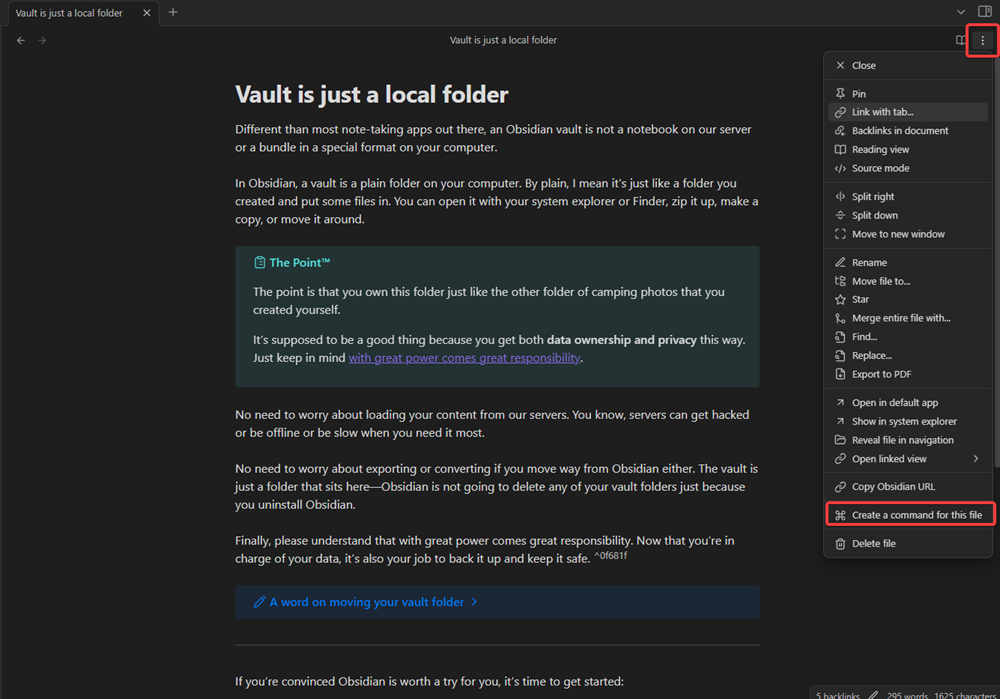
In the settings

How to rename and delete commands
Open the settings in the obsidian setting category "Community plugins" by clicking on the settings symbol.

After you opened you can easily delete, rename and also change the file path of commands.

How to install the plugin
Download it from the community plugins store https://obsidian.md/plugins?id=open-files-with-commands
More detailed description: How to install plugins in obsidian
- Download main.js, manifest.json, styles.css from the latest release (see releases)
- Create a new folder in
Vault-name/.obsidian/pluginsand put the downloaded files in there - Reload your plugins and enable the plugin


Showcase and how to use it with commander
Link to the command plugin: https://obsidian.md/plugins?id=commander
Plugin showcase
Plugin combined with commander
For plugin developers
Search results and similarity scores are powered by semantic analysis of your plugin's README. If your plugin isn't appearing for searches you'd expect, try updating your README to clearly describe your plugin's purpose, features, and use cases.