Ribbon Folder
approvedby limniemdung
Organize multiple commands into grouped buttons on the Ribbon, click to expand and execute commands from a menu for a cleaner interface. - This plugin has not been manually reviewed by Obsidian staff.
↓ 543 downloadsUpdated 20d agoMIT
Ribbon Folder
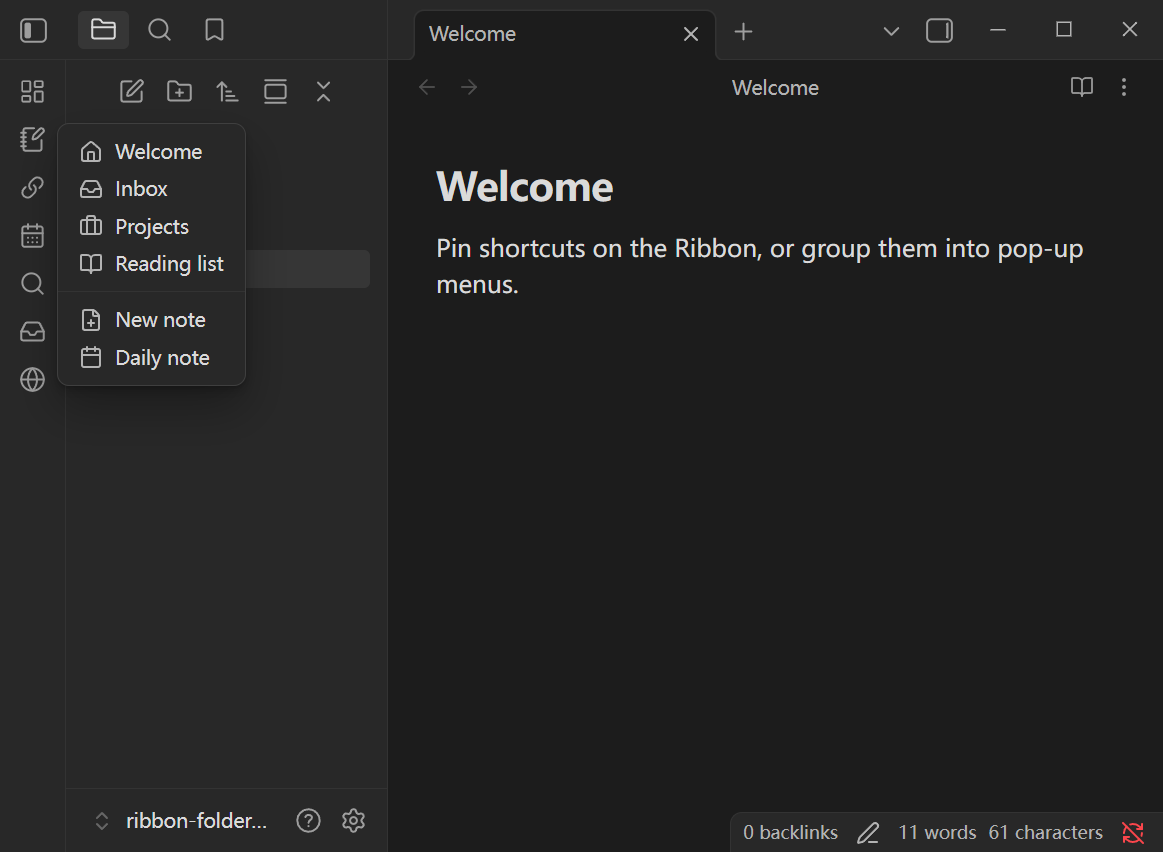
Organize Obsidian’s left Ribbon: pin commands, files, and web links as one-click shortcuts, or tuck them into group buttons with pop-up menus.
Features
Shortcuts
- Pin commands, vault files, or web links directly on the Ribbon
- Each pin is a single button that runs immediately (no menu)
- Drag to reorder; customize tooltip and icon
Groups
- Create group buttons that open a pop-up menu
- Menu items can be commands, files, web links
- Per-group options:
- Menu display: icon only / label only / both
- Trigger: click or hover
- Custom display names and icons per item
Icons
- Lucide icon names (e.g.
folder,globe) - Custom
.svgfiles via an icon folder, relative path, or full vault path
Other
- Global setting for where files open: new tab / current tab / split
Installation
Community plugins (recommended)
- Settings → Community plugins → Browse
- Search for Ribbon Folder
- Install → Enable
Manual
- Download
main.js,manifest.json, andstyles.cssfrom the latest release - Put them in
VaultFolder/.obsidian/plugins/ribbon-folder/ - Enable Ribbon Folder under Community plugins
Requires Obsidian 1.13.0 or newer.
Usage
Shortcuts
- Open Settings → Ribbon Folder → Shortcuts
- Add a command, file, or web link
- Optionally set a tooltip and icon
- The button appears on the Ribbon; click to run / open
Groups
- Open Settings → Ribbon Folder → Groups
- Create a group; set name, icon, menu display, and trigger
- Add menu items (command / file / web link / separator)
- Click (or hover) the Ribbon group button to open the menu
Custom icons
- Set Icon folder (e.g.
.obsidian/iconsorscripts/icons) - In any icon field, use a Lucide name, a file under that folder (e.g.
add.svg), or a full vault path
Feedback
Issues and suggestions: GitHub Issues
For plugin developers
Search results and similarity scores are powered by semantic analysis of your plugin's README. If your plugin isn't appearing for searches you'd expect, try updating your README to clearly describe your plugin's purpose, features, and use cases.