by stmoonar
Upload and manage media and documents across multiple providers (Local, S3, MinIO, Cloudflare R2, SM.MS, GitHub, Aliyun, Tencent, Qiniu, Upyun, Imgur). Gallery and AI image search. 支持语义搜索文件的对象存储管理.
OSS Gallery for Obsidian
English | 中文
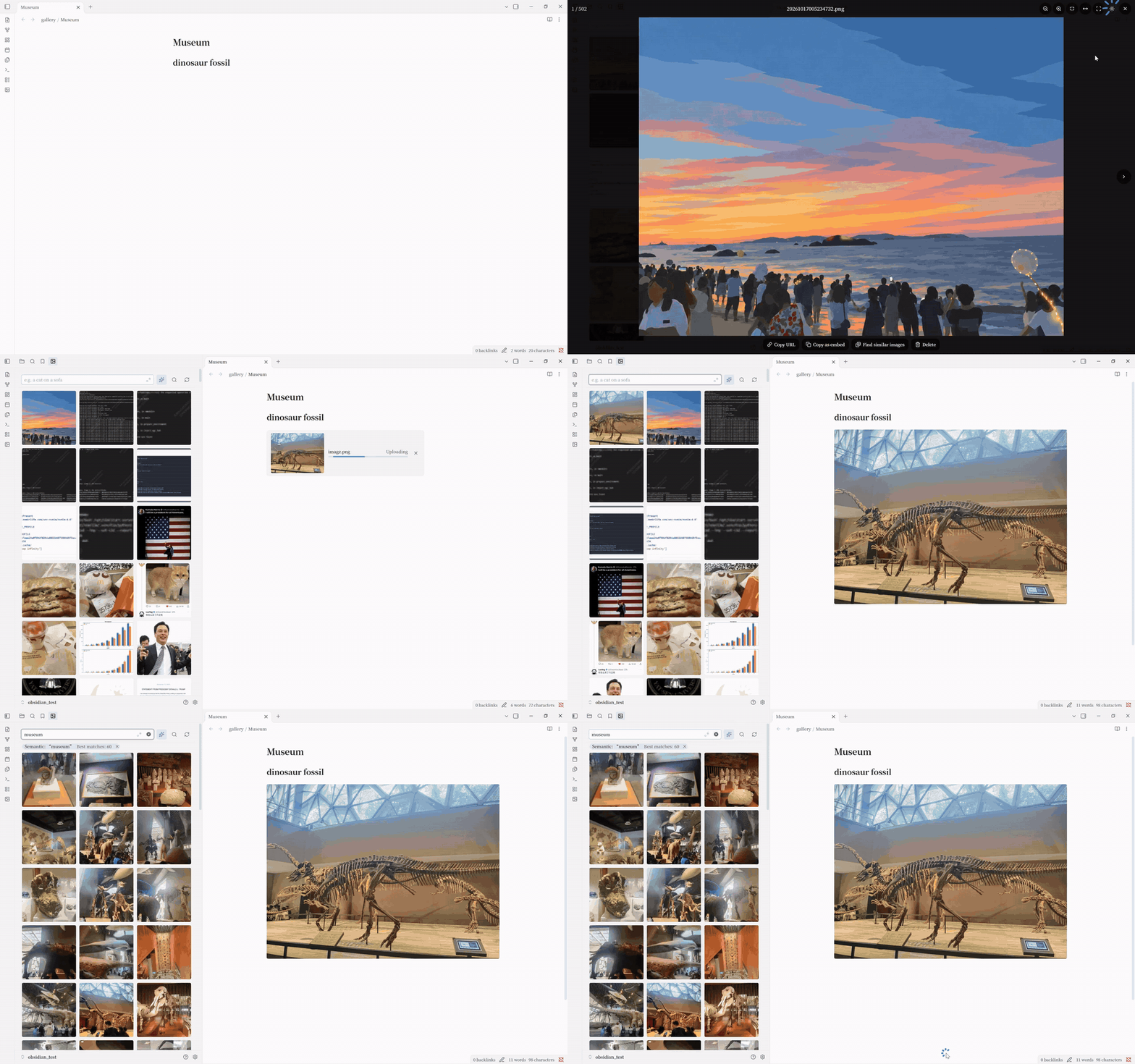
Upload images, videos, audio and documents from Obsidian to your own storage (S3, R2, MinIO, Aliyun, Tencent, Qiniu, Upyun, GitHub, SM.MS, Imgur or a local folder), browse them in a gallery, and optionally search your images by description on your own computer.


If this plugin helps you, please ⭐ star it on GitHub. Found a bug or have an idea? Open an issue (see Support and feedback).
Quick start
- Install the plugin (see Installation) and enable it.
- In Settings > OSS Gallery, pick a provider under Select provider and fill in the fields marked Required.
- Press Test connection.
- Paste or drop a file into a note. Open the gallery with the OSS Gallery ribbon icon or the command Open gallery.
Installation
- Community plugins (recommended): in Settings > Community plugins > Browse, search for "OSS Gallery", or open its page and click Add to Obsidian.
- Manual: download
main.js,manifest.jsonandstyles.cssfrom the latest release into<vault>/.obsidian/plugins/oss-gallery/, then enable the plugin. - The semantic search runtime is not part of the install. The plugin downloads it on request into the model directory, from the GitHub release whose tag matches the plugin version. A build without a matching release (a local dev build, or a BRAT build of an untagged version) cannot download it.
- Desktop only. Requires Obsidian 1.7.2 or later; older versions are not supported.
Features
- Upload: paste, drag and drop, or the File upload command (several files at once). Images, video, audio, PDF and Office files (
.doc,.docx,.pptx,.xls,.xlsx). Files are uploaded one at a time; a progress card in the note lets you cancel a running or waiting upload. A failed upload keeps the file in the note with Retry, Save to vault (as a normal attachment) and Remove. - Inserted links: embeds or plain links per file type, with a custom image embed format.
- Gallery for providers that can list: shows image files only (
.jpg,.jpeg,.png,.gif,.bmp,.webp,.svg,.ico,.tiff,.tif,.avif). Search by URL (plain text or regex), Copy URL, Copy as embed, Insert into note, drag a tile into a note, delete. - Multi-select and keyboard: Ctrl/Cmd-click, Shift-click, Ctrl/Cmd+A, Esc; arrow keys, Home/End, Enter to preview. Batch copy, insert and delete.
- Lightbox: zoom (wheel, pinch, double click,
+/-/0/1), fit to screen / fit width / 100%, pan, previous/next, swipe. - Local thumbnails: each gallery image is downloaded once; later views use a small thumbnail kept on this device. See Settings.
- Semantic image search (opt-in): find images by description or by similarity, on your GPU. See below.
Providers
| Provider | Upload | Gallery | Delete | Semantic search | Private bucket (signed GET) | Notes |
|---|---|---|---|---|---|---|
| Local | yes | yes | yes | yes | n/a | Vault folder, or an absolute folder (inserted as file:/// links) |
| SM.MS | yes | yes | yes | yes | no | Uses the S.EE API (SM.MS moved to S.EE) |
| GitHub | yes | yes | yes | yes | no | Links use raw.githubusercontent.com unless Custom domain is set |
| Aliyun OSS | yes | yes | yes | yes | no | |
| Tencent COS | yes | yes | yes | yes | no | |
| Qiniu | yes | yes | yes | yes | no | URL (CDN domain) is required |
| Upyun | yes | yes | yes | yes | no | URL (acceleration domain) is required |
| Imgur | yes | no | no | no | no | Upload only, images only |
| Cloudflare R2 | yes | yes | yes | yes | yes | |
| S3 | yes | yes | yes | yes | yes | AWS S3 and S3-compatible services |
| MinIO | yes | yes | yes | yes | yes | For public links, allow anonymous read in the bucket policy |
Signed GET: for private S3 / R2 / MinIO buckets, gallery thumbnails and semantic indexing retry with a signed request when the public URL is refused. Links in notes and the lightbox always use the public URL.
Fields (* = required, default in parentheses):
| Provider | Fields |
|---|---|
| Local | Storage path* (attachments), Path relative to the vault (on), Delete to the trash (on) |
| SM.MS | S.EE API key* (create one under Tools > API Token on S.EE) |
| GitHub | Repository name* (username/reponame), Branch (main), Token*, Custom domain |
| Aliyun OSS | Access key ID*, Access key secret*, Bucket*, Region (oss-cn-hangzhou), Path, Custom domain |
| Tencent COS | Secret ID*, Secret key*, Bucket*, Region (ap-shanghai), Path, Custom domain |
| Qiniu | Access key*, Secret key*, Bucket*, URL*, Area (z0), Path |
| Upyun | Operator*, Password*, Bucket* (service name), URL*, Path, Suffix |
| Imgur | Client ID*, Proxy |
| Cloudflare R2 | Account ID*, Access key ID*, Secret access key*, Bucket*, Public URL |
| S3 | Endpoint*, Region (us-east-1), Access key ID*, Secret access key*, Bucket*, Use HTTPS (on), Path-style URLs (on), Public URL |
| MinIO | Endpoint*, Port (9000), Use HTTPS (on), Access key*, Secret key*, Bucket*, Region, Custom domain |
Path is a provider-side folder prefix. MinIO Port and Use HTTPS apply only when Endpoint has no http:// / https:// prefix.
Settings
In the order of the settings tab:
- Select provider: upload-only and not-yet-set-up providers are marked. The provider's fields follow, with a "Missing: ..." line and Test connection (Imgur can only be checked by uploading).
- File names and folders
- Base path: folder for uploads; the gallery lists only files under it.
- File naming: Original file name / Timestamp / Timestamp and original file name (default). The original name can overwrite a stored file with the same name.
- Folder structure: None (base path only) (default) / By file type / By date / By file type and date.
- Inserted links
- Embed images (on; off inserts a plain link) and Image embed format:
$URLis the image URL,$NAMEthe file name. Default; wiki-link example![[$NAME]]. - Embed videos, Embed audio (on): insert as a player.
- Embed documents: Disabled (default) / Google Docs / Office online viewer for PDF and Office files (the file URL must be public).
- Embed images (on; off inserts a plain link) and Image embed format:
- Gallery thumbnails
- Local thumbnails (on): the first time a tile is shown, the original is downloaded once and a small copy (320 px, WebP) is saved on this device. Preview, copy and embeds always use the original. GIF and SVG tiles load the original; TIFF tiles show a thumbnail only if indexing made one. Off: tiles load the original directly.
- Thumbnail cache size (MB) (500, range 10 to 100000): per vault on this device; the least recently viewed go first.
- Clear thumbnails.
- Semantic image search: see the next section.
Semantic image search
Find images by describing them in English or Chinese, or find images that look like a given one. Off by default; nothing is downloaded until you confirm.
- Needs WebGPU with a hardware GPU (integrated graphics are fine). There is no CPU fallback. The settings page checks it first and says why it is unavailable.
- Download: Settings > Semantic image search > Download model, about 343 MB: the model (EmbeddingGemma 2, q4, about 316 MB) from Hugging Face at a pinned revision, and the runtime (about 27 MB) from this plugin's GitHub release. Every file is checked against a SHA-256 hash built into the plugin. Semantic search turns on when all files pass.
- Build the index: open the gallery and press Build index under the search box (later Update index (N new)). Local reads files from disk; remote providers download each image once, only after a dialog shows the count and download size. Index automatically indexes new images when the gallery opens.
- Search: turn on the sparkles toggle next to the search box, type a description, press Enter. The best matches come first, with their count under the search box; Show more at the end of the grid adds less similar ones.
- Find similar images: right-click a tile, use its hover button, or the lightbox action.
- Slow downloads (for example in mainland China): set Hugging Face endpoint (e.g.
https://hf-mirror.com) and GitHub mirror under Download sources. Mirrors change only where files come from; the hashes still apply. - Offline install: copy the files into the model directory with the same layout (
huggingface.co/...andruntime/<version>/...), then press Download model: files that pass the hash check are kept and not downloaded again. - Image detail (70 / 140 / 280, default 70): more detail is slower; changing it rebuilds the index.
Where files are stored
All of these are outside the vault, per device, and never synced. <app> is %LOCALAPPDATA%\obsidian-oss-gallery on Windows, ~/Library/Application Support/obsidian-oss-gallery on macOS, and $XDG_CACHE_HOME/obsidian-oss-gallery on Linux (~/.cache/obsidian-oss-gallery when XDG_CACHE_HOME is unset or not absolute).
| What | Default | Changed by | Cleared by |
|---|---|---|---|
| Semantic model and runtime (shared by all vaults) | <app>/models | Model directory | Delete model: only the files the plugin downloaded |
| Semantic index | <app>/indexes | Index directory | Clear index for this vault: only this vault's index files |
| Gallery thumbnails | <app>/thumbs | (fixed) | Clear thumbnails: only this vault's thumbnail files |
Each button removes only its own files: clearing the index keeps the model and thumbnails, and so on.
Commands
| Command | Notes |
|---|---|
| File upload | Pick files to upload into the current note |
| Open gallery | Same as the OSS Gallery ribbon icon |
| Semantic search: run self-test | Shown once the model is installed |
| Semantic search: index the current provider now | Needs the model and a listable provider |
| Semantic search: stop indexing | Shown while indexing runs |
FAQ
Images in a private bucket do not load, or the index says "Access denied (HTTP 403): check the bucket permissions or make the images publicly readable". Notes and the lightbox load the public URL, so the bucket (or its custom domain) must allow public read. S3, R2 and MinIO can index and show thumbnails of a private bucket through signed requests; other providers cannot.
I uploaded a PDF or a video, but it is not in the gallery. The gallery lists image files only. The file is uploaded and linked in your note.
The semantic search toggle is disabled. Its tooltip says why: the model is not downloaded or is being checked, semantic search is turned off in settings, WebGPU is not available, the provider cannot be indexed (Imgur), or there is no index yet (press Build index).
WebGPU is unavailable. Update Obsidian with the latest installer from obsidian.md and your graphics driver, and make sure hardware acceleration is on. Remote desktop sessions and virtual machines usually have no GPU access.
The model download is slow or fails. Set a mirror under Download sources (see above), or use the offline install.
What happens to unfinished uploads when Obsidian closes? The placeholder in the note is replaced with "(Upload of did not finish)". Upload the file again.
Why does the upload card show no percentage?
Uploads go through Obsidian's requestUrl, which cannot report progress. The card shows an "Uploading" bar until the upload finishes.
Network use and privacy
The plugin talks only to the storage service you configure, and, if you download the semantic model, to GitHub and Hugging Face (or your mirrors). No telemetry, analytics or ads; nothing is sent to the plugin author. You need no account other than your own provider's.
- Provider endpoints used for upload, list and delete:
- S3 / MinIO: the endpoint you enter
- Cloudflare R2:
<account>.r2.cloudflarestorage.com - Aliyun OSS:
<bucket>.<region>.aliyuncs.com(or your custom domain) - Tencent COS:
<bucket>.cos.<region>.myqcloud.com - Qiniu:
up-<area>.qiniup.comand the Qiniu API hosts - Upyun:
v0.api.upyun.com - GitHub:
api.github.com(links:raw.githubusercontent.comor your custom domain) - Imgur:
api.imgur.com, or your proxy - SM.MS:
s.ee/api/v1 - Local: no network
- Test connection sends one or two small read requests (a one-file listing; for GitHub, the repository and branch). Nothing is uploaded or changed.
- Document viewer: with Google Docs or Office online, the public URL of the document is sent to
docs.google.comorview.officeapps.live.com. Keep it Disabled to avoid this. - Thumbnails and indexing download your images from your own storage. Indexing a remote provider starts only after you confirm the download size. Images are analyzed locally; nothing is uploaded.
- Semantic model download happens only after you confirm the file list:
github.com(release assets) andhuggingface.co, or your mirrors. Queries and images never leave your computer. - Files outside the vault: the model, index and thumbnails (see Where files are stored), and the Local provider's folder if you set an absolute path.
- Credentials are stored in plain text in
.obsidian/plugins/oss-gallery/data.json. If you sync or commit your vault, exclude that file or use least-privilege keys. - Every provider except Local needs your own account or server; some are paid.
Support and feedback
- Like the plugin? Give it a ⭐ star on GitHub. It helps other people find it.
- Found a bug or have an idea? Open an issue. For bugs, please include:
- plugin version, Obsidian version and OS
- the provider you use (never paste keys or secrets)
- steps to reproduce, what you expected and what happened
- errors from the developer console (
Ctrl+Shift+I, orCmd+Option+Ion macOS), if any
License
MIT. Changelog: GitHub Releases. Licenses of the bundled semantic runtime (transformers.js, ONNX Runtime Web, UTIF.js, pako) are in THIRD_PARTY_NOTICES.txt on each release.
Started as a fork of Obsidian Minio Uploader Plugin.
For plugin developers
Search results and similarity scores are powered by semantic analysis of your plugin's README. If your plugin isn't appearing for searches you'd expect, try updating your README to clearly describe your plugin's purpose, features, and use cases.