by Shengzhe Gan
Manage papers, collections, writing projects, citations and manuscript deadlines in a compact workspace.
Literature Database



A compact, Zotero-style literature manager for Obsidian, by shengzhegan. Browse collections on the left, papers in a dense list, and metadata and notes on the right. Your library stays in Markdown, with PDFs stored as ordinary files.
中文使用指南 · Installation · Development · Community release preparation
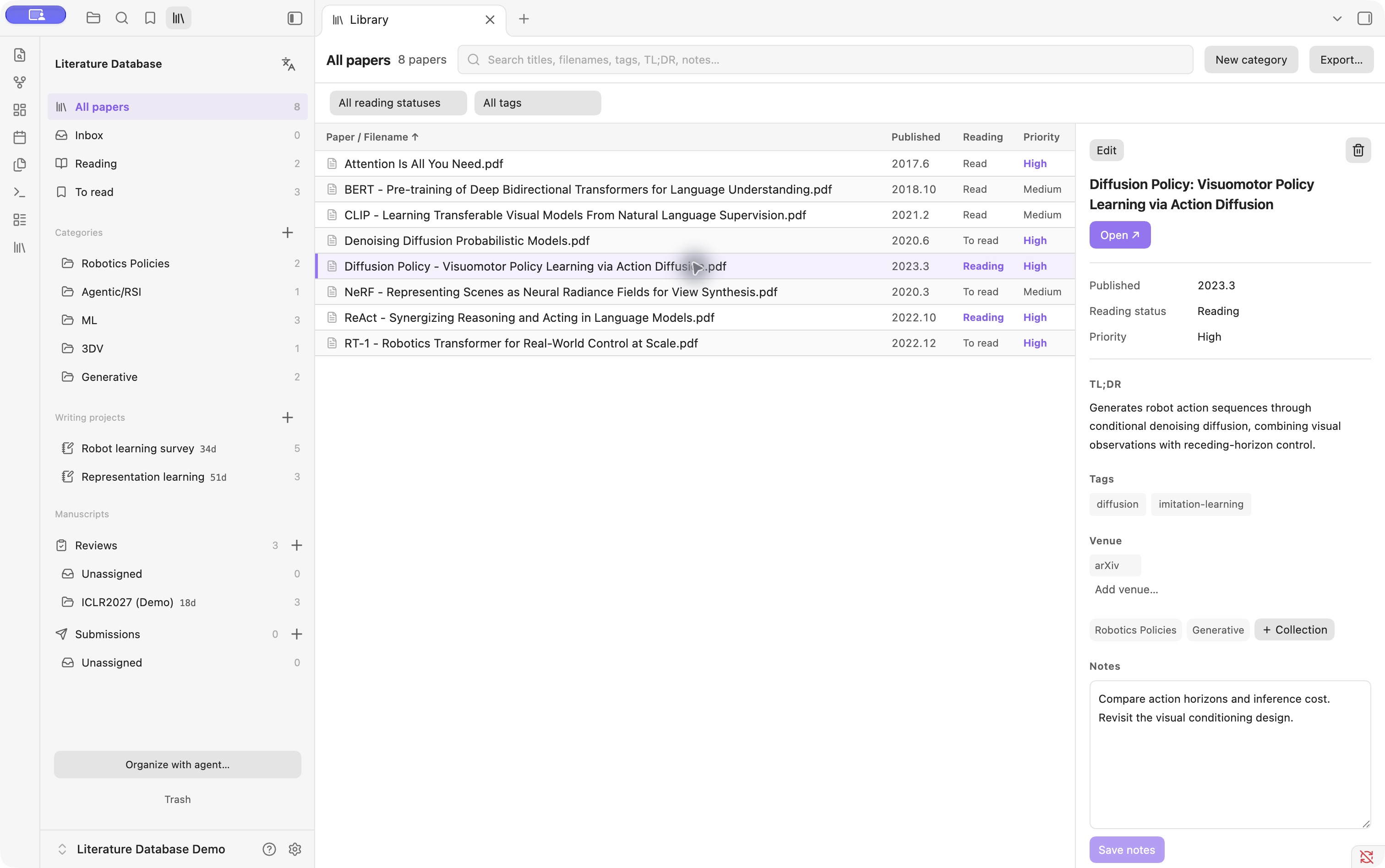
Real screenshots from a separate demo vault, using the English interface. Public papers are paired with example notes, projects and review tasks; no private library or confidential manuscripts are shown. Click any image to view it at full size.
Status: 4.3.3. View the Community listing; new releases may take time to reach the in-app directory. Requires Obsidian 1.8.7+ on desktop. Tested locally on macOS with Obsidian 1.14.4. Windows and Linux application behavior has not been validated; Finder drag/paste requires macOS. This release does not run on iPhone or iPad. The interface supports English and Chinese, following the Obsidian language by default. Screenshots below show the 4.3.0 demo UI; the same workflows remain available in 4.3.3.
Features
A compact workspace for reading
- One row per paper. Browse categories on the left, scan filenames in the middle, and read the confirmed title, TL;DR, tags, venues and notes on the right.
- Edit in place. Change reading status and priority directly in the details pane. Save notes while staying on the same paper.
- Find papers quickly. Search titles, filenames, tags, TL;DR and notes; filter by reading status or tag, and sort the list.
- Keep your PDF reader. Open ↗ uses the system's default application. Skim is optional; the plugin does not embed a second desktop PDF viewer.
Gather references for each writing project
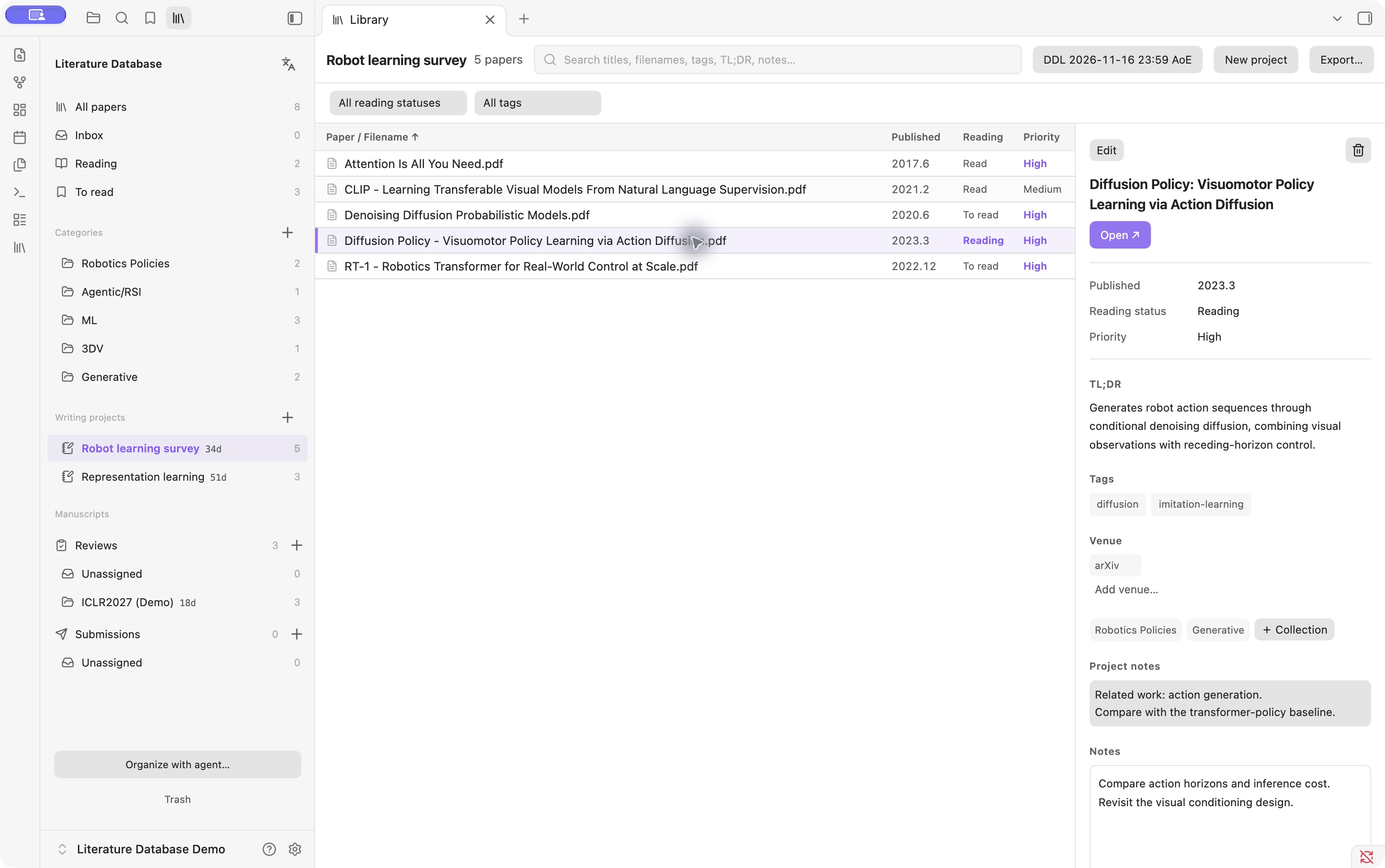
A paper can belong to several categories and writing projects while keeping one PDF and one metadata record. Drag papers into a collection to add them, or use the native checked menu to manage memberships. Explicitly move or remove a membership when needed.
Removing a paper's last membership offers Cancel or Move papers to trash everywhere. If a paper belongs to multiple collections, a trash action lets you choose between removing only the current membership and moving the paper to trash everywhere. Restoration brings back its memberships and project notes. The same safeguards cover native checkboxes, keyboard removal and batch selections; explicit moves can still replace a membership. Smart views such as All papers have no current collection to remove from.
Project notes capture why a paper matters to a particular draft, independently of its shared personal notes. Projects have their own deadlines and sidebar countdowns, including AoE. They remain separate from submissions; deadline sharing happens only when you explicitly choose it.
Export references when you write
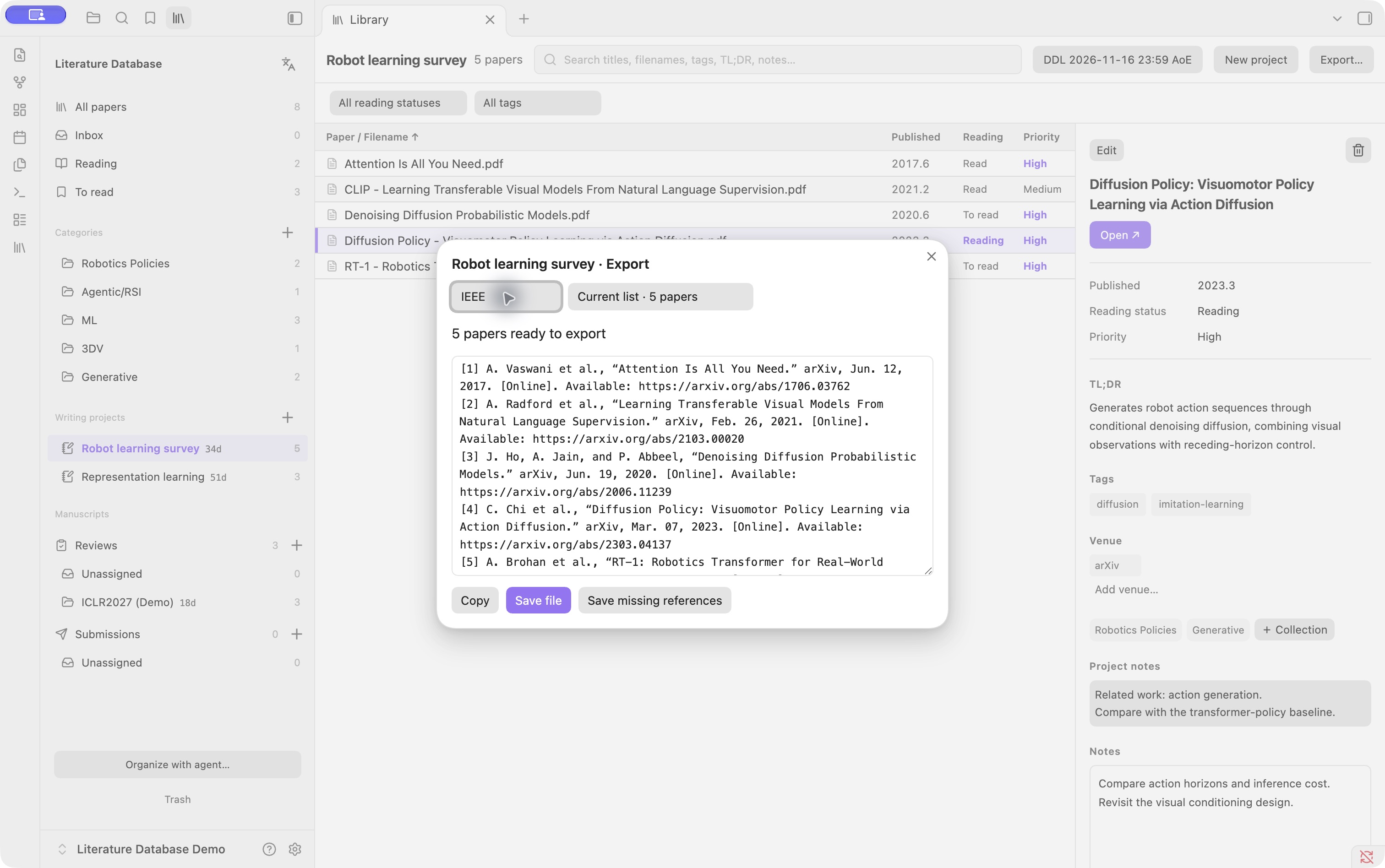
Export the current list or selected papers, preview the result, then copy it or save a file.
| Format | Output |
|---|---|
| BibTeX | .bib, preserving stored entries and citation keys |
| APA 7 | Formatted HTML, with plain-text or rich-text copying |
| IEEE | Numbered references in HTML, with plain-text or rich-text copying |
| Title list | .txt, one confirmed paper title per line—not filenames |
Citation recognition uses PDF evidence and verified Crossref/arXiv lookups. Formatting is deterministic; agents do not invent bibliographies. Missing or uncertain records are reported instead of filled with guesses. Recognition runs on demand, without a background full-library scan.
Track reviews and submissions by venue
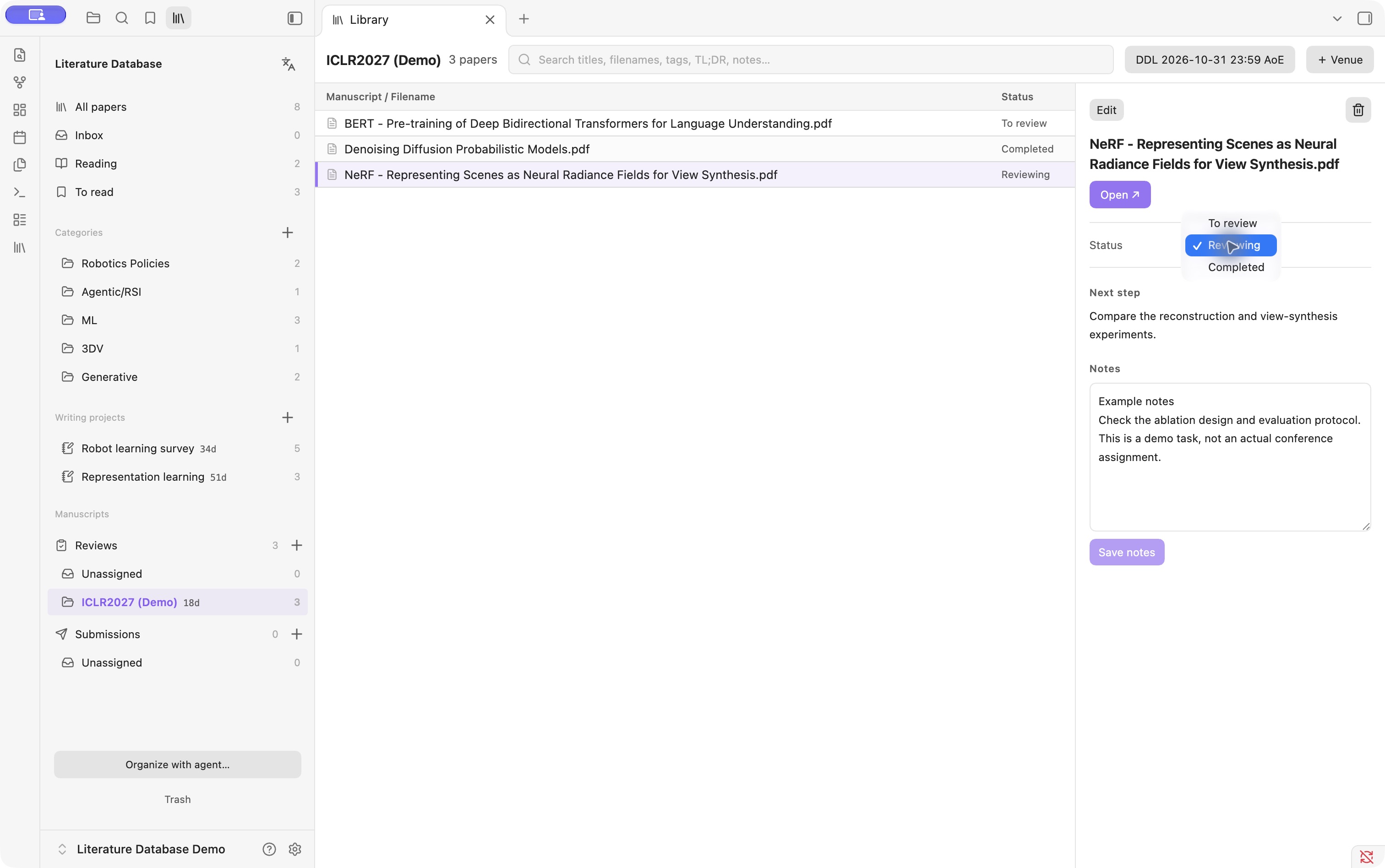
Keep review tasks and your own submissions in separate trackers. Drop PDFs into a venue or its unassigned area, drag tasks between venues, and change review status directly in the right pane: To review → Reviewing → Completed. Each venue has one deadline, a time-zone selector and a countdown. Deleting a venue returns its papers to the unassigned area.
The ICLR2027 (Demo) tasks above use already published BERT, NeRF and DDPM papers. The assignments, notes and deadline are fictional examples, not actual ICLR submissions, reviews or official dates.
Built around ordinary files
- PDF inbox: drag from Finder or right-click the empty inbox area and choose Paste on macOS. Original files and matching annotation sidecars are preserved.
- Recoverable trash: multi-select, batch restore and batch permanent deletion with one confirmation. File collisions are never overwritten.
- English and Chinese: switch from the sidebar or follow Obsidian's language; your paper titles and notes are not translated.
- Manual agent handoff: copy organization instructions when you want help. No scheduled agent runs, per-paper Markdown files or second JSON metadata database.
- Portable storage: metadata and memberships live in Markdown; PDFs and Skim sidecars remain ordinary vault files. File syncing is handled by your vault's storage provider.
Try the current version
Use a separate vault for the literature library. Open the Community listing and choose Add to Obsidian, or search for Literature Database in Community plugins. For manual installation while directory updates propagate:
- Download
main.js,manifest.jsonandstyles.cssfrom the latest release. - Create
<vault>/.obsidian/plugins/paper-reservoir-dashboard/and place the three files there. Use your vault's configured configuration folder if it differs from.obsidian. - Reload Obsidian and enable Literature Database in Community plugins.
- Click the library ribbon icon, or run Literature Database: Open library from the command palette. In a fresh vault, choose Create library. This creates four empty source tables, the attachment folders and an
AGENTS.mdif one does not already exist. It never replaces existing source files. - Drag PDFs into Inbox, or copy PDFs in Finder and paste into the empty inbox area on macOS. Use Organize with agent… to copy instructions for a manually triggered agent with local file access; then review its changes. Dropping a PDF into Inbox alone does not add it to the public library.
New libraries start with no categories or writing projects. Create your own with the sidebar + buttons; the categories in the screenshots are demo examples, not defaults.
New installations keep Open library on startup and Open source tables in library off. You can enable either under Settings → Literature Database. Existing libraries retain their previous startup behavior unless you turn it off. The source tables use a fixed schema; empty templates remain available for inspection or manual setup. If setup is interrupted, preserve any files already created and check them before completing the missing templates; never overwrite a partially synced library.
To build from source instead, install Node.js 20+ and Python 3, clone this repository and run npm run build. Normal builds need no dependency installation. Use the resulting three runtime files in step 2.
The internal plugin ID remains paper-reservoir-dashboard for compatibility with existing installations.
Interface language and existing vaults
Use the language icon beside Literature Database in the sidebar, or run Change interface language… from the command palette. Choose Follow Obsidian, 中文 or English. The preference syncs with the plugin settings. Save or cancel any edits before switching; paper titles, notes, tags, venue names and stored schema values are never translated.
On upgrade, the plugin backs up and renames the four legacy Chinese source filenames to the English names below. It preserves their contents and historical trash receipts. If both versions of a filename exist, migration stops without overwriting either file; resolve the conflict before reloading. Do not create a second set of source files by copying the empty templates into an existing vault.
Data and privacy
The canonical files are library.md (paper metadata), collections.md (collection/project memberships), reviews.md (reviews) and submissions.md (submissions). The right-hand paper title uses the confirmed title; list entries retain the actual PDF filename. Skim .skim, .fdf and .xfdf sidecars stay paired with their PDFs.
The plugin makes local backups before edits, checks for concurrent changes and keeps recoverable deletions under .maintenance-backups/deleted/. Permanent deletion removes only the selected archived record and its attachments. This is not a substitute for a separate backup. iCloud and other file sync are provided by your vault's storage provider; this plugin does not implement a sync service.
Network access: citation recognition uses api.crossref.org, export.arxiv.org and, when needed, arxiv.org. Requests contain a public identifier or paper title. It does not upload PDFs, personal notes, review manuscripts or submission attachments. Recognition runs for newly admitted public papers while the plugin is active, for exports missing citations, or after the explicit retry command; it does not scan the entire library on startup. Uncertain matches remain empty. Existing bibliography fields are preserved.
Outside-vault access: when you explicitly drop or paste local PDFs on macOS, the importer reads those files and matching annotation sidecars and copies them into the vault using ditto, preserving extended attributes. It reads the clipboard only when Paste is chosen. Opening a PDF invokes the default desktop application (/usr/bin/open on macOS). The plugin does not change your default PDF application.
No account, payment or analytics is required by the plugin. The optional agent button copies instructions; it does not itself launch an AI model or send your library to one.
License and attribution
Copyright (c) 2026 shengzhegan. Project code is licensed under GNU AGPL-3.0-only; see LICENSE.
Citation formatting includes Citation.js (MIT), citeproc-js by Frank Bennett (using its AGPL v3-or-later option), and CSL APA/IEEE styles (CC BY-SA 3.0). Other bundled dependencies retain their own licenses. Full notices, versions and rebuild instructions are in THIRD-PARTY.md. The project license does not replace those licenses.
This project is not affiliated with Obsidian, Zotero or Skim.
For plugin developers
Search results and similarity scores are powered by semantic analysis of your plugin's README. If your plugin isn't appearing for searches you'd expect, try updating your README to clearly describe your plugin's purpose, features, and use cases.