by chmod777h
Synchronize scrolling across selected PDF panes and popout windows, with page alignment, reading progress, and manual offsets.
PDF Sync Scroll
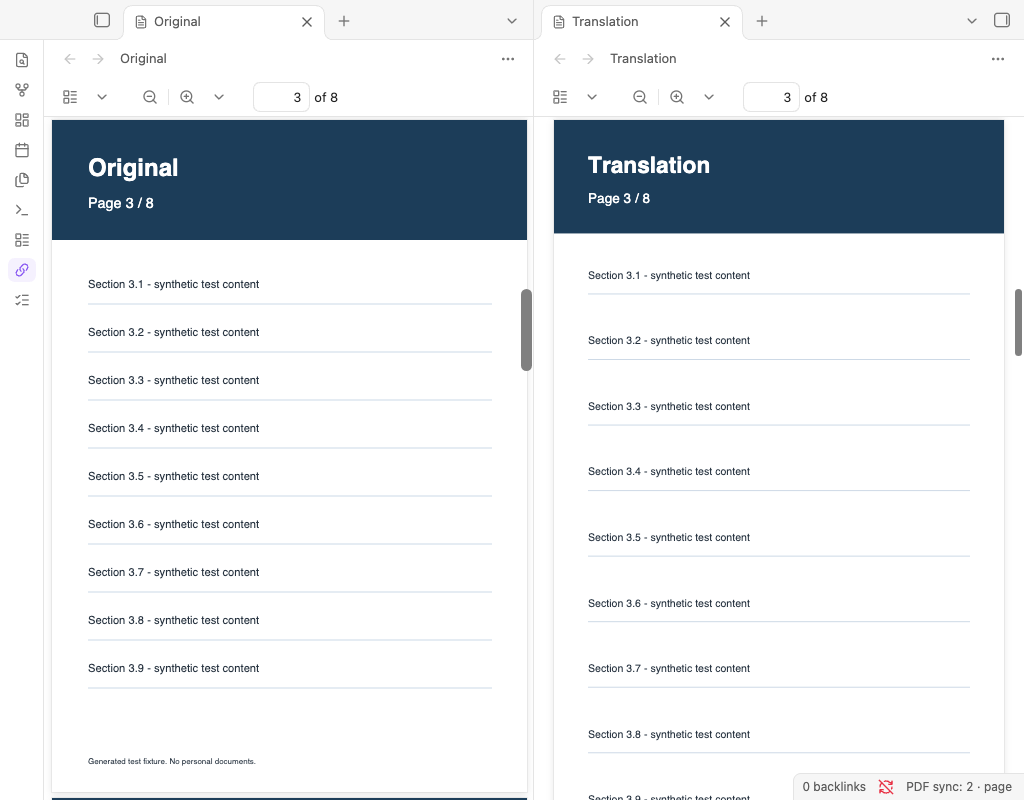
Scroll matching PDFs together in Obsidian. Select two or more panes, including popout windows, and move any selected pane to keep the others aligned.
中文说明 · Compatibility · Release guide · Changelog
Features
- Page alignment: match page numbers and fractional positions within each page, including PDFs with different page sizes and zoom levels.
- Overall progress: match percentages of each document's scrollable range.
- Manual alignment: pause, position each document independently, then preserve those relative offsets.
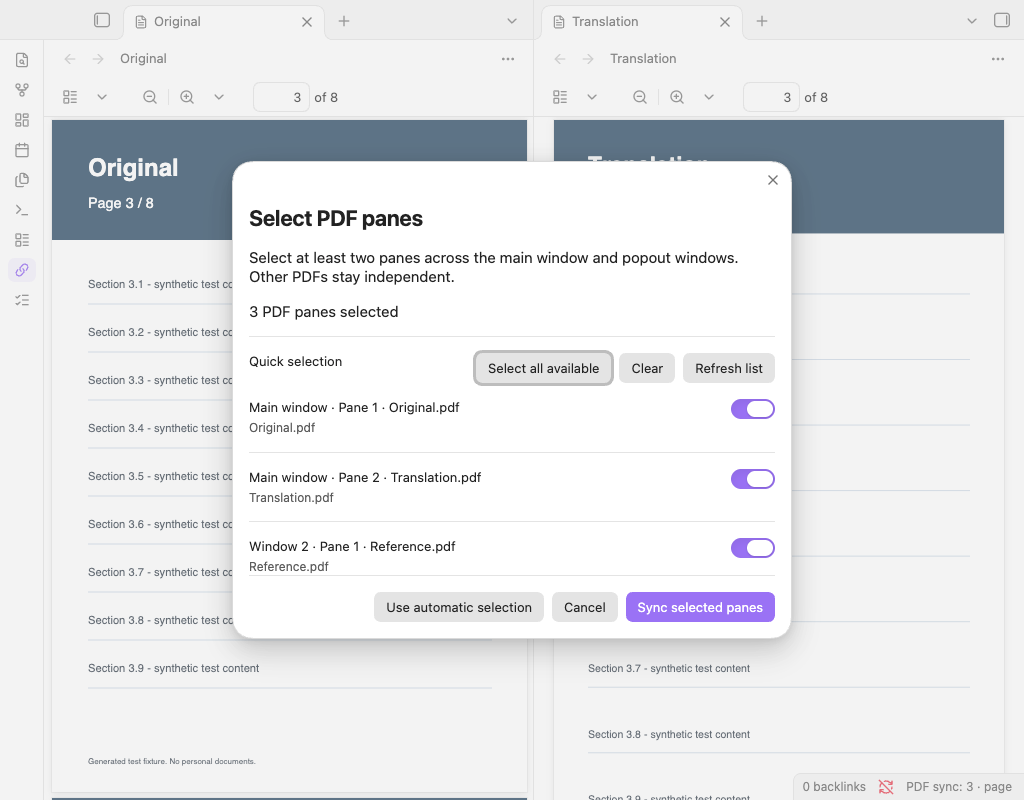
- Explicit pane selection: synchronize three or more PDFs, or choose a subset of your open PDFs. Two panes showing the same file can be selected separately.
- Popout windows: any selected pane can drive the group, within the same vault and Obsidian instance.
- English and Chinese: follows Obsidian's language; Chinese locales use Simplified Chinese text, other locales use English.
Requirements
Obsidian desktop 1.14.4 or later. macOS 1.14.4 is the verified baseline. Windows and Linux have not been application-tested. Mobile is intentionally excluded. Future app versions may require plugin updates because the built-in PDF viewer's DOM is not a stable public API. See the compatibility report.
Use vertical, continuous scrolling with no page spreads in each PDF viewer. Horizontal, wrapped/grid, non-continuous page modes, and two-page spreads are unsupported.
Install
The Obsidian Community listing is published. Automated community review was pending at submission on October 17, 2026; see the listing for the current status. Release files are also available from GitHub Releases.
For manual installation:
- Obtain
main.js,manifest.json, andstyles.cssfrom the same release. - Create
pdf-sync-scrollunder thepluginsfolder in your vault's configuration directory (normally.obsidian/plugins/pdf-sync-scroll). - Copy the three files into that folder, reload Obsidian, allow community plugins for that vault, and enable PDF Sync Scroll in Settings → Community plugins.
For an existing local installation, back up the old plugin folder and replace only those three files. Keep data.json to retain your settings. The plugin ID and command IDs have not changed. Pane selections may need to be chosen again after workspace changes.
After directory approval, installation will also be available through Settings → Community plugins → Browse. This documentation does not imply approval has already happened.
Use
- Open two PDFs in visible split panes. With default automatic selection, exactly two compatible visible PDF panes link automatically.
- Scroll either PDF. Click the chain ribbon icon or status-bar text to pause or resume.
- For three or more PDFs, use the Select PDF panes ribbon icon or command. Check at least two panes and choose Sync selected panes.
- Open Settings → PDF Sync Scroll to switch between page alignment and overall progress.
Align documents with different covers
- Pause synchronization.
- Scroll each selected PDF to corresponding content.
- Run Align at current positions from the command palette.
The command preserves relative offsets and resumes synchronization. Reset alignment clears offsets. Offsets are temporary: changing group membership, reconnecting, pausing/resuming, switching modes, replacing a file, or restarting clears them. If a hidden pane rejoins, realign if necessary.
Commands
| Command | Effect |
|---|---|
| Select PDF panes | Open the pane selector |
| Toggle synchronization | Pause or resume |
| Align at current positions | Capture offsets and resume |
| Reset alignment | Match page numbers or progress again |
Obsidian prefixes these with the plugin name. No default hotkeys are assigned.
Selection and limitations
- Automatic mode links exactly two compatible visible PDFs; more than two requires explicit selection.
- Manual mode never adds unselected panes when a selected PDF closes, changes files, or becomes hidden. It waits if fewer than two selected panes remain available.
- Selections are saved by pane identity and file path. Restoring the same workspace may preserve them; recreating panes or opening different files may require reselection. If internal pane IDs are unavailable, identity safely falls back to the current session and selections cannot persist across restarts.
- Hidden tabs do not participate. One group is supported at a time; separate vaults or app instances cannot synchronize.
- This does not match text meaning or infer added/deleted pages. Use manual alignment or progress mode for different pagination. The end of a shorter PDF is clamped without pulling the source back.
- Keep other scroll-sync plugins disabled for these panes to avoid competing updates.
Privacy
No network requests, telemetry, accounts, advertisements, payment, external services, or access to files outside the vault are required by this plugin. It reads PDF pane layout and scroll positions, not PDF text, and never edits PDF files. Settings store the synchronization mode, enabled state, and selected pane identities/file paths in the plugin's local data.json. Do not publish that file. Obsidian's own update checks are separate from this plugin.
Troubleshooting
If the status says it is waiting, show at least two compatible PDF tabs, wait for rendering to finish, and check each viewer's scrolling and spread settings. Refresh the selector if panes have changed. Select your panes again after recreating the workspace. If an Obsidian update changes the PDF viewer, report the app/installer versions, OS, plugin version, and reproduction steps with synthetic files if possible.
Development
main.js is the complete, readable CommonJS source and shipped runtime. There are no runtime dependencies or transpilation steps. require('obsidian') is provided by the host application.
Use Node.js 22 or newer and pnpm 11.25.0:
pnpm install --frozen-lockfile
pnpm verify
verify checks JavaScript syntax, runs the official Obsidian ESLint preset for JavaScript, runs regression tests, and stages exactly three installable files in dist/. It also writes SHA-256 checksums under artifacts/. TypeScript-only API lint checks do not apply to this plain JavaScript project; runtime/API compatibility is documented separately.
To additionally create install/source ZIPs, run python3 scripts/package.py after verification (Python 3.9+; standard library only).
The included CI runs these checks on macOS, Windows, and Linux once hosted on GitHub. CI configuration alone is not proof that those platforms have passed. A matching version tag creates a draft release with attachments; see the publishing guide.
License
For plugin developers
Search results and similarity scores are powered by semantic analysis of your plugin's README. If your plugin isn't appearing for searches you'd expect, try updating your README to clearly describe your plugin's purpose, features, and use cases.