pdf-to-md
approvedby kkbin505
Convert handwritten PDFs to Markdown with LaTeX formulas using AI (OpenAI GPT or Alibaba Qwen). - This plugin has not been manually reviewed by Obsidian staff.
pdf-to-md
Writing by hand aligns more naturally with the flow of thought than typing in my mind.
This tool converts handwritten notes to Markdown using AI, designed as a seamless Obsidian Plugin.
中文文档 | English
🆓 Free Local Option: GLM-OCR (No API Key Required)
If you want free, offline PDF/image recognition without any API key, GLM-OCR is the best option I've tested:
- Speed: ~6 seconds per page
- VRAM: ~4.8 GB (fits on an RTX 2060 or equivalent)
- Cost: completely free, runs locally via Ollama
Setup:
ollama pull glm-ocr:bf16
Then in plugin settings:
- Model → Ollama (Local)
- Ollama Model →
glm-ocr:bf16
📖 A little history
While studying control theory, I fell in love with the handwriting experience of the iFlytek Smart Notebook. However, organizing notes in Obsidian proved frustrating: the native OCR was terrible at recognizing mathematical formulas.
I developed this plugin to solve that problem. It leverages powerful Vision Language Models (Qwen-VL, GPT-5.4, and Gemini) to provide:
- Accurate Mixed Recognition: Seamlessly handles text and complex formulas
- LaTeX Math Formulas: Converts equations into clear Obsidian-renderable LaTeX ($...$ and $$...$$)
- Cost-Effective & Flexible: Choose cheap, fast, or ultra-accurate models inside Obsidian
🎉 Obsidian Plugin
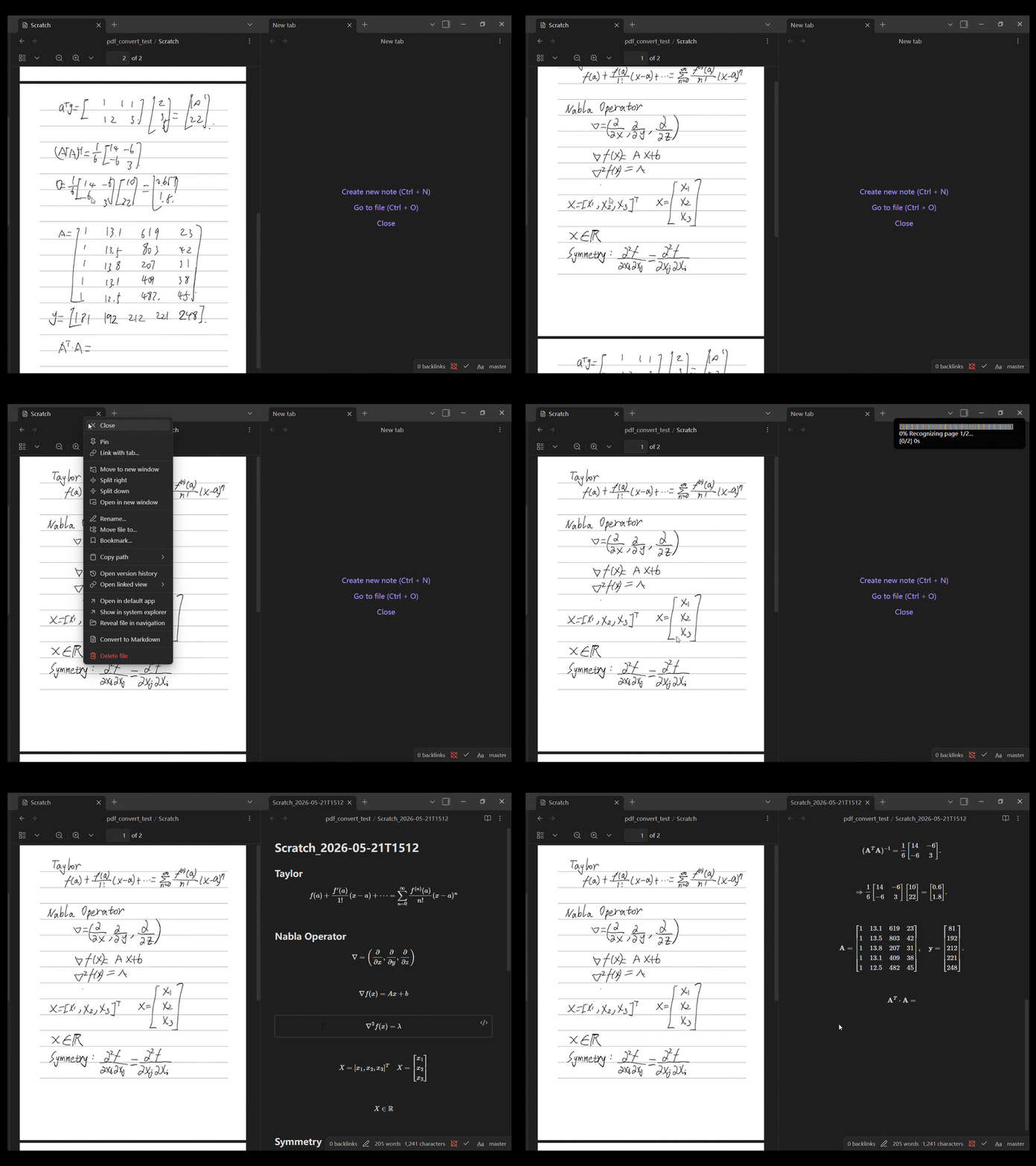
An all-in-one Obsidian plugin that converts handwritten PDFs to Markdown in a single click!
Key Features:
- 📄 Right-click any PDF → "Convert to Markdown"
- 📊 Real-time progress tracking with visual progress bar
- 🔐 Secure API key management (read-only environment variables check)
- ⚙️ Configurable DPI, timeout, retry, and file conflict handling
- 🤖 Support
- GPT
- Alibaba Qwen (千问)
- Claude
- Google Gemini
- Local LLM (ollama)
Plugin Installation
Method 1: Obsidian Plugin Marketplace (Recommended)
- Open Obsidian → Settings → Community Plugins
- Search for "pdf-to-md"
- Click Install and Enable
Method 2: Manual Installation
- Download
main.jsandmanifest.jsonfrom the latest GitHub Release - Copy them into your vault:
<your-vault>/.obsidian/plugins/pdf-to-md/ ├── main.js └── manifest.json - Restart Obsidian and enable the plugin
Method 3: Build from Source
- Clone the repo:
git clone https://github.com/kkbin505/pdf-to-md.git cd pdf-to-md - Install dependencies and build:
npm install npm run build - Copy the built files into your vault:
cp main.js manifest.json <your-vault>/.obsidian/plugins/pdf-to-md/ - Restart Obsidian and enable the plugin
Plugin Quick Start
1️⃣ Configure Environment Variables
Important: pdf-to-md reads API keys from environment variables only. No API keys are stored on disk. This is more secure.
Get Your API Keys:
- Alibaba Qwen (Recommended): https://dashscope.console.aliyun.com/apiKey
- OpenAI: https://platform.openai.com/api-keys
- Google Gemini: https://aistudio.google.com/
- Anthropic Claude: https://platform.claude.com/settings/workspaces/default/keys
Set Environment Variables:
| Provider | Env Variable | Example |
|---|---|---|
| Alibaba Qwen | DASHSCOPE_API_KEY | sk-xxx... |
| OpenAI | OPENAI_API_KEY | sk-proj-xxx... |
| Google Gemini | GEMINI_API_KEY | AIzaSyxxx... |
| Anthropic Claude | ANTHROPIC_API_KEY | sk-ant-xxx... |
Mac/Linux:
# Edit ~/.bashrc or ~/.zshrc (Mac users use ~/.zprofile), add:
export DASHSCOPE_API_KEY='sk-xxx...'
export OPENAI_API_KEY='sk-proj-xxx...'
export GEMINI_API_KEY='AIzaSyxxx...'
export ANTHROPIC_API_KEY='sk-ant-xxx...'

# Save and reload:
source ~/.bashrc  # or source ~/.zshrc
⚠️ Restart Obsidian after setting environment variables (complete restart required, not just reload).
2️⃣ Select AI Provider
Open Obsidian Settings → PDF to Markdown:
- Select the AI model directly from the unified Model dropdown.
3️⃣ Convert PDF/image
- Find PDF/image in Obsidian file browser
- Right-click → "Convert to Markdown"
- Wait for conversion (progress bar shows status)
- Converted
.mdfile is auto-saved
4️⃣ Convert images embedded in notes (new)
Right-click any image inside an open note → "Convert Image to Markdown". The recognized text and formulas are inserted directly below the image in the same note — no new file is created.
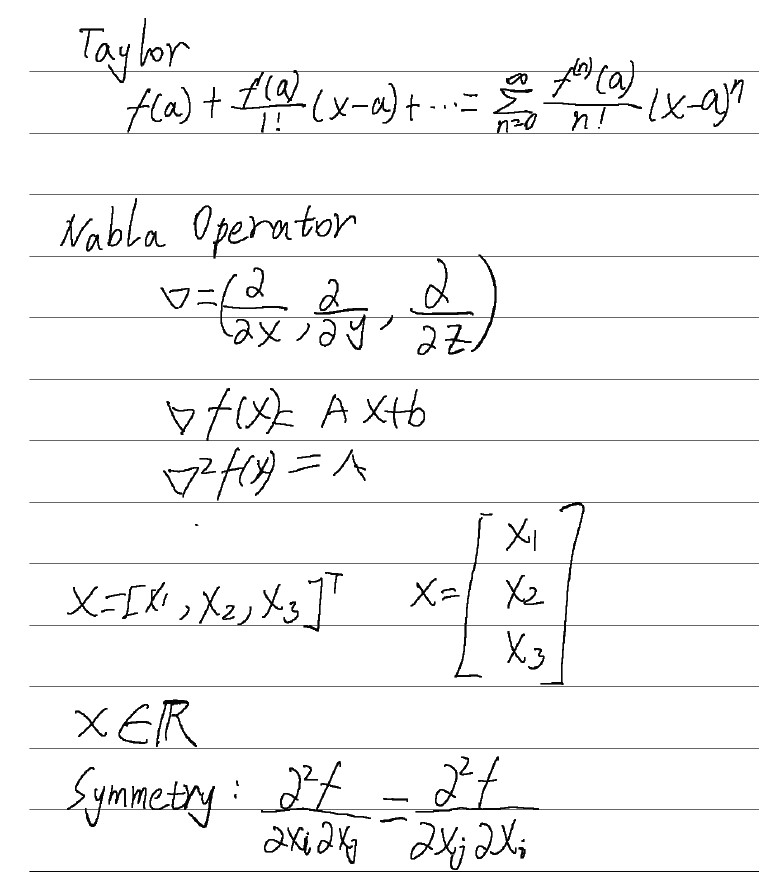
Qwen
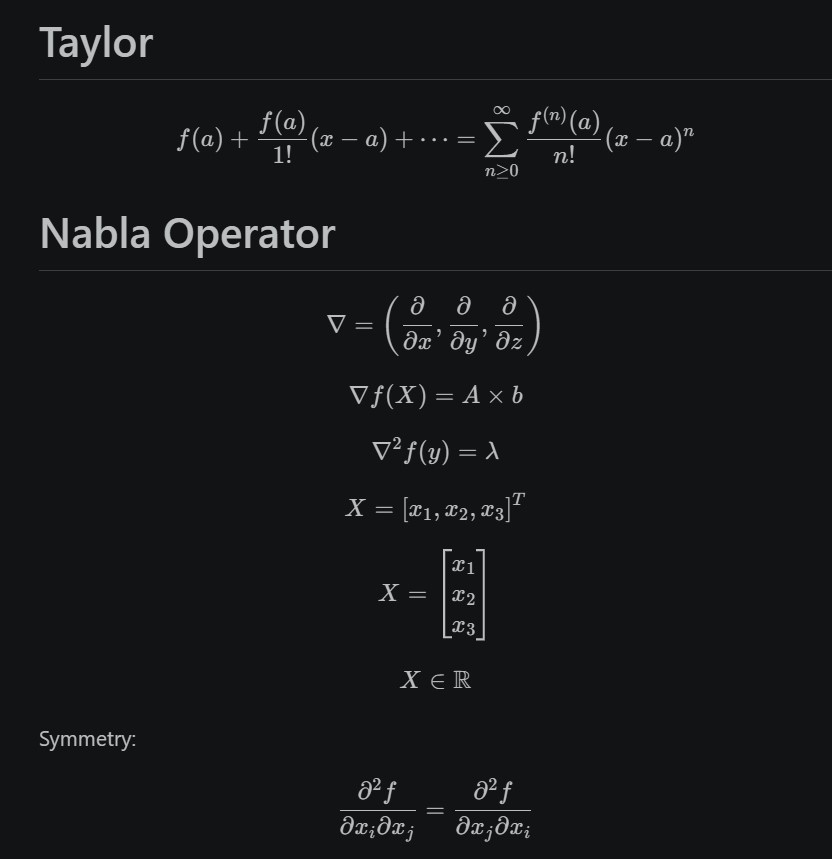
GPT

Supported AI Models
🧪 A4 Handwritten Notes Test Data (2 pages of Scratch.pdf)
| Provider | Model | Input/Output | Quality | Cost/Page | Rating |
|---|---|---|---|---|---|
| Local | glm-ocr:bf16 | 0 | ⭐⭐⭐⭐⭐ | ||
| Gemini 🏆 | gemini-2.5-flash | 638/552 | Excellent | $0 (Free) | ⭐⭐⭐⭐ |
| Qwen | qwen-vl-plus | 2824/589 | Excellent | $0.00048 | ⭐⭐⭐⭐ |
| Claude | claude-haiku-4-5-20251001 | 3156/629 | Excellent | $0.00315 | ⭐⭐⭐⭐ |
| OpenAI | gpt-5.4-mini | 5550/566 | Excellent | $0.00335 | ⭐⭐⭐⭐ |
| iFlytek | Spark | - | Poor | $0 (Free) | ⭐ |
💡 Recommendation Guide
| Priority | Recommended | Cost/Page | Reason |
|---|---|---|---|
| 1️⃣ First Choice | glm-ocr:bf16 | $0 | free, excellent recognitio, Local, fast |
| 2️⃣ China Users | Qwen | $0.00048 | Cheapest paid option, stable quality, fast |
| 3️⃣ Cost Conscious | OpenAI | $0.00335 | Most tokens but lowest unit price, competitive cost |
| ❌ Not Recommended | iFlytek | $0 | Free but poor formula recognition, text-only |
Plugin Settings
| Option | Default | Description |
|---|---|---|
| Model | Qwen VL Max | Select the AI model from the unified list |
| API Key Status | Auto-detect | Shows environment variable status (read-only) |
| PDF Rendering DPI | 150 | Higher DPI = better quality but slower (100-400) |
| API Timeout | 60s | Maximum wait time for API response |
| Max Retries | 3 | Number of retry attempts on failure |
| File Conflict Handling | Model-based naming | How to handle existing output files |
File Conflict Strategies:
- Overwrite: Replace existing file (⚠️ loses previous content)
- Skip: Don't generate if file exists
- Add Timestamp: Append timestamp to filename
- Model-based Naming (Recommended): Append model name (e.g.,
my_notes_qwen.md)
📊 Performance
Real Results
See actual output from different models:
- Qwen Result - Best cost-effectiveness
- OpenAI Result - Highest accuracy
- Original PDF - Input example
🤝 Contributing
Issues and Pull Requests are welcome!
📄 License
MIT License
Enjoy pdf-to-md! If you find it helpful, please consider giving it a Star ⭐ on GitHub!
For plugin developers
Search results and similarity scores are powered by semantic analysis of your plugin's README. If your plugin isn't appearing for searches you'd expect, try updating your README to clearly describe your plugin's purpose, features, and use cases.