Auto-Properties
pendingby Aaron Gillespie
Create automated properties based on note content and rules.
Auto-properties Plugin
[!TIP] TL;DR - Create auto-updating properties based on rules
This is an Obsidian plugin which creates automatically-updating note properties based on user-defined rules. This pairs nicely with bases and templates.
👉 Demo Video 👈
Example
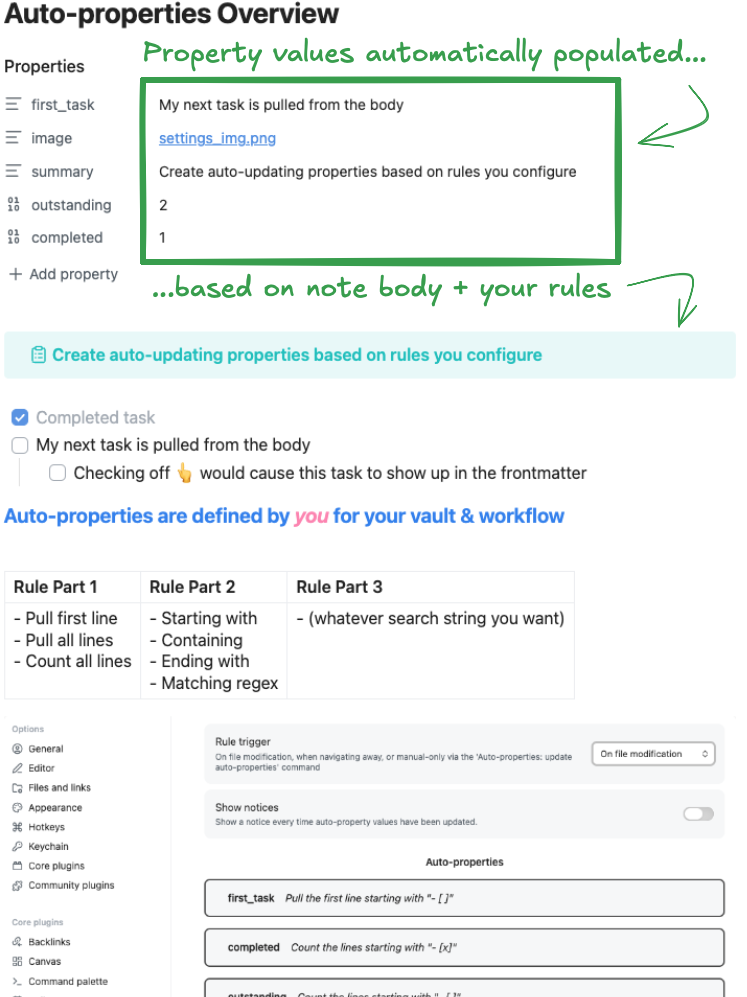
Overview
This plugin updates frontmatter of your notes using rules that act on their body (content).
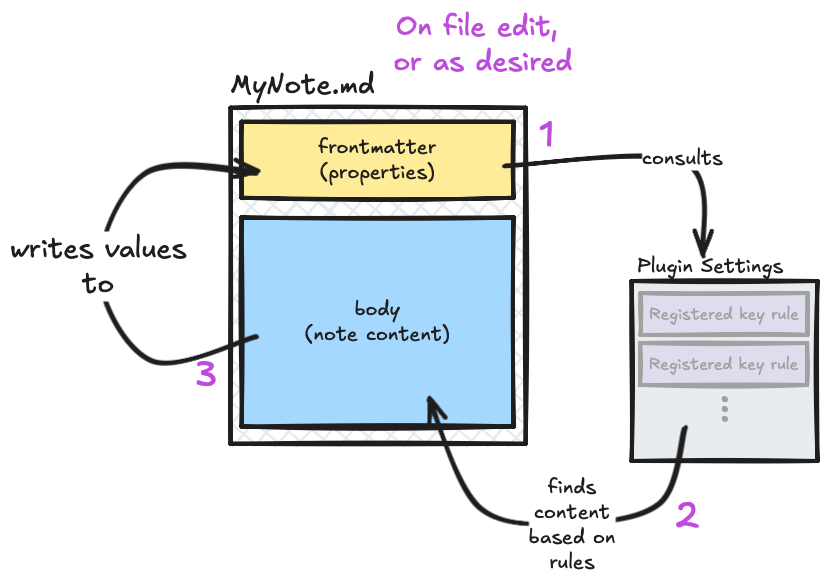
Use
How
- Install & enable plugin - open
Auto-Propertysettings - Decide how often you want the auto-properties to update
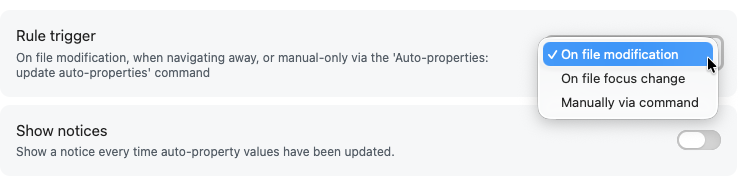
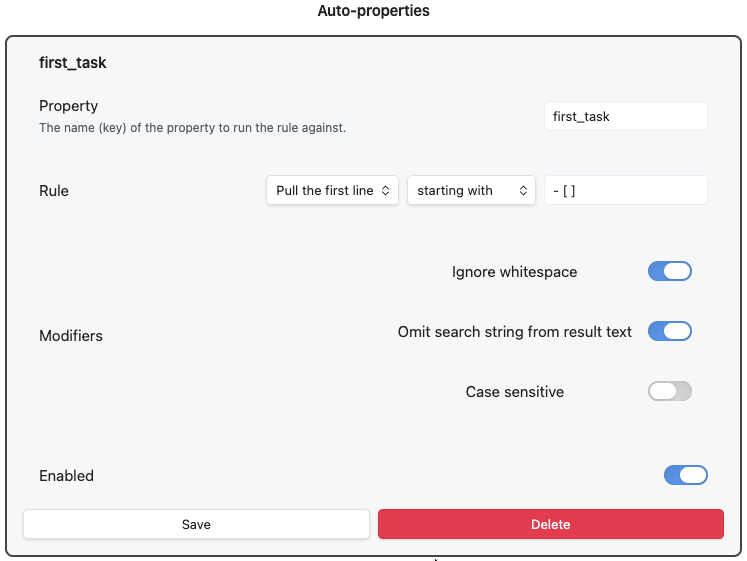
- Create your first auto-property & configure its rule criteria.
- Add your property's key to your notes
- Done! Your notes willl then update the property values automatically however often you've configured
Rule Criteria
- Key - the property name the rule will be applied to in your notes
- Custom Rule - end up being readable sentences that say what the rule does:
| Rule Part 1 | Rule Part 2 | Rule Part 3 |
|---|---|---|
| - Pull first line - Pull all lines - Count all lines | - Starting with - Containing - Ending with - Matching regex | (whatever search string you want) |
- Modifiers - change how rules apply or are shown
- Ignore whitespace - whether or not "starts with" should care about indention
- Omit search string from result text - allows you to not include whatever text you are using in the text input field of the rule
- Case sensitive - whether or not "THIS" is the same as "tHiS"
- Pre-built Rules - there are a few other types of rules you can use that are self-explanatory
- Creation date
- Modification date
- Character count
- Enabled - you can toggle rules on/off without deleting them
Trigger Modes
On Update
After a brief pause in typing, auto-properties will update (if changess are needed). This makes undo mildly tedious to use, however. It's not my preferred method.
On File Focus Change
When switching between or closing tabs, the note from the tab you just left will be processed and its proerties updated. This is how I use it, personally.
Manually
Will only update properties when you run the Auto-properties: Update Auto-properties command.
Use Cases
My use case was based on pulling the first open task into a property... but you can do much more.
- All open tasks
- First open task
- First task with status
- First line with tag (or any given text)
- All lines with whatever text
- First embeded image
Design Considerations
Do one thing
This plugin is intentionally small. It does one thing. No unncessary overhead. Maximum modularity.
You specify the keys & rules
You have control over the keys (property names) you do and don't want to have rules for. You control what the rules do.
Note bodies are never changed
For safety, this plugin only updates note properties. It will never modify the body of the note. This prevents accidental data loss.
Few "smart" touches
The plugin tries to do as little "magic under the hood" stuff as possible - but does do a couple of things to work better with how Obsidian works.
- targeting embeds (via search string
![[) will convert to a clickable link - targeting blocks that have a block ID will convert to a clickable link to that block
- i.e. it will make links for blocks ending with a space, carrot, and some text ^likethis
Installation
This is in queue to be added to the Obsidian Community plugins page. It will hopefully be added there soon!
In the meantime, you can install via BRAT. I used to think this was an involved process, but it's actually quite easy.
- Install BRAT & enable it
- In BRAT settings, click "Add Plugin"
- Copy & paste this repo's URL into BRATs settings
- Done.
For plugin developers
Search results and similarity scores are powered by semantic analysis of your plugin's README. If your plugin isn't appearing for searches you'd expect, try updating your README to clearly describe your plugin's purpose, features, and use cases.