Book Search Plus
pendingby DuckTapeKiller
Search for books in Google Books, Goodreads, Open Library and local Calibre libraries to create notes.

Book Search Plus is a plugin for Obsidian that allows you to search for books and create notes with rich metadata. It supports multiple providers, including Goodreads (via scraping), OpenLibrary (public API), Calibre (local library), and Google Books.
This version features a refined UI, smart tag generation, and enhanced customization options.
This plugin is based on the architecture of obsidian-book-search-plugin by anpigon.
Features
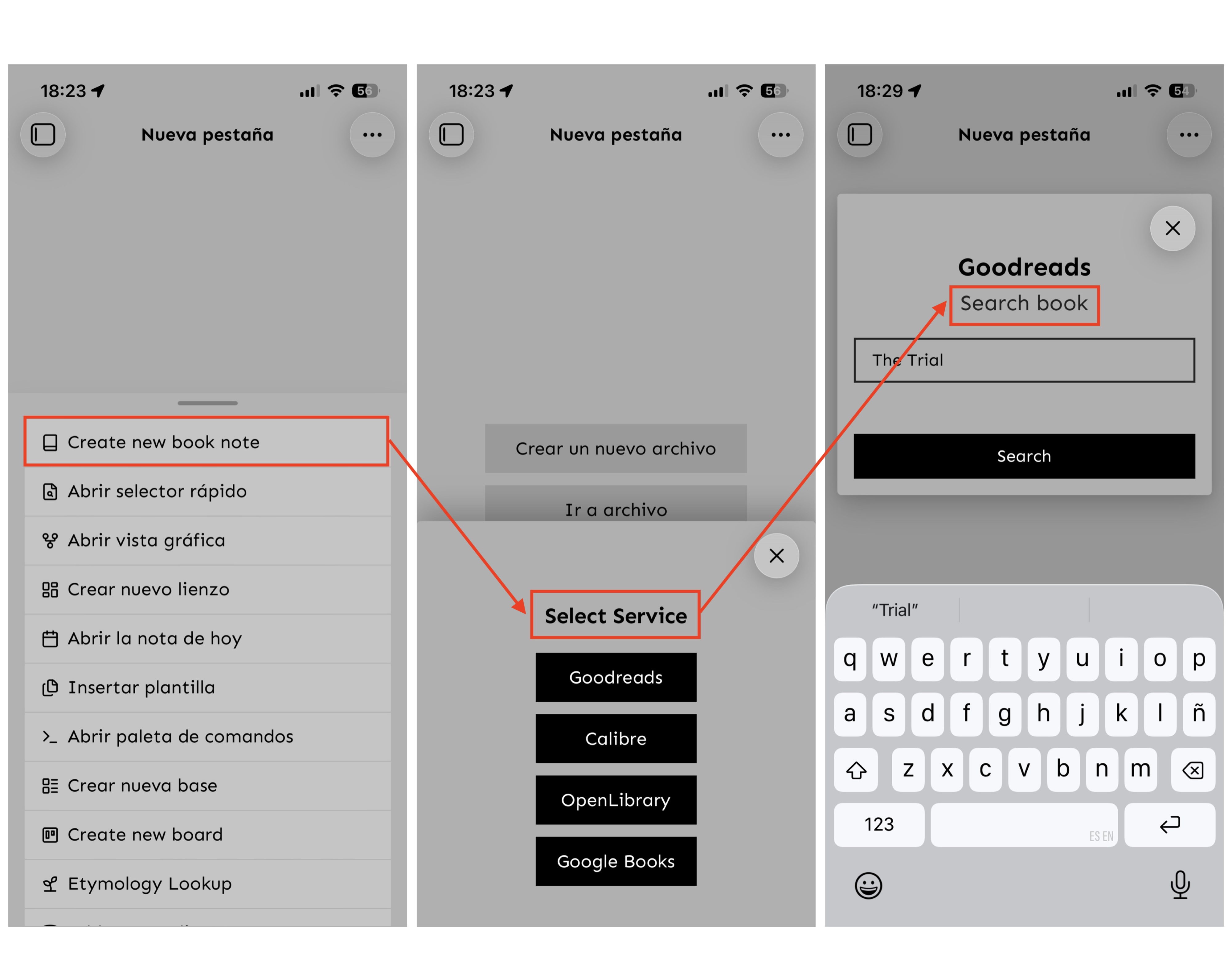
- Unified Service Selection: Quickly choose your source from a compact, aesthetic modal:
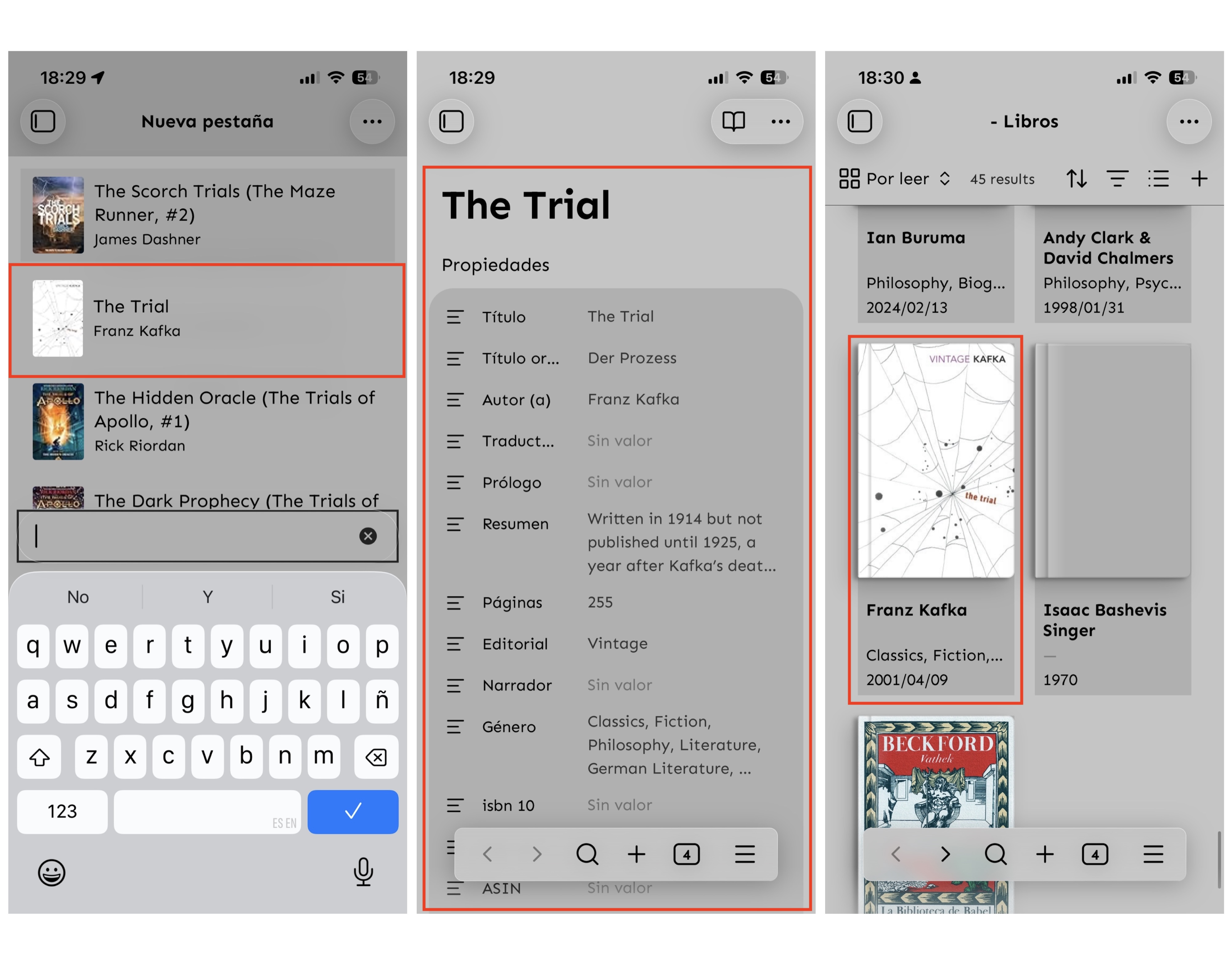
- Goodreads: Scrapes detailed metadata including Original Title, Page Count, and ASIN.
- Calibre: Connects to your local library to import books you own.
- OpenLibrary: Fetches open-source book data.
- Google Books: The classic search provider.
- Smart Tag Generation: Automatically generates tags based on the author and title in
snake_case(e.g.,ernest_hemingway,for_whom_the_bell_tolls). - YAML List Support: Tags are automatically formatted as correct YAML lists.
- Template Flexibility: Supports custom frontmatter templates with extensive variables.
- Clean UI: Polished, theme-adaptive styling.
Calibre Setup
To search your local Calibre library:
- Open Calibre.
- Go to Preferences > Sharing > Sharing over the net.
- Click Start Server.
- Note the Port (default
8080) and ensure it matches the plugin settings.
Frontmatter & Templates
The plugin inserts metadata into your notes using Handlebars syntax (e.g., {{title}}). You can customize this in the settings.
Default Behavior (Raw Data)
If you leave the "Frontmatter" field in settings empty, the plugin will insert all available metadata fields it finds (e.g., subtitle, authors array, previewLink, etc.). This is useful if you want to see everything the service provides.
Recommended Template
To keep your metadata clean and organized, we recommend using a specific template. Below is a standard English configuration. Copy this into the "Frontmatter" text area in settings:
---
title: "{{title}}"
author: "{{author}}"
publisher: "{{publisher}}"
isbn: "{{isbn13}}"
pages: "{{totalPage}}"
publish_date: "{{publishDate}}"
cover: "{{coverUrl}}"
tags: {{tags}}
description: "{{description}}"
created: "{{DATE}}"
read: false
---
Custom Templates
If you want to create your own template, you can put ANY text you want in the "Frontmatter" text area in settings. Use the following variables to inject data:
Available Variables
{{title}}- Book Title{{originalTitle}}- Original Title (Goodreads only){{author}}- Author Name{{description}}- Book Summary{{publisher}}- Publisher Name{{category}}- Genre/Category{{publishDate}}- Date of publication{{totalPage}}- Number of pages{{coverUrl}}- URL of the cover image{{localCoverImage}}- Path to the saved local cover image{{isbn10}}- 10-digit ISBN{{isbn13}}- 13-digit ISBN{{asin}}- Amazon Standard Identification Number{{tags}}- Automatically generated tags (author_name,book_title)
Important Note on Tags
When adding tags to your template, you MUST wrap the variable in quotes.
Correct Usage:
tags: "{{tags}}"
Why?
Obsidian's frontmatter (and the Properties view) considers {{tags}} invalid syntax if it is not wrapped in quotes. If you try to use it without quotes, the value may disappear or be deleted by Obsidian.
How it works:
Even though you write "{{tags}}", the plugin is smart enough to detect this. It will automatically remove the quotes and format the result as a valid YAML list:
Result in your note:
tags:
  - tag_one
  - tag_two
MOBILE FLOW
EXAMPLE CALIBRE DATA IMPORT
https://github.com/user-attachments/assets/fb176df3-e7d3-4759-a8c0-5e20e9023774
EXAMPLE GOODREADS DATA IMPORT
https://github.com/user-attachments/assets/2110c0b5-9a06-4459-93f5-60fae05c6393
Credits
BY DuckTapeKiller.
For plugin developers
Search results and similarity scores are powered by semantic analysis of your plugin's README. If your plugin isn't appearing for searches you'd expect, try updating your README to clearly describe your plugin's purpose, features, and use cases.