Detailed Canvas
pendingby endlessblink
Enrich canvas link cards with AI-generated descriptions and cover images using Ollama.
Detailed Canvas

Enrich Obsidian Canvas link cards with AI-generated summaries, images, and metadata. Supports Ollama, OpenAI, Claude, Groq, and OpenRouter.
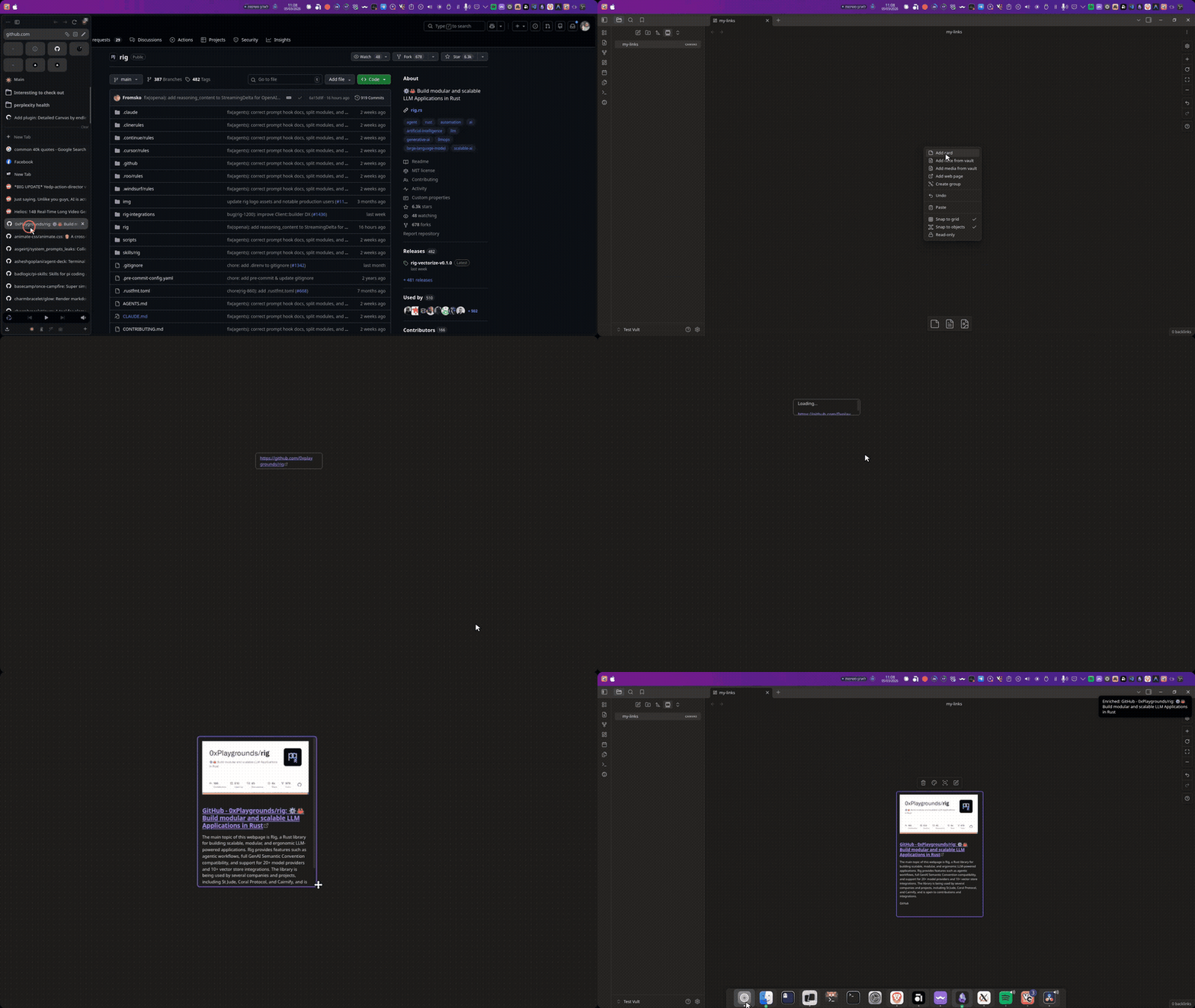
Features
- AI-generated summaries for canvas link cards using your choice of AI provider
- Automatic metadata extraction — title, description, and cover image from web pages
- Twitter/X support — extracts tweet content, images, and author info via fxtwitter API
- Auto-enrich on paste — automatically process new link cards added to canvas
- Context menu integration — right-click any link card to enrich it
- Batch processing — enrich all link cards in a canvas at once
- Multiple AI providers — Ollama (local), OpenAI, Claude, Groq, OpenRouter
Usage
Enrich a single link card
- Right-click a link card on your canvas
- Select Enrich with AI description from the context menu
- The plugin scrapes the URL, generates an AI summary, and replaces the link with a rich card
Enrich all link cards
Open the command palette (Ctrl/Cmd + P) and search for:
- Enrich selected link card — process selected link cards
- Enrich all link cards in canvas — process every link card in the active canvas
Auto-enrich
When enabled in settings, new link cards pasted into a canvas are automatically enriched.
Supported AI Providers
| Provider | Type | Setup |
|---|---|---|
| Ollama | Local | Install Ollama, pull a model (ollama pull llama3.2) |
| OpenAI | Cloud | Get an API key from platform.openai.com |
| Claude | Cloud | Get an API key from console.anthropic.com |
| Groq | Cloud | Get an API key from console.groq.com |
| OpenRouter | Cloud | Get an API key from openrouter.ai |
Settings
AI Provider
- Provider — choose between Ollama, OpenAI, Claude, Groq, or OpenRouter
- API key — required for cloud providers (stored locally in your vault)
- Model — select from available models (auto-fetched where supported)
- Test connection — verify your provider is reachable
Behavior
- Auto-enrich on paste — automatically enrich new link cards
- Show notifications — display progress during enrichment
- Max description length — limit generated summary length (default: 500 chars)
Advanced
- AI prompt — customize the instructions for generating summaries
- Use environment variables — read API keys from env vars instead of stored settings (
OPENAI_API_KEY,OPENROUTER_API_KEY,GROQ_API_KEY,ANTHROPIC_API_KEY) - Reset to defaults — restore all settings
Troubleshooting
| Problem | Solution |
|---|---|
| "Connection failed" with Ollama | Make sure Ollama is running (ollama serve) |
| "Invalid API Key" error | Double-check your API key in settings |
| No models in dropdown | Click "Refresh" or verify your provider connection |
| X/Twitter links show no content | The plugin uses fxtwitter API — ensure the URL is a tweet link (contains /status/) |
| Card not updating | Try the command palette enrichment instead of auto-enrich |
Installation
From community plugins
- Open Settings → Community Plugins
- Search for "Detailed Canvas"
- Click Install, then Enable
Manual installation
- Download the latest release from GitHub
- Extract
main.js,manifest.json, andstyles.cssto your vault's.obsidian/plugins/detailed-canvas/directory - Reload Obsidian
- Enable the plugin in Settings → Community Plugins
Development
npm install
npm run dev    # development with watch mode
npm run build  # production build
npm run lint   # lint the code
License
MIT
For plugin developers
Search results and similarity scores are powered by semantic analysis of your plugin's README. If your plugin isn't appearing for searches you'd expect, try updating your README to clearly describe your plugin's purpose, features, and use cases.