Simple Tap Timer
pendingby gustipardo
A minimal timer plugin with one-tap start/stop, note-level timer exclusivity, reports, and session logging.
Simple Tap Timer
Simple Tap Timer is an Obsidian plugin to run quick timers directly inside your notes.
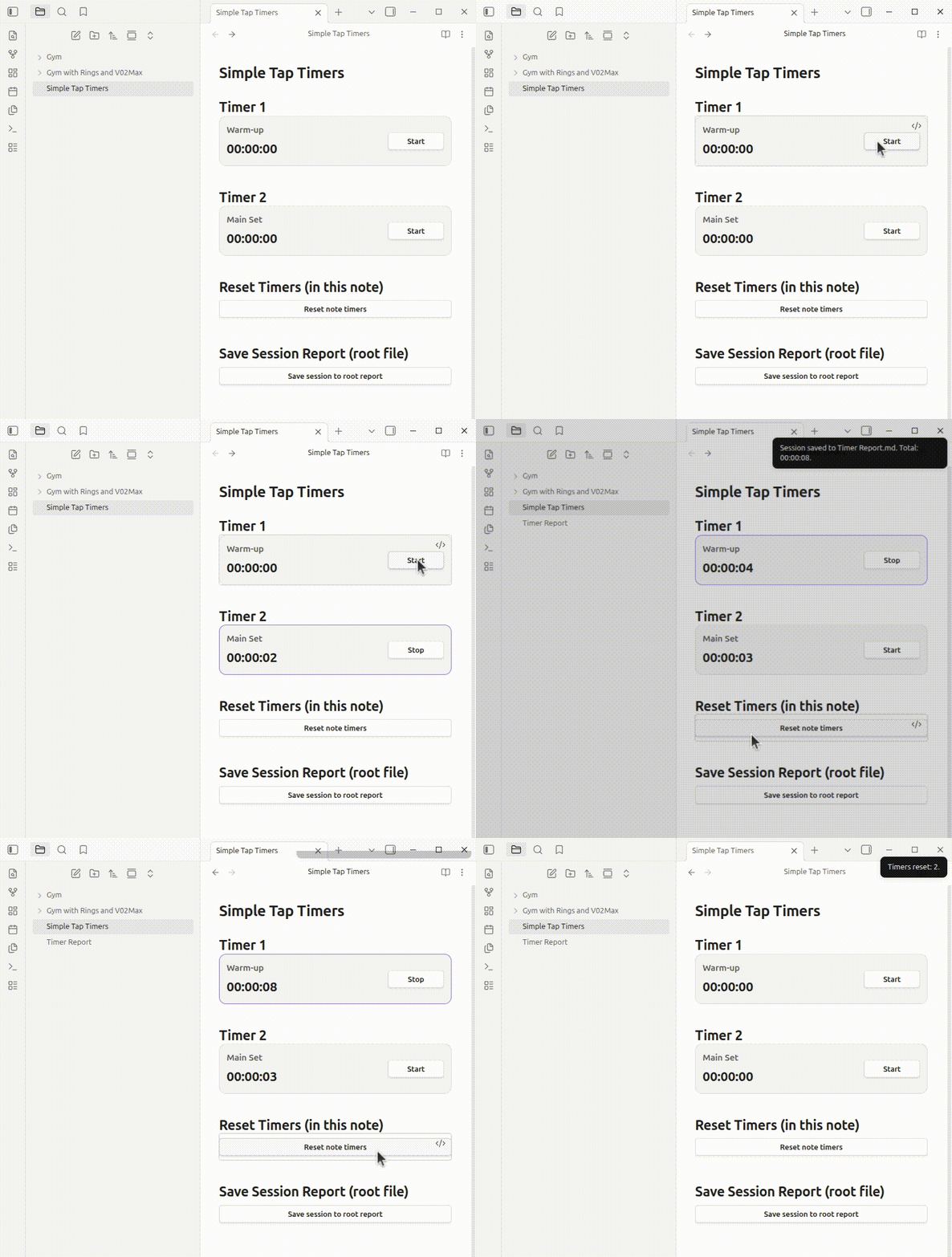
Demo
This demo shows timer usage, reset-all, and save-session flow.
What it does
- Render interactive timers from markdown code blocks.
- Start/stop each timer with one tap.
- By default, only one non-independent timer can run at a time in the same note.
- Generate a timer summary table in the note.
- Reset all timers in the note.
- Save a session log to any folder/file path in your vault.
Core timer block
Minimum usage (required only):
```tap-timer
```
Fully customizable example:
```tap-timer
title: Push-ups
id: pushups-timer
independent: false
startLabel: Start
stopLabel: Stop
errorNotice: Could not update timer.
```
Timer parameters
id: unique timer id (recommended).title: optional title shown above the timer.independent:true/false(defaultfalse).false: when started, other non-independent timers in the same note are paused.true: can run in parallel.
startLabel: start button label.stopLabel: stop button label.errorNotice: message shown if timer action fails.
Report block
Minimum usage (required only):
```tap-timer-report
```
Fully customizable example:
```tap-timer-report
button: Generate timer table
busyLabel: Generating...
missingNoteNotice: Could not identify the note to generate the table.
successNotice: Timer table generated/updated in the note.
errorNotice: Could not generate timer table.
reportTitle: Timer Summary
noteLabel: Note
updatedLabel: Updated
idHeader: ID
titleHeader: Title
valueHeader: Final Value
emptyLabel: (no timers)
```
This block inserts/updates a marked report section in the current note.
Reset-all block
Minimum usage (required only):
```tap-timer-reset-all
```
Fully customizable example:
```tap-timer-reset-all
button: Reset note timers
busyLabel: Resetting...
confirm: This will reset all timers in this note. Continue?
missingNoteNotice: Could not identify the note to reset timers.
successNotice: Timers reset: {count}.
errorNotice: Could not reset timers.
```
Save-session block
Minimum usage (required only):
```tap-timer-save-session
```
Fully customizable example:
```tap-timer-save-session
button: Save session
busyLabel: Saving...
confirm: This will save this session to the session log. Continue?
missingNoteNotice: Could not identify the note to save the session.
successNotice: Session saved to {log}. Total: {total}.
errorNotice: Could not save the session.
workout: Upper Body Day
folder: Logs
file: Sessions.md
historyTitle: # Timer Sessions History
sessionPrefix: Session
dateLabel: Date
dateIsoLabel: Date ISO
workoutLabel: Workout
noteLabel: Note
totalTimeLabel: Total time
sectionHeader: Section
idHeader: ID
timeHeader: Time
emptySectionLabel: (no timers)
```
Save path options
You can configure destination in two ways:
folder+file(recommended)logwith a full vault-relative path (legacy/explicit override)
If log is provided, it takes precedence over folder + file.
Notes for publishing and usage
- All defaults are in English.
- All user-visible labels/messages have generic defaults and can be overridden via block parameters.
- Legacy
next:is not used anymore.
For plugin developers
Search results and similarity scores are powered by semantic analysis of your plugin's README. If your plugin isn't appearing for searches you'd expect, try updating your README to clearly describe your plugin's purpose, features, and use cases.