Exam Creator
pendingby Iwan Hoogendoorn
Create and take exams with multiple choice questions from your notes. Features scoring, timer, and review mode.
Obsidian Exam Creator
A powerful exam simulator plugin for Obsidian, inspired by some popular Exam Simulators. Create and take practice exams directly from your notes with scoring, timer, and detailed review features.


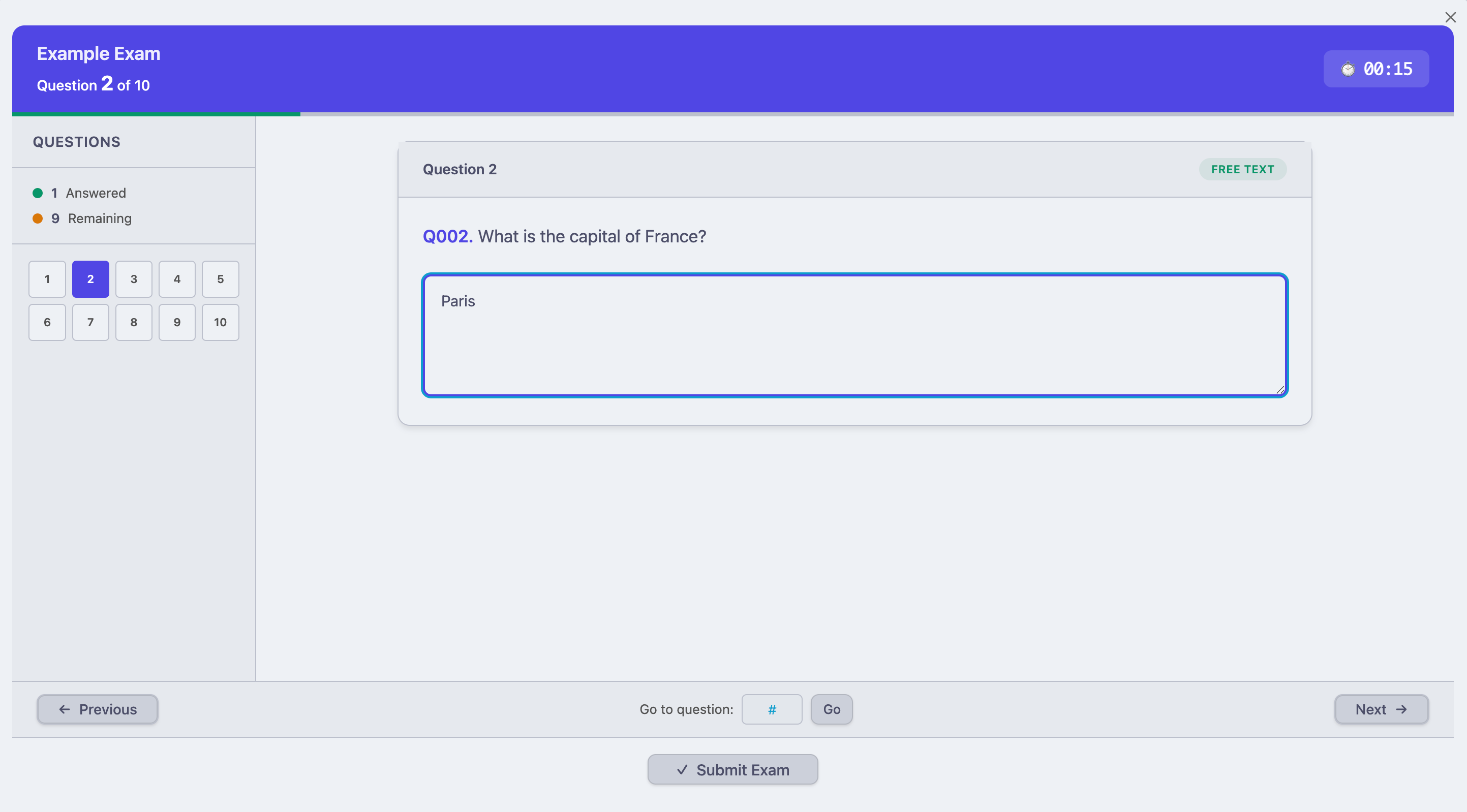
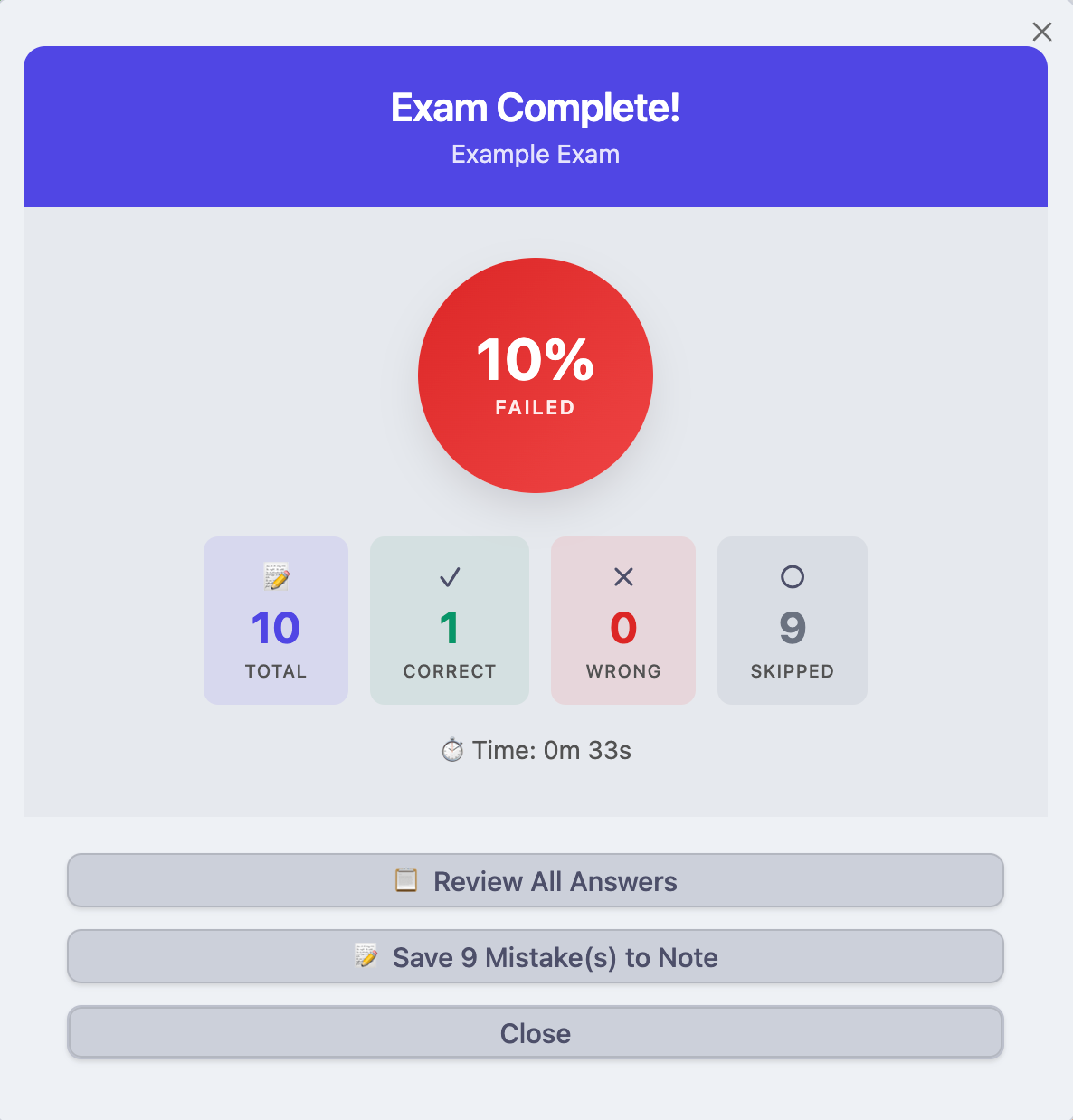
Features
✅ Multiple Question Types
- Single choice (one correct answer)
- Multiple choice (multiple correct answers)
- Free text / fill-in answers
✅ Image Support - Embed images in questions using Obsidian's standard syntax
✅ Timer - Track time spent on exams
✅ Scoring System - Automatic grading with pass/fail status (70% threshold)
✅ Question Navigation - Jump to any question, see answered/unanswered status
✅ Full Review Mode - Dedicated large screen for reviewing all answers
✅ Save Mistakes - Export wrong answers to a new note for later review
✅ Shuffle Options - Randomize questions and/or answer order
✅ Supports 300+ Questions - Scalable UI for large question banks
Installation
Option 1: Manual Installation (Recommended)
-
Download the plugin files
main.jsmanifest.jsonstyles.css
-
Create the plugin folder
Your Vault/.obsidian/plugins/exam-creator/ -
Copy the files into the
exam-creatorfolder -
Enable the plugin
- Open Obsidian
- Go to Settings → Community plugins
- Find "Exam Creator" in the list
- Toggle it ON
Option 2: Build from Source
# Clone the repository
git clone https://github.com/your-repo/obsidian-exam-creator.git
cd obsidian-exam-creator

# Install dependencies
npm install

# Build the plugin
npm run build

# Copy main.js, manifest.json, and styles.css to your vault
Question Format
Create your exam questions in any Obsidian note using the following format:
Single Choice Question
Q001. What is the capital of France?

A. London
B. Paris
C. Berlin
D. Madrid

Answer: B
Multiple Choice Question
Q002. Which of the following are programming languages?

A. Python
B. HTML
C. JavaScript
D. CSS

Answer: A, C
Free Text Question
Q003. What is the chemical symbol for water?

Answer: H2O
Question with Image
Using Obsidian's wiki-link syntax:
Q004. What shape is shown in the image?

![[circle.png]]

A. Square
B. Circle
C. Triangle
D. Rectangle

Answer: B
Or using standard Markdown:
Q005. Identify the animal in the picture.

A. Dog
B. Cat
C. Bird
D. Fish
Answer: B
Format Rules
- Questions must start with
Qfollowed by a number and a dot (e.g.,Q001.,Q1.,Q42.) - Options use capital letters followed by a dot (e.g.,
A.,B.,C.) - The answer line must start with
Answer:(case-insensitive) - Multiple answers are separated by commas (e.g.,
Answer: A, C, D) - Use
---between questions for better readability (optional)
Usage
Starting an Exam
-
Open a note containing your exam questions
-
Start the exam using one of these methods:
- Click the ✓ checkmark icon in the left ribbon
- Open Command Palette (
Ctrl/Cmd + P) → "Exam Creator: Start Exam from Current Note"
-
The plugin will parse your questions and open the exam interface
Taking the Exam
- Answer questions by clicking options or typing in the text field
- Navigate using Previous/Next buttons or click question numbers in the sidebar
- Jump to any question using the "Go to question" input
- Track progress via the sidebar (green = answered)
- Monitor time with the timer in the header
Submitting the Exam
- Click "Submit Exam" when ready
- If you have unanswered questions, you'll be asked to confirm
- View your score summary with pass/fail status
Reviewing Answers
- After submitting, click "Review All Answers"
- A full-screen review modal opens with:
- Left sidebar: All questions with status indicators
- Filters: View All, Correct, Wrong, or Skipped
- Detail panel: Full question with your answer vs correct answer
- Use Previous/Next or click questions in the sidebar to navigate
Saving Mistakes
- On the results screen, click "Save X Mistake(s) to Note"
- A new note is created in the same folder containing:
- All questions you got wrong or skipped
- Your original answer
- The correct answer
- Ready for re-study!
Commands
| Command | Description |
|---|---|
| Start Exam from Current Note | Parse questions and begin the exam |
| Preview Questions in Current Note | See a summary of detected questions |
Settings
Access via Settings → Community plugins → Exam Creator → ⚙️
| Setting | Description | Default |
|---|---|---|
| Shuffle Questions | Randomize question order each exam | Off |
| Shuffle Answers | Randomize answer option order | Off |
| Show Timer | Display elapsed time during exam | On |
| Default Time Limit | Time limit in minutes (0 = unlimited) | 0 |
Tips & Best Practices
Organizing Your Exams
- Create a dedicated folder for exam notes (e.g.,
Exams/) - Use descriptive filenames (e.g.,
AWS Solutions Architect - Practice Exam 1.md) - Separate topics into different notes
Writing Good Questions
- Keep question text clear and concise
- Use consistent formatting throughout
- Number questions sequentially for easy reference
- Add images when visual context helps
Effective Study Strategy
- Take the full exam first
- Review all wrong answers
- Save mistakes to a new note
- Re-study the mistake note
- Retake just the mistakes until you get 100%
Large Question Banks
- The plugin handles 300+ questions efficiently
- Use the sidebar grid for quick navigation
- Filter by status to focus on problem areas
Example Exam
Here's a complete example exam you can copy into a note:
# Sample Exam - General Knowledge

Q001. What is the largest planet in our solar system?

A. Earth
B. Mars
C. Jupiter
D. Saturn

Answer: C

---

Q002. Which elements are noble gases?

A. Helium
B. Oxygen
C. Neon
D. Nitrogen
E. Argon

Answer: A, C, E

---

Q003. In what year did World War II end?

Answer: 1945

---

Q004. What is the capital of Australia?

A. Sydney
B. Melbourne
C. Canberra
D. Perth

Answer: C

---

Q005. Which of the following are prime numbers?

A. 2
B. 4
C. 7
D. 9
E. 11

Answer: A, C, E
Troubleshooting
"No questions found" error
- Ensure questions start with
Qfollowed by a number and dot - Check that the
Answer:line is present for each question - Make sure there's no extra formatting breaking the pattern
Images not displaying
- Verify the image exists in your vault
- Check the file path is correct
- Try both
![[image.png]]andformats
Plugin not appearing
- Ensure all three files (
main.js,manifest.json,styles.css) are in the plugin folder - Restart Obsidian completely
- Check that Community plugins are enabled in Settings
Scrolling issues
- If content is cut off, the question area should scroll
- Try resizing the Obsidian window
- Ensure you're on the latest version of the plugin
Changelog
Version 1.0.0
- Initial release
- Single/multiple choice and free text questions
- Image support
- Timer and scoring
- Question navigation with sidebar
- Full review mode
- Save mistakes to note feature
- Shuffle questions/answers options
License
MIT License - Free to use, modify, and distribute.
Support
If you encounter issues or have feature requests, please open an issue on the repository.
Enjoy your studies! 📚✨
For plugin developers
Search results and similarity scores are powered by semantic analysis of your plugin's README. If your plugin isn't appearing for searches you'd expect, try updating your README to clearly describe your plugin's purpose, features, and use cases.