BeastVault
pendingby Lyova Potyomkin
Adversary and environment stat blocks for Daggerheart TTRPG.
BeastVault
An Obsidian.md plugin for Daggerheart TTRPG GMs to search, edit, and create beautiful adversary & environment stat blocks.
Features
- Search and insert adversaries & environments from the SRD via commands
- Beautifully render editable stat blocks with intuitive UI
- Roll dice for attack or damage with one click
- Track marked HP, stress, countdowns and feature uses
- Battle points counted in the status bar
- Customizable colors to look pretty in any color theme
- Works in a canvas for FCG-style encounter building
Planned
- Local library support for homebrew stat blocks to search over
- Filtering and sorting via Bases
- "Summon" buttons for adversaries/environments that might summon others
- Ability to mark adversaries with conditions (e.g. Vulnerable, Restrained)
Installation
Manual
- Go to the latest release
- Download
main.js,manifest.jsonandstyles.css - Inside your Obsidian vault, create folder
.obsidian/plugins/beastvault - Copy the downloaded files to this folder
- If Obsidian was open, restart it
- Navigate to
Settings>Community pluginsand enable BeastVault
Automatic via BRAT
- Install the BRAT plugin from the community plugins browser
- Navigate to BRAT settings and click
Add beta plugin - Enter
ly0va/beastvaultas the repository and clickAdd plugin
Showcase
Insert from library
Insert an adversary via a command by going Ctrl+P > Insert adversary from library or using the side ribbon menu.
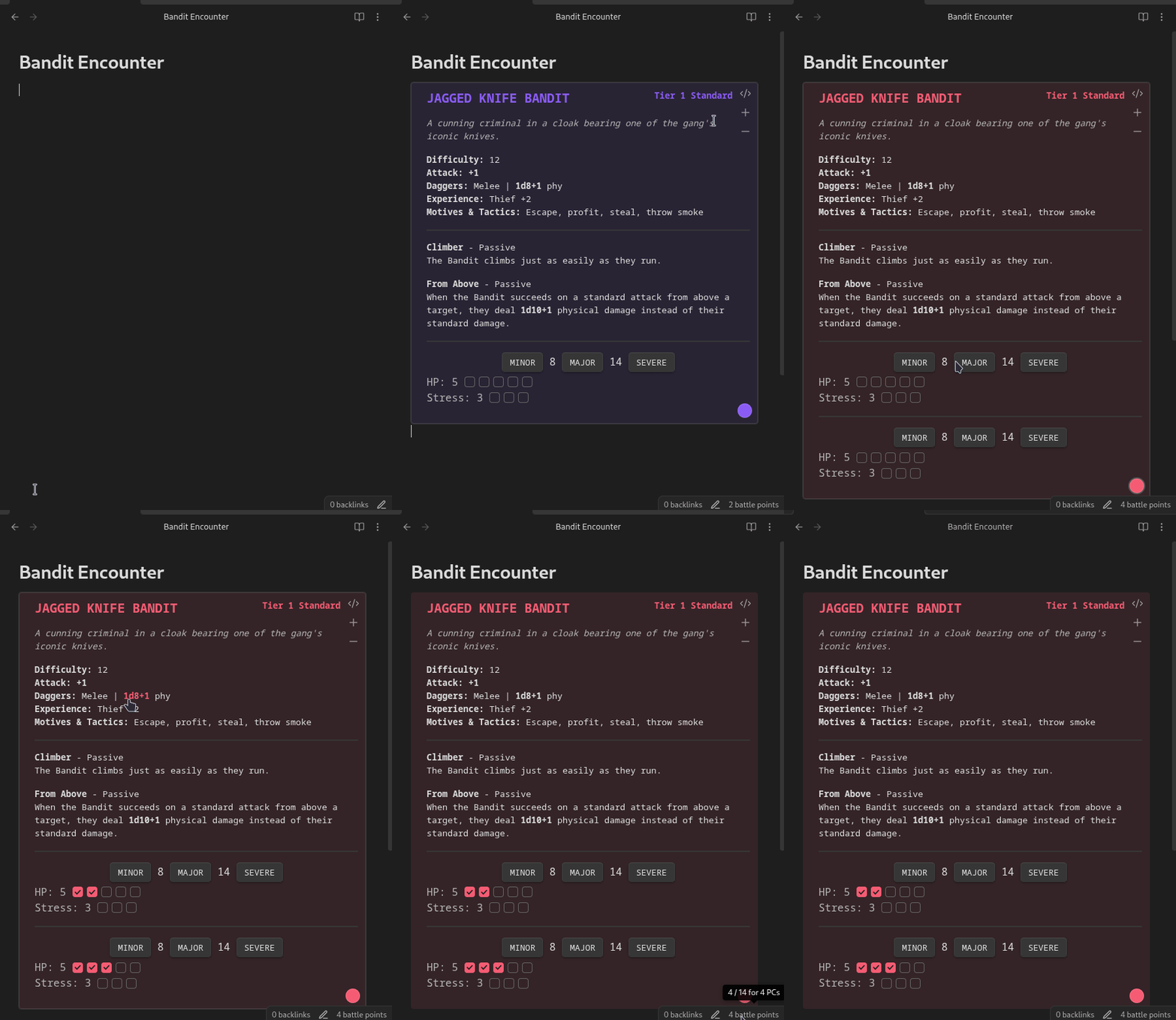
[!TIP] For quicker access, bind plugin commands to a key combination of your choice from the Hotkeys settings tab. I use
Alt+Ato insert an adversary &Alt+Eto insert an environment.
[!TIP]
Clickthreshold buttons to mark the corresponding amount of HP. UseAlt+Clickto clear it instead.
Homebrew
Make your own homebrew adversary by creating a daggerheart code block, or edit an inserted one by clicking the </> button in the top-right corner.
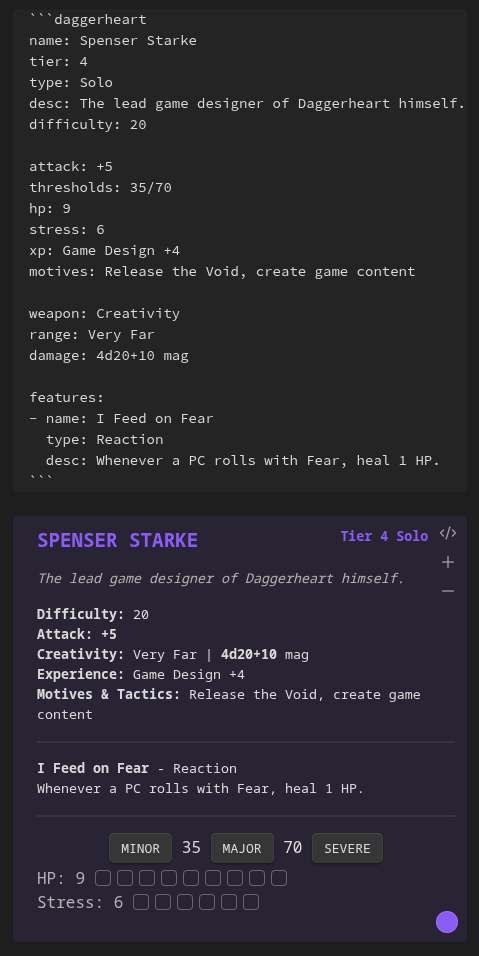
[!TIP] You can insert an empty adversary template by using the
Insert adversary templatecommand.
[!IMPORTANT] Do not use
TABin stat blocks. The indents for features must be manually indented with spaces.
Build encounters
Build out full encounters (works in a canvas too!) and track their HP & stress during a session. Marked HP & stress are preserved even after you close Obsidian.
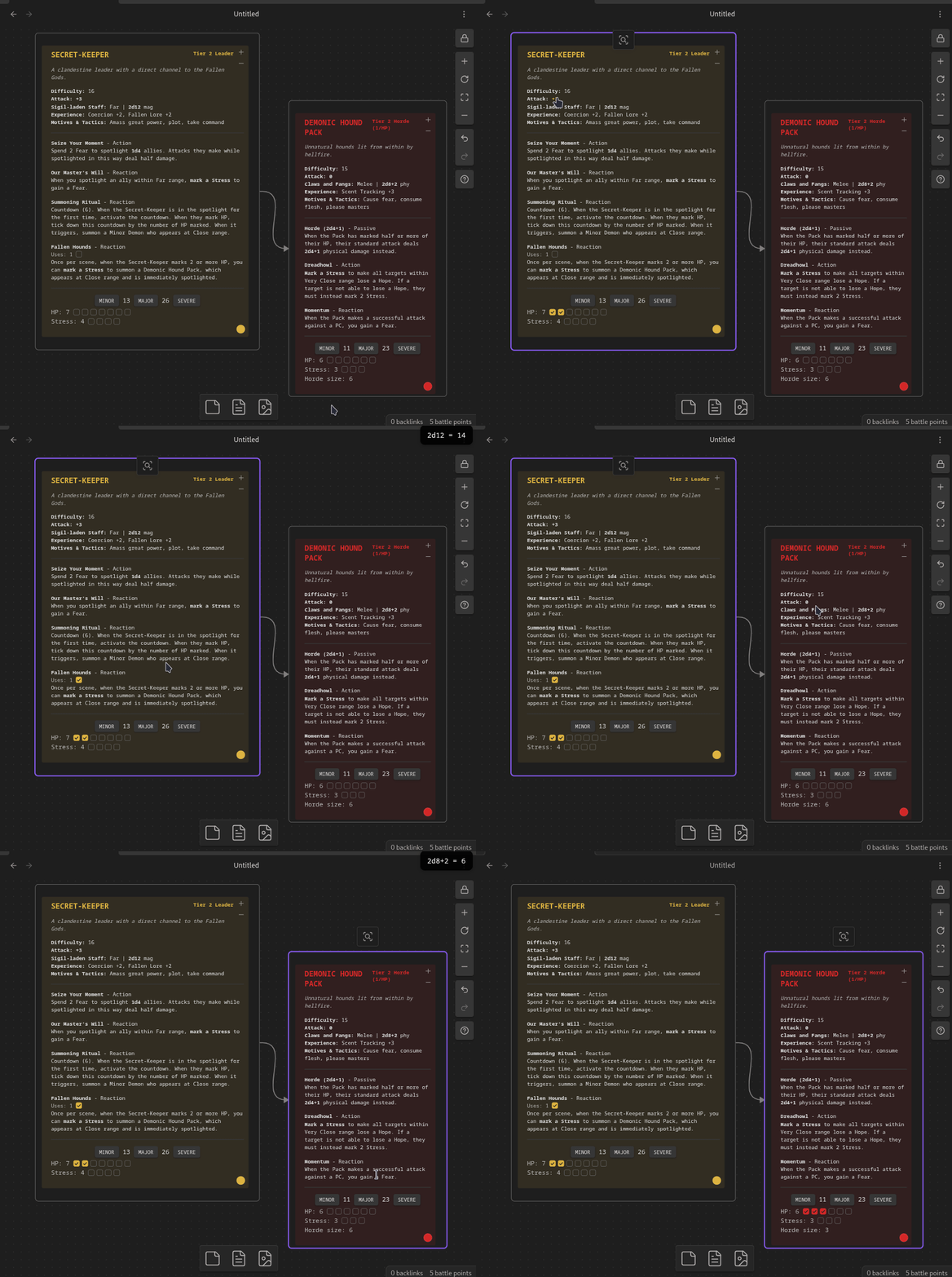
[!TIP] Building encounters in a canvas is made much more convenient by enabling node auto-resizing in this plugin. During a playing session, using canvas in read-only mode is recommended.
Library management
Go to BeastVault settings > Library folder location and enter a folder name. All notes in this folder will be scanned for daggerheart codeblocks, which will be available in search.
You can also import adversaries in bulk, by creating .json or .yaml files in this folder, which can contain a single stat block or an array of stat blocks.
The structure of the stat blocks is documented below.
Additionally, it is possible to enable compatibility with Fantasy Statblocks in settings.
With this enabled, any FSB-compatible blocks found in the notes inside the library folder will also be available in search, as long as they have layout: Daggerheart Adversary or layout: Daggerheart Environment.
[!IMPORTANT]
- Only entries with a valid string
nameare added to the library.- After adding, deleting, or modifying anything in the library, run
Refresh libraryeither by using the side ribbon menu or the command palette.- If an entry has no
hpand nostressfields, it is added as an environment; otherwise - as an adversary.- All other fields are optional.
Reference
The daggerheart code block parses the adversary or an environment as YAML with the following properties:
| Property | Definition | Example |
|---|---|---|
name | Name of the adversary | Bear |
tier | Adversary tier | 1 |
type | Type of the adversary | Bruiser |
desc | Adversary description | A large bear with thick fur and powerful claws. |
difficulty | Adversary difficulty | 14 |
weapon | Name of the adversary's weapon | Claws |
range | Range of the adversary's weapon | Close |
damage | Amount and type of adversary's weapon damage | 1d8+3 phy |
hp | Total adversary hitpoint slots | 6 |
stress | Total adversary stress slots | 3 |
thresholds | Adversary thresholds, separated by a /; leave blank for minions with 1 HP | 9/17 |
attack | Adversary attack bonus; click to roll for attack | +1 |
xp | Adversary experiences | Ambusher +2, Keen Senses +3 |
motives | Adversary's motives and tactics | Climb, defend territory, pummel, track |
features | List of feature objects, see table below | |
id | Stat block id, used by the plugin to track marked HP, stress etc; inserted automatically, can be any random string; defaults to fileName::adversaryName | a2sd4vsf |
features properties:
| Property | Definition | Example |
|---|---|---|
name | Name of the feature | Relentless (2) |
type | Feature type | Passive |
desc | Feature description; supports markdown | Make a standard attack. On a success, the target is *Vulnerable* until they next act. |
uses | Uses per scene (for those features that limit them) | 2 |
countdown | Size of the countdown activated by the feature, if any | 6 |
flavor | Hints for GM/PCs for flavoring an adversary or environment for their setting | Have any of the PCs forded rivers like this before? Are any of them afraid of drowning? |
For environments, weapon, damage, range, hp, stress, thresholds, attack, xp, motives are not set.
Instead, additional properties are available:
| Property | Definition | Example |
|---|---|---|
impulses | Environment impulses | Bar crossing, carry away the unready, divide the land |
adversaries | Potential adversaries in an environment | Guards (Bladed Guard, Head Guard), Masked Thief, Merchant |
tone | Tone and feel of the environment | Musty and mournful, serene yet slightly wrong |
All of the properties are optional, and simply won't render if skipped.
Attributions
Plugin inspired by FreshCutGrass and DaggerForge.
Copyright Notice
This plugin includes materials from the Daggerheart System Reference Document 1.0, © Critical Role, LLC. All rights reserved.
Public Game Content created and owned by Darrington Press, LLC. Available at https://www.daggerheart.com.
Licensed under the Darrington Press Community Gaming License: https://darringtonpress.com/license/.
Stat blocks may have minor edits to correct obvious errors.
For plugin developers
Search results and similarity scores are powered by semantic analysis of your plugin's README. If your plugin isn't appearing for searches you'd expect, try updating your README to clearly describe your plugin's purpose, features, and use cases.