Life Grid
pendingby F. Javier R. Donado
Visualize your entire life as an interactive grid, where each dot represents a day. Highlight notes, life periods, and milestones to reflect on your past, track your present, and plan your future.
Obsidian Life Grid
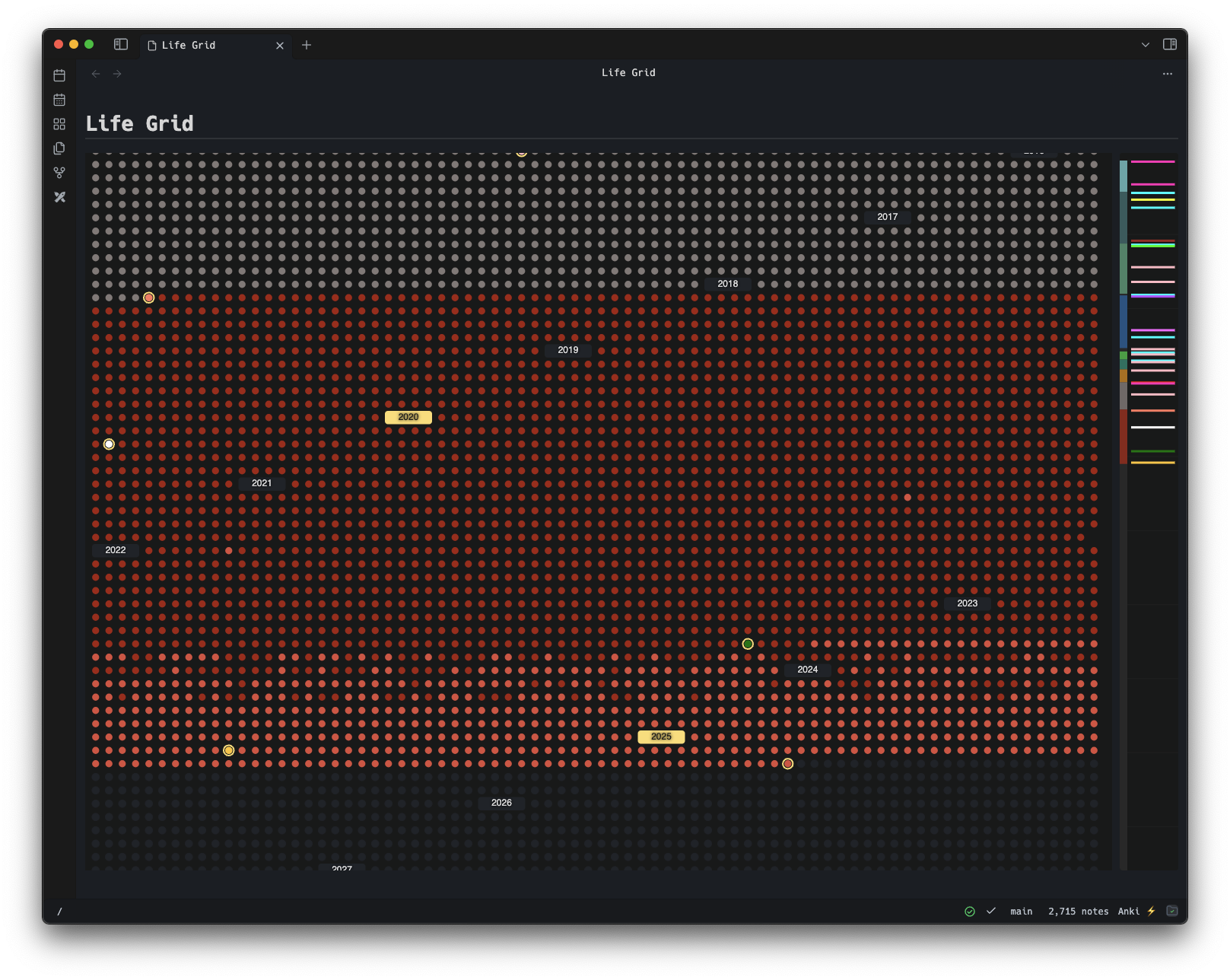
An Obsidian plugin to visualize your entire life as an interactive grid, where each dot represents a day of your existence (whether it's real or simulated).
Track your journey, highlight important milestones, and gain perspective on how you're spending the time you have. Perfect for anyone who enjoys a mild existential crisis with their morning notes.
Entirely vibe-coded, so thank you, Claude!
✨ Features
📅 Life Visualization
- Daily Dots: Every day of your life is represented as a dot in a beautiful grid
- Age Display: Hover over any day to see your exact age at that moment
- Today Highlight: Current day is highlighted with a special border
- Automatic Scrolling: Grid automatically centers on today when opened
📝 Daily Notes Integration
- Note Detection: Days with daily notes are automatically highlighted in green
- Seamless Navigation: Click any day to open or create a daily note
- Custom Colors: Override default colors using frontmatter in your daily notes
🎯 Life Periods
- Background Coloring: Define colored periods for different life phases
- Flexible Ranges: Set start and end dates, or use "present" for ongoing periods
- Period Labels: Add meaningful labels like "Childhood", "University", "Career"
- Visual Organization: Easily see how your life has been structured
🌟 Special Events & Milestones
- Event Highlighting: Mark special days with custom colors and event names
- Milestone Tooltips: Rich tooltips show event details when you hover
- Event Borders: Important events get special visual treatment
- Minimap Events: See all your events at a glance in the sidebar minimap
🗺️ Interactive Minimap
- Decade Markers: Visual guides show decade boundaries
- Event Overview: All special events are displayed as lines on the timeline
- Quick Navigation: Click to jump to different periods of your life
- Proportional Scaling: Adapts to your screen size
🎨 Beautiful Design
- Dark Theme Optimized: Designed to work perfectly with Obsidian's dark theme
- Responsive Layout: Adapts to different screen sizes and window dimensions
- Smooth Interactions: Optimized performance with spatial indexing for fast tooltips
- Year Headers: Clear visual separation with highlighted milestone years (every 5 years)
🚀 Getting Started
Requirements
- Desktop Only: This plugin is designed for desktop use and requires a mouse for optimal interaction with hover tooltips and precise clicking.
Installation
- Open Obsidian and navigate to
Settings > Community Plugins. - Search for "Life Grid" and click
Install. - Enable the plugin in the
Installed Pluginssection.
Initial Setup
-
Set Your Birthday:
- Go to Settings → Community Plugins → Life Grid
- Enter your birthday in YYYY-MM-DD format (e.g.,
1990-05-15)
-
Adjust Maximum Age (optional):
- Default is 95 years
- Adjust based on your preference for how far to project
-
Open Life Grid View:
- Use command palette:
Ctrl/Cmd + P→ "Open Life Grid" - Or use the ribbon icon (if enabled)
- Use command palette:
📖 Usage Guide
Daily Notes Integration
The plugin automatically detects daily notes (by default in YYYY-MM-DD format, but this is configurable). Days with notes appear in green if no other color has been defined for the current period, making it easy to see your journaling consistency.
Adding Special Events
To mark special events, add frontmatter to your daily notes:
---
color: "#ff6b6b"
eventName: "Graduated from University"
---
# 2015-06-15

Today I graduated!
Configuring Life Periods
Life periods help you visualize different phases of your life:
- Open Settings: Go to Settings → Community Plugins → Life Grid
- Add New Period: Click "+ Add New Period"
- Configure Period:
- Label: e.g., "University Years"
- Start Date:
2011-09-01 - End Date:
2015-06-15(or "present" for ongoing) - Color: Choose a background color
Navigation & Interaction
- Hover: See age, date, and event information
- Click: Open or create daily notes
- Scroll: Navigate through your life timeline
- Minimap: Use the right sidebar for quick navigation
⚙️ Configuration
Settings Panel
Access all settings through Settings → Community Plugins → Life Grid:
- Birthday: Your birth date (required)
- Maximum Age: How many years to display (default: 95)
- Life Periods: Define colored background periods
- Advanced JSON: Direct JSON editing for power users
Frontmatter Options
Customize individual days with frontmatter in your daily notes:
---
# Custom color for this day
color: "#ff6b6b"

# Event name for special occasions
eventName: "Wedding Day"
---
Period Configuration
{
	"start": "2010-09-01",
	"end": "2014-06-15",
	"color": "#4a90e2",
	"label": "College Years"
}
💡 Tips & Best Practices
🎯 Getting the Most Value
- Set up life periods to see the big picture of your life phases
- Use consistent daily journaling to see patterns in green dots
- Mark important events with custom colors and meaningful names
- Review periodically to gain perspective on time and priorities
🎨 Visual Organization
- Use similar color schemes for related periods
- Choose distinct colors for major life transitions
- Use the minimap to quickly jump between decades
- Take advantage of the decade markers for long-term planning
📝 Daily Notes Integration
- Establish a consistent daily note naming convention (e.g.: YYYY-MM-DD)
- Consider adding the Life Grid view to your daily workflow
🔧 Advanced Features
JSON Configuration
For power users, you can directly edit the periods configuration as JSON:
[
	{
		"start": "1990-05-15",
		"end": "2008-06-15",
		"color": "#ffd93d",
		"label": "Childhood & School"
	},
	{
		"start": "2008-09-01",
		"end": "2012-05-15",
		"color": "#4a90e2",
		"label": "University"
	},
	{
		"start": "2012-06-01",
		"end": "present",
		"color": "#50c878",
		"label": "Professional Career"
	}
]
Performance Optimization
The plugin is optimized for performance:
- Spatial indexing for fast tooltip detection
- Batch SVG rendering for smooth scrolling
- Efficient event handling for large date ranges
🚀 Installation
- Open Obsidian and navigate to
Settings > Community Plugins. - Search for "Life Grid" and click
Install. - Enable the plugin in the
Installed Pluginssection.
🤝 Contributing
Contributions are welcome! To contribute:
- Fork the repository on GitHub.
- Create a new branch for your feature or bug fix.
- Submit a pull request with a detailed description of your changes.
For major changes, please open an issue first to discuss what you would like to change.
📄 License
This project is licensed under the MIT License.
🙏 Acknowledgments
Thanks to GitHub Copilot for writing all this code. I just wrote prompts.
Remember: Every dot represents a day. Make them count. ✨
For plugin developers
Search results and similarity scores are powered by semantic analysis of your plugin's README. If your plugin isn't appearing for searches you'd expect, try updating your README to clearly describe your plugin's purpose, features, and use cases.