Isearch and Mark
pendingby myaccount-hash
Emacs keybindings with Isearch and mark set.
Isearch and Mark
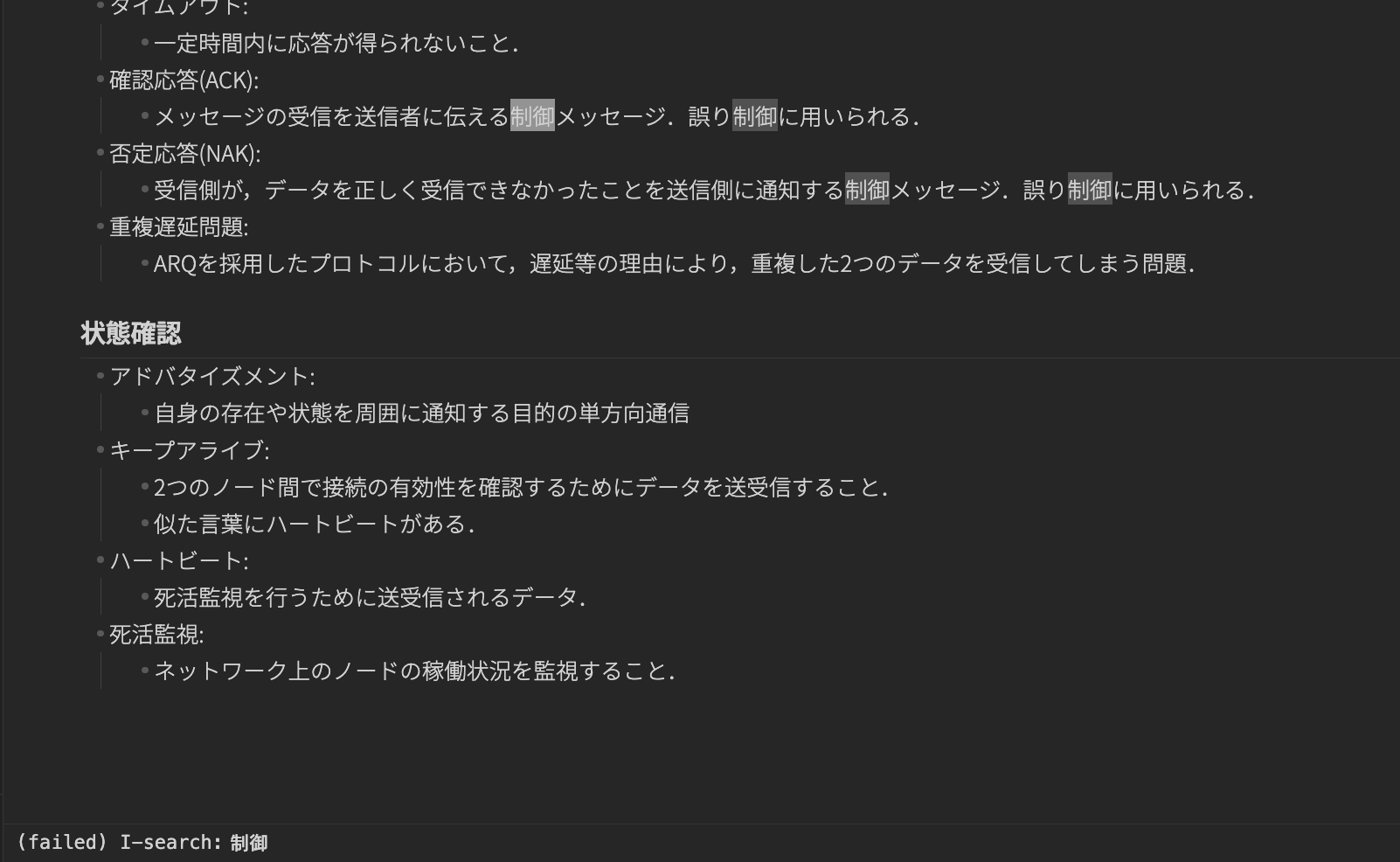
This plugin brings Emacs-style keybindings to Obsidian, focusing on incremental search (Isearch) and mark/region operations.
Emacs-likeなキーバインドをObsidianに追加するプラグインです。 インクリメンタル検索とマーク・リージョン操作を提供します。 yankやkillはOSのクリップボードを使用します。"
Commands and Emacs keybindings
Emacs default keybindings and their corresponding commands.
Key assignments must be configured manually in Obsidian.
To use mark and region functionality, assign movement commands (e.g. Backward char, Forward char) to keys such as C-f, C-b, etc.
以下はEmacsのデフォルトキーバインドと,対応するコマンド一覧です。
ホットキーは手動で設定してください.
マーク・リージョン機能を使うには,移動コマンド(Backward char,Forward charなど)を C-f,C-b 等に割り当てる必要があります.
Cursor movement
| Command | Emacs key |
|---|---|
| Forward char | C-f |
| Backward char | C-b |
| Next line | C-n |
| Previous line | C-p |
| Beginning of line | C-a |
| End of line | C-e |
| Beginning of buffer | M-< |
| End of buffer | M-> |
| Forward word | M-f |
| Backward word | M-b |
Mark / Region
| Command | Emacs key |
|---|---|
| Set mark | C-SPC |
| Keyboard quit (clear mark) | C-g |
Kill / Yank
| Command | Emacs key |
|---|---|
| Copy region | M-w |
| Kill region | C-w |
| Kill line | C-k |
| Kill word | M-d |
| Backward kill word | M-DEL |
| Yank | C-y |
Incremental search
| Command | Emacs key |
|---|---|
| Isearch forward | C-s |
| Isearch backward | C-r |
Limitations
-
Key repeat is not supported in the current implementation. If C-f/b/n/p is set at the system level (e.g. macOS), this is usually fine, but if C-f/b/n/p is set only within Obsidian, key repeat will not work.
現在の実装ではキーのリピートに対応していない.システムレベルでC-f/b/n/pが設定されている場合(MacOS等)では実用上の問題はないが,Obsidian上でのみC-f/b/n/pを設定している場合はリピート入力が機能しない.
-
Because this depends on CodeMirror internal APIs (
editor.cm/@codemirror/*), behavior may change with Obsidian updates.CodeMirrorの内部API(
editor.cm/@codemirror/*)に依存するため,Obsidianの更新で挙動が変わる可能性がある. -
Emacs-like undo/redo will not be implemented because it would require separate history management.
Emacs-likeなUndo/Redo機能は実装しない.独自の履歴管理を行う必要があるため.
-
A large number of hotkey assignments is unavoidable by design.
ホットキー設定が多数必要になるのは仕様上避けられない.
TODO
-
Enable movement-related commands only while the note is in focus.
ノートにフォーカスしている最中のみ移動系コマンドを有効にする.
-
Exit Isearch mode with any key input.
任意のキー操作でIsearchモードから抜ける.
-
Support key repeat input.
キーのリピート入力に対応する.
Keybind Settings Example
Here is a sample configuration for .obsidian/hotkeys.json.
以下は.obsidian/hotkeys.jsonのサンプル設定です.
{
  "emacs-isearch-mark:backward-char": [
    {
      "modifiers": ["Ctrl"],
      "key": "B"
    }
  ],
  "emacs-isearch-mark:beginning-of-buffer": [
    {
      "modifiers": ["Alt"],
      "key": ","
    }
  ],
  "emacs-isearch-mark:beginning-of-line": [
    {
      "modifiers": ["Ctrl"],
      "key": "A"
    }
  ],
  "emacs-isearch-mark:end-of-buffer": [
    {
      "modifiers": ["Alt"],
      "key": "."
    }
  ],
  "emacs-isearch-mark:end-of-line": [
    {
      "modifiers": ["Ctrl"],
      "key": "E"
    }
  ],
  "emacs-isearch-mark:forward-char": [
    {
      "modifiers": ["Ctrl"],
      "key": "F"
    }
  ],
  "emacs-isearch-mark:isearch-backward": [
    {
      "modifiers": ["Ctrl"],
      "key": "R"
    }
  ],
  "emacs-isearch-mark:isearch-forward": [
    {
      "modifiers": ["Ctrl"],
      "key": "S"
    }
  ],
  "emacs-isearch-mark:keyboard-quit": [
    {
      "modifiers": ["Ctrl"],
      "key": "G"
    }
  ],
  "emacs-isearch-mark:kill-line": [
    {
      "modifiers": ["Ctrl"],
      "key": "K"
    }
  ],
  "emacs-isearch-mark:kill-region": [
    {
      "modifiers": ["Ctrl"],
      "key": "W"
    }
  ],
  "emacs-isearch-mark:next-line": [
    {
      "modifiers": ["Ctrl"],
      "key": "N"
    }
  ],
  "emacs-isearch-mark:previous-line": [
    {
      "modifiers": ["Ctrl"],
      "key": "P"
    }
  ],
  "emacs-isearch-mark:set-mark": [
    {
      "modifiers": ["Ctrl"],
      "key": " "
    }
  ],
  "emacs-isearch-mark:yank": [
    {
      "modifiers": ["Ctrl"],
      "key": "Y"
    }
  ],
  "emacs-isearch-mark:copy-region": [
    {
      "modifiers": ["Alt"],
      "key": "W"
    }
  ],
  "emacs-isearch-mark:backward-word": [
    {
      "modifiers": ["Alt", "Ctrl"],
      "key": "B"
    }
  ],
  "emacs-isearch-mark:forward-word": [
    {
      "modifiers": ["Alt", "Ctrl"],
      "key": "F"
    }
  ],
  "emacs-isearch-mark:kill-word": [
    {
      "modifiers": ["Alt", "Ctrl"],
      "key": "D"
    }
  ],
  "emacs-isearch-mark:backward-kill-word": [
    {
      "modifiers": ["Alt", "Ctrl"],
      "key": "H"
    }
  ]
}
For plugin developers
Search results and similarity scores are powered by semantic analysis of your plugin's README. If your plugin isn't appearing for searches you'd expect, try updating your README to clearly describe your plugin's purpose, features, and use cases.