Vault Search
pendingby Jacob Mei
Semantic search for your vault using local Ollama embeddings.
Vault Search
Local-first semantic search for Obsidian — simple, private, Chinese-friendly




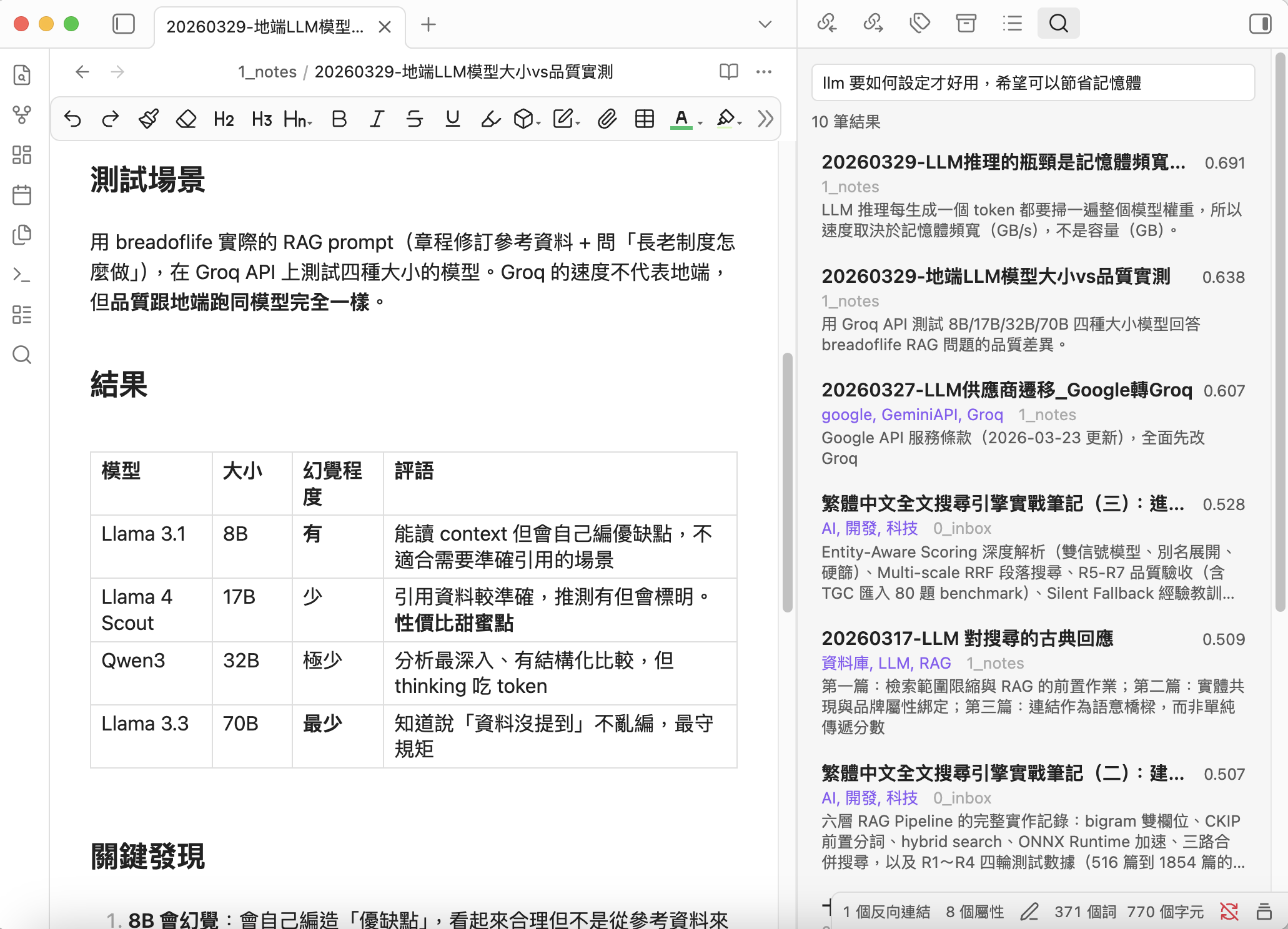
Vault Search focuses on making "search by meaning" dead simple and genuinely useful.
No cloud services. No API keys. No subscription fees. Your notes never leave your machine.
Why Vault Search?
Andrej Karpathy shared his vision of LLM-maintained knowledge bases — letting AI "compile" your notes into a structured wiki. It's a compelling approach, but it assumes you're ready to hand full editorial control to an LLM.
Vault Search takes a different stance. We believe your original notes have intrinsic value. The best search system doesn't replace your writing — it helps you rediscover it. RAG and semantic search shine precisely because they work with your existing content, not over it.
What sets Vault Search apart
Truly local, truly private — All embedding, indexing, search, and description generation happen on your machine. Zero data leaves your computer. This isn't a toggle; it's the architecture.
Simple and fast — Sidebar panel persists results while you browse. Cmd/Ctrl+P for instant modal search. One-click "Find Similar" with zero API calls. Clean UI, intuitive workflow.
Optimized for Chinese — Built with qwen3-embedding:0.6b, which excels at Traditional Chinese + English semantic understanding. Combined with synonym expansion, even different phrasings of the same concept will match.
Smart prioritization — Hot/Cold tiers automatically surface linked and recent notes, keeping search results relevant to your actual workflow. Cold (orphan) notes stay searchable but don't dilute results.
LLM-powered descriptions — A local LLM generates frontmatter descriptions for your notes, giving the embedding model a high-quality summary to work with. This dramatically improves search relevance for long notes — a feature rarely seen in lightweight plugins.
Runs on 8GB laptops — Minimal memory and CPU footprint. Recommended models work on a MacBook M2 with 8GB RAM. Incremental indexing + debounce means near-zero overhead in daily use.
Flexible and compatible — Works with Ollama, LM Studio, llama.cpp, vLLM, or any OpenAI-compatible server. Choose the models that work best for your language and hardware.
Optional chunking — For users with long documents, enable chunking to search within specific sections. Three modes:
- Off (default)
- Smart (skip notes with descriptions)
- All
Most users don't need chunking, but power users can adjust as needed.
"Strikes an ideal balance between privacy, simplicity, Chinese language support, and search quality."
Features
- Semantic Search — Find notes by meaning, not just keywords. The more you describe, the more precise the results.
- Sidebar Panel — Persistent results in the right sidebar
- Quick Modal — Cmd/Ctrl+P for fast note jumping
- Find Similar — Discover related notes instantly (zero API calls)
- Smart Indexing — Incremental updates, auto-indexes on file changes
- Hot/Cold Tiers — Prioritize linked and recent notes
- Chunking — Optional overlapping chunks for long documents (off by default)
- Description Generator — Local LLM generates frontmatter descriptions for better search quality
- Synonym Expansion — Define synonyms to improve recall
- Multi-format API — Ollama + OpenAI-compatible (LM Studio, llama.cpp, vLLM)
- Bilingual UI — English & Traditional Chinese
Requirements
- Ollama installed and running
- An embedding model (e.g.,
ollama pull qwen3-embedding:0.6b) - An LLM model for description generation (e.g.,
ollama pull qwen3:1.7b) (optional) - Obsidian desktop (no mobile support planned yet)
Installation
BRAT (recommended)
- Install BRAT plugin
- Add this repository:
notoriouslab/vault-search - Enable "Vault Search" in Community plugins
Manual
- Download
main.js,manifest.json,styles.cssfrom the latest release - Copy to
.obsidian/plugins/vault-search/in your vault - Enable in Settings → Community plugins
Quick Start
- Settings → Vault Search → Select your embedding model
- Click Rebuild to index your vault
- Cmd/Ctrl+P → "Semantic search" or click the ribbon icon
Recommended Workflow
For the best search quality, follow this order:
1. Generate descriptions  →  2. Rebuild index  →  3. Search
   (LLM summarizes notes)    (embed with descriptions)   (enjoy better results)
Why this order? The indexer uses frontmatter description preferentially for embedding. If you generate descriptions first, the index captures high-quality summaries instead of raw content — resulting in noticeably better search relevance, especially for long notes.
- Minimal setup: Skip step 1, just Rebuild and search. Works fine for short notes.
- Best quality: Run Generate descriptions (preview) → review the report → Apply descriptions → then Rebuild index.
- With chunking: Use "Smart" mode — notes with descriptions use the description for embedding; notes without get chunked automatically.
Settings
Search & Index
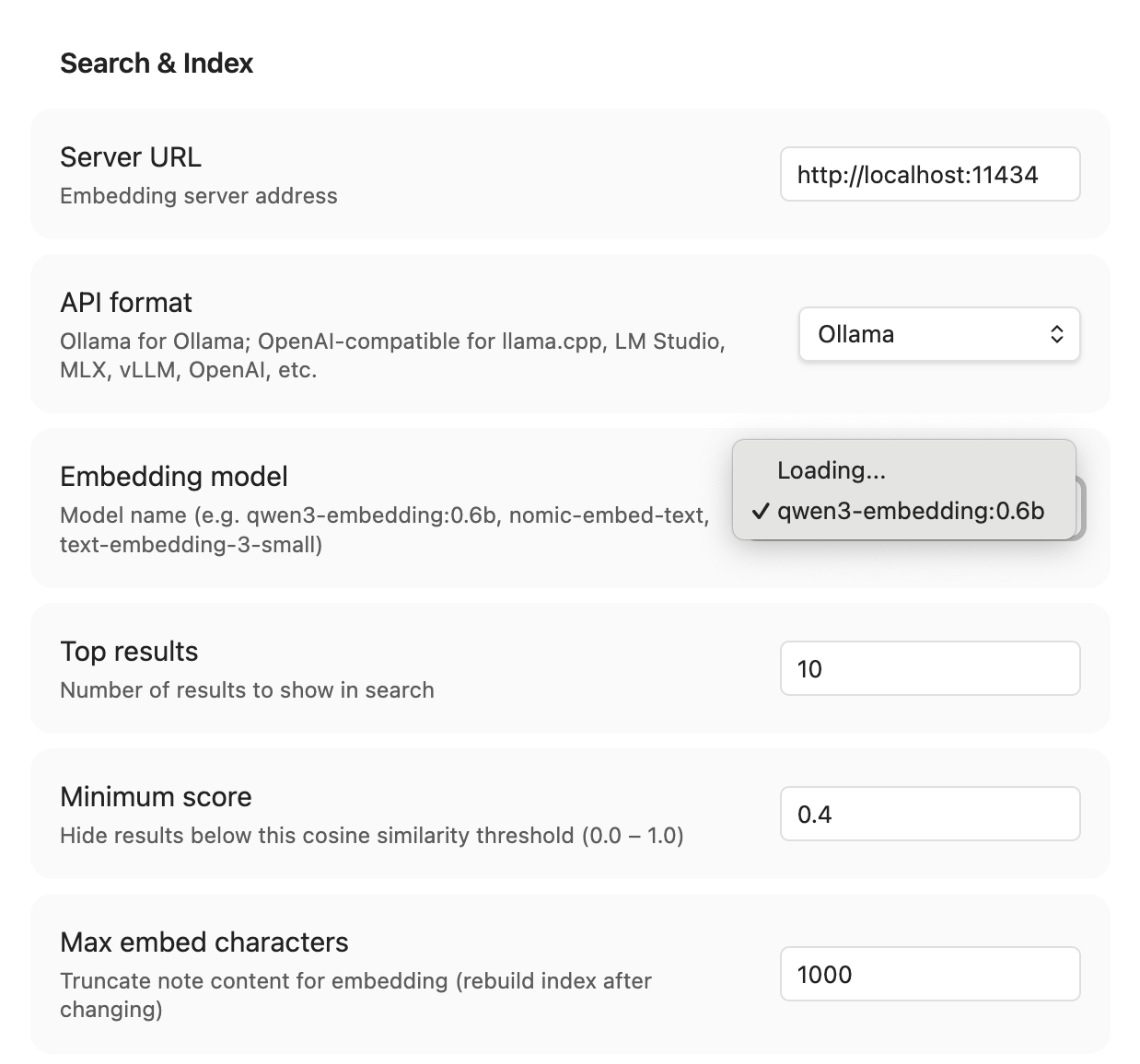
| Setting | Default | Description |
|---|---|---|
| Server URL | http://localhost:11434 | Ollama or OpenAI-compatible server |
| API format | Ollama | Ollama or OpenAI-compatible |
| API Key | — | Optional, for authenticated servers |
| Embedding model | qwen3-embedding:0.6b | Model for vector embeddings |
| Top results | 10 | Max results shown |
| Min score | 0.5 | Cosine similarity threshold (0–1) |
| Max embed chars | 2000 | Content truncation for embedding |
| Hot days | 90 | Recent notes threshold |
| Search scope | Hot only | Hot only or all notes |
| Chunking mode | Off | Off / Smart / All |
| Chunk size | 1000 | Characters per chunk |
| Chunk overlap | 200 | Overlapping characters |
| Exclude patterns | _templates/ .trash/ .obsidian/ | Folders to skip |
| Synonyms | — | keyword = syn1, syn2 per line |
| Auto-index | On | Re-embed on file change |
Description Generator
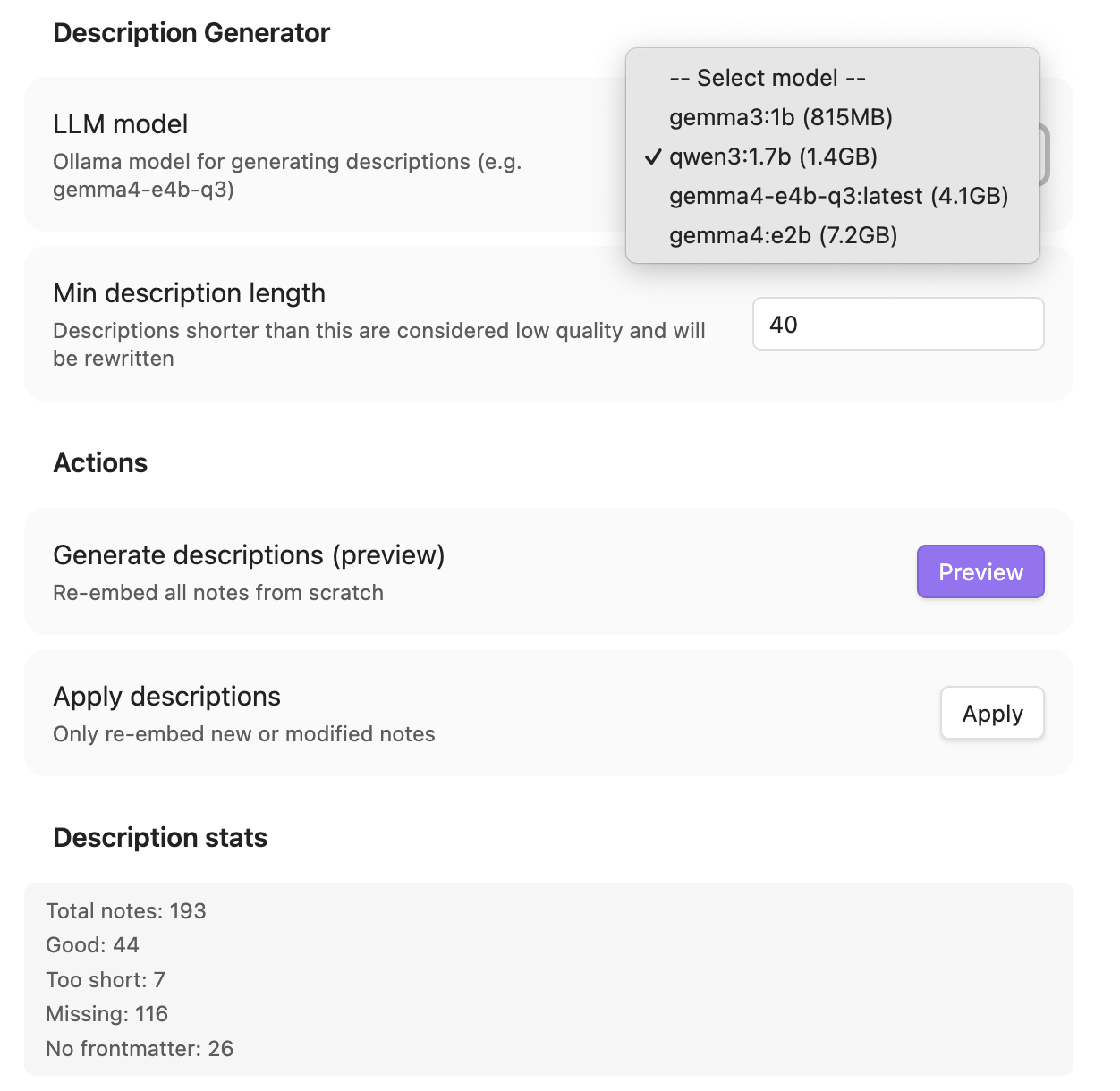
| Setting | Default | Description |
|---|---|---|
| LLM model | qwen3:1.7b | Model for generating descriptions |
| Min description length | 30 | Shorter descriptions get rewritten |
Commands
All commands are prefixed with Vault Search: in the Command Palette (Cmd/Ctrl+P).
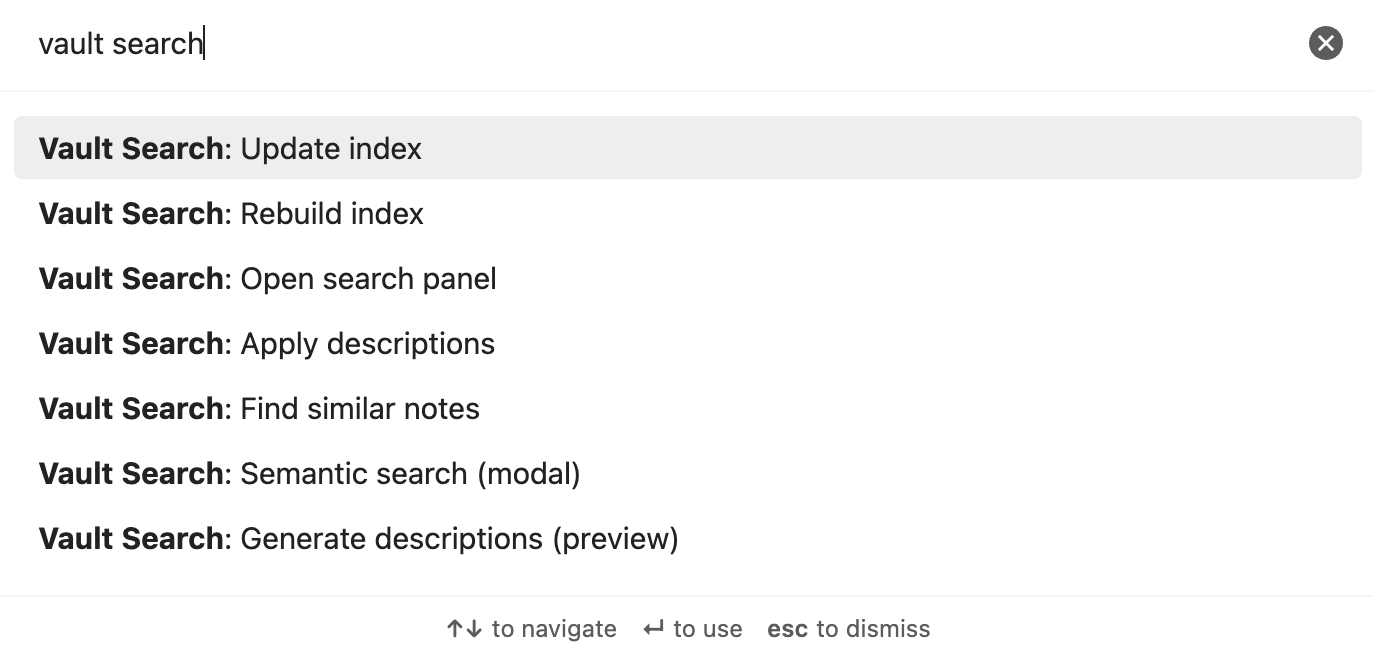
| Command | Description |
|---|---|
Vault Search: Semantic search (modal) | Quick search with keyboard navigation |
Vault Search: Open search panel | Sidebar with persistent results |
Vault Search: Find similar notes | Related notes for current file |
Vault Search: Rebuild index | Full re-index |
Vault Search: Update index | Incremental update |
Vault Search: Generate descriptions (preview) | LLM generates descriptions → report |
Vault Search: Apply descriptions | Write previewed descriptions to frontmatter |
How It Works
┌─────────────┐     ┌──────────┐     ┌──────────────┐
│  Your Notes │────▶│  Ollama  │────▶│ Vector Index │
│  (.md)      │     │ Embed API│     │ (plugin data)│
└─────────────┘     └──────────┘     └──────┬───────┘
                                            │
┌─────────────┐     ┌──────────┐            │
│  Your Query │────▶│  Ollama  │──── cosine similarity
│             │     │ Embed API│            │
└─────────────┘     └──────────┘     ┌──────▼───────┐
                                     │   Results    │
                                     │ (ranked)     │
                                     └──────────────┘
- Index — Note content (or description if available) → embedding model → vector stored locally
- Search — Query (+ synonym expansion) → same model → cosine similarity → ranked results
- Hot/Cold — Linked/recent = hot (default). Orphan = cold (opt-in)
- Chunking — Long notes split into overlapping chunks, each embedded separately. Search returns the best-matching chunk's score.
- Descriptions — Local LLM summarizes notes → stored in frontmatter → used preferentially for embedding
Recommended Models
| Model | Size | Use | Notes |
|---|---|---|---|
qwen3-embedding:0.6b | 639MB | Embedding | Best for Chinese + English |
nomic-embed-text | 274MB | Embedding | Lighter, English-focused |
qwen3:1.7b | 1.4GB | LLM | Good quality, handles 2000+ chars |
gemma3:1b | 815MB | LLM | Lighter, but unstable > 500 chars input |
For 8GB RAM machines, use
qwen3-embedding:0.6b+qwen3:1.7b. Both fit comfortably.
Development
git clone https://github.com/notoriouslab/vault-search.git
cd vault-search
npm install
npm run dev    # watch mode
npm run build  # production build
License
For plugin developers
Search results and similarity scores are powered by semantic analysis of your plugin's README. If your plugin isn't appearing for searches you'd expect, try updating your README to clearly describe your plugin's purpose, features, and use cases.