Similar Notes
approvedby joybro
Find semantically similar notes using AI. Local models (mobile & desktop) or cloud APIs.
Similar Notes for Obsidian

Find semantically similar notes using AI. Choose local models for privacy or cloud APIs for flexibility.
Similar Notes View
As you write, similar notes appear at the bottom of your current note.

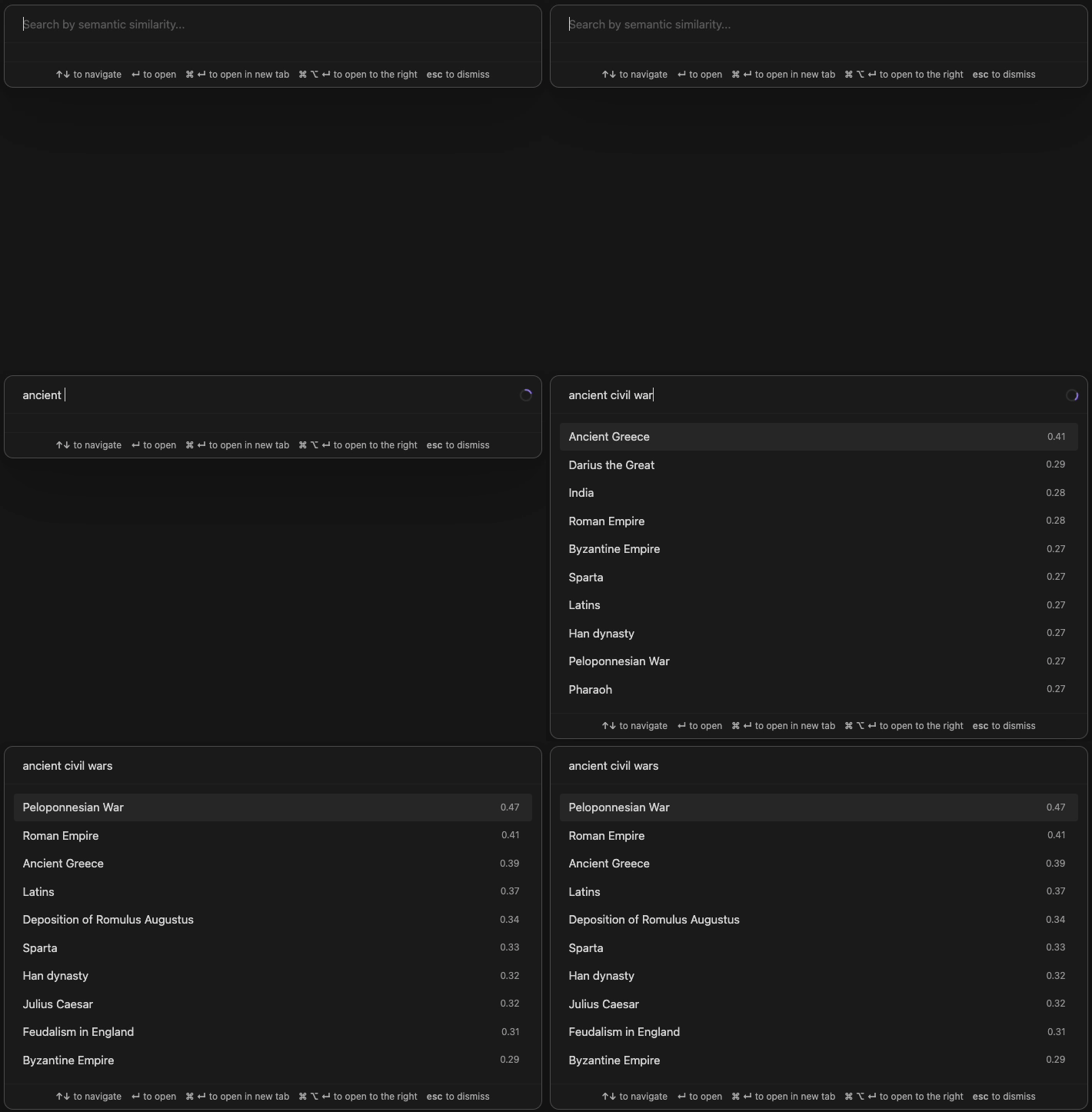
Semantic Search
Press Cmd+Shift+O (or Ctrl+Shift+O) to search your vault by meaning, not just keywords.
Features
- Flexible Options: Run locally (100% private) or use cloud APIs like OpenAI
- Mobile & Desktop: Built-in models work on iOS, Android, and all desktop platforms
- OpenAI Support: Use OpenAI embedding models or any OpenAI-compatible API
- Ollama Support: Connect to custom models via Ollama (desktop only)
- No Setup Required: Built-in models work out of the box, no API keys needed
Getting Started
- Install the plugin
- The default model will download automatically (one-time, ~30MB)
- Your notes will be indexed in the background
- Similar notes will appear at the bottom of your current note
Progress appears in the status bar.
Model Options
Built-in Models (Mobile & Desktop)
Supports any Sentence Transformer model from Hugging Face that ships ONNX weights. Local processing, no API keys required.
Recommended:
all-MiniLM-L6-v2(English, default)paraphrase-multilingual-MiniLM-L12-v2(multilingual)
Custom models: The plugin uses Transformers.js, which requires ONNX weights. Many Hugging Face repos only ship PyTorch / safetensors and will fail to load. For other models, look for an ONNX-converted version under the
onnx-communityorganization, or use the Ollama / OpenAI providers instead.
Mobile note: Large models may cause crashes due to memory limits. Consider using the default model or OpenAI API on mobile.
OpenAI / Compatible API
Supports any OpenAI-compatible embedding API.
Recommended:
text-embedding-3-small
Note for CJK users: For Chinese, Japanese, and Korean text, multilingual models like
bge-m3(via Ollama) often outperform OpenAI models in both quality and token efficiency.
Using OpenRouter
OpenRouter offers embedding models from multiple vendors through one OpenAI-compatible API, often at very low cost (a whole vault typically indexes for well under a dollar). Configure it through the OpenAI provider:
- Model provider: OpenAI API
- Server URL:
https://openrouter.ai/api/v1 - API Key: your OpenRouter key (
sk-or-...) - Model: Custom model..., then enter the model ID from OpenRouter (e.g.
perplexity/pplx-embed-v1-0.6b,qwen/qwen3-embedding-8b, oropenai/text-embedding-3-small) - Use Test connection to verify before Load & Apply.
Privacy note: OpenRouter routes your note content to the model vendor, and each vendor has its own data retention policy. OpenRouter accounts have a Zero Data Retention (ZDR) option that restricts routing to providers who confirmed they do not store your data; requests that would hit a non-ZDR endpoint fail with an error instead of going through silently. If your vault contains sensitive material, enable it once at openrouter.ai/settings/privacy (Data Policies, Zero Data Retention) before indexing. It applies account-wide, so no plugin configuration is needed. (Thanks to David Torrens for testing OpenRouter and researching the ZDR setting.)
Ollama (Desktop Only)
Supports any Ollama embedding model.
Recommended:
nomic-embed-text(English)bge-m3(multilingual)
Agent Usage
The active note's similar-notes results can be exported to a JSON file, so an external coding agent can reuse the plugin's similarity search without understanding embeddings or plugin internals:
- Open a note in Obsidian.
- Run the command Similar Notes: Export similar notes for active note.
- Read the results from
.obsidian/plugins/similar-notes/similar-notes-export.json.
Output format (success):
{
  "version": 1,
  "ok": true,
  "sourcePath": "Projects/My Note.md",
  "generatedAt": "2026-06-09T12:34:56.000Z",
  "results": [
    {
      "path": "Knowledge/Related Note.md",
      "title": "Related Note",
      "score": 0.82,
      "excerpt": "similar content..."
    }
  ]
}
On error (e.g. no active markdown file, search failure), the same file is written with { "version": 1, "ok": false, "code": "...", "error": "..." }, where code is NO_ACTIVE_FILE or SEARCH_FAILED.
For driving the command from an agent (CLI flow, validation tips, drop-in skill snippet), see docs/agent-export.md.
Technical Details
- Transformers.js: Runs Hugging Face models directly in Obsidian
- WebGPU: GPU acceleration on desktop, automatic CPU fallback
- Orama: Built-in vector database for fast search
- Web Workers: All processing runs in background threads
Multi-Device Usage
This plugin stores all data locally in IndexedDB, which is device-specific storage that does not sync across devices.
What this means:
- Each device maintains its own independent index
- Obsidian Sync, iCloud, Syncthing, or any other file sync tool will not sync the plugin's data
- When you open your vault on a new device, the plugin will automatically index your notes from scratch
This is by design - IndexedDB provides fast, reliable local storage that doesn't interfere with vault syncing.
License
For plugin developers
Search results and similarity scores are powered by semantic analysis of your plugin's README. If your plugin isn't appearing for searches you'd expect, try updating your README to clearly describe your plugin's purpose, features, and use cases.