Sweeper
pendingby schovi
Cleans up messy markdown with diff preview. Normalizes whitespace, lists, HTML, and more.
Obsidian Markdown Sweeper
An Obsidian plugin that cleans up messy markdown with a diff preview before applying changes.
Why?
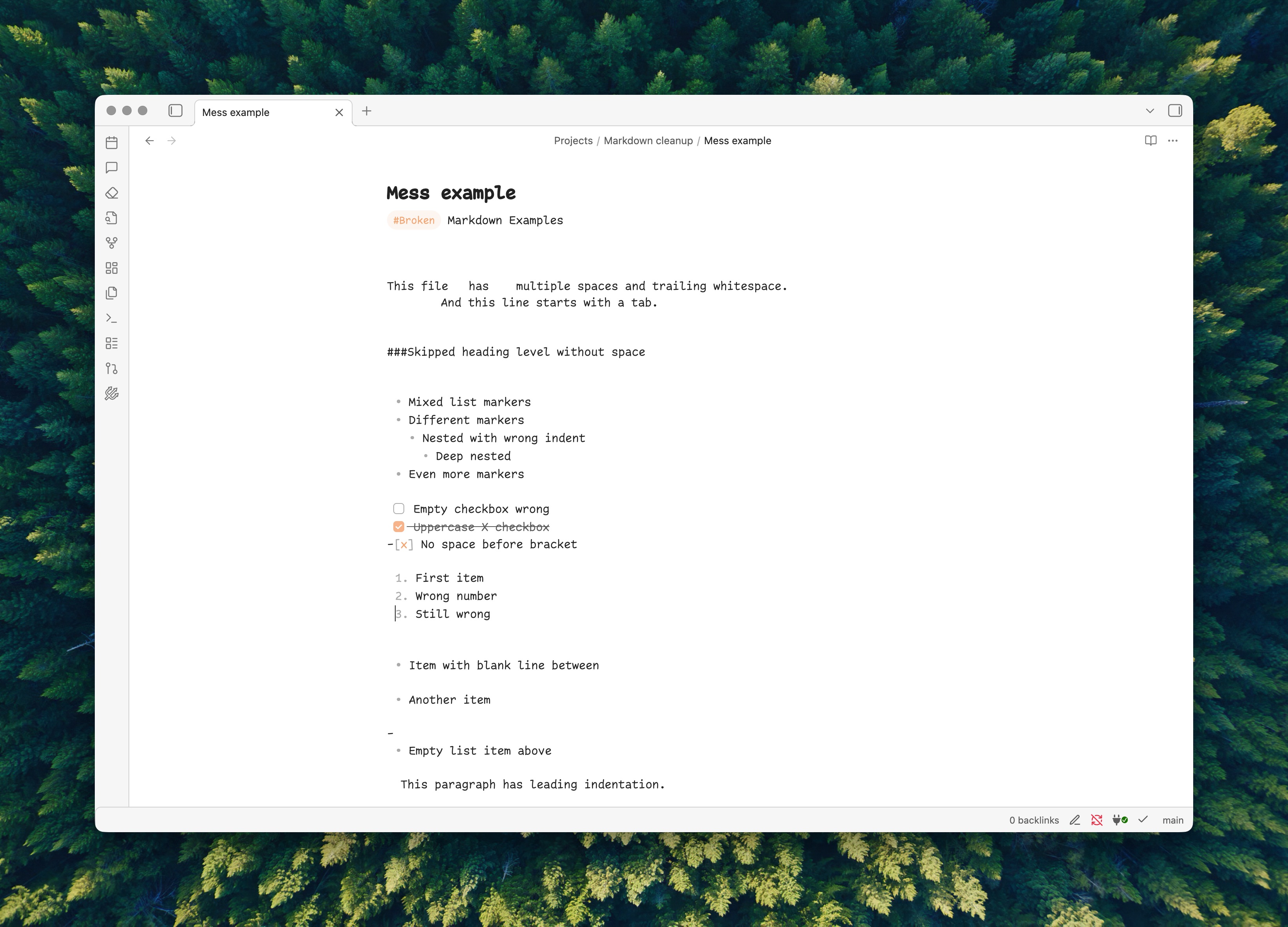
Markdown comes from everywhere - copy-pasted from web pages, exported from Notion, converted from Word docs, or AI-generated content. Each source introduces its own quirks:
- Smart quotes and curly apostrophes instead of straight ones
- HTML entities like
&and littered throughout - Inconsistent list markers (
*,+,-) - Broken indentation and excessive whitespace
- HTML tags mixed with markdown
This plugin normalizes all of it with a single command, showing you exactly what will change before applying.
💡 Tip: When pasting from external sources (web, Notion, Word), use
Cmd+Shift+V(Mac) orCtrl+Shift+V(Windows/Linux) to paste as plain text. This avoids most formatting issues before they happen.
See It in Action
Check out the example files to see what Sweeper can do:
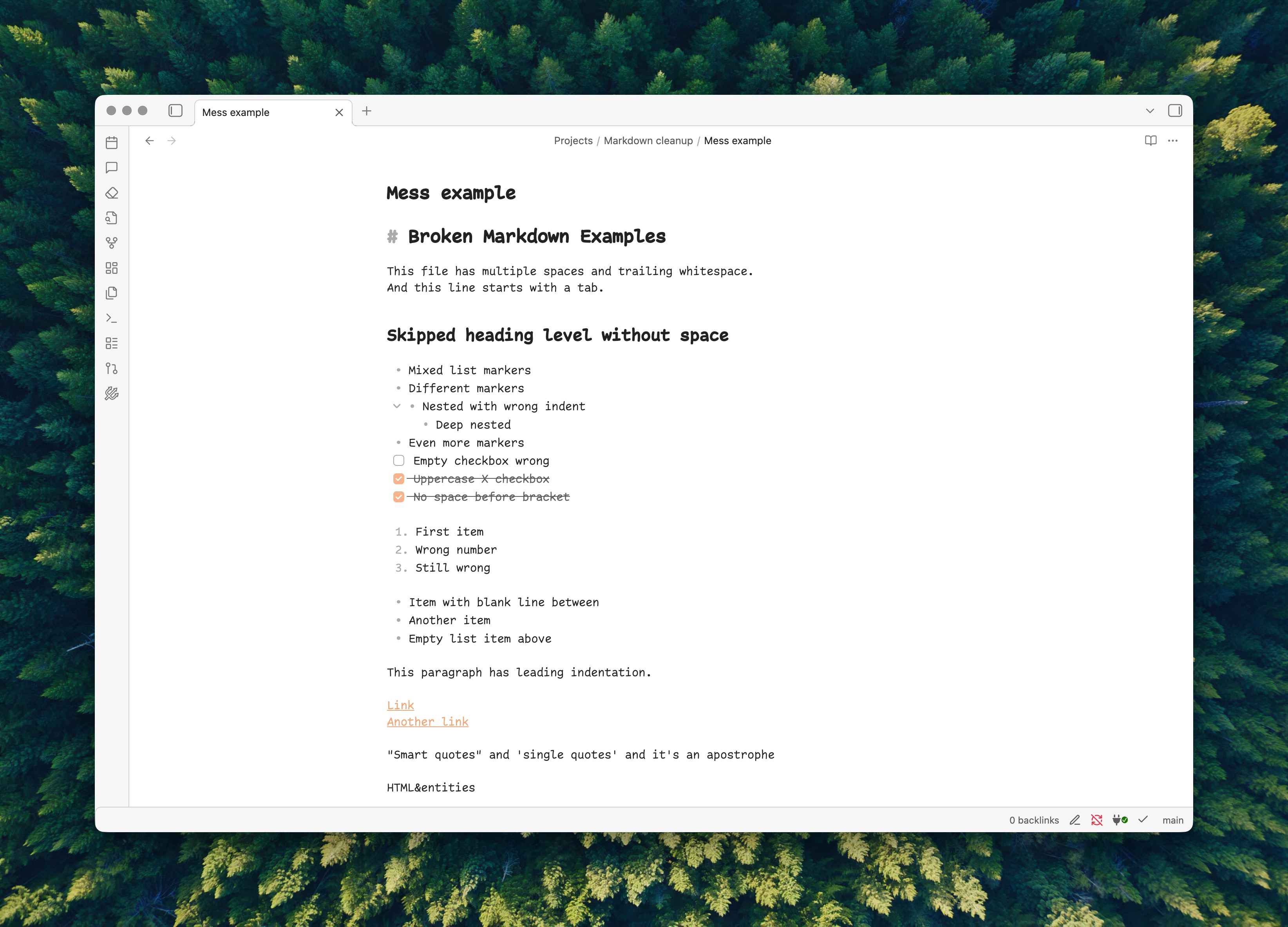
examples/mess.md- A markdown file with common issues (broken headings, mixed list markers, HTML entities, smart quotes, etc.)examples/sweeped.md- The same file after running Sweeper with aggressive preset
Installation
From Obsidian Community Plugins
- Open Settings → Community Plugins
- Search for "Sweeper"
- Install and enable
Manual Installation
- Download
main.js,manifest.json, andstyles.cssfrom the latest release - Create folder:
<vault>/.obsidian/plugins/sweeper/ - Copy the files into that folder
- Enable in Settings → Community Plugins
Usage
Commands
| Command | Description |
|---|---|
| Cleanup Markdown | Shows diff preview, apply changes with confirmation |
| Quick Cleanup | Applies all enabled rules immediately (no preview) |
| Paste and Clean | Pastes clipboard content and cleans it in one step |
Access via Command Palette (Cmd/Ctrl + P) or the ribbon icon.
Selection Mode
- No selection: Cleans entire document
- With selection: Cleans only selected text
Diff Preview
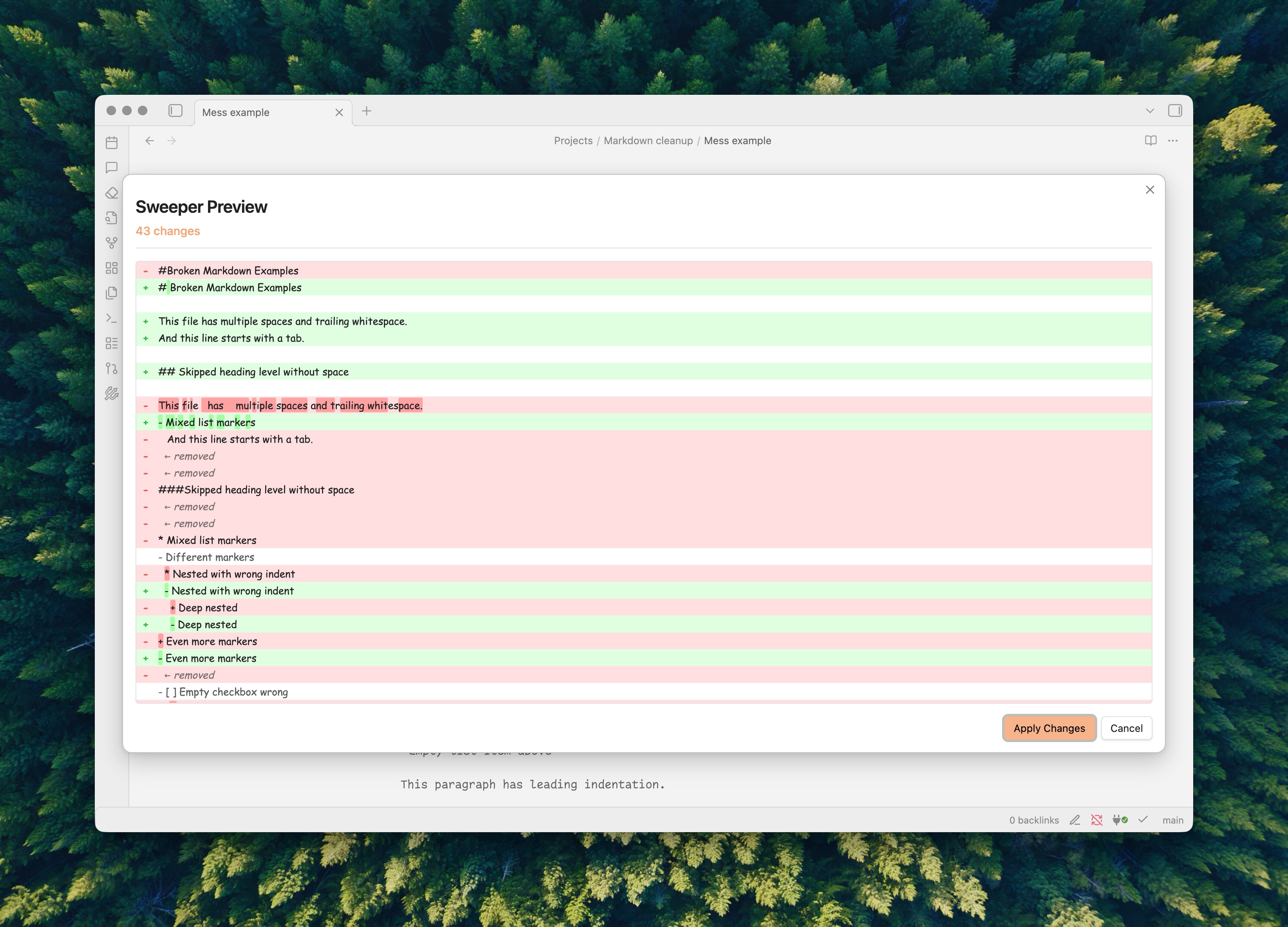
The diff modal shows:
- Red lines: Content being removed
- Green lines: Content being added
- Orange highlight: Whitespace-only changes
- Visible whitespace markers:
·for spaces,→for tabs
Presets
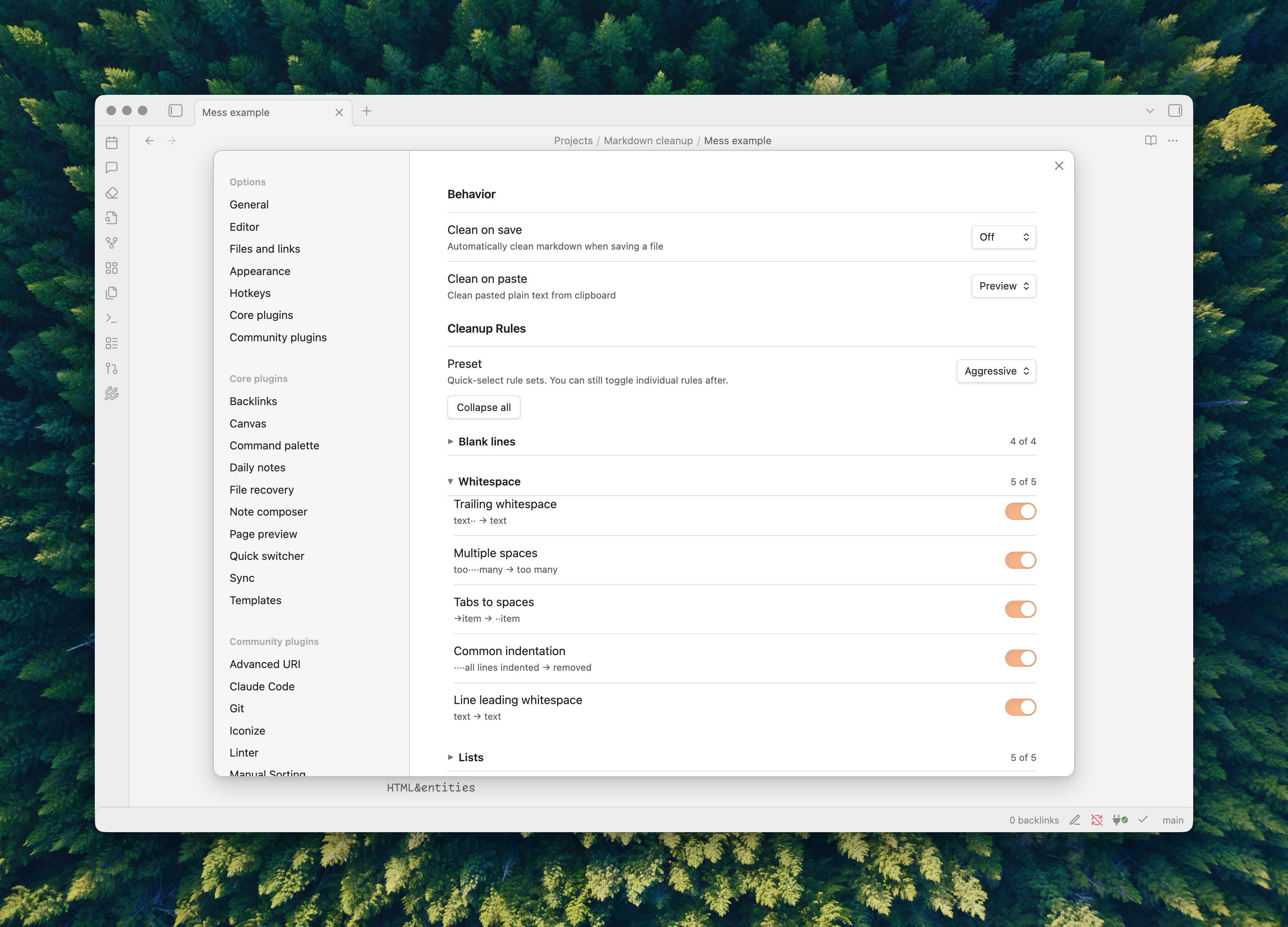
Choose how aggressive the cleanup should be:
| Preset | Description |
|---|---|
| Minimal | Safe fixes - trailing whitespace, blank lines, EOF newline |
| Standard | Common normalizations - list markers, heading spaces, tabs |
| Aggressive | Full cleanup - HTML conversion, smart quotes, emphasis style |
Presets are cumulative: Standard includes all Minimal rules, Aggressive includes all Standard rules.
You can also switch to Custom mode and toggle individual rules.
Rules
Blank Lines
| Rule | Preset | Example |
|---|---|---|
| Extra blank lines | Minimal | 3+ blank lines → 1 blank line |
| Blank line whitespace | Minimal | ··· (empty line) → `` (empty line) |
| EOF newline | Minimal | text\n\n\n → text\n |
| Blank lines in lists | Aggressive | - a\n\n- b or 1.\n\n2. → collapsed |
Whitespace
| Rule | Preset | Example |
|---|---|---|
| Invisible characters | Minimal | Removes zero-width chars, converts non-breaking space |
| Trailing whitespace | Minimal | text·· → text |
| Multiple spaces | Standard | too····many → too many |
| Tabs to spaces | Standard | →item → ··item |
| Common indentation | Aggressive | Removes leading indent from all lines |
Lists
| Rule | Preset | Example |
|---|---|---|
| Bullet characters | Standard | • ○ ● ▸ → - item |
| Unicode checkboxes | Standard | ☐ ☑ ☒ → - [ ] / - [x] |
| List markers | Standard | * item → - item |
| Checkboxes | Standard | - [] task → - [ ] task |
| Empty list items | Standard | - (empty) → removed |
| Broken indentation | Standard | ········- item → ··- item |
| Ordered list numbers | Standard | 1. 1. 1. → 1. 2. 3. |
Formatting
| Rule | Preset | Example |
|---|---|---|
| Link spaces | Standard | [text] (url) → [text](url) |
| Smart quotes | Aggressive | "curly" → "straight" |
| Emphasis style | Aggressive | _italic_ → *italic* |
| Horizontal rules | Aggressive | *** → --- |
| Dedupe horizontal rules | Aggressive | ---,---,--- → --- |
| Code fences | Aggressive | ~~~ → ``` |
Headings
| Rule | Preset | Example |
|---|---|---|
| Numbered headers | Aggressive | 1 — / I — / A — → ## 1. / ## I. / ## A. |
| Heading spaces | Standard | ##Title → ## Title |
| Fix heading level gaps | Aggressive | # H1 → ### H3 becomes ## H3 |
HTML
| Rule | Preset | Example |
|---|---|---|
| HTML to Markdown | Standard | <b>text</b> → **text** (known tags only) |
| HTML entities | Standard | & → &, → space (safe entities only) |
| Aggressive HTML cleanup | Aggressive | <b> → **, strips unknown tags |
Note: Standard HTML cleanup preserves </> entities and unknown HTML tags (they may be intentional). Aggressive mode decodes everything and strips all remaining HTML.
Block Elements
| Rule | Preset | Example |
|---|---|---|
| Block quotes | Aggressive | >text → > text |
Obsidian-specific
| Rule | Preset | Example |
|---|---|---|
| Tag case | Aggressive | #Tag → #tag |
Settings
- Clean on save: Clean markdown when you press
Cmd/Ctrl+S- Off - Disabled
- Quick - Clean immediately without preview
- Preview - Show diff modal before saving
- Clean on paste: Clean plain text pasted from clipboard
- Off - Disabled
- Quick - Clean and paste immediately
- Preview - Show diff with Accept/Keep Original buttons
- Preset: Choose Minimal, Standard, Aggressive, or Custom
- Individual rules: Toggle each rule when in Custom mode
Development
npm install          # Install dependencies
npm run dev          # Build in watch mode
npm run build        # Production build
npm run test         # Run tests
License
MIT
For plugin developers
Search results and similarity scores are powered by semantic analysis of your plugin's README. If your plugin isn't appearing for searches you'd expect, try updating your README to clearly describe your plugin's purpose, features, and use cases.