Remove Newlines
approvedby handcartcactus
Remove line breaks or blank lines from text selected in the editor, or as you paste from the clipboard.
Remove Newlines
Core Features
Adds four commands:
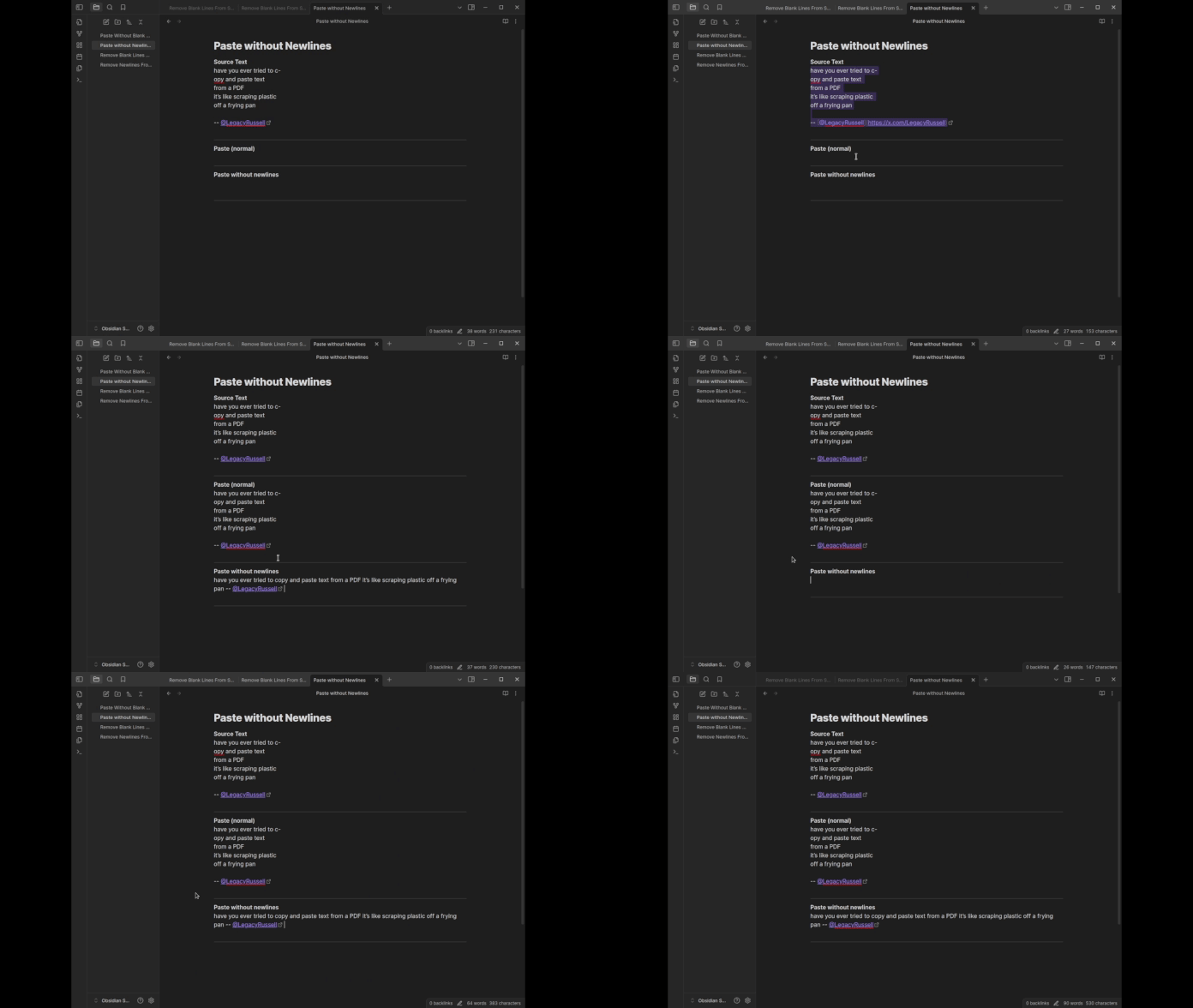
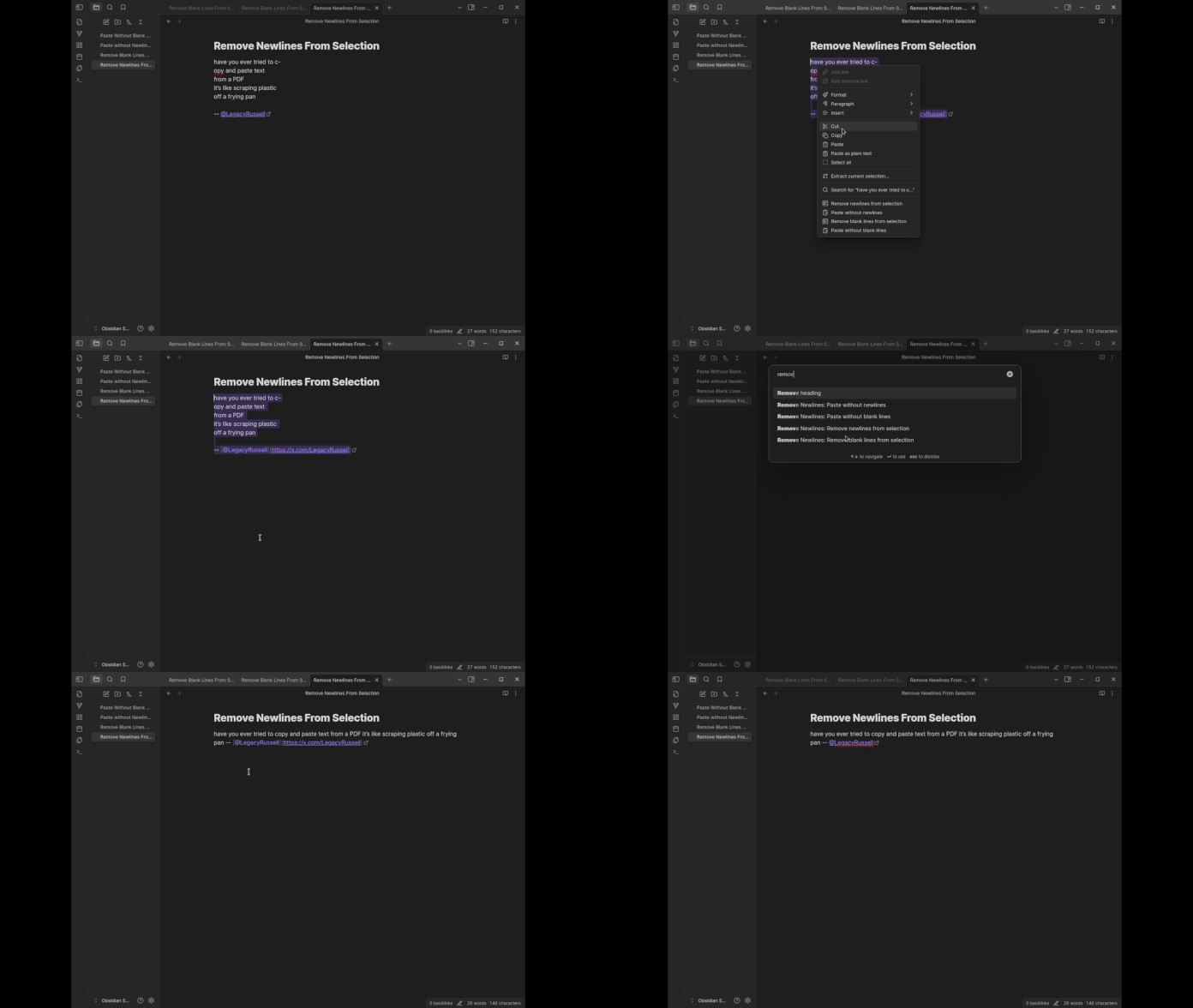
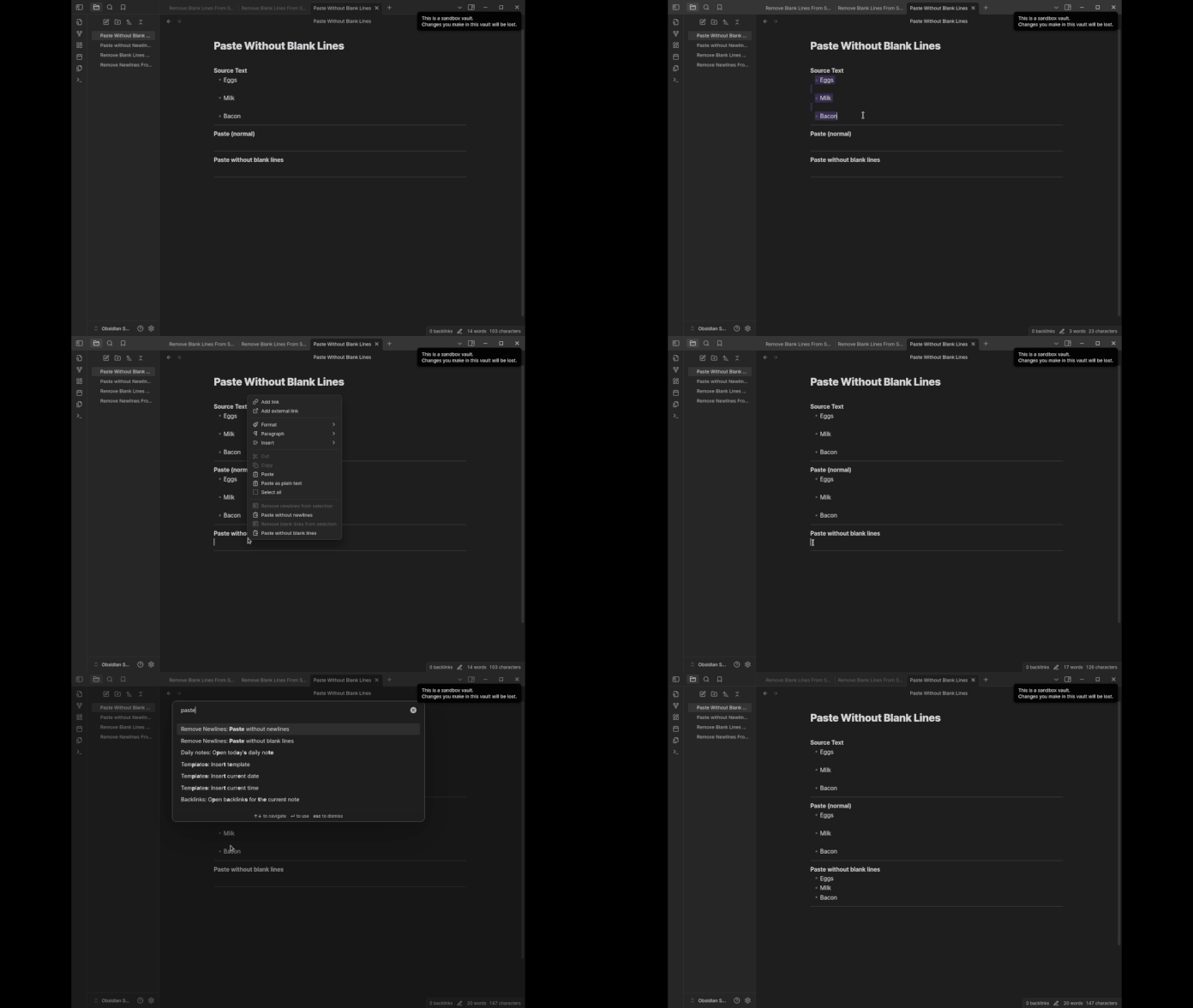
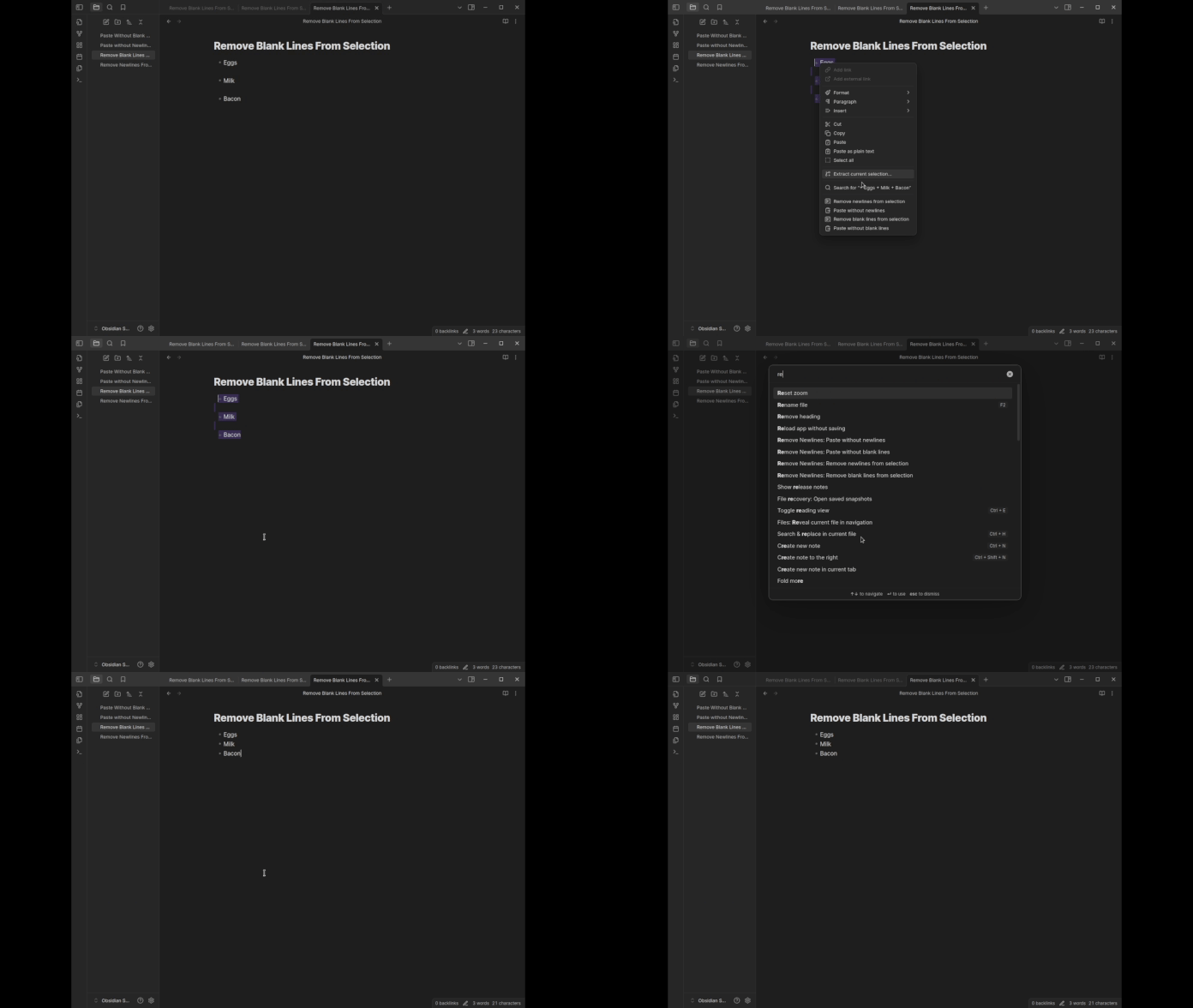
Remove newlines from selectionandPaste without newlinescan remove newlines from text. They can turn hard-wrapped text into a single paragraph. These commands can optionally remove word-break hyphenation and fix consecutive whitespace issues. This is especially useful when pasting text from a PDF.Remove blank lines from selectionandPaste without blank linescan remove blank lines from text. These commands are especially useful when pasting content from the web, which can often have a gratuitous amount of blank lines and whitespace.
The commands will appear in the context menu (right-click), but can also be invoked via the Command Palette or bound to a keyboard shortcut.
Use Cases
I started developing remove-newlines because copy-pasting quotes from PDFs into my Obsidian notes involved a lot of tedious clean-up work. Since then, it has saved me countless hours of cleaning up ugly text formatting. People tend to use this plugin for the following use cases:
- Copy-pasting from a PDF: Text copied from PDFs often contains hard-wraps (e.g. a newline every 80 characters) and hyphenated word breaks.
Paste without newlineswill fix it. - Copy-pasting from the web: Text copied from HTML often gets rendered into markdown with a large amount of unecessary blank lines.
Paste without blank linescan fix it. - Copy-pasting from LLM tools (e.g. ChatGPT, Claude, Perplexity): This falls under "text copied from HTML", but this seems to be a popular use case. I recommend you use the dedicated copy buttons in the UI for best results, as they often put well-formatted markdown into the clipboard. Clicking and dragging the text on the page will often copy a bunch of gross HTML that converts to markdown poorly (and inconsistently). However, this text is significantly easier to clean up when you use
Paste without blank lines. - Cleaning up existing notes:
Remove blank lines from selectionis useful when cleaning up large drafts with lots of whitespace.
Usage
Paste without newlines
Remove newlines from text selection
Paste without blank lines
Remove blank lines from text selection
Change Settings
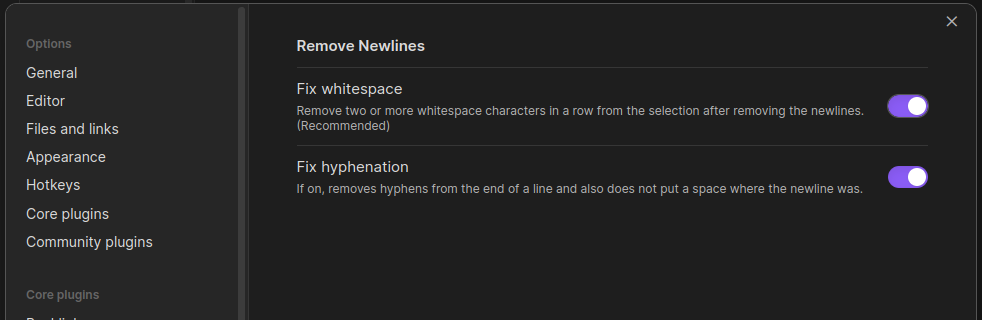
You can change how Remove Newlines handles word-break hyphenation and consecutive whitespace (when removing newlines) by visiting the plugin's settings tab.
Adding Hotkeys
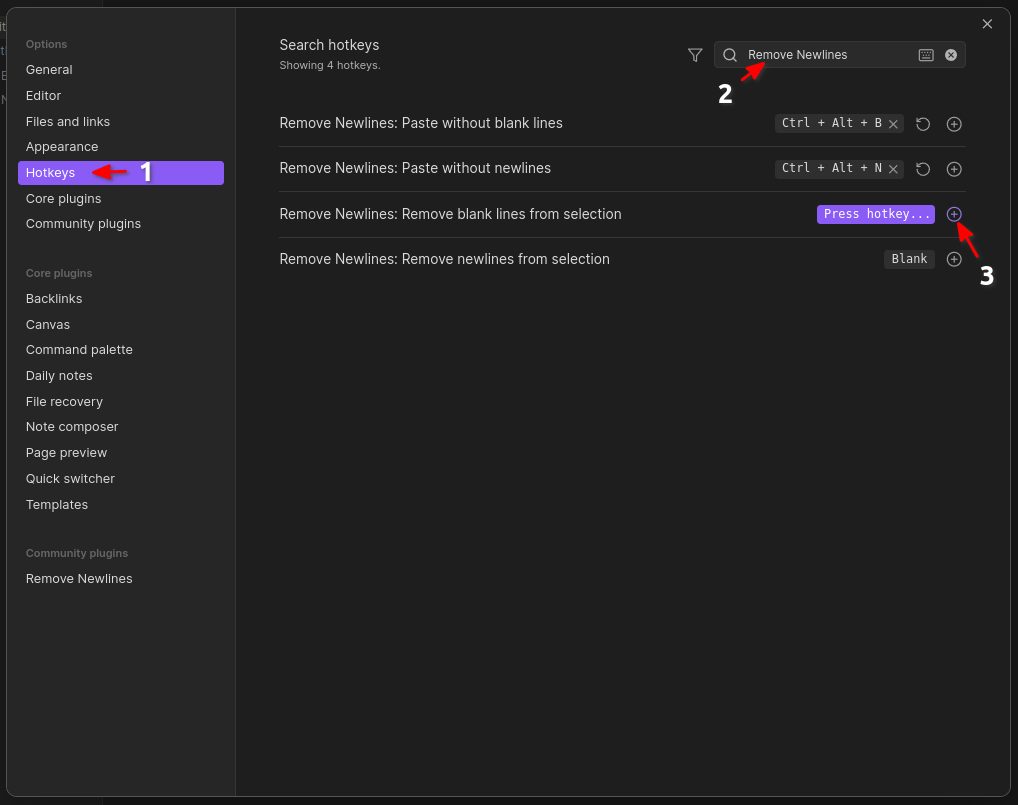
There are no hotkeys for these actions by default, but you can create them in the settings modal under the "Hotkeys" section.
What's New?
1.0.7
- Convert HTML formatting to markdown while pasting, instead of stripping text.
1.0.6
- Refactors core code and introduces testing
- fixes the remove blank lines function to work even with tables and tabbed text
1.0.5
- Added the ability to remove blank lines from the context menu and the command palette.
1.0.4
- Fixed a bug where invoking plugin actions from command palette did not work, and added newlines at the top of the file.
- Added support for
CR,LF, and/orCR LFline endings.
1.0.3
- Added ability to remove newlines from text selection in the Obsidian editor.
- Added ability to paste content without newlines into the Obsidian editor.
Installing
Via the Community Plugin Manager
- Open the Community Plugins tab of your Obsidian's settings modal.
- Click the "Browse" button under "Community Plugins".
- Search for "Remove Newlines".
- Click "Install" on the plugin page, then "Enable".
Via URI/Browser
- Visit the official plugin page on Obsidian's plugin repository.
- Click "Install".
- Allow the site to open the obsidian link via Obsidian.
- Click "Install" on the plugin page, then "Enable".
Manually
- Download the latest release of the plugin.
- Create a
remove-newlinesfolder in your vault'splugins/directory:<YourVaultFolder>/.obsidian/plugins/remove-newlines - Unzip the release file and copy over
main.js,styles.css, andmanifest.jsoninto theremove-newlines/folder you created in step 2.
Report Issues
If you encounter any issues, please report them on the issue tracker for this plugin. For help with pasting-related commands, please be sure to note what operating system and applications you are using (e.g. Windows, pasting text from Chrome).
Request Features
If you'd like to request a feature or have an idea for a new feature, please use the GitHub issue tracker.
Inspection
All relevant source code can be found in main.ts and also utils.ts. To compile yourself from source:
- clone this repo
cdto the project folder- run
npm run devornpm run build - perform a manual install
Plugin Stats
For plugin developers
Search results and similarity scores are powered by semantic analysis of your plugin's README. If your plugin isn't appearing for searches you'd expect, try updating your README to clearly describe your plugin's purpose, features, and use cases.