PropMove
pendingby SHU-red
Move notes based on a frontmatter property value.
PropMove
Automatically move notes based on frontmatter properties. It just works.

Features
- Auto-move on create/update: Watches frontmatter changes and moves notes automatically
- Multiple property mappings: Define value-to-folder rules per property
- Smart conflict handling: Appends unique suffixes (note 1.md, note 2.md) when targets exist
- Ignore folders: Protect template folders by excluding them from processing
- Auto folder creation: Creates missing target directories automatically
Installation
cd /path/to/your/vault/.obsidian/plugins/
git clone https://github.com/SHU-red/propmove.git
Enable in Obsidian Settings → Community plugins
Configuration
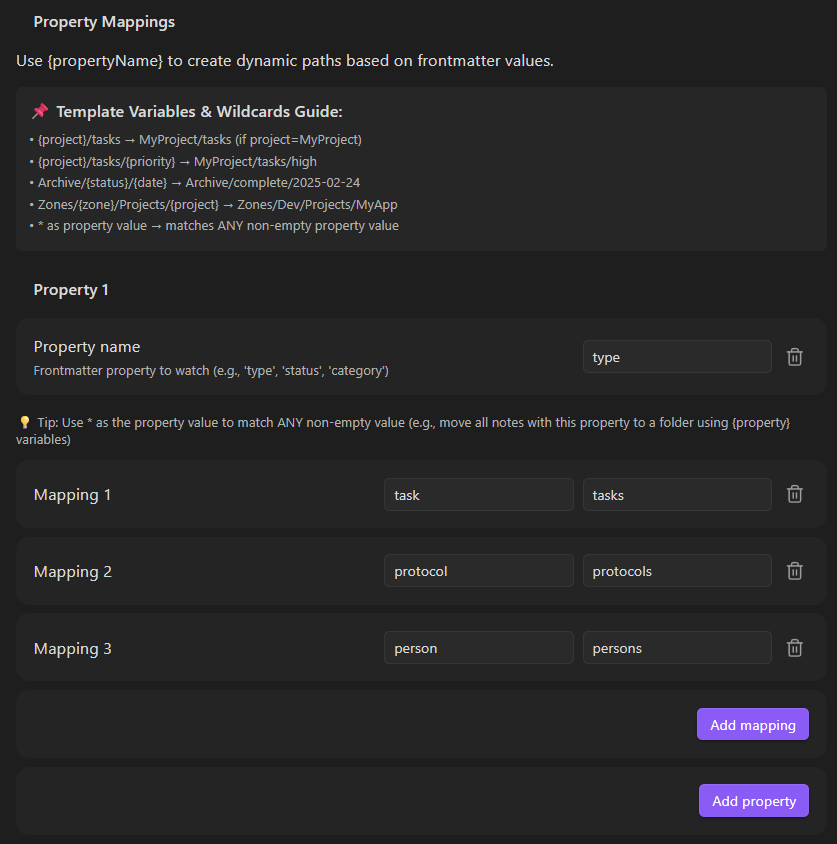
Property Mappings
Set up properties with value-to-folder rules:
Property: type
  • task → Tasks
  • protocol → Protocols
  • daily → Daily

Property: status
  • draft → Inbox/Drafts
  • final → Archive
Ignore Folders
Prevent files in specific folders from being moved (useful for templates):
Ignore Folders:
  • templates
  • _archive
  • drafts/work-in-progress
How It Works
- When a note is created or frontmatter changes, PropMove checks its properties
- If the note is in an ignored folder, it's skipped
- First matching property mapping determines the target folder
- If target file exists, a numeric suffix is appended (configurable)
- Note is moved to destination; folders created if needed
Settings
| Setting | Default | Description |
|---|---|---|
| Auto-append suffix | ON | Append numbers to avoid conflicts |
| Ignore Folders | — | Folders to exclude from processing |
| Properties | — | Property name + value→folder mappings |
License
MIT
For plugin developers
Search results and similarity scores are powered by semantic analysis of your plugin's README. If your plugin isn't appearing for searches you'd expect, try updating your README to clearly describe your plugin's purpose, features, and use cases.