AI Translator
pendingby TaGiaHuy
Translate specific words to a target language using AI (Gemini, OpenAI, OpenRouter) and more.
Here is the complete, professional README.md in English, optimized for GitHub with clear navigation and callouts.
🌐 Obsidian AI Translator
A sophisticated AI-powered translation and personal dictionary system for Obsidian, powered by TaGiaHuy and community APIs.
✨ Features
🌍 Multiple Translation Engines
- AI-Powered Intelligence: Deep integration with Google Gemini, OpenAI, and OpenRouter for context-aware translations.
- High-Speed Lookups: Built-in support for Google Translate API (browser-based) and Free Dictionary API for instant results without needing API keys.
🔍 Interactive Dictionary Popup
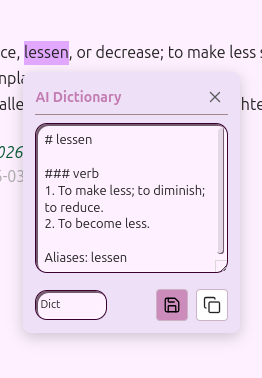
- Fully Draggable: Position the popup anywhere on your screen; it stays where you want it.
- On-the-fly Switching: Compare translations instantly by switching providers via a dropdown menu inside the popup.
- Live Editing: Refine or add personal notes to the AI-generated definition before saving it to your vault.
- Smart Actions: Save definitions using custom templates or copy results to your clipboard with a single click.
⚡ Seamless Workflow
- Auto-Trigger Mode: Automatically trigger the popup upon text selection for a friction-less reading experience.
- Provider Loop: Cycle through your favorite AI engines instantly using a customizable hotkey.
- Inline Translation: Replace selected text with its translation directly in the editor (e.g.,
Hello➔Hello (Xin chào)).
🔌 Recommended Integrations
While AI Translator is a standalone plugin, it is designed to work in synergy with the following tools to supercharge your learning:
- Note Definitions: Display your saved definitions as tooltips when hovering over words in other notes, eliminating the need to re-translate.
- Spaced Repetition: Automatically turn your saved vocabulary into flashcards for long-term retention.
[!IMPORTANT] Note: These are independent projects. You must install them separately from the Community Plugins store to enable these integrated workflows.
🚀 Installation
Option 1: Community Plugins (Coming Soon)
- Go to Settings > Community plugins.
- Click Browse and search for
AI Translator. - Click Install, then Enable.
Option 2: Manual Installation
- Download the latest release (
main.js,styles.css,manifest.json) from the Releases page. - Create a folder named
obsidian-ai-translatorin:<your-vault>/.obsidian/plugins/. - Move the downloaded files into that folder.
- Reload Obsidian and enable the plugin in Settings > Community plugins.
⚙️ Configuration
- API Keys: Enter your keys for Gemini, OpenAI, or OpenRouter in the settings tab.
- Trigger Mode:
Auto: Popup appears immediately on selection.Manual: Popup appears only via command or hotkey.
- Save Folder: Define where your vocabulary/definition notes will be stored.
- Templates: Customize your notes using placeholders:
{{word}}: The original text.{{definition}}: The translated output.{{date}}/{{time}}: Timestamp of creation.
📖 How to Use
Lookup & Save
- Highlight a word or phrase in your editor.
- The popup appears (or use the "Show Dictionary Popup" command).
- Review the result, edit if necessary, and click the Save (floppy disk) icon.
- A new Markdown file is generated in your designated folder.
Pro Tips
- Cycle Providers: Bind a hotkey (like
Alt + P) to "Cycle AI Provider". This allows you to flip between different AI models within the active popup to get different perspectives on a word. - Inline Translate: Use the "Translate Selection" command to translate and replace text in-place while writing.
📄 License
This project is licensed under the MIT License.
For plugin developers
Search results and similarity scores are powered by semantic analysis of your plugin's README. If your plugin isn't appearing for searches you'd expect, try updating your README to clearly describe your plugin's purpose, features, and use cases.