AI Selection Toolbar
pendingby rikyliu
AI-powered toolbar for selected text with TTS, translation, explanation, and word recognition features.
Obsidian AI Selection Toolbar
中文
一个强大的 Obsidian 插件,为选中的文本提供悬浮 AI 工具栏,集成 AI 驱动的翻译、解释、总结和识词功能,同时支持浏览器内置和 API 双模式的文本朗读。
🚀 快速上手
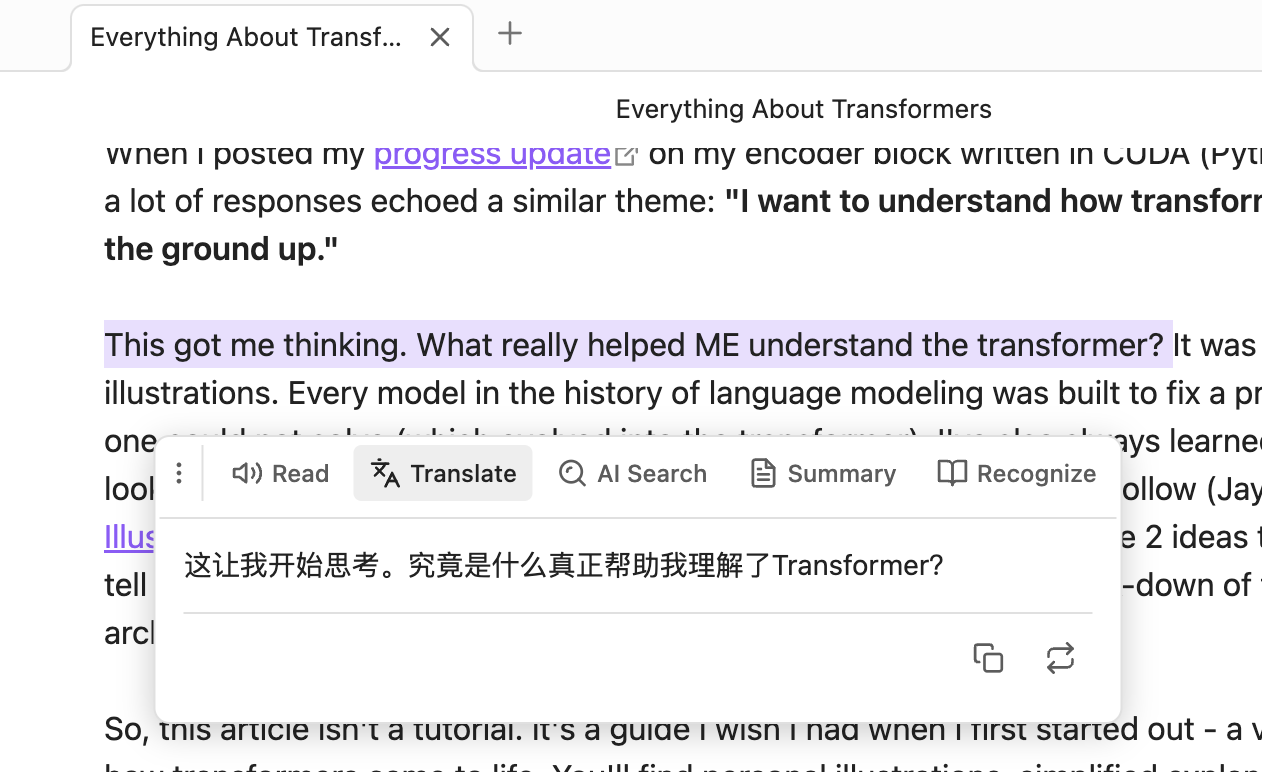
- 选中文本:在编辑器中高亮选择需要处理的文本
- 自动弹出菜单:悬浮菜单会在选中后自动出现(300ms 防抖)
- 点击功能按钮:
- 🔊 朗读:播放文本语音
- 🌐 翻译:获取翻译结果
- 💡 AI 搜索:获取智能解释
- 📄 总结:提取文本要点
- 📖 识词:查看单词音标和例句(仅限单词/短语)
- 拖动菜单:点击手柄图标可自由拖动菜单位置
✨ 核心功能
🔊 智能朗读(TTS)
- 双模式支持
- 🌐 浏览器内置 TTS:无需 API,开箱即用
- ☁️ API 服务:支持 OpenAI TTS 或兼容 API,音质更佳
- 选中文本一键朗读
- 支持语速和音调调节
- 播放/暂停控制
- 自动检测系统可用语音
🌐 AI 翻译
- 流式输出翻译结果,实时查看
- 支持自定义目标语言
- 一键复制或替换原文
- 自定义提示词模板,适配不同翻译风格
💡 AI 搜索(解释)
- 流式输出智能解释
- 快速理解概念、词汇或术语
- 支持自定义输出语言
- 可追加解释到笔记末尾
📄 智能总结
- 流式输出总结内容
- 长文本快速提取要点
- 支持自定义输出语言
- 特色功能:
- 🔄 刷新:重新生成总结
- ⬇️ 插入:将总结插入到选中文本下方
- 📋 复制:复制总结内容
📖 识词(Word Recognition)
- 智能判断:自动识别单词、短语或成语
- 英文:支持单个单词或不超过 5 个单词的短语
- 中文:支持词语或成语(不超过 10 个字)
- 自动过滤句子(包含标点符号的长句)
- 功能展示:
- 📢 发音按钮:点击朗读单词/词组(使用浏览器 TTS)
- 🔤 音标显示:IPA 音标(英文)或拼音(中文)
- 📚 例句展示:AI 生成 2 个实用例句
- 适合语言学习和词汇积累
⚙️ 详细配置
功能开关
所有功能都可以独立开启或关闭:
- ✅ 启用语音朗读
- ✅ 启用翻译
- ✅ 启用 AI 搜索
- ✅ 启用总结
- ✅ 启用识词
TTS 朗读设置
提供商选择
- 🌐 浏览器内置:免费、无需配置、离线可用
- ☁️ API 服务:需要配置 API,音质更好(开发中)
浏览器 TTS 设置(选择浏览器内置时)
- 语音选择:自动检测系统可用语音
- 语速:0.25 - 4.0(默认 1.0)
- 音调:0.5 - 2.0(默认 1.0)
API TTS 设置(选择 API 服务时)
- API URL:TTS API 端点(支持 OpenAI 格式)
- API Key:你的 API 密钥(可选)
- 语音参数:自定义参数,如
voice=alloy&model=tts-1 - 语速:0.25 - 4.0
AI 设置
- API URL: AI API 端点(支持 OpenAI/Ollama 格式)
- API Key: 你的 API 密钥(本地模型可留空)
- Model: 模型名称(如
gpt-3.5-turbo、gpt-4)
翻译设置
- 目标语言: 选择或输入自定义语言(默认:English)
- 提示词模板: 自定义翻译风格,使用
{{targetLanguage}}占位符
解释设置
- 输出语言: 选择或输入自定义语言(默认:中文)
- 提示词模板: 自定义解释风格,使用
{{outputLanguage}}占位符
总结设置
- 输出语言: 选择或输入自定义语言(默认:中文)
- 提示词模板: 自定义总结风格,使用
{{outputLanguage}}占位符
识词设置
- 提示词模板: 自定义识词提示,使用
{{word}}占位符 - 默认返回 JSON 格式:
{ "phonetic": "...", "examples": ["...", "..."] }
📦 安装方法
通过 Obsidian 社区插件(推荐)
- 打开 Obsidian 设置
- 进入「第三方插件」→「浏览」
- 搜索 "AI Selection Toolbar"
- 点击安装并启用
手动安装
- 从 Releases 下载最新版本
- 解压到 vault 的
.obsidian/plugins/ai-selection-toolbar/目录 - 重启 Obsidian
- 在设置中启用插件
📝 API 兼容性
支持的 TTS 提供商(可选,浏览器模式无需配置):
- OpenAI TTS API
- 其他兼容 OpenAI 格式的 TTS 服务
支持的 AI 提供商(必需):
- ✅ OpenAI(GPT-3.5、GPT-4 等)
- ✅ Ollama(本地运行,免费)
- ✅ 其他兼容 OpenAI 格式的 API(如 Azure OpenAI、LiteLLM 等)
推荐配置:
- 零成本方案:浏览器 TTS + Ollama 本地模型(如
llama3) - 高质量方案:OpenAI TTS + GPT-4
🐛 常见问题
Q: 悬浮菜单不显示?
- 确保在 Live Preview 或 Source 模式下(阅读模式不支持)
- 检查是否正确选中了文本
- 等待 300ms 防抖时间
- 检查插件是否已启用,至少开启一个功能
Q: API 调用失败?
- 检查 API URL 是否正确(格式:
https://api.openai.com/v1/chat/completions) - 验证 API Key 是否有效且有足够额度
- 打开开发者控制台(Ctrl/Cmd + Shift + I)查看详细错误信息
- 确保网络连接正常,能访问 API 服务器
- 如果使用 Ollama,确保本地服务已启动(
ollama serve)
Q: 浏览器 TTS 不发音?
- 确认浏览器支持 Web Speech API(Chrome、Edge、Safari 支持)
- 检查系统音量是否开启
- 尝试选择不同的语音(部分语音可能不可用)
- 在设置中测试不同的语音选项
Q: API TTS 音频无法播放?
- 检查浏览器是否支持 Web Audio API
- 确认 TTS API 返回的是有效的音频数据(应为 MP3 格式)
- 查看控制台是否有解码错误
- 尝试使用浏览器 TTS 模式作为备选
Q: 识词功能提示"不符合规则"?
- 识词功能仅支持单词、短语或成语
- 英文:不超过 5 个单词,不包含句子标点(. ! ? ;)
- 中文:不超过 10 个字,不包含句子标点(,。!?;:等)
- 如果需要解释整句话,请使用「AI 搜索」功能
Q: 如何使用本地 AI 模型(Ollama)?
- 安装 Ollama:https://ollama.ai/
- 下载模型:
ollama pull llama3 - 启动服务:
ollama serve - 插件设置:
- AI API URL:
http://localhost:11434/v1/chat/completions - API Key: 留空(本地模型无需)
- Model:
llama3(或其他已下载的模型)
- AI API URL:
Q: 流式输出显示乱码?
- 某些 API 提供商可能不完全兼容 OpenAI 流式格式
- 尝试更换 AI 模型或 API 提供商
- 检查 API URL 是否正确
- 查看控制台错误日志
🎯 使用场景
- 📖 阅读学习:快速翻译和理解外文文献
- ✍️ 写作辅助:润色翻译、获取同义词解释
- 🌍 语言学习:识词功能查看音标和例句
- 📝 笔记整理:总结长文本、提取关键信息
- 🔊 听力训练:文本朗读,多语言发音练习
🛣️ 开发计划
- 支持更多 TTS 提供商
- 添加历史记录功能
- 支持批量处理
- 自定义快捷键
- 更多语言的 UI 本地化
📄 许可证
MIT License - 详见 LICENSE 文件
💖 支持项目
如果这个插件对你有帮助,欢迎:
- ⭐ 给项目点个 Star
- 🐛 报告 Bug 和建议
- 📢 分享给其他 Obsidian 用户
📮 反馈与建议
English
A powerful Obsidian plugin that provides a floating AI toolbar for selected text, featuring AI-powered translation, explanation, summarization, and word recognition, with dual-mode text-to-speech support (browser-based and API-based).
🚀 Quick Start
- Select Text: Highlight the text you want to process in the editor
- Auto-popup Menu: The floating menu appears automatically after selection (300ms debounce)
- Click Function Buttons:
- 🔊 Read: Play text-to-speech
- 🌐 Translate: Get translation result
- 💡 AI Search: Get intelligent explanation
- 📄 Summary: Extract key points
- 📖 Recognize: View word phonetics and examples (words/phrases only)
- Drag Menu: Click and drag the handle icon to reposition the menu
✨ Key Features
🔊 Smart Text-to-Speech
- Dual Mode Support
- 🌐 Browser Built-in TTS: No API required, works out of the box
- ☁️ API Service: Supports OpenAI TTS or compatible APIs for better quality
- One-click text reading
- Adjustable speed and pitch
- Play/Pause control
- Auto-detect available system voices
🌐 AI Translation
- Streaming translation output with real-time display
- Customizable target language
- One-click copy or replace original text
- Custom prompt templates for different translation styles
💡 AI Search (Explanation)
- Streaming intelligent explanations
- Quick understanding of concepts, terms, or vocabulary
- Customizable output language
- Append explanations to note
📄 Smart Summarization
- Streaming summary output
- Quick extraction of key points from long texts
- Customizable output language
- Special features:
- 🔄 Refresh: Regenerate summary
- ⬇️ Insert: Insert summary below selected text
- 📋 Copy: Copy summary content
📖 Word Recognition
- Smart Detection: Automatically identifies words, phrases, or idioms
- English: Single words or phrases up to 5 words
- Chinese: Words or idioms (up to 10 characters)
- Auto-filter sentences (long texts with punctuation)
- Features:
- 📢 Pronunciation Button: Click to read word/phrase (using browser TTS)
- 🔤 Phonetic Display: IPA notation (English) or Pinyin (Chinese)
- 📚 Example Sentences: AI-generated 2 practical examples
- Perfect for language learning and vocabulary building
⚙️ Configuration
Feature Toggles
All features can be independently enabled or disabled:
- ✅ Enable Text-to-Speech
- ✅ Enable Translation
- ✅ Enable AI Search
- ✅ Enable Summary
- ✅ Enable Word Recognition
TTS Settings
Provider Selection
- 🌐 Browser Built-in: Free, no configuration, works offline
- ☁️ API Service: Requires API configuration, better quality
Browser TTS Settings (When browser built-in is selected)
- Voice Selection: Auto-detect available system voices
- Speed: 0.25 - 4.0 (default 1.0)
- Pitch: 0.5 - 2.0 (default 1.0)
API TTS Settings (When API service is selected)
- API URL: TTS API endpoint (OpenAI format supported)
- API Key: Your API key (optional)
- Voice Parameters: Custom parameters, e.g.,
voice=alloy&model=tts-1 - Speed: 0.25 - 4.0
AI Settings
- API URL: AI API endpoint (OpenAI/Ollama format supported)
- API Key: Your API key (leave empty for local models)
- Model: Model name (e.g.,
gpt-3.5-turbo,gpt-4)
Translation Settings
- Target Language: Select or enter custom language (default: English)
- Prompt Template: Customize translation style using
{{targetLanguage}}placeholder
Explanation Settings
- Output Language: Select or enter custom language (default: Chinese)
- Prompt Template: Customize explanation style using
{{outputLanguage}}placeholder
Summary Settings
- Output Language: Select or enter custom language (default: Chinese)
- Prompt Template: Customize summary style using
{{outputLanguage}}placeholder
Word Recognition Settings
- Prompt Template: Customize word recognition prompt using
{{word}}placeholder - Default returns JSON format:
{ "phonetic": "...", "examples": ["...", "..."] }
📦 Installation
Via Obsidian Community Plugins (Recommended)
- Open Obsidian Settings
- Go to "Community Plugins" → "Browse"
- Search for "AI Selection Toolbar"
- Click Install and Enable
Manual Installation
- Download the latest release from Releases
- Extract to
.obsidian/plugins/ai-selection-toolbar/in your vault - Restart Obsidian
- Enable the plugin in Settings
📝 API Compatibility
Supported TTS Providers (Optional, not needed for browser mode):
- OpenAI TTS API
- Other OpenAI-compatible TTS services
Supported AI Providers (Required):
- ✅ OpenAI (GPT-3.5, GPT-4, etc.)
- ✅ Ollama (local deployment, free)
- ✅ Other OpenAI-compatible APIs (e.g., Azure OpenAI, LiteLLM)
Recommended Configurations:
- Zero-cost: Browser TTS + Ollama local models (e.g.,
llama3) - High-quality: OpenAI TTS + GPT-4
🐛 FAQ
Q: Floating menu not showing?
- Ensure you're in Live Preview or Source mode (Reading mode not supported)
- Check if text is properly selected
- Wait for 300ms debounce time
- Check if plugin is enabled and at least one feature is turned on
Q: API call failed?
- Verify API URL is correct (format:
https://api.openai.com/v1/chat/completions) - Ensure API Key is valid and has sufficient quota
- Open developer console (Ctrl/Cmd + Shift + I) to view detailed error messages
- Check network connection and API server accessibility
- If using Ollama, ensure local service is running (
ollama serve)
Q: Browser TTS not speaking?
- Confirm browser supports Web Speech API (Chrome, Edge, Safari supported)
- Check system volume is on
- Try selecting different voices (some voices may be unavailable)
- Test different voice options in settings
Q: API TTS audio not playing?
- Check if browser supports Web Audio API
- Confirm TTS API returns valid audio data (should be MP3 format)
- Check console for decoding errors
- Try using browser TTS mode as an alternative
Q: Word recognition says "not eligible"?
- Word recognition only supports words, phrases, or idioms
- English: Up to 5 words, no sentence punctuation (. ! ? ;)
- Chinese: Up to 10 characters, no sentence punctuation (,。!?;:etc.)
- For full sentences, use "AI Search" feature instead
Q: How to use local AI models (Ollama)?
- Install Ollama: https://ollama.ai/
- Download model:
ollama pull llama3 - Start service:
ollama serve - Plugin settings:
- AI API URL:
http://localhost:11434/v1/chat/completions - API Key: Leave empty (not needed for local models)
- Model:
llama3(or other downloaded models)
- AI API URL:
Q: Streaming output showing garbled text?
- Some API providers may not be fully compatible with OpenAI streaming format
- Try switching AI model or API provider
- Check if API URL is correct
- Review console error logs
🎯 Use Cases
- 📖 Reading & Learning: Quickly translate and understand foreign literature
- ✍️ Writing Assistance: Polish translations, get synonym explanations
- 🌍 Language Learning: Word recognition for phonetics and examples
- 📝 Note Organization: Summarize long texts, extract key information
- 🔊 Listening Practice: Text reading for multi-language pronunciation practice
🛣️ Roadmap
- Support for more TTS providers
- Add history feature
- Support batch processing
- Custom keyboard shortcuts
- More UI localizations
📄 License
MIT License - See LICENSE file for details
💖 Support the Project
If this plugin helps you:
- ⭐ Star the project
- 🐛 Report bugs and suggestions
- 📢 Share with other Obsidian users
📮 Feedback
For plugin developers
Search results and similarity scores are powered by semantic analysis of your plugin's README. If your plugin isn't appearing for searches you'd expect, try updating your README to clearly describe your plugin's purpose, features, and use cases.