PicLinker
approvedby Coeris
一款面向 Obsidian 的全库图片资产管理工具,覆盖扫描、去重、比对、批量等操作。 - This plugin has not been manually reviewed by Obsidian staff.
PicLinker
An Obsidian plugin for managing image assets across your vault — scanning, deduplication, comparison, and batch operations.




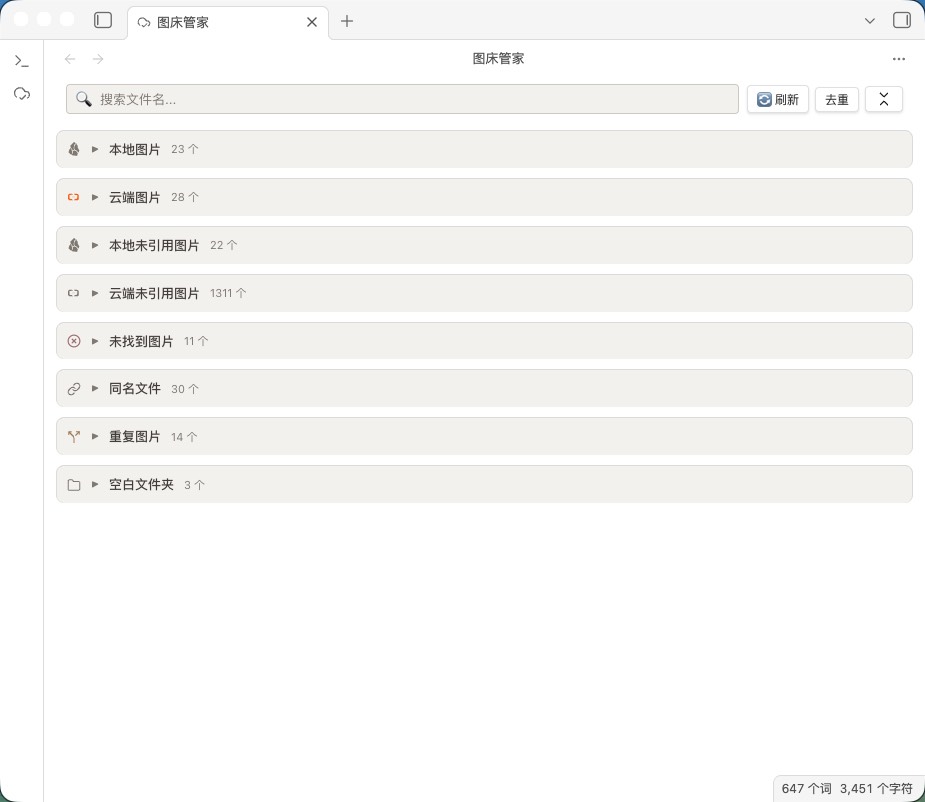
Main panel: eight-panel overview
Install
Community plugin store (recommended)
Open Obsidian → Settings → Community plugins → Browse → search "PicLinker" → Install → Enable.
Manual install
Download main.js, manifest.json, and styles.css from Releases, place them in .obsidian/plugins/PicLinker/, and enable the plugin.
Core features
- Vault-wide scanning with real-time response — recognizes three image reference formats (skipping code blocks):
![](),![[path]],<img>. Incremental scanning (mtime cache, concurrency 20) speeds up large vaults. Six events are registered (create / modify / delete / rename, metadataCache resolution, active-leaf switching) with 500 ms debounce for real-time accuracy. - Eight-panel view — separate views for referenced vs. unreferenced images, missing links, same-name files, duplicates, and empty folders, each independently collapsible with search filtering and counts.
- Four image hosts — Aliyun OSS (V4 signature), Tencent COS (V1 signature), GitHub, and SM.MS, cross-checked against actual references, with frontmatter path prefixes and bare-path image fields (cover / banner, etc.) auto-detected.
- Smart deduplication — SHA-256 content hashing across local×local, cloud×cloud, and local×cloud. Dedup is not automatic during scanning: trigger it via the toolbar "Dedup" button (single-click for selected, double-click for the whole vault). The keeper is the highest-scored unselected item (cloud +1000 weight). After deletion, all note references are updated automatically — zero broken links.
- Batch operations — batch delete (trash-recoverable), delete cloud files, delete reference lines (tag-level), copy Markdown/HTML links, download. A confirmation modal shows the affected count and asks once before executing.
- Security — AES-GCM + PBKDF2 encrypted credential storage (v1→v2 auto-migration); desktop uses the Node.js request layer and mobile falls back to
requestUrl, both bypassing CORS. - WebDAV sync — share image-host configs across devices with three-way conflict detection (local mtime / remote mtime / last sync time); supports Nutstore (坚果云) and NextCloud.
- Mobile support — single-finger drag to pan, pinch to zoom, tap overlay to close; thumbnail sizes auto-tighten (28×28); toolbar and action area stack at 768 px, settings stack at 600 px; notch safe-area adapted.
Eight-panel view
| Panel | Description |
|---|---|
| Local images | Files present in the vault and referenced by notes |
| Cloud images | Hosted on an image host and referenced by notes |
| Local unreferenced | Present in the vault, no note references |
| Cloud unreferenced | Hosted but not referenced by any note |
| Missing images | Referenced by notes but absent both locally and in the cloud (broken links); grouped by referencing note since 1.3.0 |
| Same-name files | Local and cloud files sharing a filename, or multiple local files with the same name |
| Duplicate images | File groups with identical SHA-256 hashes |
| Empty folders | Directories containing no files or subfolders |
Source badges: same-name and duplicate entries are prefixed with a purple "Local" or blue "Cloud" badge.
Configuration
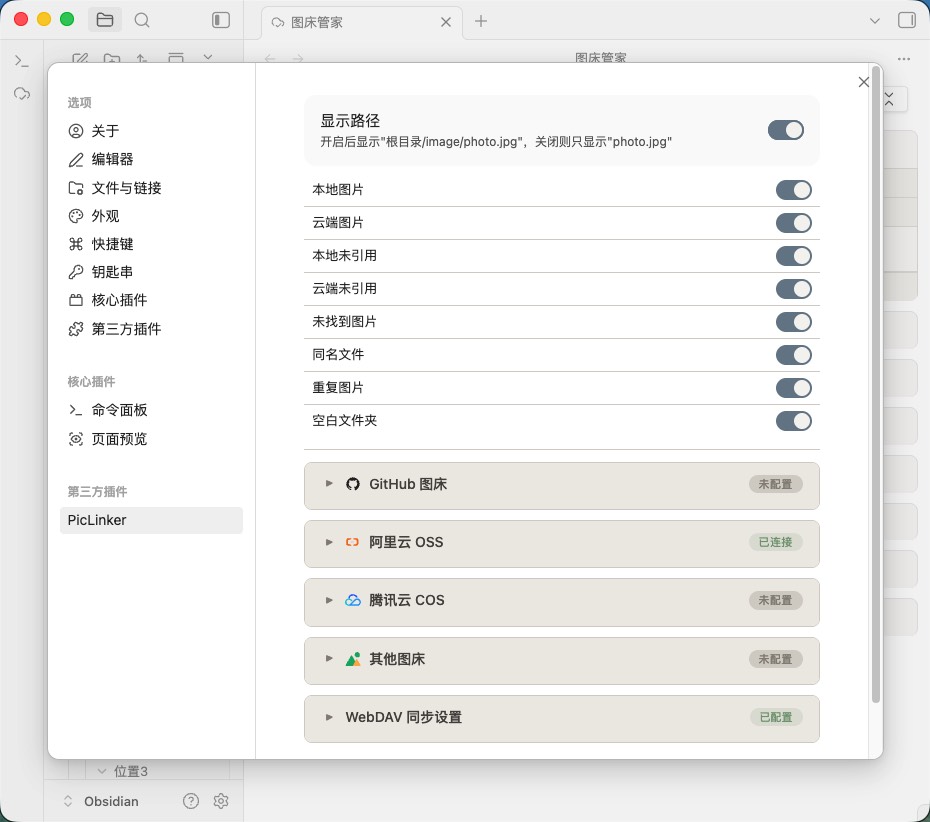
See CONFIG.md for detailed image-host setup (GitHub / Aliyun OSS / Tencent COS / SM.MS), WebDAV sync, and general settings.
Settings panel
Supported image syntax
 <!-- Standard Markdown -->
![[image.png|500]] <!-- Wikilink with size (wikilink-only; Markdown  does not support `|size`) -->
![[image.png]] <!-- Wikilink -->
<img src="image.png"> <!-- HTML -->
Remote URLs are recognized too. Code blocks are skipped automatically.
Frontmatter
---
image-bed: aliyun       # image host (GitHub / aliyun / tencent / other)
image-path: blog/2026/  # cloud path prefix
---
Beyond image-bed / image-path config keys, top-level bare-path image fields (such as cover, banner, thumbnail, whose value ends with an image extension) are auto-detected and included in reference stats and dedup comparison. Config keys are excluded from scan results.
Commands
| Command | Description |
|---|---|
打开图床管家 (Open PicLinker) | Open the main view |
刷新图片扫描 (Refresh image scan) | Rescan the whole vault |
运行诊断测试 (Run diagnostics) | Run functional diagnostics |
Development
See DEVELOPMENT.md for the project structure, build setup, and contribution guide.
License
MIT © PicLinker
For plugin developers
Search results and similarity scores are powered by semantic analysis of your plugin's README. If your plugin isn't appearing for searches you'd expect, try updating your README to clearly describe your plugin's purpose, features, and use cases.