Pocketbook Cloud Highlight Importer
approvedby lenalebt
Import notes and highlights from your Pocketbook Cloud account.
Obsidian Pocketbook Cloud Highlights Plugin
This is a plugin for Obsidian (https://obsidian.md) to import highlights that you made on your Pocketbook E-Ink reader, or in the Pocketbook App on your phone, using a Pocketbook Cloud account.
Requires the "dataview" plugin to work correctly - and does not check that it's installed ;-). Only works for "login with password".
How it works
It will
- read all highlights from your pocketbook account
- dump them into small markdown files with yaml frontmatter
- create dataview queries to grab all comments together
Setup
After installing, go to the settings page:
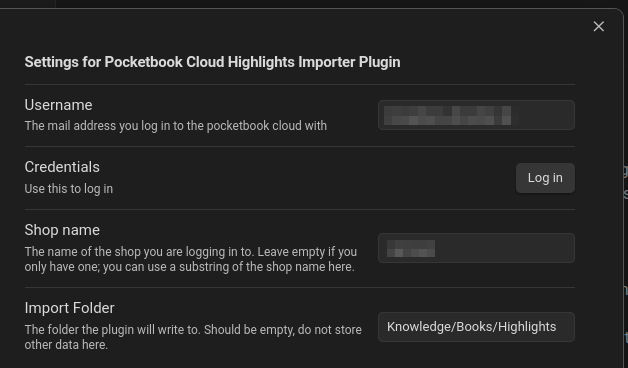
You need to fill your user name. After that, click "Log in" to start the login process. This will ask you for a password, but the password will not be saved (a refresh token will be, though).
In case you have multiple shops under your pocketbook account, you can fill the "Shop name" you want to use (substring of the name is enough). The "Import Folder" is where your highlights will be saved to.
Usage
After setup, you can find the pocketbook cloud highlight import in the command palette.
License
It's AGPL-3.0 licensed, since the used library "epub-cfi-resolver" is AGPL-3.0. I would have made it ISC-licensed otherwise.
For plugin developers
Search results and similarity scores are powered by semantic analysis of your plugin's README. If your plugin isn't appearing for searches you'd expect, try updating your README to clearly describe your plugin's purpose, features, and use cases.