by erni
Manage a Pokémon TCG collection inside your vault using the TCGdex API. Search cards, track variants, prices and view a dashboard.
Pokemon Collection Manager
Track your Pokémon Trading Card Game collection in plain Markdown, right inside your Obsidian vault — with card search, variant detection, live market prices, set completion, a gallery view and a dashboard.





Card data, images and prices come from the free, open TCGdex API. No account or API key is needed.
Highlights
- Your data stays Markdown. Every collection is an ordinary table in an ordinary note. Edit it by hand, sync it, version it — the plugin only touches the region between its own markers.
- Fast card entry. Search by name, jump straight to a card with its set code and number (
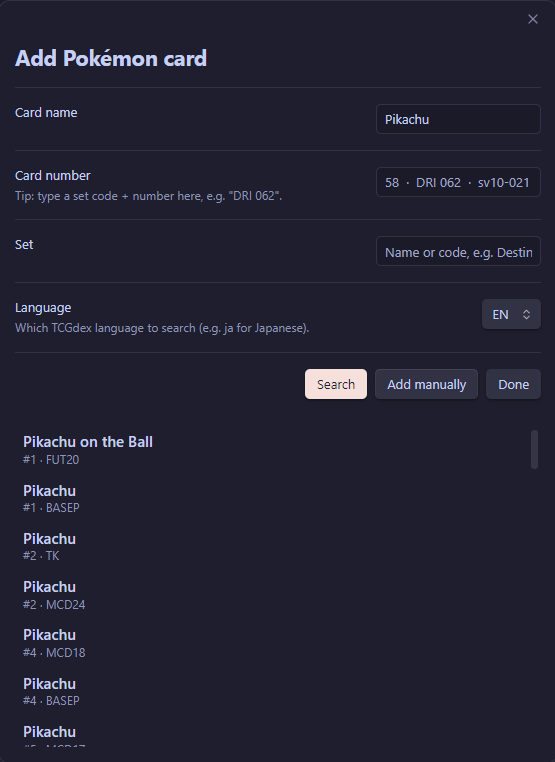
DRI 062), paste a Cardmarket link, or bulk-add a whole list in one go — even mixing languages (sv7 055 JA). - Real variants. Only the printings a card actually has are offered (Normal, Reverse Holo, Holo, 1st Edition, Shadowless, stamped, jumbo …), plus free-text custom variants.
- Market prices. Cardmarket (EUR) or TCGplayer (USD), priced per variant and adjusted for condition. Graded slabs (PSA, CGC, BGS …) keep your own price.
- Set completion. Regular and master-set progress, the missing cards and the cost to complete.
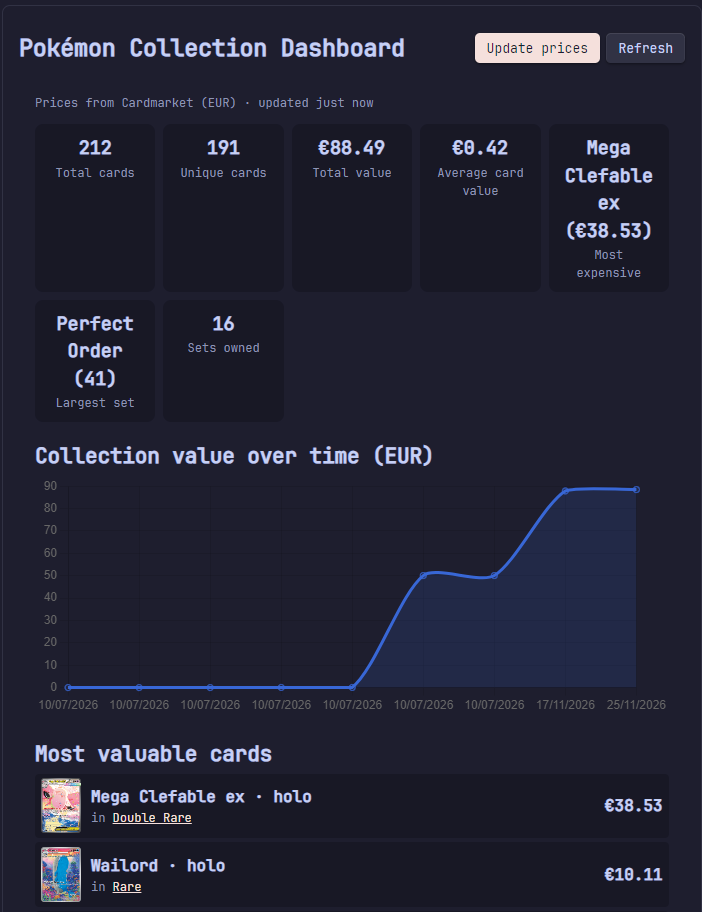
- Dashboard, gallery and price history. Collection value over time, most valuable cards, biggest movers, breakdowns by set, rarity and condition, a binder view and per-card price charts.
- Wishlist and trade lists. Separate lists with their own totals, spare-copy detection and one-step moves into your collection.
- CSV import and export. Round-trips your own exports and reads Collectr, TCGplayer and Cardmarket files.
- 16 languages, offline-friendly, mobile-ready. Japanese and other non-English cards are supported, including their own sets. Responses are cached and reused offline, and all requests go through Obsidian's own network API.
Screenshots
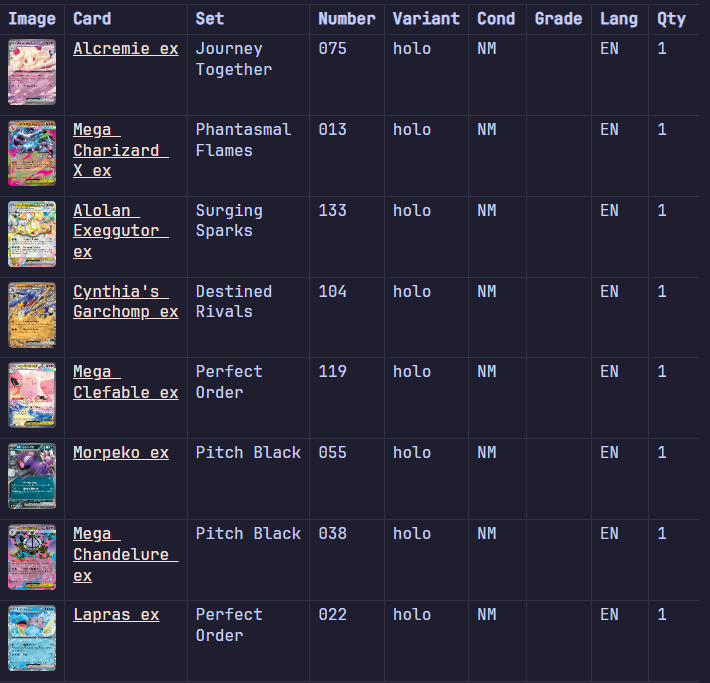
| Add cards by name, set or set code + number | Your collection is a plain Markdown table |
|---|---|
 |  |
Quick start
- In Obsidian, open Settings → Community plugins → Browse, search for Pokemon Collection Manager, then install and enable it (more options under Installation).
- Create a note inside the
Pokemonfolder (the default collection folder — configurable). - Open the command palette and run Pokemon Collection Manager: Add card.
- Type
DRI 062(or a card name), pick the card, choose the variant and condition, and click Add to note. - Run Create dashboard note to see your collection's statistics and charts.
A collection table looks like this — readable without the plugin, and safe to edit by hand:
<!-- pokemon-collection:start -->
| Card | Set | Number | Variant | Cond | Grade | Lang | Qty | Price |
| --- | --- | --- | --- | --- | --- | --- | --- | --- |
| [Pikachu](https://www.cardmarket.com/…)<!--k:sv10-003:reverse:NM--> | Destined Rivals | 003 | reverse | NM |  | EN | 2 | €4.00 |
<!-- pokemon-collection:end -->
The full walkthrough is in Getting started.
Documentation
| Guide | What it covers |
|---|---|
| Getting started | Installation, your first collection note and first card |
| Adding cards | Search, set code + number, Cardmarket links, bulk add, manual cards, variants, condition and grade |
| The collection table | Table format, columns, editing by hand, sorting, thumbnails |
| Prices | Price sources, condition multipliers, graded cards, updates, stale prices, price history |
| Dashboard | The pokemon-dashboard block: statistics and charts |
| Set completion | The pokemon-set block: regular and master sets, missing cards, cost to complete |
| Gallery and binder | The pokemon-gallery block: card grid and 3×3 binder pages |
| Wishlist and trade lists | List types, moving cards, trade candidates |
| CSV import and export | Export format, supported apps, column mapping |
| Commands | Every command at a glance |
| Settings | Every setting and its default |
| Data, network and privacy | Which files are stored and which services are contacted |
| Troubleshooting and FAQ | Common problems and answers |
| Development | Building from source and the code architecture |
| Changelog | What changed in each version |
Installation
From Community plugins (recommended)
Pokemon Collection Manager is available in the official Obsidian Community plugins directory:
- Open Settings → Community plugins and turn off Restricted mode if it is on.
- Click Browse and search for Pokemon Collection Manager.
- Click Install, then Enable.
Updates arrive through Obsidian's built-in plugin updater (Settings → Community plugins → Check for updates).
Manually
- Download
main.js,manifest.jsonandstyles.cssfrom the latest release. - Copy them into
<your vault>/.obsidian/plugins/pokemon-collection/(create the folder if needed). - Reload Obsidian and enable Pokemon Collection Manager in Settings → Community plugins.
With BRAT (beta builds)
Install the BRAT plugin, choose Add beta plugin and enter Erni0k/PokeObsidian.
Network use and privacy
The plugin needs an internet connection to look up cards and prices. It contacts:
api.tcgdex.net— card, set and price data;assets.tcgdex.net— card images and set symbols, when they are shown.
Cardmarket links are only opened when you click them. Nothing about your vault or your collection is sent anywhere, and there is no telemetry, no account and no ads. Details: Data, network and privacy.
Support and contributing
Bug reports and feature requests are welcome in GitHub Issues. Please include your Obsidian version, platform and, if possible, the card or set involved. To build from source, see Development.
The plugin is free and always will be. If it helps you keep track of your cards, you can support its development on Ko-fi ☕
License and disclaimer
Released under the MIT License.
This is an unofficial fan project. It is not affiliated with, endorsed or sponsored by Nintendo, Creatures, GAME FREAK, The Pokémon Company, Cardmarket or TCGplayer. Pokémon and all related names are trademarks of their respective owners. Card data and images are provided by TCGdex.
For plugin developers
Search results and similarity scores are powered by semantic analysis of your plugin's README. If your plugin isn't appearing for searches you'd expect, try updating your README to clearly describe your plugin's purpose, features, and use cases.