PrayerChime
approvedby MjavadH
Offline Islamic prayer times for Iranian cities. - This plugin has not been manually reviewed by Obsidian staff.
PrayerChime
PrayerChime is an offline, Persian-first Obsidian plugin that shows Islamic prayer times for cities in Iran. It uses the bundled Iranian city dataset and local calculation code, so daily prayer times are available without calling an external API.
The plugin is now available in Obsidian Community Plugins. Installing from Community Plugins is the recommended installation method.
Contents
- Features
- Screenshot
- Installation
- Getting started
- How it works
- Settings
- Privacy
- Troubleshooting
- Development
- Project structure
- Contributing
- License
- Persian README
screenshot
| Desktop | Mobile |
|---|---|
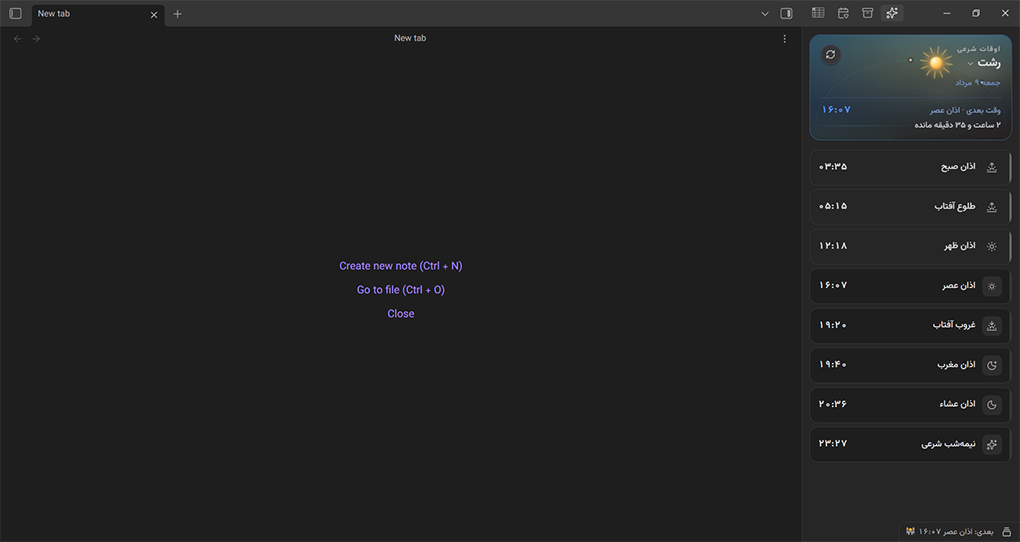 | 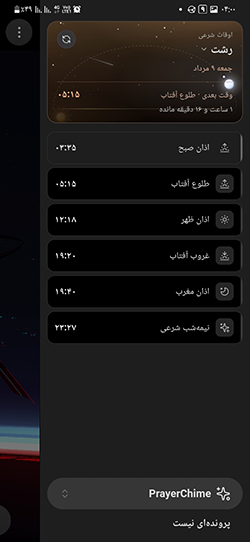 |
Features
- Offline prayer times for Iranian cities using local coordinates and built-in solar calculations.
- No external prayer-time API is required for normal use.
- Persian and RTL interface for the main view and settings page.
- Obsidian ribbon action to open the PrayerChime view.
- Dedicated right-sidebar view with today’s Persian date, selected city, prayer-time list, next time, and countdown.
- Status bar item that can show the next upcoming prayer time.
- City search across city, county/province, and state names.
- Favorite cities for faster switching from the settings page.
- Configurable calculation method: Tehran, Jafari, ISNA, MWL, or Umm al-Qura.
- Configurable warning interval for the “approaching” visual state.
- Configurable visible items for Fajr, sunrise, Dhuhr, Asr, sunset, Maghrib, Isha, and Islamic midnight.
- Automatic UI refresh while the PrayerChime view is open.
- Desktop and mobile support where Obsidian supports community plugins.
Installation
Recommended: install from Community Plugins
PrayerChime has been published in Obsidian Community Plugins, so this is the preferred way to install and update it.
- Open Settings in Obsidian.
- Go to Community plugins.
- If community plugins are disabled, enable them according to Obsidian’s prompt.
- Click Browse.
- Search for PrayerChime.
- Click Install.
- Click Enable.
Manual installation
Use manual installation only if you need to test a local build or install a release outside Community Plugins.
-
Download or build the plugin files.
-
Create this folder in your vault:
<Vault>/.obsidian/plugins/prayer-chime/ -
Copy these files into that folder:
main.jsmanifest.jsonstyles.css
-
Restart Obsidian or run Reload app without saving from the command palette.
-
Enable PrayerChime from Settings → Community plugins.
Getting started
- Install and enable PrayerChime.
- Click the PrayerChime ribbon icon, or open the PrayerChime view from Obsidian.
- Open Settings → PrayerChime.
- Select your preferred calculation method if the default Tehran method is not what you need.
- Search for your city or province and select the city.
- Optionally star cities to add them to favorites.
- Choose which prayer-time entries should be shown.
- Use the refresh button in the PrayerChime view whenever you want to redraw the view immediately.
If no valid city is selected, PrayerChime falls back to Tehran.
How it works
PrayerChime loads Iranian city data from src/data/iran-dataset.json, normalizes the dataset, and assigns each city a stable ID derived from its state, province, city name, latitude, and longitude.
Prayer times are calculated locally for the current Tehran date and formatted in the Asia/Tehran time zone. The view then renders enabled prayer-time items in this order:
- Fajr
- Sunrise
- Dhuhr
- Asr
- Sunset
- Maghrib
- Isha
- Islamic midnight
The PrayerChime view updates item states every few seconds:
- Upcoming: the time is later today.
- Approaching: the time is within the configured warning interval.
- Now: the time is within the active threshold around the calculated timestamp.
- Past: the active threshold has passed.
Settings
Open Settings → PrayerChime to configure the plugin.
General settings
- Calculation method
- Tehran / Institute of Geophysics, University of Tehran
- Jafari / Shia Ithna Ashari
- ISNA
- MWL
- Umm al-Qura
- Show in status bar: show or hide the next prayer time in Obsidian’s status bar.
- Warning interval: choose when the view should mark a time as approaching: 5, 10, 15, or 30 minutes before the time.
Displayed times
Enable or disable each displayed item:
- Fajr
- Sunrise
- Dhuhr
- Asr
- Sunset
- Maghrib
- Isha
- Islamic midnight
City picker
- Search by city, county/province, or state.
- Select a city from the result list.
- Star cities to keep them in the favorites row.
- Remove a favorite with the
xbutton on the favorite chip.
Privacy
PrayerChime does not send your location, city selection, vault contents, or prayer-time settings to any external service. City data is bundled with the plugin, prayer times are calculated locally, and plugin preferences are stored through Obsidian’s normal plugin data storage in your vault.
Troubleshooting
PrayerChime does not appear
- Confirm that the plugin is installed and enabled in Settings → Community plugins.
- Click the PrayerChime ribbon icon.
- Check the right sidebar.
- Reload Obsidian if the view was not registered after installation.
My city is not found
- Search using the Persian spelling.
- Search by province or state name.
- If the city is missing from the bundled dataset, please open an issue or pull request.
Times look wrong
- Confirm that the selected city is correct.
- Confirm that the selected calculation method matches your preference.
- Check whether the displayed time item is sunset or Maghrib; depending on the calculation method, these may differ.
Nothing is shown in the view
- Make sure at least one prayer-time item is enabled in settings.
- Reload Obsidian.
- If you installed manually, confirm that
main.js,manifest.json, andstyles.cssare in the plugin folder.
Development
Requirements
- Node.js
- pnpm because the project declares
pnpm@11.16.0as its package manager - An Obsidian vault for manual testing
Install dependencies
pnpm install
Development build
pnpm run dev
Production build
pnpm run build
Run tests
pnpm test
Lint and format
pnpm run lint
Version bump
pnpm run version
Project structure
.
├── README.md                    # English documentation
├── REAME-FA.md                  # Persian documentation
├── manifest.json                # Obsidian plugin manifest
├── package.json                 # Scripts, metadata, and dev dependencies
├── styles.css                   # Plugin view and settings styles
├── tests/                       # Vitest test suite
└── src/
    ├── core/
    │   ├── constants.ts         # View IDs, timing constants, ordering, and icons
    │   └── settings.ts          # Default settings and settings normalization
    ├── data/
    │   └── iran-dataset.json    # Bundled Iranian city dataset
    ├── services/
    │   ├── adhan.ts             # Local prayer-time calculation primitives
    │   ├── city-service.ts      # City dataset parsing, fallback, and search
    │   └── prayer-service.ts    # Calculation orchestration and time formatting
    ├── settings/
    │   └── settings-tab.ts      # Obsidian settings UI
    ├── types/
    │   └── index.ts             # Shared TypeScript types
    ├── utils/
    │   ├── date.ts              # Tehran date/time constants
    │   └── format.ts            # Persian digits, countdown, and date formatting
    ├── views/
    │   └── prayer-times-view.ts # Obsidian item view renderer
    └── main.ts                  # Plugin entry point
Contributing
Contributions are welcome. Useful contributions include bug reports, feature requests, dataset fixes, documentation improvements, tests, and focused pull requests.
Before opening a pull request, run:
pnpm run build
pnpm test
License
PrayerChime is released under the MIT License.
For plugin developers
Search results and similarity scores are powered by semantic analysis of your plugin's README. If your plugin isn't appearing for searches you'd expect, try updating your README to clearly describe your plugin's purpose, features, and use cases.