Property from backlink
approvedby Giacomo D’angelo
Add a frontmatter property to all notes linking to the current note. - This plugin has not been manually reviewed by Obsidian staff.
Property from Backlink
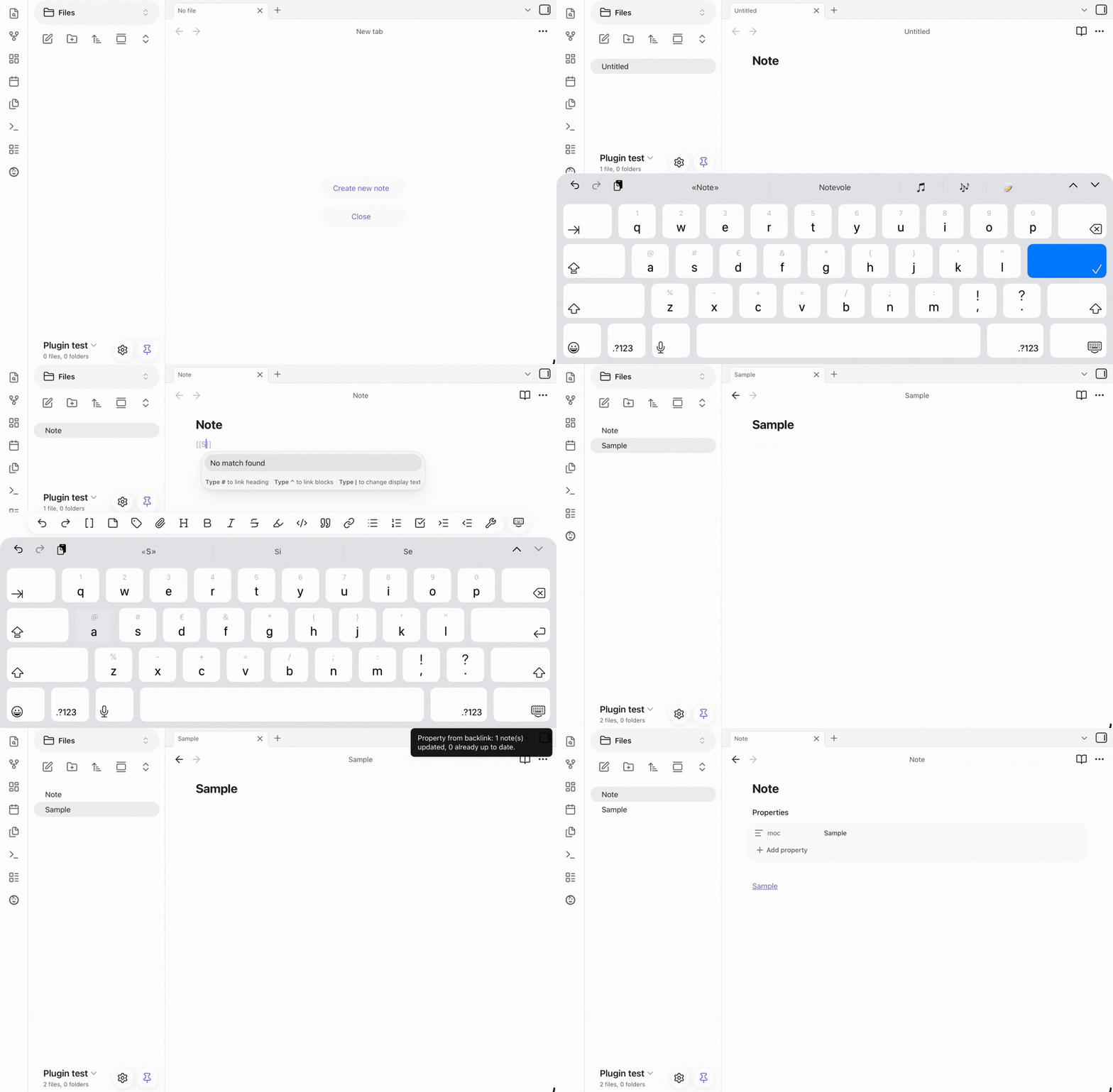
Automatically add or remove a frontmatter property on every note that links to a given note, using that note's name as the value.
What it does
This plugin gives you two command, built around the same idea: keeping a frontmatter property in sync with a note's backlink.
-
"Tag backlinks of this note with property" - adds the property to every note linking to the current note
-
"Remove property added by this note from backlinks" - removes the property to every note linking to the current note
Both work the same way:
- Open the note you want to use as the "source" (e.g. a MOC note called
Projects) - Run the command
- Every note that links to it is updated
Tagging backlinks
The plugin never overwrites data, it only adds to it:
- No existing property → the property is created with the source note's name as its value.
- Existing property with the same value already → nothing changes.
- Existing property with a different single value → the property becomes a list containing both the old and the new value.
- Existing property already a list → the new value is appended, unless it's already present. Running the command multiple times on the same note is always safe (idempotent) — it will never create duplicate entries.
Removing the property
- Property holds only that value → the property itself is removed from the note.
- Property is a list containing that value among others → only that value is removed; the rest of the list is left untouched. If only one value remains, the property becomes a plain value again instead of a single-item list.
- Property doesn't contain that value → nothing changes. Like tagging, this is safe to run multiple times — running it again on a note that's already clean does nothing.
Settings
- Property name — the frontmatter property used to store the source note's name. Defaults to
moc. Change it tocategory,hub, or anything that fits your vault's conventions.
Installation
From Obsidian
- Open Settings → Community plugins.
- Make sure "Restricted mode" is off.
- Click Browser, search for "Property from Backlink", and install it.
- Enable the plugin.
Manual installation
- Download
main.js,manifest.json, andstyles.cssfrom the latest release. - Create a folder named
property-from-backlinkinside your vault's.obsidian/plugins/directory. - Copy the three files into that folder.
- Reload Obsidian, then enable the plugin under Settings → Community plugins.
Requirements
Requires Obsidian v1.4.4 or later (uses the FileManager.processFrontMatter API).
License
0BSD — see LICENSE.
For plugin developers
Search results and similarity scores are powered by semantic analysis of your plugin's README. If your plugin isn't appearing for searches you'd expect, try updating your README to clearly describe your plugin's purpose, features, and use cases.