Property Order
approvedby ZhengYX
Reorder property values and customize property key suggestion order in Obsidian. - This plugin has not been manually reviewed by Obsidian staff.
Property Order
Property Order enhances Obsidian Properties with safe list-value reordering plus configurable native property-name and property-value suggestions.
Demo
Move a value between supported top-level YAML list properties on desktop:
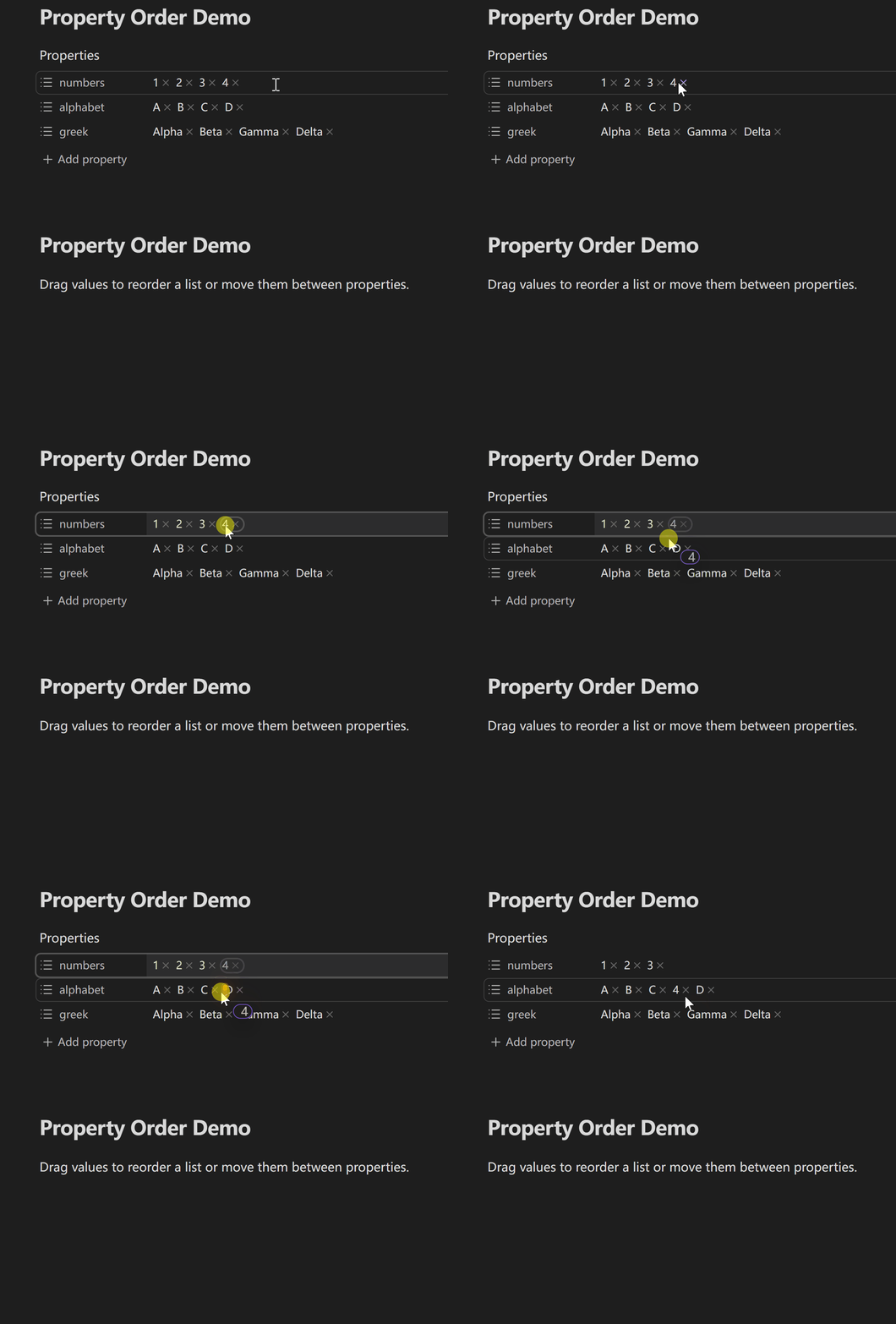
Cross-property drag is enabled by default and can be disabled in the Value order settings.
Features
- Drag to reorder values inside a top-level YAML list property.
- Move values between supported properties in the same note, with an option to disable it.
- Treat empty or scalar YAML storage as a text list when Obsidian's native Properties UI assigns the list type, allowing safe moves in or out and normalizing every affected non-string item from its original token text.
- Preserve the current list format by default, or write every affected property as bracket or bullet lists. Same-property reorders and cross-property moves each commit through one verified editor transaction.
- Pin, move to the bottom, or hide native property-name suggestions.
- Sort property-name suggestions by mixed-language name, strict recent-use order, or the number of Markdown notes containing each property.
- Optionally reorder and filter Obsidian's existing property-value suggestions by native order, mixed-language name, confirmed recent use, or the number of Markdown notes containing each value for the active property.
- Apply per-property value rules for sort overrides, pinned values, bottom values, and hidden values without generating new candidate values.
- Advance recent histories only after Metadata Cache confirms that the selected property name or property value was committed; hover, keyboard navigation, cancellation, and unconfirmed edits do not count.
- Keep keyboard navigation aligned with the final visible suggestion order.
- Fail closed for unsupported YAML and fail open when Obsidian's suggestion DOM is not recognized.
Requirements and compatibility
- Obsidian 1.12.7 or later.
- Desktop supports direct dragging. Mobile uses an explicit action in Obsidian's native long-press menu before dragging.
- Property Order works only with top-level YAML properties that Obsidian identifies as text lists for value dragging; suggestion enhancement only reorders or filters candidate values that Obsidian already exposes in the Properties UI. Detailed boundaries are listed below.
Installation
Manual installation
Download property-order-<version>.zip from the latest release and extract it into Vault/.obsidian/plugins/. The archive contains the property-order/ directory with main.js, manifest.json, and styles.css. Reload Obsidian, then enable Property Order under Community plugins.
Upgrade
Back up and preserve Vault/.obsidian/plugins/property-order/data.json when it exists. Replace only main.js, manifest.json, and styles.css; delete data.json only when you explicitly want to reset all plugin preferences.
Usage
- Enable Property Order under Settings → Community plugins.
- Open a note with top-level YAML list properties in Obsidian Properties.
- On desktop, drag a value directly. On mobile, long-press a value, choose Reorder (or Reorder or move), then drag that value.
- Configure Key suggestions for property-name candidates and, if desired, enable Value suggestions to order Obsidian's existing property-value candidates with global defaults and per-property rules.
Settings
Every supported Obsidian version uses the same accessible General, Value order, Key suggestions, and Value suggestions tabs. The active tab already names the current section, so content begins directly with its first setting instead of repeating that title.
- General controls the interface language and optional diagnostic notices. Follow Obsidian uses Obsidian's interface language.
- Value order controls list writeback format, cross-property moves, and related drag behavior. Temporarily disabling value drag preserves the separate cross-property preference for the next time value drag is enabled.
- Key suggestions configures pinned, bottom, hidden, name-sorted, recently used, and note-count-sorted native property-name suggestions. Recent order is strict MRU: pinned rules remain first, confirmed recent names follow in newest-first order, names absent from history fall back to name order, and bottom rules remain last. Note count means the number of cached Markdown notes containing the property, not interaction frequency.
- Value suggestions is opt-in and configures Obsidian's existing property-value suggestion menus. The default sort can preserve native order or use name, confirmed recent use, or note count. Per-property rules use
property-pattern = value-pattern; sort overrides useproperty-pattern = native|name|recent|usage.*is a wildcard, the first matching sort override wins, and hidden rules take priority over pinned and bottom rules. - Recent property-name history contains at most 100 exact names. Recent property-value history keeps at most 100 exact values per property for up to 100 properties. Neither history stores timestamps; both use Obsidian local storage for the current Vault on the current device, are separate from
data.json, and are not synced. Each settings page provides its own clear action. - Name and recently used sorting do not traverse the Vault. Note-count sorting scans cached frontmatter lazily only when that mode needs data and reuses invalidatable caches. Opening the property-name rule editor may also load cached property names lazily for its autocomplete, independently of the selected sort mode.
Limitations
- Mobile reorder is deliberately armed from Obsidian's native long-press menu, so Edit, Remove from list, and Copy remain available. The armed action applies to one value and expires automatically.
- Only top-level YAML properties that Obsidian identifies as text lists are supported for value dragging. Normal lists use native pills; guarded empty or scalar mismatch rows may be sources or targets, while an aligned, unambiguous mixed mismatch row may only receive an appended value.
- Object lists, nested lists, multiline flow sequences, source-mode line dragging, and cross-file moves are not supported.
- Value suggestions do not create a vocabulary or new candidates. They act only while Obsidian exposes a recognizable native property-value suggestion menu in the Properties UI; otherwise Property Order leaves the native menu unchanged.
- Converting bullet lists to bracket lists may discard item comments and blank lines that bracket syntax cannot represent.
- Direct keyboard value reordering and screen-reader drag announcements are not currently provided.
Privacy and security
Property Order reads and updates the current note through Obsidian's editor and Vault APIs. It does not require an account, upload note content, or call a remote service. Unsupported YAML is rejected before writeback, and supported changes are committed through one verified editor transaction. When note-count ordering is selected for property-name or property-value suggestions, the plugin enumerates Markdown files and reads cached frontmatter metadata to calculate counts; it does not read every note body. While recent sorting is available, the plugin keeps only ordered, timestamp-free device-local histories of confirmed property names and property values in Obsidian's per-Vault local storage; the settings pages provide separate clear actions.
Development
Use Node.js 24.19.0 and npm 11.17.0. Install the exact dependency graph from the frozen lockfile, then run the complete repository gate:
npm ci
npm run check
Documentation
- Product requirements
- UX specification
- Architecture
- Testing strategy
- Changelog
- Contributing guide
- Security policy
Support
- Use General for workflow ideas and general feedback.
- Use Q&A for usage and configuration questions.
- Use the structured GitHub issue forms for reproducible bugs and concrete feature requests.
- Report vulnerabilities privately through the repository's security policy.
Remove private Vault paths, note content, YAML values, and credentials before posting publicly.
License
MIT © ZhengYX
For plugin developers
Search results and similarity scores are powered by semantic analysis of your plugin's README. If your plugin isn't appearing for searches you'd expect, try updating your README to clearly describe your plugin's purpose, features, and use cases.