by minseon9
Reading Tracker for importing books from Open Library, organizing your reading shelves, and analyzing your reading habits.
Reading Tracker
Every time you read, you leave a note. Find a book, record the sitting, keep the passage — all as plain Markdown in your own vault.
The idea
Obsidian's Daily notes gives you one note per day. This gives you one note per sitting with a book. Same shape, different unit: the record belongs to the reading, not to the date.
Reading Tracker/
├─ Books/
│  └─ 소년이 온다.md
├─ Sessions/
│  ├─ 2026-10-04 소년이 온다.md
│  └─ 2026-10-06 소년이 온다.md
└─ Views/
   ├─ shelf.base
   ├─ library.base
   ├─ sessions.base
   └─ statistics.base
Two kinds of note, with one rule each:
- A book note is the book: what it is, and where you are up to. Its
## Reading Historyis an index of your sittings. - A session note is one sitting. Its properties are the facts; its body is yours. Nothing in the body is ever parsed, so a transcription or a long reflection can take any shape you like.
Quick start
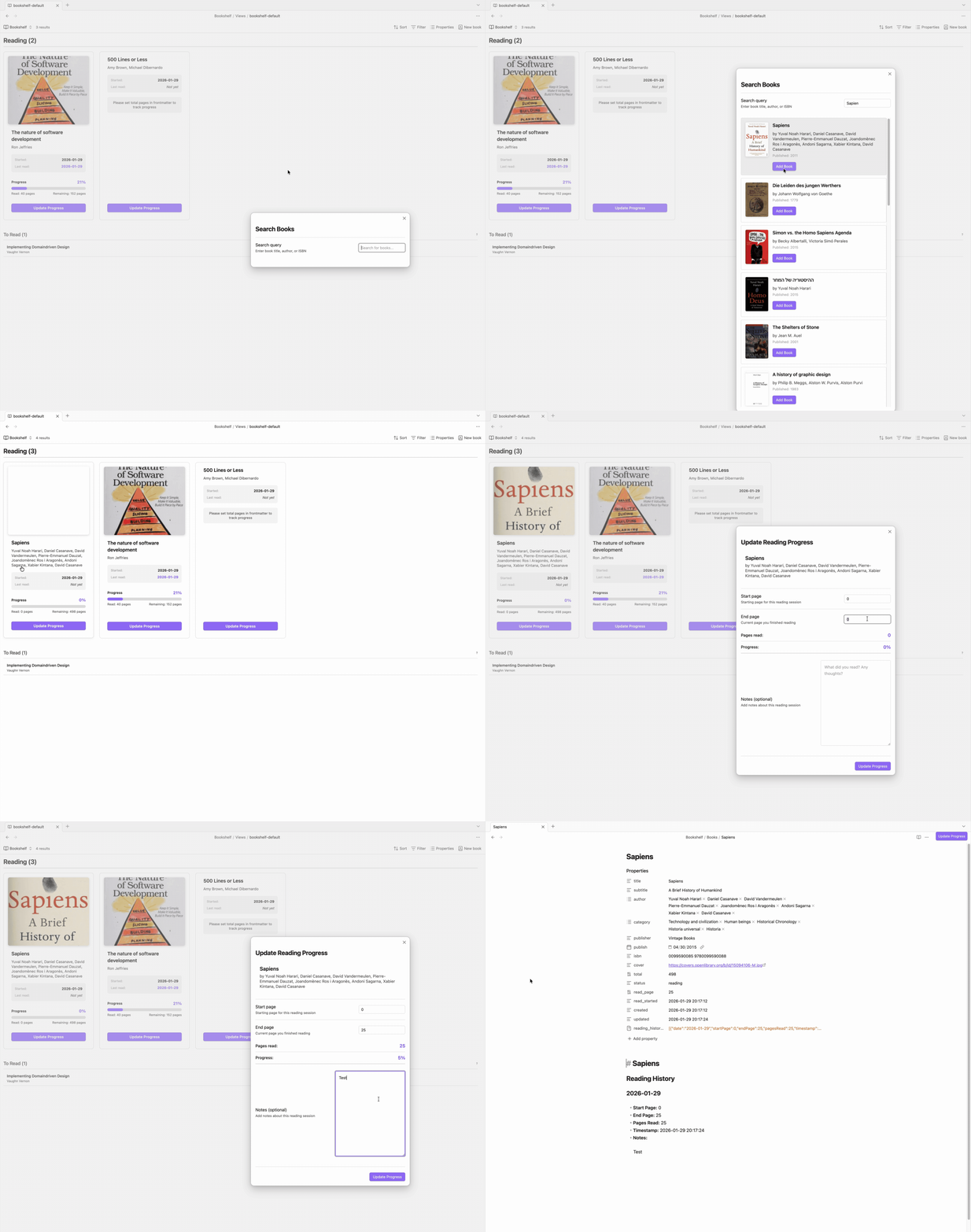
- Add a book: ribbon icon, or
Ctrl/Cmd+P→ "Search book" - Record a sitting: open the book note → the book icon in its header
- Keep writing: the session note opens as soon as it is written
- Look back: ribbon icon for the shelf, or the
.basefiles inReading Tracker/Views/
Recording a sitting
The dialog asks for as much or as little as you want:
| Field | |
|---|---|
| From / To | How far you got |
| Minutes | How long you read. Optional. |
| Passages | Everything you copied out. Add passage adds another, each with its own page and line. |
| Thoughts | What you made of it |
| Rating | 1–5 for the book |
| Give up on this book | Record the sitting, then mark the book abandoned |
Three things then happen, each touching only its own file: the sitting gets its note, the book note's index gains a line pointing at it, and the book's properties catch up with where you now are.
The session note
---
book: "[[소년이 온다]]"
date: 2026-10-04
from: 140
to: 216
amount: 76
unit: pages
minutes: 90
quotes: 2
---

> [!quote] p.152 l.7
> 그녀는 어둠 속에서 오래 서 있었다.

> [!quote] p.168
> 아버지는 말이 없었다.

이 장면들 때문에 다시 읽기로 했다. 여기서부터는 마음껏 길게.
One sitting is rarely one passage, so copy out as many as you like — each becomes its own quote callout, titled with where it came from. quotes is a count, not a copy of the pages: the passages and their citations live in the body, and nothing in the properties duplicates them.
The properties are what the views read — never the body. Keep writing in it whenever you like; add headings, images, more passages, links to other notes. Nothing the plugin does will reformat it.
The book note's index
## Reading History

- 2026-10-04: 140-216 — [[2026-10-04 소년이 온다]]
- 2026-10-06: 216-260 — [[2026-10-06 소년이 온다]]
- 2026-10-07: 300
A line with a link points at that sitting's session note. A line without one is a sitting you logged by hand, and it counts just the same — handy when you only want to note how far you got. A line giving a single position means "read up to here", picking up where the previous one left off.
Lines are only ever added. Nothing already in the section is re-parsed or rewritten, so your edits always survive. The heading is configurable, so ## 독서 기록 works too.
Pages, percent, or listening time
Set reading_unit on a book note:
reading_unit | Positions look like |
|---|---|
pages (default) | 140-216 |
percent | 20%-45% |
time (audiobooks) | 0:00-1:30 |
Ranges can be written with -, –, ~, →, or ->.
Views
Four are generated in Reading Tracker/Views/:
- Shelf — what you're reading and what's next. Drag a book from "To read" into "Reading", or use the Start reading button. Most recently read first.
- Library — everything you're not currently reading, grouped into unread, finished, and abandoned.
- Sessions — every sitting across every book, newest first. A plain Bases table, because the session notes keep their facts in properties.
- Statistics — books and pages finished, days you read on, time spent, average rating, books abandoned, yearly and monthly trends, top categories.
Book properties
---
title: 소년이 온다
author: [한강]
category: [소설]
publisher: 창비
publish: "2014"
isbn: "9788936434120"
cover: https://covers.openlibrary.org/...
series:
series_position:
total: 216          # total pages — or 100 for percent, total minutes for time
status: reading     # unread / reading / finished / abandoned
reading_unit: pages
rating: 5           # 1-5, optional
read_page: 260
read_started: 2026-10-01 21:40:00
read_finished:
---
No created, no updated, no session index. Obsidian already tracks when a note was made and last changed, and the sittings are notes of their own — so there is nothing here to keep in step with anything else.
Settings
Two:
- Reading tracker folder — where everything lives
- Reading index heading — the heading your sittings are listed under
Everything else has one sensible answer and is simply done: a book is finished when you reach its last page, a sitting is always worth recording, and times are in your local timezone.
Adding books
Search uses the Open Library API — the one book API that needs no account, no key, and no registration. Nothing you search for leaves the vault except the query itself.
Its catalogue is strongest for English-language books. Coverage of Korean and other non-English titles is thin, and page counts are often missing, so there is always a way through: Add "…" by hand appears under the results and in place of them when there are none. It creates the book note with the title you typed and opens it, so you can fill in the author and page count using Obsidian's own properties editor. total is the only one the tracker needs — it decides when a book counts as finished.
Requirements
Obsidian 1.10.1 or later, on desktop. The views are built on Bases, which needs 1.10.1.
Installing it by hand
The plugin is not in the community directory yet, so install it from source:
npm install
npm run build
npm run deploy -- /path/to/your/vault
Then in Obsidian: Settings → Community plugins → turn off Restricted mode → Reload → enable Reading Tracker.
Development
npm install
npm run test-vault   # a throwaway vault with the plugin symlinked in
npm run dev          # watch build; reload Obsidian to pick it up
npm run verify       # build + lint + release checks + load smoke test
No runtime dependencies. Notes are read through Obsidian's metadata cache and written through processFrontMatter and Vault.process, so there is no YAML library and no private copy of your properties.
docs/RELEASING.md covers local verification — including a test vault and a manual checklist — and how to publish and submit to the community directory.
Upgrading from 0.2.x
Your book notes keep working. Entries in the old ### date block form are still read and are left exactly where they are; new sittings are added below them as index lines.
These properties are no longer written, and can be deleted whenever you like:
created/updated— Obsidian's own file times replace themreading_history_summary— sittings are session notes nowisbn10/isbn13— merged into a singleisbn
The folder default changed from Bookshelf to Reading Tracker. If you already have a Bookshelf folder, point Reading tracker folder back at it and nothing moves.
Support
For plugin developers
Search results and similarity scores are powered by semantic analysis of your plugin's README. If your plugin isn't appearing for searches you'd expect, try updating your README to clearly describe your plugin's purpose, features, and use cases.