Recipe Vault
approvedby taylorsdugger
Recipe Vault is a full recipe management system for Obsidian. Import recipes from web pages, browse them in a gallery, and build shopping lists automatically. - This plugin has not been manually reviewed by Obsidian staff.
🥘 Recipe Vault
Your recipes, in plain markdown, right inside Obsidian.



🌐 Visit the site · 📦 Install from the community directory
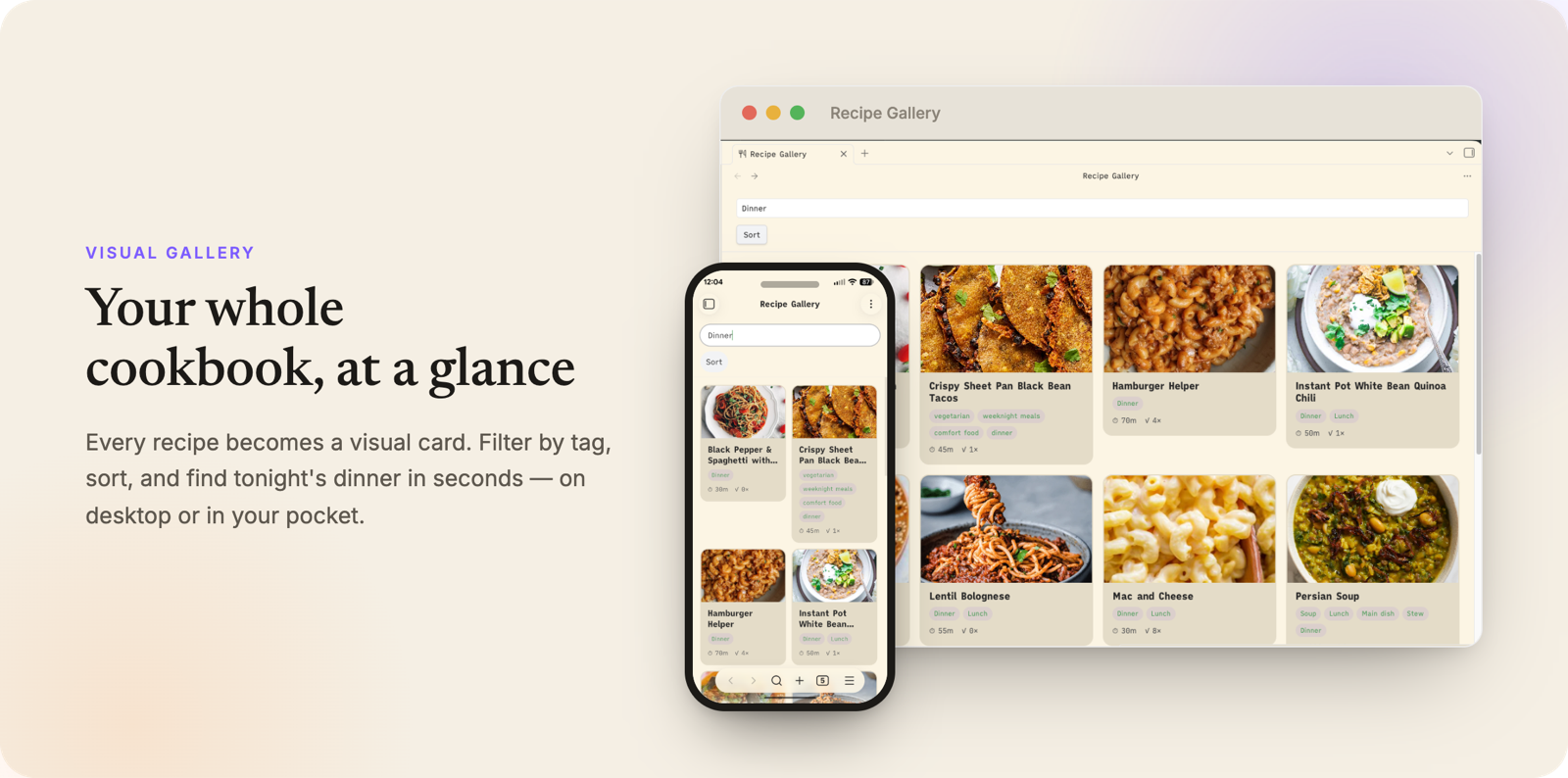
Import recipes from the web, browse them in a visual gallery, and build shopping lists automatically. Paste a URL, get a clean recipe note. No subscriptions, no accounts, no ads, just your recipes in your vault.
Screenshots and a walkthrough of every feature: recipes.taylordugger.com.
✨ Features
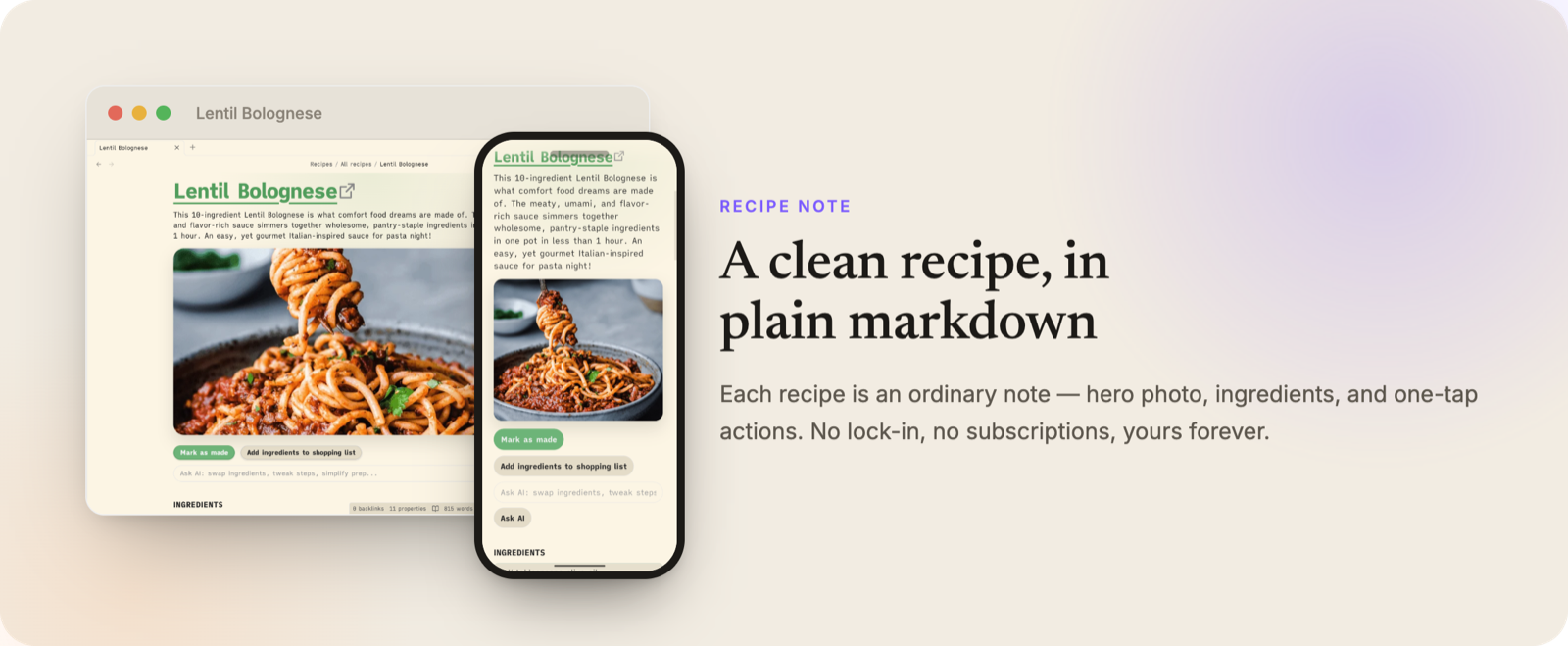
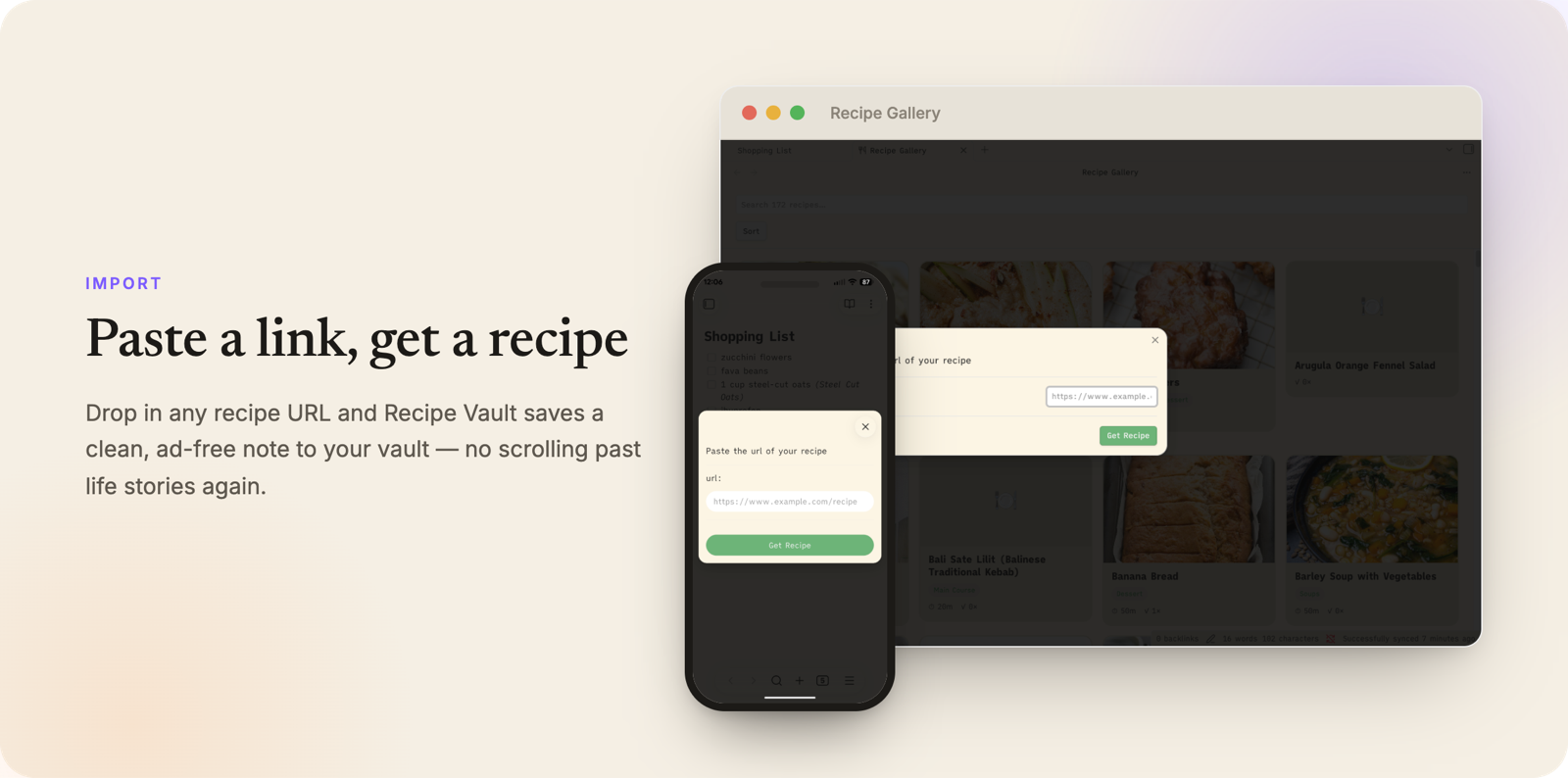
- 🌐 Import from any URL: fetches structured recipe data (JSON-LD) from a recipe page and creates a formatted note instantly.
- 📸 Add recipe from photo: photograph a cookbook page or recipe card (or pick image files) and let AI vision transcribe it into a recipe note, with a verify/edit step before saving. Works on desktop and mobile.
- ✍️ Add recipes manually: create a recipe note from scratch using the same template.
- 🖼️ Recipe gallery: browse your whole collection visually in a dedicated gallery view.
- 🔍 Search everything: filter as you type across titles, meal types, and ingredients, so you can find every recipe that uses what's already in the fridge.
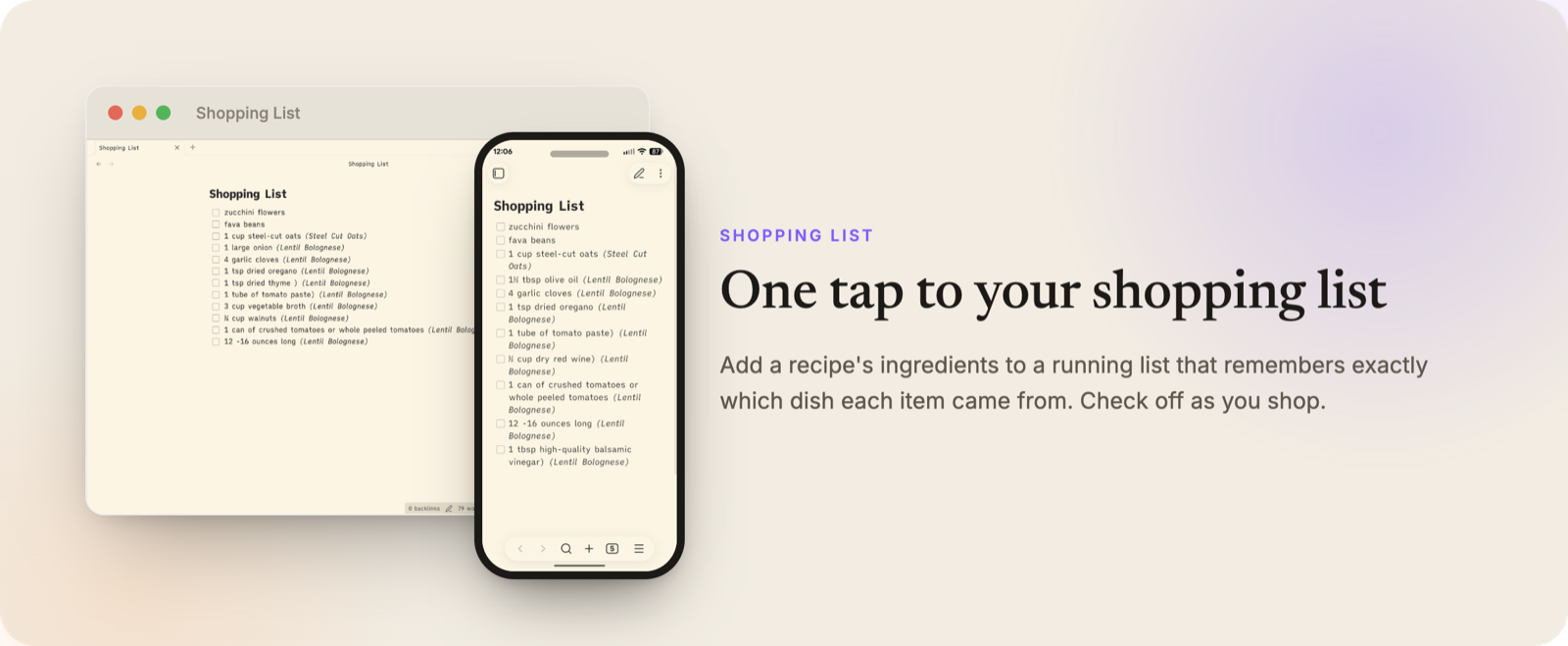
- ⚖️ Shopping list: check off ingredients in a note and send them to a single shopping list file, with automatic unit merging.
- 🔁 Compare recipes: select multiple recipes and view them side by side, with shared and unique ingredients highlighted.
- 📅 Mark as made: track when you last made a recipe and how many times.
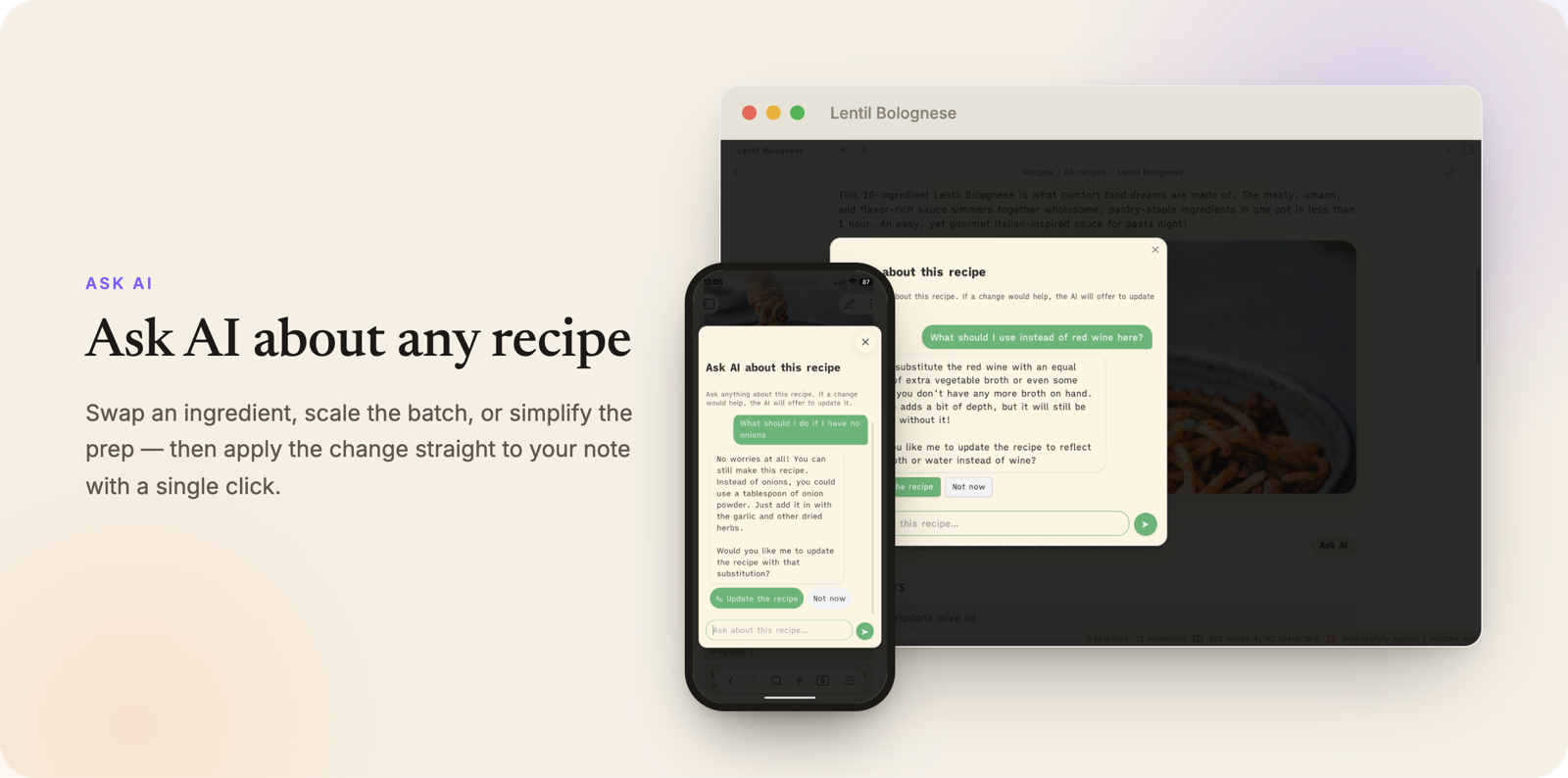
- 🤖 Ask AI for edits: request changes like "make this dairy-free" or "scale to 2 servings" via OpenRouter (API key required).
- 🎨 Customizable templates: full Handlebars support so your notes look exactly how you want.
📥 Installation
From the Obsidian Community Plugins browser
- Open Obsidian → Settings → Community plugins
- Search for Recipe Vault
- Click Install, then Enable
Manual installation
- Download
main.js,manifest.json, andstyles.cssfrom the latest release. - Copy them into your vault at
.obsidian/plugins/recipe-vault/. - Reload Obsidian and enable the plugin under Settings → Community plugins.
🚀 Quick Start
- Click the chef hat icon in the ribbon (or run Import recipe from the command palette).
- Paste a recipe URL and press Enter.
- Your recipe note is created in the configured save folder.
To browse your recipes, click the utensils icon in the ribbon to open the Recipe Gallery.
⌨️ Commands
| Command | What it does |
|---|---|
| Import recipe | Opens a URL prompt and imports a recipe into a new note |
| Open recipe gallery | Opens the visual gallery of your recipe notes |
| Mark recipe as made | Increments times_made and sets last_made to today on the active note |
| Add checked ingredients to shopping list | Sends checked ingredients from the active recipe to your shopping list file |
| Clear checked items from shopping list | Removes completed items from your shopping list |
| Add recipe (manual) | Creates a new recipe note from a title prompt |
| Add recipe from photo | Transcribes a photographed cookbook page or recipe card into a new note (requires an OpenRouter API key) |
| Batch import recipes from URL list | Imports multiple recipes from a list of URLs (one per line) in the active note |
| Rebuild ingredient search index | Rebuilds the in-memory index that powers ingredient search in the gallery |
⚙️ Settings
| Setting | Description |
|---|---|
| Recipe save folder | Where new recipe notes are created. The gallery browses this folder by default, so imports show up automatically |
| Save in currently opened file | Import into the active note instead of creating a new one |
| Save images | Download recipe images into your vault |
| Save images in subdirectories | Create a per-recipe subfolder under the image folder |
| Recipe template | Handlebars template used when creating recipe notes |
| Decode entities | Decodes HTML entities in imported data |
| Proxy fallback for blocked imports | If a page blocks the import (e.g. a 403 from bot protection), retry once through a public read proxy (allorigins.win). Sends the recipe URL to a third party. Off by default |
| Shopping list file | Path to your shopping list note (created automatically if missing) |
| Recipe gallery folder | The folder the Recipe Gallery browses, including its subfolders. Leave blank to follow the Recipe save folder (recommended). Set it only to browse a different folder |
| OpenRouter API key | Required for Ask AI and Add recipe from photo |
| AI model ID | Which model to use for Ask AI and Add recipe from photo (default: google/gemini-2.5-flash-lite) |
| AI request timeout (ms) | Timeout for AI requests (minimum 5000 ms) |
| Custom AI system prompt | Optional override for the built-in Ask AI instructions |
| Recipe title filler words | Controls how imported titles are cleaned up |
| Filter vegan words / gluten-free words | Optionally strips dietary labels from imported recipe titles |
| Debug mode | Enables extra developer logging |
Gallery is empty but you've imported recipes? By default the gallery follows your Recipe save folder, so this shouldn't happen. If it does, you've set an explicit Recipe gallery folder that points somewhere other than where recipes are saved. Either clear that setting (blank = follow the save folder) or point it at your save folder, and your recipes will show up.
📝 Custom Templates
Recipe Vault uses Handlebars for note templates. The plugin assumes the recipe page includes JSON-LD structured data.
Built-in helpers
splitTags converts comma-separated tags into a YAML list for Obsidian frontmatter:
tags:
{{splitTags keywords}}
photoFrontmatter formats image values correctly for frontmatter (wikilink for local files, URL for remote):
photo: "{{photoFrontmatter image}}"
magicTime formats ISO durations and timestamps into readable values:
DateSaved:
{{magicTime}}
CookTime:
{{magicTime cookTime}}
TotalTime:
{{magicTime totalTime}}
DatePublished:
{{magicTime datePublished "dd-mm-yyyy"}}
Example output:
DateSaved: 2024-04-13 20:10
CookTime: 15m
TotalTime: 1h 5m
Default frontmatter fields
cssclasses: recipe-note
tags:
date_added:
meal_type:
author:
cook_time:
url:
photo:
times_made:
last_made:
Tip: Keep frontmatter starting at line 1 of your template. Obsidian requires this to parse it correctly.
🤖 Ask AI
Recipe Vault can use an AI model to suggest edits to a recipe directly in the note preview (for example, "make this dairy-free" or "scale to 2 servings"). This requires an OpenRouter API key, which you can add in plugin settings.
No OpenRouter key yet? Sign up free at openrouter.ai, then grab a key from openrouter.ai/keys. It's pay-as-you-go (no subscription), and the default model costs well under a cent per request. Paste the key into Recipe Vault settings → OpenRouter API key.
The default model is google/gemini-2.5-flash-lite. Any OpenRouter-compatible model ID can be used, and you can optionally override the built-in system prompt in settings.
📸 Add Recipe from Photo
No cookbook page? No problem. Run Add recipe from photo from the command palette to turn a photographed cookbook page or recipe card into a note:
- Capture: take a photo (camera opens automatically on mobile) or choose existing image files. Multiple photos are treated as pages of a single recipe, so multi-page cookbook spreads work in one go.
- Verify: the vision model transcribes the name, ingredients, instructions, time, and yield; edit the result before saving to fix any misreads.
- Photo: the captured photo is attached to the note by default, or choose a different image or none.
This uses the same OpenRouter API key and model as Ask AI, so no separate setup is required. There's no bundled OCR engine; the vision model does the transcription, so it works on mobile too.
From my testing each recipe import from a cookbook costs under $0.001 on average (using Gemini 2.5 Flash Lite).
🔒 Network use and privacy
Recipe Vault is primarily local, but it can make network requests for the following features:
- Recipe URL import: fetches the page you provide to read recipe JSON-LD data. The URL and page response are used only to create recipe notes in your vault.
- Proxy fallback (optional, off by default): if an import is blocked and you enable this setting, the recipe URL is retried once through a public read proxy (allorigins.win), which sends that URL to a third-party service.
- Recipe image download (optional): when enabled, recipe images referenced by imported recipes are downloaded into your vault.
- Ask AI via OpenRouter (optional): sends your prompt plus recipe ingredients/instructions to OpenRouter to generate suggestions. Requests include your configured OpenRouter API key.
- Add recipe from photo via OpenRouter (optional): sends your captured/chosen photo(s) to OpenRouter for transcription. Requests include your configured OpenRouter API key.
No ads are shown, and no telemetry is collected by Recipe Vault itself.
🏷️ Releasing
Releases are automated via GitHub Actions.
- Go to Actions → Tag and Release
- Click Run workflow and choose
patch,minor, ormajor - Review the draft release and publish when ready
🙏 Credits
Recipe Vault is based on obsidian-recipe-grabber by @seethroughdev, which provided the original URL import foundation. This project has since been substantially rewritten and extended with new features.
📄 License
For plugin developers
Search results and similarity scores are powered by semantic analysis of your plugin's README. If your plugin isn't appearing for searches you'd expect, try updating your README to clearly describe your plugin's purpose, features, and use cases.