Remove Empty Folders
approvedby fnya
Easily remove empty folders.
Remove Empty Folders
This is an Obsidian plugin that removes empty folders.
Caution !!
Be sure to back up Obisidan data before running this plugin !!
In the worst case scenario, data may be lost.
How to use
Select the notes you want to merge in the file explorer.
Select the folder(s) in the File Explorer from which you want to remove the empty folder(s).
Right click on the selection and select Remove empty folders.
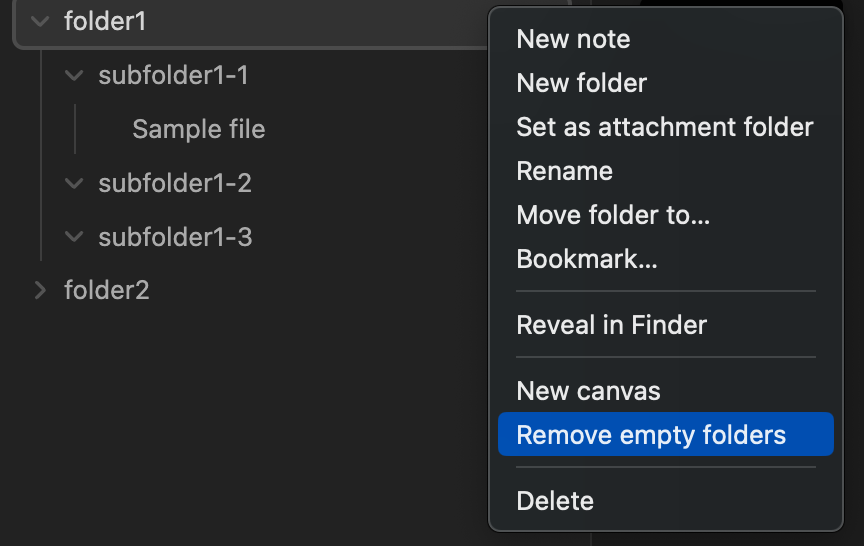
In the image example, subfulder1-2 and subfulder1-3 will be removed.
Limitations
This plugin removes empty folders at the point of execution. Therefore, empty folders as a result of running the plugin will not be removed.
You may need to run the plugin several times to remove all empty folders.
Troubleshootings
In the unlikely event that an unexpected folder is deleted, please check inside the ObsidianValtPath/.trash folder.
The plugin moves the empty folder to the obsidian .trash folder rather than physically removing it, so the contents can be checked and recovered as shown in the following image.

For plugin developers
Search results and similarity scores are powered by semantic analysis of your plugin's README. If your plugin isn't appearing for searches you'd expect, try updating your README to clearly describe your plugin's purpose, features, and use cases.