Remove Empty Assets
approvedby xzhi
中文: 删除附件目录中的空目录,支持桌面端与移动端。附件目录路径支持绝对路径、相对每个笔记目录(./)、相对仓库根三种写法;删除 md 笔记或附件时自动定点扫描,支持定时扫描,删除方式可选回收站或永久删除,中英文界面 | EN: Remove empty folders inside attachment directories, desktop & mobile. Configurable path (absolute, per-note, vault-root), auto-scan on note/attachment deletion, scheduled scan, trash/permanent delete, bilingual UI. - This plugin has not been manually reviewed by Obsidian staff.
Remove Empty Assets
一个用于 Obsidian 的轻量插件:删除附件目录中的空目录,支持桌面端与移动端。如果你喜欢这个项目的话,欢迎给个 star!
A lightweight Obsidian plugin that removes empty folders inside your attachment directories. Works on both desktop and mobile. If you like this project, please give it a star!
📖 项目简介 / Overview
Obsidian 使用过程中,删除笔记或附件后,附件目录里常常残留大量空目录。Remove Empty Assets 会自动清理这些空目录:附件目录路径可配置(绝对路径 / 相对每个笔记目录 / 相对仓库根),支持启动自动清理、删除笔记/附件时定点扫描、定时扫描、命令面板手动触发,并可在系统回收站、.trash 回收文件夹与永久删除之间切换删除方式。
During normal Obsidian use, deleting notes or attachments often leaves a pile of empty folders behind in your attachment directories. Remove Empty Assets cleans them up for you: the attachment directory path is configurable (absolute / relative to each note / relative to the vault root), and cleanup can be triggered automatically on startup, on note or attachment deletion, on a schedule, or manually from the command palette. Deletion can go to the system trash, the .trash folder, or be permanent.
👀 预览 / Preview
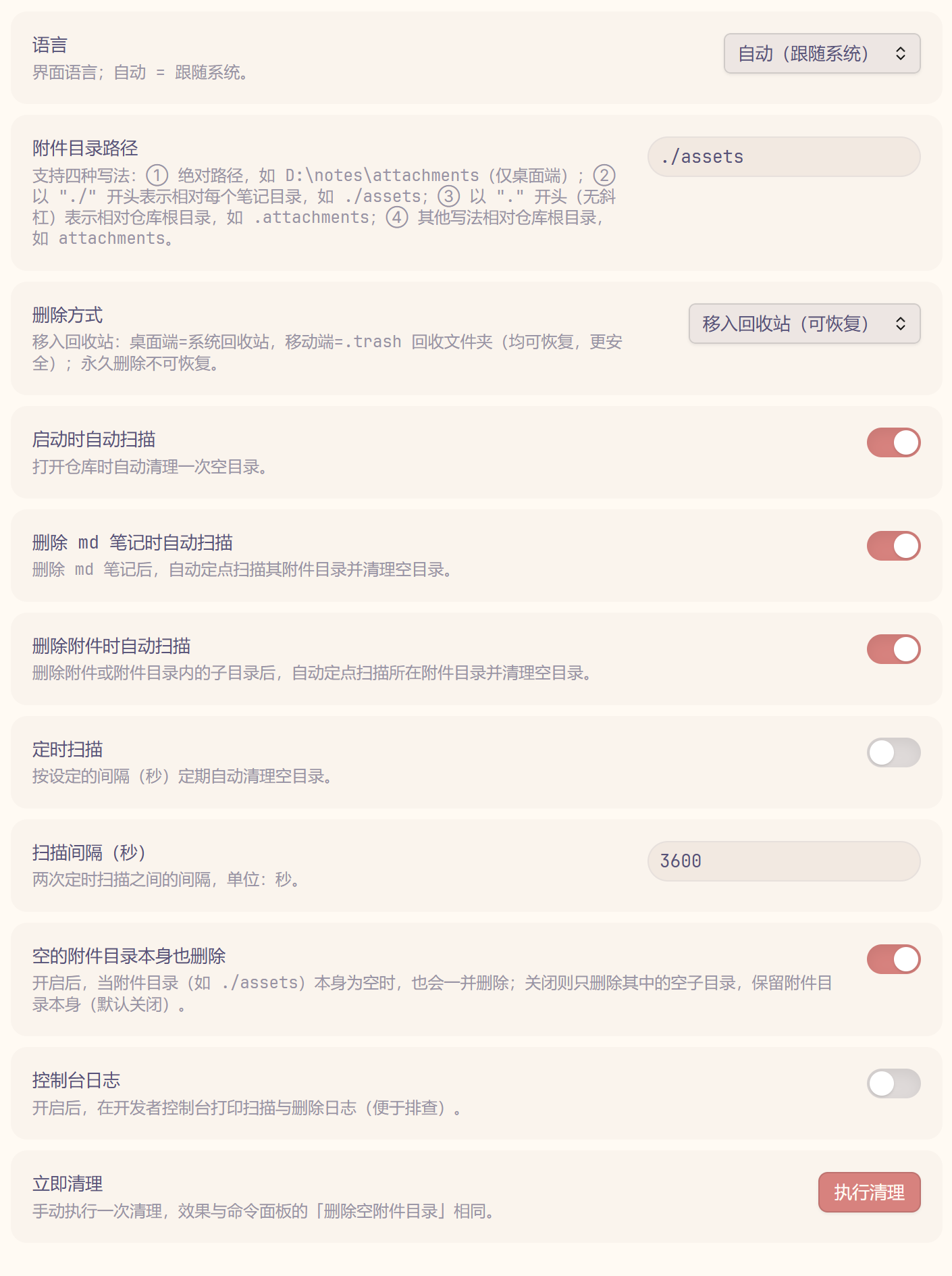
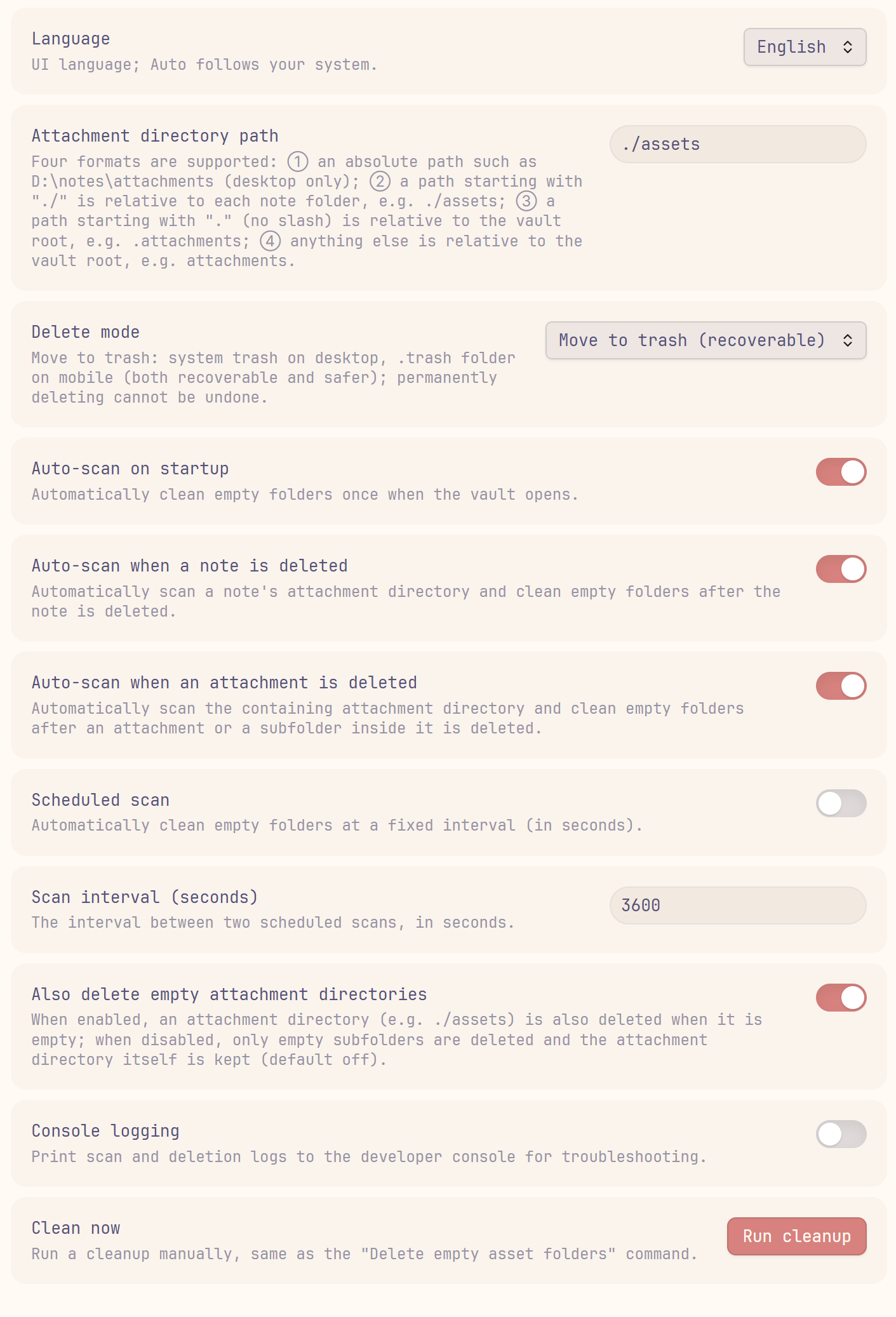
✨ 功能特性 / Features
| 功能 | 描述 | 默认值 |
|---|---|---|
| 跨平台 | 桌面端与移动端通用;移动端使用 .trash 回收文件夹 | 始终启用 |
| 路径可配置 | 支持绝对路径、相对每个笔记目录(./ 开头)、相对仓库根目录三种写法 | .attachments |
| 递归清理 | 先删空子目录,上层因此变空时也一并删除 | 始终启用 |
| 启动自动清理 | 打开仓库时自动清理一次(可关闭) | 开启 |
| 删除笔记自动扫描 | 删除 md 笔记后定点扫描其附件目录 | 开启 |
| 删除附件自动扫描 | 删除附件或附件目录内子目录后定点扫描所在目录 | 开启 |
| 定时扫描 | 按设定间隔(秒)定期自动清理 | 关闭 |
| 删除方式 | 系统回收站 / .trash / 永久删除 | 移入回收站 |
| 中英文界面 | 设置页与提示支持 English / 中文切换 | 自动(跟随系统) |
| 控制台日志 | 打印扫描与删除日志,便于排查 | 关闭 |
| 保留空附件目录 | 是否连同空的附件目录本身一起删除 | 关闭(保留) |
| Feature | Description | Default |
|---|---|---|
| Cross-platform | Works on desktop and mobile; mobile uses the .trash folder | Always on |
| Configurable path | Absolute path, relative to each note (./ prefix), or relative to the vault root | .attachments |
| Recursive cleanup | Empty subfolders are removed first, then emptied parents are removed too | Always on |
| Cleanup on startup | Runs once when the vault opens (can be disabled) | On |
| Scan on note deletion | Scans a note's attachment directory when the note is deleted | On |
| Scan on attachment deletion | Scans the containing directory when an attachment or subfolder is deleted | On |
| Scheduled scan | Automatically cleans at a configurable interval (seconds) | Off |
| Delete mode | System trash / .trash / permanent delete | Move to trash |
| Bilingual UI | Settings and notices in English / Chinese | Auto (follow system) |
| Console logging | Prints scan and deletion logs for troubleshooting | Off |
| Keep empty attachment dirs | Whether to also delete the empty attachment directory itself | Off (keep) |
📦 安装 / Installation
从 Obsidian 社区插件安装 / From Obsidian Community Plugins
- 打开 Obsidian → 设置 → 第三方插件。
- 点击 浏览,搜索 Remove Empty Assets。
- 点击 安装,然后 启用。
- Open Obsidian → Settings → Community plugins.
- Click Browse and search for Remove Empty Assets.
- Click Install, then Enable.
从 GitHub Releases 安装 / From GitHub Releases
- 从最新 release 下载
main.js、styles.css和manifest.json。 - 放入
<vault>/.obsidian/plugins/remove-empty-assets。 - 重启 Obsidian,在 设置 → 第三方插件 中启用 Remove Empty Assets。
- Download
main.js,styles.css, andmanifest.jsonfrom the latest release. - Place them in
<vault>/.obsidian/plugins/remove-empty-assets. - Restart Obsidian, then enable Remove Empty Assets from Settings → Community plugins.
🚀 使用 / Usage
- 在设置中填写附件目录路径(例如
./assets),选择删除方式,然后保存。 - 删除 md 笔记或附件时,插件会自动定点扫描并清理产生的空目录;也可使用命令面板的「删除空附件目录」手动触发。
- 在设置面板点击「执行清理」可立即清理一次。
- Fill in the attachment directory path (e.g.
./assets) and choose a delete mode in the settings, then save. - When you delete a note or an attachment, the plugin automatically scans and cleans up the resulting empty folders; you can also trigger it manually with the Delete empty asset folders command.
- Click Run cleanup in the settings tab to clean immediately.
⚙️ 设置说明 / Settings
| 设置 | 说明 |
|---|---|
| 附件目录路径 | ① 绝对路径(仅桌面端);② ./ 开头=相对每个笔记目录;③ .attachments 等=相对仓库根 |
| 删除方式 | 回收站:桌面端=系统回收站、移动端=.trash;或永久删除 |
| 启动时自动扫描 | 打开仓库时自动清理一次 |
| 删除 md 笔记时自动扫描 | 删除笔记后定点扫描其附件目录 |
| 删除附件时自动扫描 | 删除附件/子目录后定点扫描所在附件目录 |
| 定时扫描 | 按间隔(秒)定期自动清理 |
| 扫描间隔(秒) | 两次定时扫描的间隔 |
| 空的附件目录本身也删除 | 附件目录本身为空时是否一并删除 |
| 控制台日志 | 是否在控制台打印扫描与删除日志 |
| 语言 | 界面语言;自动=跟随系统 |
| 立即清理 | 手动执行一次清理 |
| Setting | Description |
|---|---|
| Attachment directory path | ① absolute path (desktop only); ② ./ prefix = relative to each note; ③ .attachments etc. = relative to the vault root |
| Delete mode | Trash: system trash on desktop / .trash on mobile; or permanent delete |
| Auto-scan on startup | Runs a cleanup once when the vault opens |
| Auto-scan when a note is deleted | Scans the note's attachment directory after deletion |
| Auto-scan when an attachment is deleted | Scans the containing directory after an attachment/subfolder is deleted |
| Scheduled scan | Periodically cleans at an interval (seconds) |
| Scan interval (seconds) | Interval between two scheduled scans |
| Also delete empty attachment directories | Whether to delete the attachment directory itself when empty |
| Console logging | Print scan and deletion logs to the console |
| Language | UI language; Auto follows your system |
| Clean now | Run a cleanup immediately |
🤝 参与贡献 / Contributing
欢迎提交 issue 与 PR。/ Issues and pull requests are welcome.
📄 许可证 / License
💖 支持 / Support
如果你喜欢这个插件,并对我表示感谢,你可以在这里请我喝一杯奶茶!
If you enjoy this plugin and want to say thanks, you can buy me a bubble tea!
微信 / WeChat Pay | 微信赞赏 / WeChat Tip | 支付宝 / Alipay |
For plugin developers
Search results and similarity scores are powered by semantic analysis of your plugin's README. If your plugin isn't appearing for searches you'd expect, try updating your README to clearly describe your plugin's purpose, features, and use cases.