Better Paste
approvedby Johan Sanneblad
Removes tracking from links, fetches page titles, and cleans up pasted text from AI chats, terminals and PDF documents. - This plugin has not been manually reviewed by Obsidian staff.
Read in your language: English • العربية • Deutsch • Español • فارسی • Français • Bahasa Indonesia • Italiano • Nederlands • Polski • Português • Português (Brasil) • Русский • ไทย • Türkçe • Українська • Tiếng Việt • 日本語 • 한국어 • 中文简体 • 中文繁體
Stop fixing formatting after every paste! Better Paste finally lets you copy images from Safari to Obsidian, it strips tracking parameters from URLs, fetches page titles, and cleans up AI-generated text. Your own regex snippets run on every paste too. Just paste, and the plugin handles the rest.
If you love using Better Paste, please consider ☕️ Buying me a coffee or Sponsor on GitHub ❤️.
1 Installation
- Install Obsidian from obsidian.md
- Enable community plugins under Settings, Community plugins
- Install Better Paste: click Browse, search for "Better Paste", then Install
2 What it does
Ten examples. Some run on every paste, others are commands you run when you need them.
2.1 Custom snippets
Write your own find and replace rules with regex and they run on every paste. This one removes Perplexity's citation markers:
The fix shipped last week[1][2] and rollout begins today[3].
becomes
The fix shipped last week and rollout begins today.
Two snippets come with the plugin, ready to edit or switch off: Remove bold from headings and Collapse blank lines. More to import are on the wiki, like converting ChatGPT math. How a rule is written is in section 3.5.
2.2 Images from Safari
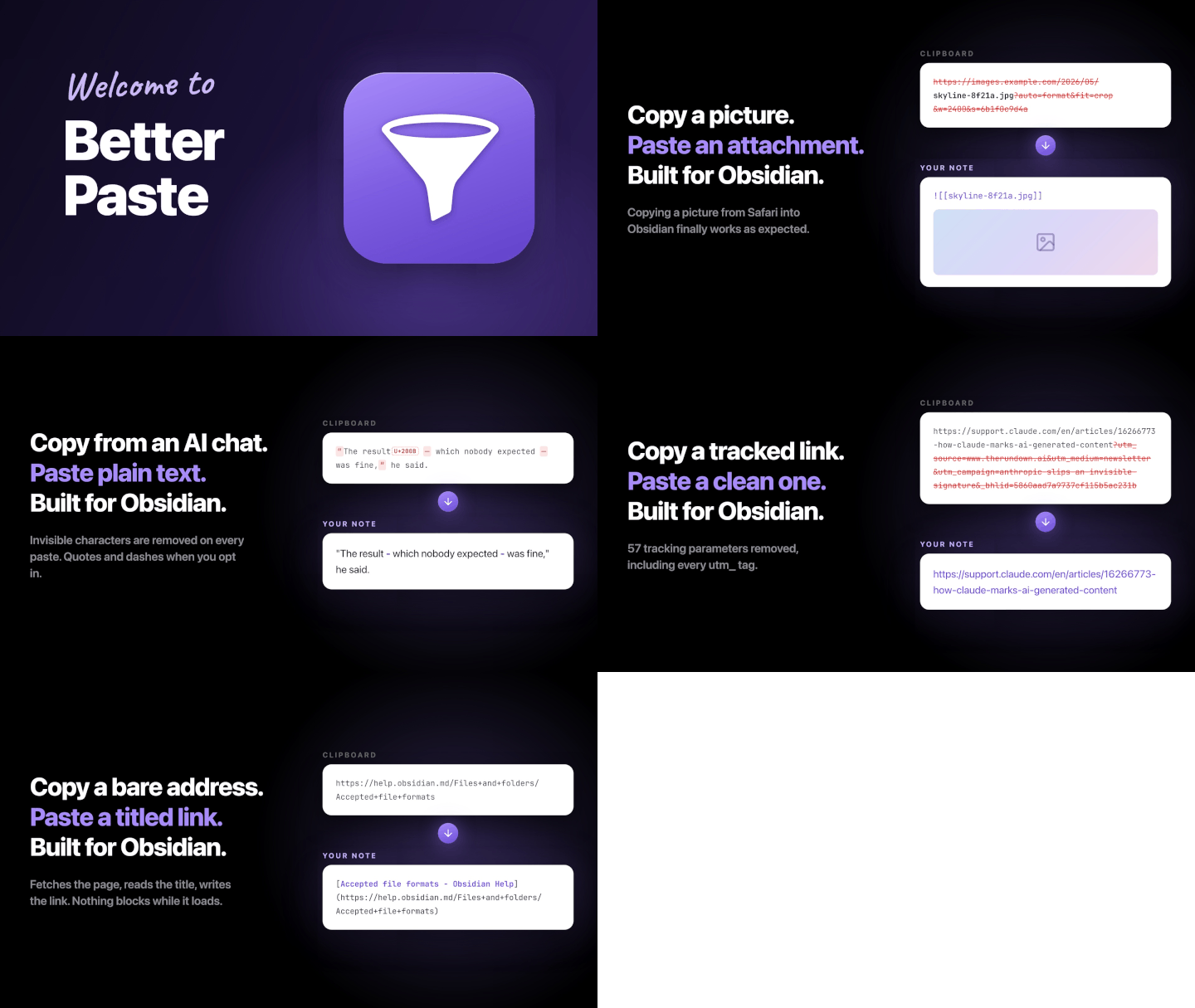
Use Copy image in Safari and the clipboard holds two versions: the picture itself and its web address. Obsidian pastes the address, but you copied a picture and expect a picture. Better Paste pastes the picture, saved into your vault:

becomes
![[skyline-8f21a.jpg]]
2.3 Tracking parameters
Links you copy from newsletters and social apps drag a lot of tracking junk along. Better Paste cleans it off:
https://www.theverge.com/2026/1/9/story?utm_source=newsletter&utm_medium=email&fbclid=IwAR2x9
becomes
https://www.theverge.com/2026/1/9/story
2.4 Link titles
Paste a bare URL and it turns into a Markdown link with the real page title:
https://obsidian.md
becomes
[Obsidian - Sharpen your thinking](https://obsidian.md)
The URL is pasted right away and updates when the title arrives, so nothing blocks.
A list of links works too. Paste several URLs, each on its own line, and every one gets its title.
Fetched titles often end with the site name, like · GitHub or - YouTube. The included Remove site names from titles link snippet trims those, and you can add your own rules, see section 3.5.
Reddit, YouTube, TikTok and Loom block ordinary page lookups, so their titles are fetched from each site's own embed service instead, and Stack Overflow and the other Stack Exchange sites through the Stack Exchange API. Dropbox share links get the file or folder name as their title, and Obsidian URLs get the note name.
2.5 Nested lists
Copy a nested list, paste it deep inside another list, and the old indentation comes along, breaking the tree apart. Better Paste reindents the whole list to fit the item you paste on. This:
- [ ] Trip planning
    - [ ] Book hotel
    - [ ] Pack
        - [ ] Chargers
pasted onto the empty item in
- Projects
    - Summer
        -
becomes
- Projects
    - Summer
        - [ ] Trip planning
            - [ ] Book hotel
            - [ ] Pack
                - [ ] Chargers
It works with bullets, numbered lists and checkboxes, however deep the destination is, and whether the copy uses tabs or spaces. A paste that is not purely a list, or does not land on a list item, comes through exactly as before. Rich copies from web pages go through Obsidian's HTML conversion instead.
2.6 Block quotes
Paste several paragraphs into a block quote and only the first line stays quoted, an Obsidian issue for years. Better Paste quotes every pasted line, so the whole paste stays inside the quote. This:
We started in a garage.

Two years later we were forty people.
pasted into the callout
> [!quote] From the interview
>
becomes
> [!quote] From the interview
> We started in a garage.
>
> Two years later we were forty people.
It works in plain block quotes and callouts alike.
2.7 Terminal output
Terminals break long lines at the window edge. Escape codes are stripped on every paste, and when you select the pasted output and run Clean up terminal output, the lines are joined back together:
npm warn deprecated inflight@1.0.6: This module is not supported and leaks memory. Do
  not use it. Check out lru-cache instead.
becomes
npm warn deprecated inflight@1.0.6: This module is not supported and leaks memory. Do not use it. Check out lru-cache instead.
2.8 Text from PDFs
PDFs wrap paragraphs into short lines and break words with hyphens. Select the pasted text and run Clean up PDF text:
The findings suggest that long-term expo-
sure has a measurable effect on the out-
come in both groups.
becomes
The findings suggest that long-term exposure has a measurable effect on the outcome in both groups.
Ligatures like fi become real letters too, so search finds the words again.
The command opens a dialog with a preview, so you see the result before it lands. Two switches handle what no rule can guess: remove page numbers, or join everything into one paragraph. Your picks are remembered for the next time.
2.9 Cleanup of AI-generated text
Chatbot text comes with curly quotes, long dashes and invisible characters. The invisible ones are removed on every paste, and with Quotes and Dashes turned on the rest becomes plain text too:
“It works,” she said — finally.
becomes
"It works," she said - finally.
2.10 Commas and quotes
Prefer your commas outside the quotation marks? Select the text and run Move commas outside quotes:
She called it "finished," then left.
becomes
She called it "finished", then left.
Move commas inside quotes goes the other way.
3 Settings
Here are the settings you will actually look for.
3.1 Behavior
- Clean up every paste: the master switch. Turn it off to use only the commands, or to clean only notes marked with
bp: true(see section 4). - Note property (default
bp): the per-note switch from section 4. Rename it if it collides with something in your vault, or leave it blank to turn it off.
3.2 Attachments
- Web images: what happens when a paste links to a picture on the web, as a bare image URL or inside copied web content. Link with preview, the default, pastes an embed that shows the picture straight from the web. Download with preview saves a copy into your vault, wherever your attachment settings point, named after the source file, so no more
image.png. Do nothing leaves image pastes to Obsidian. An image copied in the browser carries the actual picture on the clipboard, so it is saved into your vault in both Link with preview and Download with preview (see example 2.2). - Pasted files: what happens when you paste or drop files from your device, like PDFs and screenshots. Do nothing, the default, leaves the paste to Obsidian, preview included. Link without preview inserts a plain link instead, so
![[Document.pdf]]becomes[[Document.pdf]]. The files are still saved using your Obsidian attachment settings. - File names: add your own format, like
{{name}}-YYYY-MM-DD. You can also use{{noteName}}for the note name,{{property:xyz}}for any frontmatter property, and{{counter}}or{{counter:2}}for a number that counts up. A screenshot has no source name, so it getsPasted imageplus a timestamp, the same name Obsidian gives it. WithattachName: demoin a note and the format{{property:attachName}}-{{counter}}, pasted screenshots becomedemo-1.png,demo-2.png,demo-3.png. The format applies to every image Better Paste saves, screenshots included. - Size and style: give every saved image a width, a class, or both, so a paste comes out as
![[photo.jpg#invert|400]]. Define your own comma-separated lists like200, 400, 600andinvert, invertW, then apply one value everywhere or pick Ask on every paste to choose in a small dialog each time (Enter applies, and your last pick is preselected). Classes like#invertare defined by themes and CSS snippets, for example to invert an image in dark mode. The Image width property (defaultimage-width) sets a per-note width, see section 4.
Alt text survives, and if a download fails the original link stays in your note. Images over 50 MB or slower than 30 seconds are left as links. A note with its own image-width property (see section 4) overrides the size setting.
3.3 Links
- Fetch titles for pasted links: on by default, see example 2.4 above.
- Clean pasted links: removes common trackers everywhere, plus known clutter from sites such as YouTube, Google and Amazon.
- Link removals: add parameter names you also want removed everywhere or on specific sites. A live tester shows the result before you paste:
https://www.youtube.com/watch?v=dQw4w9WgXcQ&list=PLxAbC123&si=8f2a1c&utm_source=share&t=42
https://www.amazon.com/dp/B0CHX1W1XY/ref=sr_1_3?crid=2ABCDE&keywords=usb+hub&qid=1735689600&sr=8-3
https://www.google.co.uk/search?q=obsidian+plugins&client=safari&sca_esv=9f1&sourceid=chrome
becomes
https://www.youtube.com/watch?v=dQw4w9WgXcQ&list=PLxAbC123&t=42
https://www.amazon.com/dp/B0CHX1W1XY/ref=sr_1_3?keywords=usb+hub
https://www.google.co.uk/search?q=obsidian+plugins
A removal looks like this:
fbclid
mine.example | source, ref
fbclid removes that parameter on every site. mine.example | source, ref removes source and ref on mine.example and its subdomains, while every other parameter stays. And google.* matches google.com and google.se alike. You can see every built-in removal, and updates to that file arrive with plugin releases. Suggest your removals opens betterpaste.md with your list filled in. Review it there, then open a draft in your email app. Cryptographically signed links stay unchanged. Shared files and gift articles keep their access parameters.
Start a line with ! to turn off the built-in removals for one site:
!youtube.com
3.4 Text processing
- Trim surrounding whitespace: removes blank lines and stray spaces around the paste. Blank lines in the middle stay.
- Invisible characters: removes zero-width spaces and turns non-breaking spaces into normal ones. Emoji, Persian and Arabic joiners, and CJK spacing are left alone.
- Quotes: turns curly quotes and apostrophes into straight ones, so
“don’t”becomes"don't". Off by default, so your typography is kept until you opt in. - Dashes: turns en and em dashes into hyphens. Also off by default. Quotes and dashes inside code, links and note names are left alone.
3.5 Custom processing
- Text snippets: your own regex rules, run on the whole paste after the built-in rules. Each snippet has its own switch, and they run in list order, so drag to reorder. Remove bold from headings and Collapse blank lines come with the plugin.
- Link snippets: the same kind of rules, run on each pasted link once its title has arrived. A rule sees the finished Markdown link, and the address stays unchanged. Remove site names from titles comes with the plugin and trims endings like
· GitHuband- YouTube. - A rule is one JavaScript regex replacement per line, in the form
s/find/replace/flags. Lines starting with#are comments:
# Remove Perplexity citations
s/\[\d+\]//g
- Try it: type sample text and watch every enabled snippet run on it, live. Link snippets have their own tester that takes a Markdown link. The snippet editor has the same preview for the snippet you are writing.
- Import snippets and Export snippets: move snippets between vaults through the clipboard. Ready-made ones are on the wiki; copy one there and paste it in.
- Open regex playground: opens regex101 set up the way the rules work, for building and testing a find pattern.
3.6 Structure
- Keep list nesting on paste: on by default, see example 2.5 above.
- Continue block quotes on paste: also on by default, see example 2.6 above.
Structure rules run after the text rules, because they read the note around the cursor and reshape the cleaned text to fit it.
4 Per-note control
Add bp: false to a note's frontmatter and Better Paste leaves that note alone. Perfect for logs and transcripts:
---
bp: false
---
It works the other way too: bp: true cleans a note even when Clean up every paste is off.
| Clean up every paste | No bp property | bp: true | bp: false |
|---|---|---|---|
| On | cleaned | cleaned | left alone |
| Off | left alone | cleaned | left alone |
And image-width sets the width of images pasted into that note:
---
image-width: 400
---
Images come out as ![[picture.png|400]], Obsidian's own size syntax. 400x300 works too.
5 Commands
Nine commands, ready for your own hotkeys (Settings, Hotkeys). The ids are for URI schemes and plugins like Commander, prefixed better-paste:.
- Paste (
paste): paste through the rules, even in a note that opted out. - Paste as plain text (
paste-raw): paste the clipboard's plain text without running any rules. - Clean up selection (
selection-clean): run the text rules on selected text. - Clean up terminal output (
selection-clean-terminal): rejoin wrapped lines, remove leading indentation and turn•bullets into Markdown lists in the selection. On demand, because only you know the text came from a terminal. - Clean up PDF text (
selection-clean-pdf): rejoin the short lines a PDF layout makes, repair words broken by hyphens and expand ligatures in the selection. A dialog previews the result and offers page number and paragraph options. - Run snippet (
selection-run-snippet): pick a snippet and apply it to the selection, even one that is switched off for pasting. - Move commas inside quotes (
selection-commas-inside) and Move commas outside quotes (selection-commas-outside): comma style next to closing quotes, applied to the selection. - Toggle automatic cleanup (
toggle-cleanup): flip the master switch.
6 Good to know
- Pasted text inside code blocks, inline code or frontmatter stays unchanged, and fenced code inside a paste comes through untouched. One exception: with Web images set to Download with preview, pasting an image address into an empty property in source mode saves the image into your vault with the property set to
"[[skyline-8f21a.jpg]]". Obsidian Bases can show that as a cover image, and a local copy works offline. - Screenshots are saved by Better Paste, with the same name Obsidian would give them unless you set your own file name format.
- Rich content (HTML) is converted to Markdown by Obsidian first; Better Paste then cleans the links and applies the Web images setting to the pictures in the result.
7 Languages
Better Paste speaks 21 languages: Arabic, Chinese (Simplified), Chinese (Traditional), Dutch, English, French, German, Indonesian, Italian, Japanese, Korean, Persian, Polish, Portuguese, Portuguese (Brazil), Russian, Spanish, Thai, Turkish, Ukrainian and Vietnamese. It follows the language Obsidian is set to (switching takes effect after a restart).
8 Privacy
Better Paste runs locally and makes network requests in exactly three cases:
- downloading an image you pasted
- fetching the title of a link you pasted (turn off Fetch titles for pasted links to stop this)
- loading the artwork for the welcome and What's new dialogs from GitHub
No telemetry, no analytics, and nothing is ever uploaded. Settings live in .obsidian/plugins/better-paste/data.json and stay in your vault.
Every release is checked with TypeScript, ESLint with the official Obsidian ESLint plugin, Stylelint, Prettier, Vitest and a dead code check. Warnings fail the build.
9 About
I'm Johan Sanneblad. I have a PhD in Software Development and have worked with innovation development for companies like Apple, Electronic Arts, Google, Microsoft, Lego, SKF, Volvo Cars, Volvo Group and Yamaha. I also build Notebook Navigator, the most popular file explorer plugin for Obsidian.
Feel free to connect with me on LinkedIn!
10 Questions or issues?
Open an issue on the GitHub repository. For paste bugs, the most useful thing you can include is what was on your clipboard: open https://dynalist.io/clipboard in the app you copied from, paste there, and include what it prints.
Pull requests are not accepted; contribute ideas as feature requests instead. See CONTRIBUTING.md for details.
11 License
GNU General Public License v3.0. See LICENSE.
For plugin developers
Search results and similarity scores are powered by semantic analysis of your plugin's README. If your plugin isn't appearing for searches you'd expect, try updating your README to clearly describe your plugin's purpose, features, and use cases.