Secret Placeholders
approvedby Liam
Embed password-manager secrets in notes as placeholders so the .md never contains the actual credential. Supports OpenBao/Vault, 1Password Connect, and Bitwarden/Vaultwarden. - This plugin has not been manually reviewed by Obsidian staff.
Secret Placeholders
Keep credentials out of your Obsidian notes. A note holds only a
placeholder like {{bao:kv/personal/github#token}}; the real value is
fetched from your password manager and shown inline only inside
Obsidian — never written to the .md file.
Demo
Autocomplete — type {{, pick a provider, fuzzy-search your secrets.

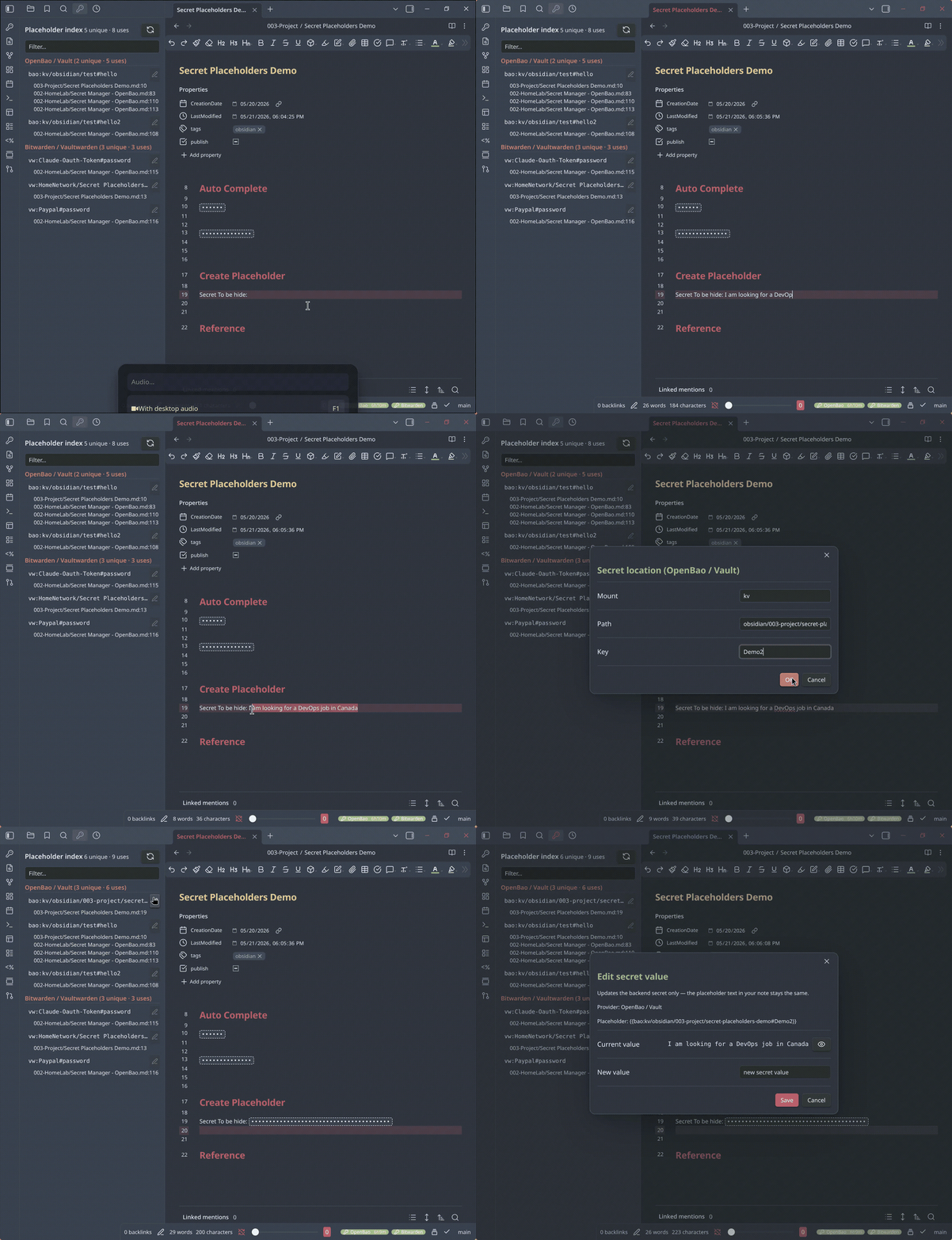
Save a selection as a new secret — the value goes to your password manager, the note keeps only a placeholder.
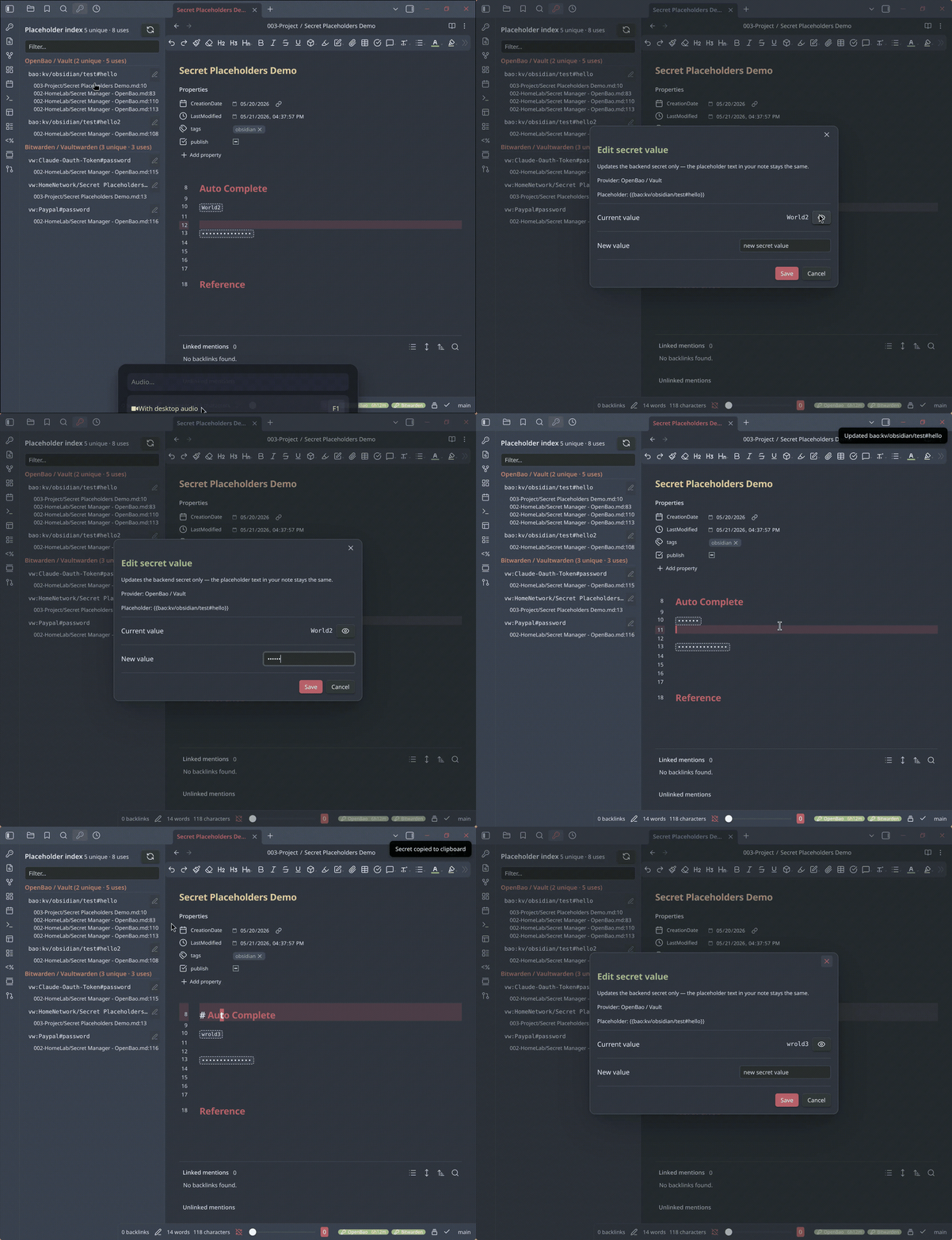
Edit a secret's value — the backend updates; the note is untouched.
Why
LLM agents that manage your vault — reading, refactoring, summarising — are useful right up until the vault holds credentials. Keeping secrets in a separate password manager helps, but then notes that refer to a secret are half-broken: you can't see the value while reading or editing.
Secret Placeholders closes that loop. The note keeps a small placeholder; the plugin resolves it to the live value at render time.
| Who / what | Sees |
|---|---|
| You, in Obsidian | the real secret value |
| An LLM agent reading the vault | only {{bao:...}} — a path, not a value |
| Git history, backups, sync | only the placeholder |
The secret value lives in your password manager; the plugin only borrows it into memory while Obsidian displays the note. Rendering is strictly display-only — it never writes to the vault.
Supported backends
| Backend | Auth |
|---|---|
| OpenBao / HashiCorp Vault | Token, or OIDC browser login (desktop) |
| 1Password Connect | Connect token (self-hosted Connect server) |
| Vaultwarden / Bitwarden self-hosted | Master password |
| Bitwarden cloud | Master password |
Each backend has its own placeholder prefix — bao:, 1p:, vw:.
Enable any subset; disabled backends contribute no UI.
Install
Community store: Settings → Community plugins → Browse → search "Secret Placeholders" → Install → Enable.
Manual: download manifest.json, main.js, styles.css from the
latest release
into <vault>/.obsidian/plugins/secret-placeholders/, then enable it in
Settings → Community plugins.
Quick start
- Open Settings → Secret Placeholders. Under Providers, turn off any backend you don't use.
- Configure the one you do use and log in — see provider setup. The status-bar chip lights up when login succeeds.
- In a note, type
{{and pause — autocomplete offers your providers, then your secrets. - The placeholder renders inline. Single-click it to copy the value.
- To capture a new secret: select a credential in a note, right-click → Save selection to .
Documentation
- Provider setup — OpenBao, 1Password Connect, Bitwarden/Vaultwarden, and the placeholder syntax for each.
- Usage & features — masking, click actions, autocomplete, the right-click menu, the sidebar index, commands, and the settings reference.
- Security & troubleshooting — the security model, what data goes where, known limitations, and a troubleshooting table.
Security at a glance
The .md file never contains the secret — only the placeholder. Resolved
values stay in memory. Tokens are in memory by default; the optional
"remember on device" setting encrypts them with a passphrase. The plugin
talks only to the server URLs you configure — no telemetry, no
third-party endpoints. Full detail in
docs/security.md.
Contributing
A backend is a single module implementing the Provider interface in
src/providers/types.ts. Register it in src/main.ts; the OpenBao
provider in src/providers/openbao/ is a compact reference. The
rendering, autocomplete, sidebar, and command code are all
provider-agnostic. Build with npm run build, type-check with
npm run typecheck.
License
MIT — see LICENSE.
For plugin developers
Search results and similarity scores are powered by semantic analysis of your plugin's README. If your plugin isn't appearing for searches you'd expect, try updating your README to clearly describe your plugin's purpose, features, and use cases.