by miyavis
Local-first knowledge dashboard with heatmaps, quick memos, weekly reviews, and agent knowledge deposition via MCP.
Sediment



Local, controllable AI write auditing for your knowledge vault. Every write an agent makes into your notes can be approved, rolled back, and traced.
Why Sediment
- You let an agent write into your vault — but a chat diff vanishes on restart, doesn't record shell changes, and never tells the agent you revoked something.
- Sediment turns each write into a durable local record: frozen preview, hash-bound approval, snapshot, timestamped decision, and a searchable timeline.
- It is the audit layer underneath the agent you already use — not another chat client or search engine. No telemetry, no cloud, no shell.
The problem
You let an agent write into your Obsidian vault. Then the hard questions start:
- What exactly did it change, and was it what you approved?
- If it edited a note after you reviewed the diff, can you still roll back?
- Six weeks later, can you answer who wrote what, when, and under which decision?
Chat diffs answer the first question for the current session. They do not survive a restart, do not record shell-level changes, and do not tell the agent that you revoked something. Sediment is built for the second and third questions.
The audit loop
- Gate — path denylist/allowlist and per-operation switches apply in every work mode.
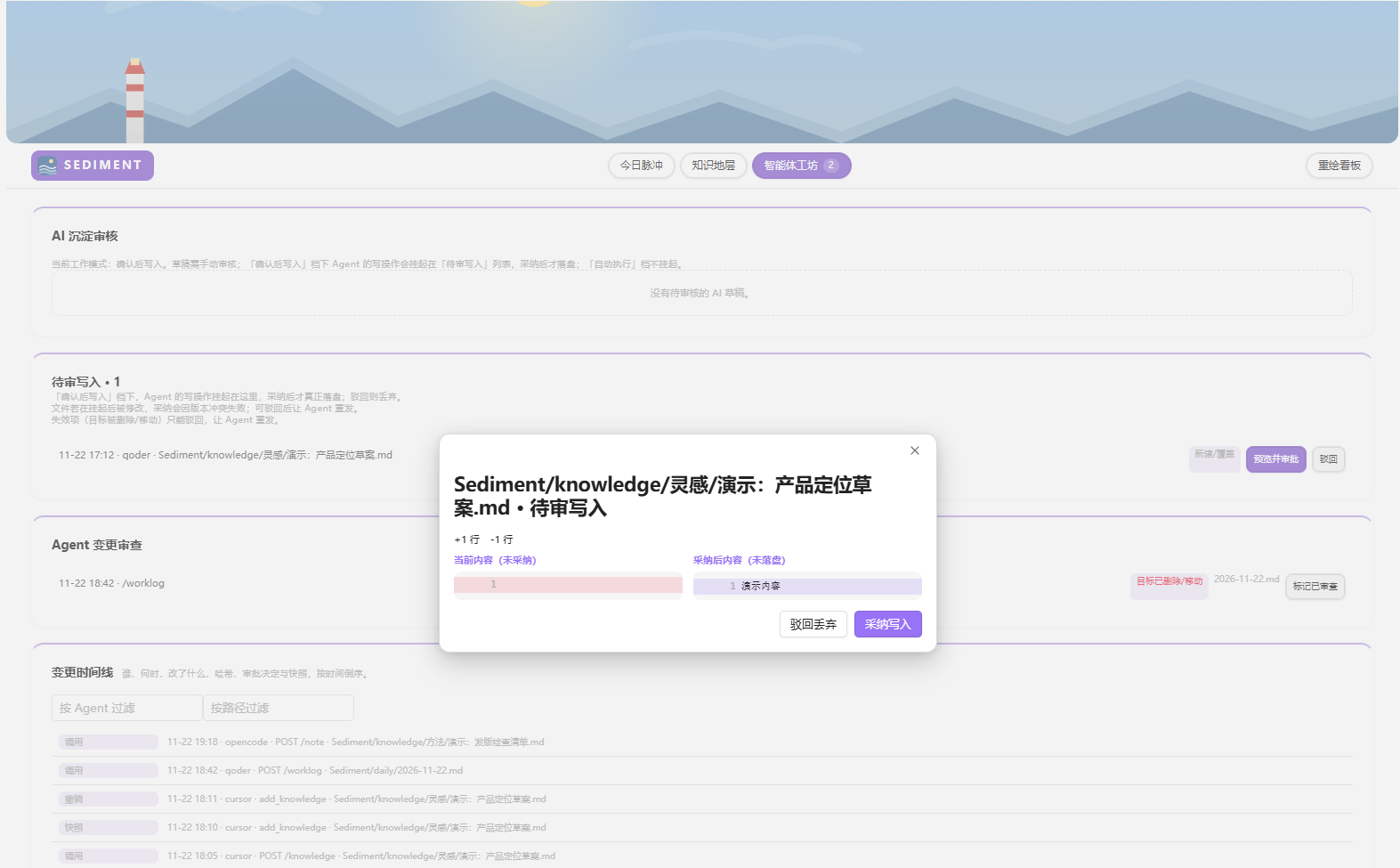
- Hold — in Confirm before write mode, the request is frozen: original request,
before/afterpreview, and a SHA-256 hash ofbefore. Nothing lands yet. - Verify — at approval, the target is re-read. If it was modified or created in the meantime, approval is refused (
CONTENT_CHANGED). This closes the "approve A, write B" race. - Decide — accept (replay through the same guarded write path) or reject (drop the pending call and its audit row).
- Record — a snapshot, a timestamped review decision, and a timeline event persist locally. Bridge submissions also write
decisions/<id>.jsonfor the agent to poll.
The result is a chain you can inspect: MCP call → pending write → approval → snapshot → change timeline.
Why not the alternatives
| Tool | What it does | Write governance |
|---|---|---|
| Copilot for Obsidian | Agent container, chat, autocomplete | Permission tiers and a session diff — its own docs call it a review aid, not a complete audit: shell changes are not recorded, revoke is not sent to the agent, diff is lost on restart |
| MCP bridges (mcp-obsidian, local-rest-api) | Vault access over MCP/HTTP | Auth and optimistic locking, but no approval queue, diff, rollback, or provenance |
| Smart Connections / Tracker / Heatmap Calendar | Semantic search and statistics | Read-only; no write path |
| Notion AI / Capacities | Cloud AI knowledge work | Approval previews exist, but no local model and no vault-level audit trail |
Sediment does not try to be a chat client or a search engine. It is the write-audit layer underneath whichever agent you already use.
What you get
- Pending writes with a real diff — preview, accept, or reject; snapshots give every accepted change a rollback point.
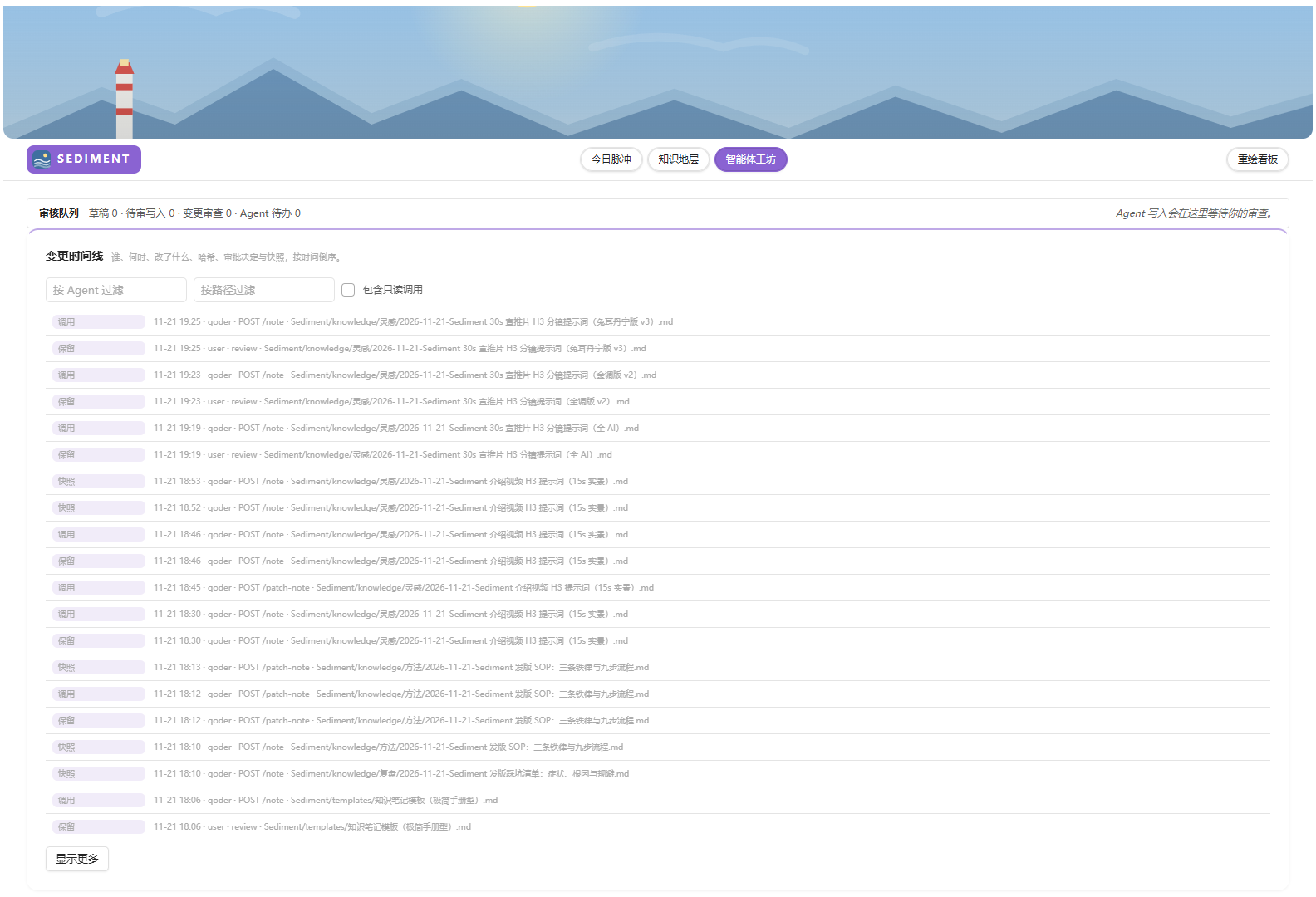
- Change timeline — one searchable stream of calls, pending writes, decisions and snapshots, filterable by agent and path.
- Audit export — JSON or CSV bundle with paths replaced by short hashes by default; opt in to full paths when needed.
- 14 MCP tools — context, search, notes, memos, deposition, tasks, change review, and the new read-only
get_change_timeline. - Per-client call status — cumulative, 24 h and 7 d counts, last call and tool, live badge when active.
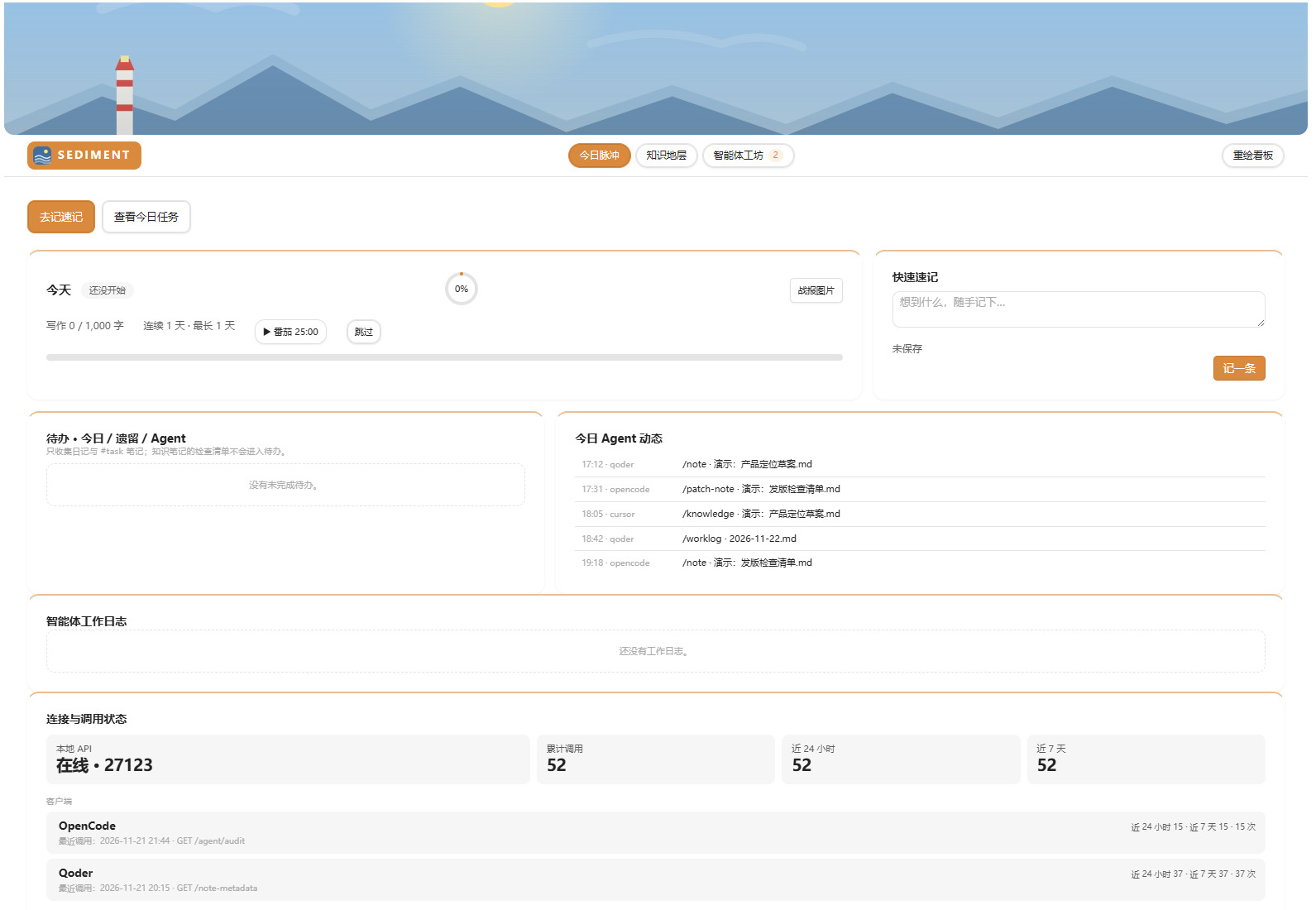
Supporting views exist to explain and feed the audit story: writing statistics, heatmaps, contribution trends, knowledge strata, quick memos, weekly reviews, task scanning and health checks. Focus-time tracking lives in Knowledge Strata as the data source for the human-vs-AI stratification; it is on by default and can be disabled in settings. Poster export and art-style switching are experimental and off by default.
Quick start
- Install — BRAT: add
miyavis/Sedimentas a beta plugin. Manual: copymain.js,manifest.jsonandstyles.cssfrom Releases into<vault>/.obsidian/plugins/sediment/. - Set the work mode to Confirm before write in settings. Enable "Snapshot before changes" so accepted writes have a rollback point. Settings default to Simple mode showing only the audit essentials; switch to All settings for weights, search enhancement and experimental options.
- Connect an agent — enable the local Agent API, keep the generated token, then use "Configure agent clients" or copy a snippet from
examples/. - Make a write — the agent gets
pending: true; you review it in the workshop; the result appears in the timeline.
One-click client setup supports 14 clients: OpenCode, Qoder (+ CN), Claude Desktop, Claude Code, Cursor, Cline (CLI + VS Code), Gemini CLI, Windsurf (+ Next), OpenAI Codex (TOML), Hermes Agent (YAML), and VS Code / Copilot. Detected clients are listed first; supported-but-not-installed clients are shown in a collapsed section so you always see the full support range.
Security, in brief
- The local API listens on
127.0.0.1only, requires a Bearer token, and ignores?token=. .obsidian/and.git/are always blocked; blocked folders and tags cannot be read, written, or searched.- The plugin never executes shell commands. Node
fsis used only for MCP client config, the bundled bridge script, and note snapshots. - No telemetry, cloud upload, self-update, or advertising.
- An agent with direct filesystem access outside Sediment can still edit notes — this is a workflow aid, not a sandbox. See
examples/SECURE-AGENT-SETUP.mdfor the full threat model and recommended settings.
Agent integration
Claude Code / OpenCode / Qoder / Cursor / Claude Desktop
        │ MCP stdio
        ▼
mcp-server/index.mjs
        │ HTTP + Bearer token
        ▼
127.0.0.1:27123
Public MCP surface (14 task-oriented tools, AGENT_API_VERSION = 1; read-only additions do not change it):
- Context:
get_daily_context,get_active_context - Search and read:
search_notes,list_notes,read_note - Write:
write_note,patch_note - Deposition:
add_memo,add_knowledge,record_work_log - Tasks:
manage_tasks - Changes:
manage_changes - Audit:
get_change_timeline - Read-only workspace state:
get_workspace_state
See examples/SECURE-AGENT-SETUP.md, the Claude Code skill in examples/claude-code/, and the OpenCode / Cursor snippets in examples/. Recommended: copy examples/AGENTS.md into your vault root as AGENTS.md. Coding agents (Codex, Claude Code, Cursor, …) read it automatically and will then write through MCP, wait for human approval in confirm mode, and keep tokens out of notes — instead of editing the vault with raw filesystem access.
File bridge (non-MCP agents, experimental)
Off by default. When enabled, proposals/ and decisions/ appear under .obsidian/plugins/sediment/bridge/. Any agent that can write files may submit a proposal; it enters the pending queue and is applied only after you accept. Files are capped at 256 KB; only write_note, patch_note and add_knowledge are supported. Existing decisions are never overwritten — resend with a new id.
Data and recovery
- Main data:
.obsidian/plugins/sediment/data.json; backups and audit exports are local. - Default folders live under
Sediment/in the vault:daily,reviews,agent-logs,knowledge,backups. - "Migrate legacy folders" in settings moves old defaults file by file, preserving Obsidian links.
- Unknown data versions or malformed data pause writes and keep a recovery copy.
- Uninstalling the plugin does not delete normal folders, daily notes, or backups.
When reporting issues, do not include tokens, private note contents, or a full data.json.
Development
npm install
npm run build
npm test
npm run test:typecheck
npm run lint:eslint
npm run lint:stylelint
npm run test:release
npm run build— sync versions/changelog/bridge, type-check, bundlemain.js, packagedist/sediment/npm test— i18n lint, unit suites, MCP smoke testnpm run test:release— verify version, changelog, and release artifactsnpm run check— run all lint/type/test/release checks in one passnpm run audit:prod— audit production dependencies only (dev toolchain advisories do not ship)
One version source: version in package.json. scripts/version-bump.mjs syncs it to the lockfile, manifest, versions.json, MCP serverInfo, and both README badges. Generated files use LF so Windows and Linux builds are byte-identical.
src/                 plugin entry, data, agent, timeline, UI
tests/suites/        unit suites + shared helpers
examples/            agent setup snippets, threat model, demo data
scripts/             build sync, tests, release verification
mcp-server/          MCP stdio bridge
.github/workflows/   CI and release
Known limitations
- Desktop-only (
isDesktopOnly): client setup, snapshots, and uninstall use Node's filesystem. - Semantic search defaults to local TF-IDF; optional Ollama embeddings are loopback-only with automatic fallback.
- The timeline is bounded by retained tool calls (500) and snapshots (200); export regularly for a permanent record.
- Approval hardening is a workflow aid, not a cryptographic guarantee. Keep the vault in a trusted environment.
Changelog and license
See CHANGELOG.md. Release notes are on the Releases page.
MIT © miyavis <miyavis521@gmail.com>
For plugin developers
Search results and similarity scores are powered by semantic analysis of your plugin's README. If your plugin isn't appearing for searches you'd expect, try updating your README to clearly describe your plugin's purpose, features, and use cases.