by ivan1248
Publish notes to a Git repository with filtering and optional review of changes.
Selective Publisher for Obsidian
A plugin for Obsidian that selectively publishes notes to a Git repository based on customizable criteria.
Features
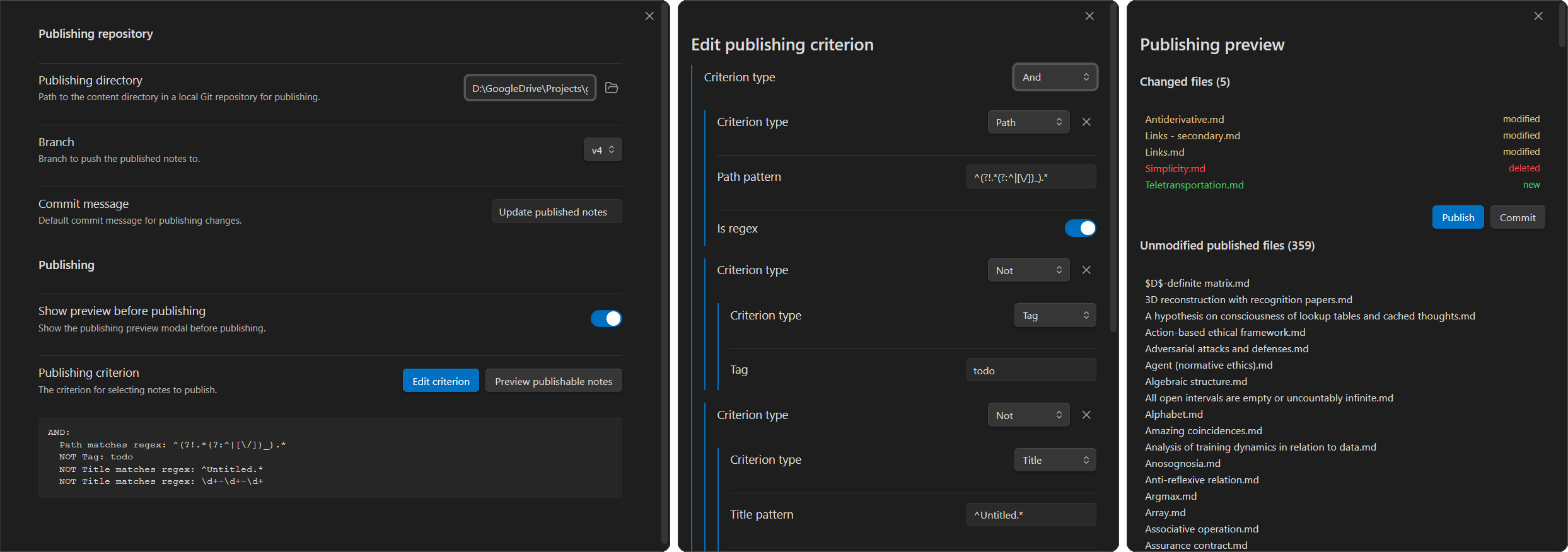
- Filtering of notes and attachments based on tags, frontmatter, path, or content, and path-based filtering of other files.
- Committing and pushing to a target Git repository.
- Review of changes with diffs before publishing.
Requirements
- Obsidian v1.13.0+
- Git installed and configured locally.
- A local clone of target remote repository.
- For publishing as a website, the repository should typically contain a static site generator which is able to process Obsidian Markdown files, such as Quartz.
Installation
- Search for Selective Publisher in Obsidian's Community Plugins.
- Click "Install" and then "Enable".
Setup
- Clone your target repository (e.g., GitHub Pages) to a local folder.
- In the plugin settings:
- Set "Publishing folder" to the absolute local path of the repository or a folder within it. (If Quartz is used, this is the
contentfolder.) - Optionally, select a "Branch".
- Configure "Publishing criterion" (see below).
- Optionally, uncheck "Show preview before publishing" to skip the preview modal when publishing.
- Set "Publishing folder" to the absolute local path of the repository or a folder within it. (If Quartz is used, this is the
Usage
Publishing criterion
The plugin evaluates each markdown file against a tree combining criteria:
- Tag: Matches an Obsidian tag exactly, by prefix, or by substring (e.g.,
publicwith "starts with" matches#public/blog). - Frontmatter: Matches a YAML frontmatter key by existence, or its value by equality, substring, or regex.
- Title: Matches the file basename (without extension) by substring, regex, or glob.
- Path: Matches the path relative to the vault root by substring, regex, or glob.
- Content: Matches the file content with a regex.
Criteria can be combined with logical operators: AND, OR, and NOT.
Publishing
Publish with the ribbon button (paper plane icon) or the Publish notes command. If the "Show preview before publishing" setting is enabled (the default), a preview opens first. The Preview publishable files command opens the same preview.
The preview lists the matching files with their status relative to the target repository (new, modified, deleted, unmodified), can show file diffs, and lets you publish (commit and push) or just commit (local only).
Development
npm install        # install dependencies
npm run dev        # build in watch mode (for development)
npm run build      # type-check and build for production
npm run lint       # run ESLint
To test locally, put main.js and manifest.json into <your-vault>/.obsidian/plugins/selective-publisher/ and reload the plugin.
Other information
-
Disclosures per Obsidian developer policies:
- Network use. The network is used for synchronizing with the remote Git repository when publishing. No other servers are contacted.
- File access outside the vault. The plugin manages the publishing folder.
- Running external programs. The plugin runs
gitcommands in the publishing repository. - Vault access. The plugin reads notes to evaluate the publishing criterion and copies only matching notes and their attachments.
-
AI agents used in development: Claude 3.7 Sonnet – Opus 4.6, GPT-4o – GPT-5.2, Gemini 3 Pro and Flash, Claude Opus 5.5
Related projects
Obsidian plugins:
- Enveloppe
- Publishes via the GitHub API rather than a local Git repository.
- Has more features and options, including processing of links and dataviews.
- Has less flexible filtering of files.
- Quartz Syncer
- Publishes through authentication to different Git providers.
- Has more features, including frontmatter processing and integration with other plugins such as Dataview.
- Has less flexible filtering of files.
- Digital Garden
Static site generators and other projects:
For plugin developers
Search results and similarity scores are powered by semantic analysis of your plugin's README. If your plugin isn't appearing for searches you'd expect, try updating your README to clearly describe your plugin's purpose, features, and use cases.