Smart Related Notes
approvedby Saiki77
Surface notes most semantically similar to the one you're reading in a left-sidebar panel, powered by a small multilingual embedding model that runs entirely on your machine. Private and offline. - This plugin has not been manually reviewed by Obsidian staff.
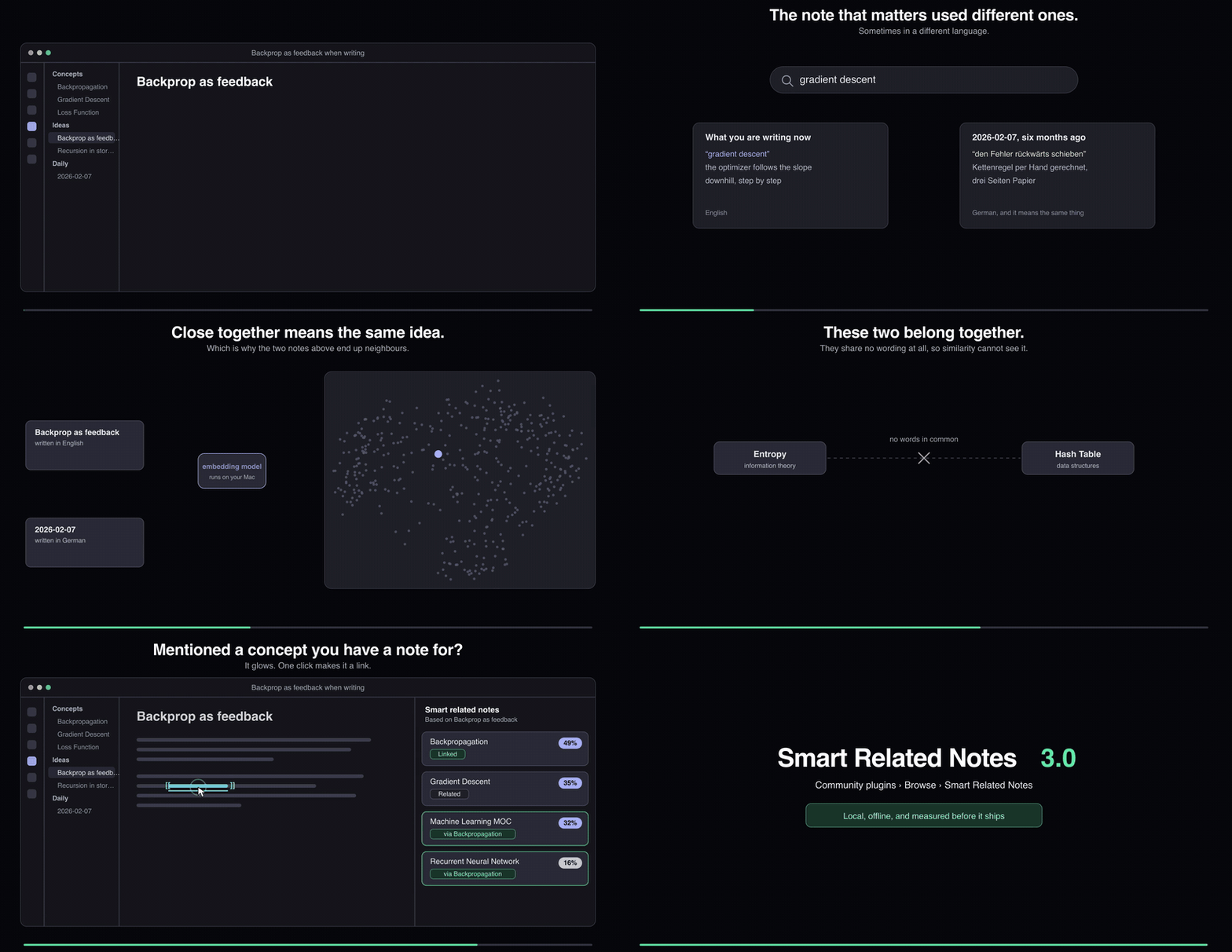
Crisper, as MP4 · every number in it is measured, see ARCHITECTURE.md
Smart Related Notes
A left-sidebar panel that surfaces the notes most semantically similar to the one you're reading, so you browse your vault by meaning, not by folders. Open any note and the panel ranks the rest by how closely they relate, as a stack of cards you can click to jump to.
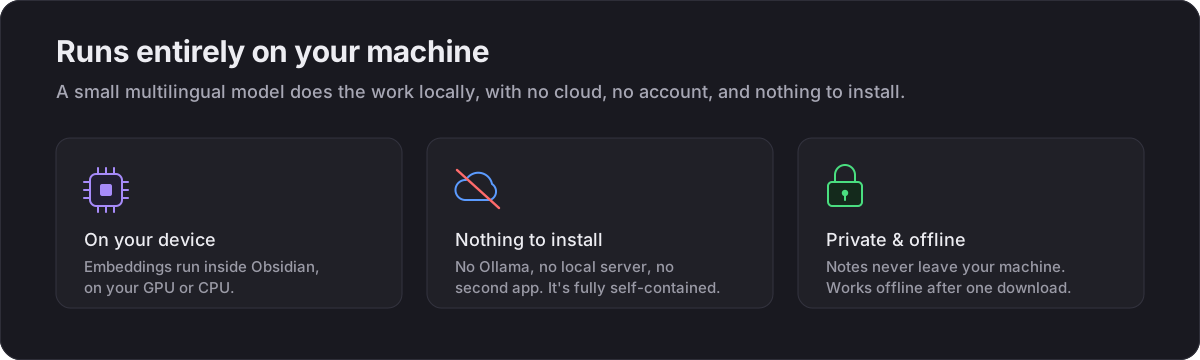
It runs on a small multilingual embedding model that lives entirely on your machine: no cloud, no API key, no second app or server. After a one-time model download it works fully offline, and it understands German, English and 100+ other languages, so matches cross languages naturally.
Contents · What's new · Roadmap · What it does · How it works · Settings · Install
What's new in 4.0
The plugin gained a reader: a small local text model that quietly reads your notes in the background and improves what the panel shows. It writes a one-line summary for every note (shown under the card title, with a fuller two-sentence summary on hover) and suggests tags for the active note, picked only from tags your vault already uses, shown as ghost chips you can add with one click.
Like the embeddings, it is invisible infrastructure: it works only while Obsidian is idle, pauses when you type or when indexing runs, caches everything, and re-reads a note only when its content changes. It is off by default; enabling it downloads the engine and a model sized to your machine's memory (a large, mid or small Qwen3, roughly 1 to 5 GB), stored outside the vault so sync never sees it. Everything runs on your machine through llama.cpp inside the plugin itself: no cloud, no account, no second app. On networks that block downloads there is a guided offline setup (command palette: "Reader: offline setup") that fetches the files through your browser and imports them automatically, verified against pinned checksums.
Also in 4.0: the insights report's surprising-connections section is gone. It generated a list that was rarely used; the link-graph machinery behind it stays in the ranking itself, where it earns its keep.
What's new in 3.0
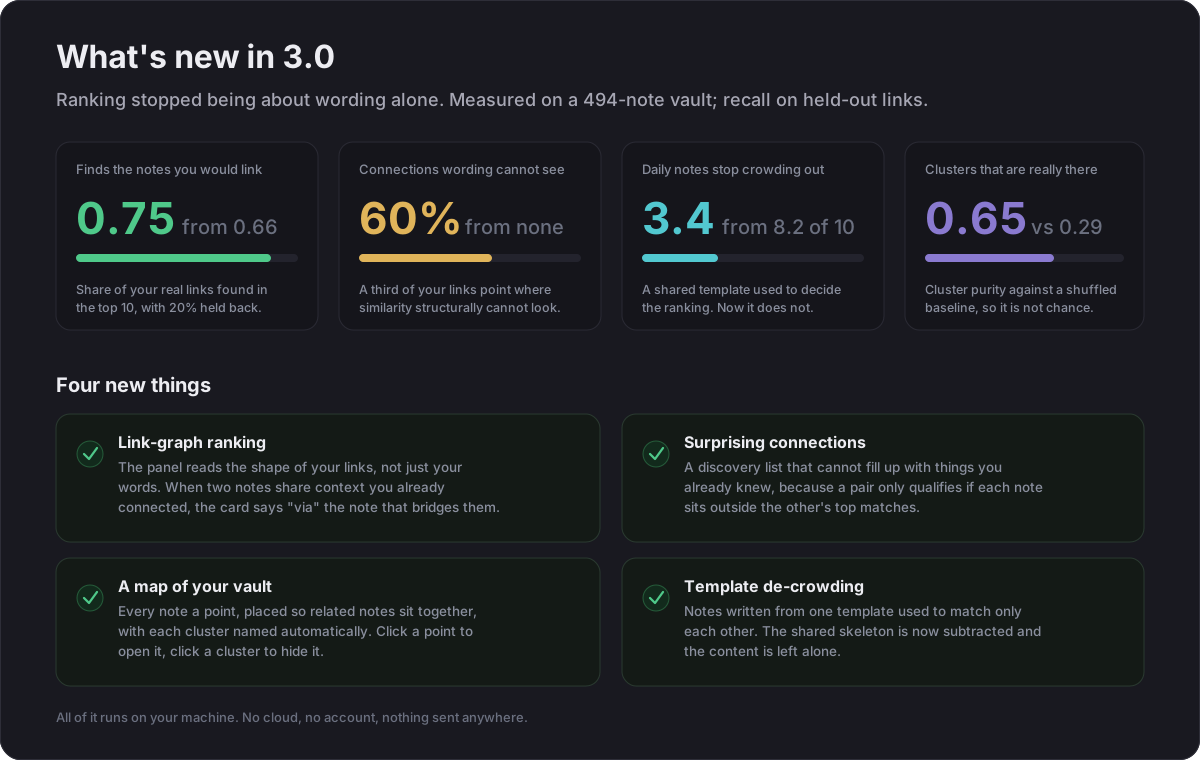
Ranking stopped being about wording alone. The panel now also reads the shape of your own links, which is what produced every number above. Full detail lives in ARCHITECTURE.md; the short version is that similarity and your link graph disagree often enough to be worth fusing, and roughly a third of the links you make point somewhere similarity structurally cannot look.
Roadmap
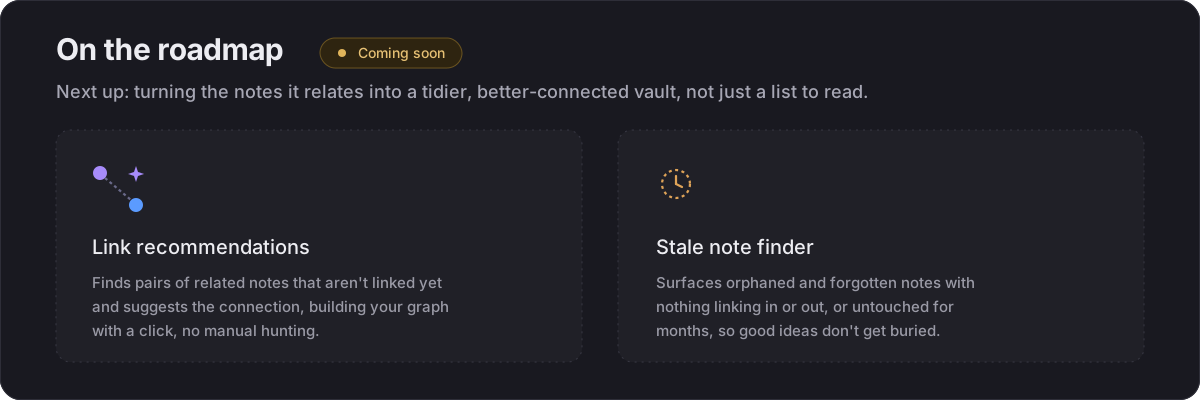
Next. Asking the vault questions, and letting other tools use what it knows:
- Search by category: ask for "characters" and get the characters, not the note about characters, with no tags and no map-of-content required. Measured at 0.78 member-precision, but only on a model that can handle short queries; on a plain paraphrase model the same pipeline tops out at 0.42, so the feature will only offer itself where it works rather than quietly returning noise.
- Semantic views in Bases: meaning as a column you can sort, filter and group on.
- Link suggestions with receipts: not "these look similar" but the exact detail two notes share, so you can judge it at a glance. The underlying gate stack was measured on a related study (judged precision 0.40 to 0.60 at n=15, 95% interval 0.36 to 0.80); the feature itself has not been measured yet.
- A ranker built from channels: each signal scores independently, with the weights fitted to your own links, per vault, on your machine. The admission rule is the interesting part: a new channel only earns a place if it is measurably independent of the ones already there. That is how the link-graph channel was chosen. Its rank correlation with the content channel is 0.075 and it added 0.08 recall; a keyword channel correlated at 0.30 and made things worse.
Exploring, for 5.0. Hypotheses with open questions rather than promises:
- The signal only your machine has: which notes you open and edit in one sitting is evidence neither the text nor the links can give, and it is the last plausibly independent channel left. It is also the one a cloud service structurally cannot have, because that data never leaves your computer.
- Vaults of a hundred thousand notes: every ranking currently scans the whole vault. A real nearest-neighbour index turns that into a lookup. Unglamorous, and the thing that decides whether any of the above survives a serious archive.
- Notes that disagree, and help while you write.
Ideas that fail their measurement get cut rather than shipped quietly. Bridges, analogy search, a duplicate alarm, a personal similarity metric and a keyword channel were each built, measured, and dropped.
What it does
Finding what relates
- Semantic ranking: for the active note, ranks every other note by meaning and shows the top matches as cards: title, muted folder path, a short snippet, and a similarity % pill. Click a card to open that note. With no note open, the panel lists your recent notes instead of sitting empty.
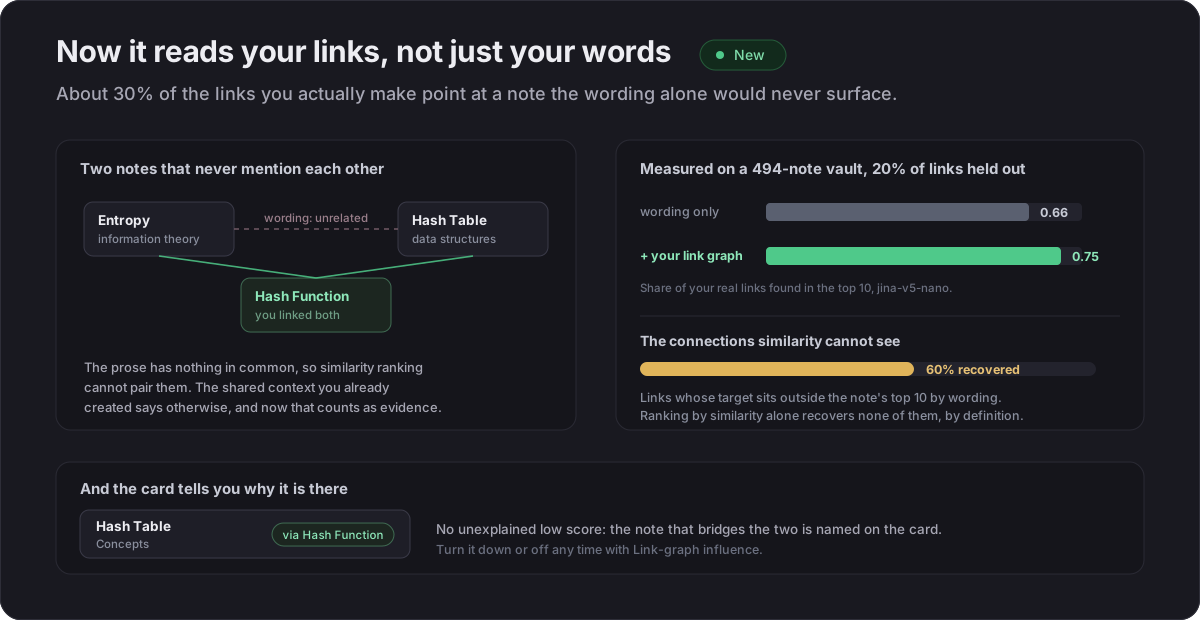
- Link-graph ranking: the panel does not rank by wording alone. When two notes share context you have already connected them through, that counts as evidence they belong together, and such a card says via the note that bridges them. This is what lifted held-out link recall from 0.66 to 0.75.
- Semantic search: the magnifier in the panel header ranks your whole vault by meaning against a typed query, not just keyword matches.
- Linked-notes mode: the link icon switches the cards to show what the current note links to, the structural complement to similarity ranking.
Building your graph
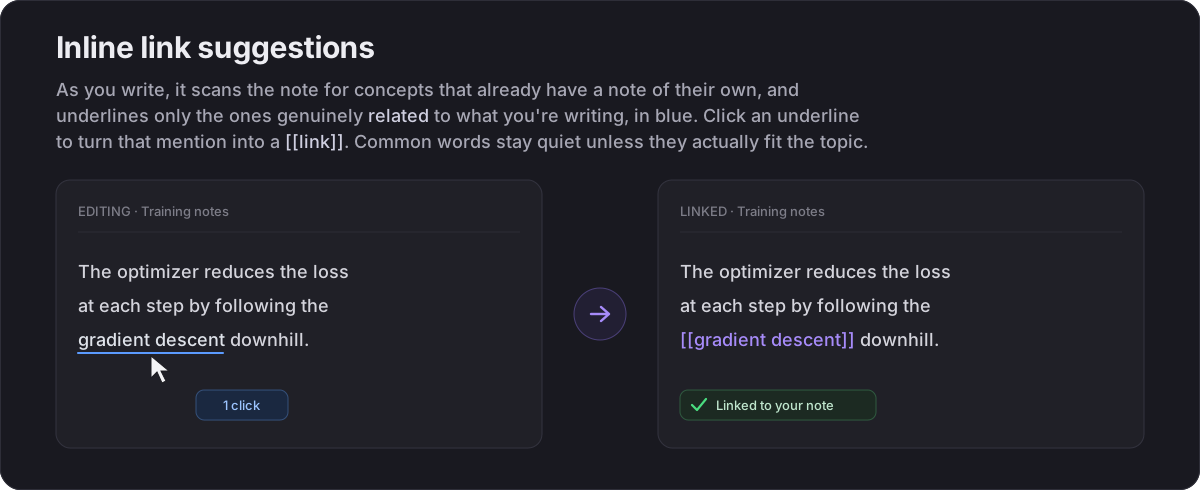
- Inline link suggestions: when you mention a concept that already has a note, it glows with a slim underline; one click turns the mention into a wikilink. It is context-aware, so a common word like "analysis" only glows where it fits the topic, and it works with or without the easy-links plugin.
- Smarter
[[completion: typing[[ranks existing notes by how well they fit what you are writing, and offers to create a new note for a strongly relevant concept that does not have one yet. - Vault insights: a whole-vault report of suggested links, orphans, near duplicates, stale notes and suggested tags. See below.
Seeing your vault
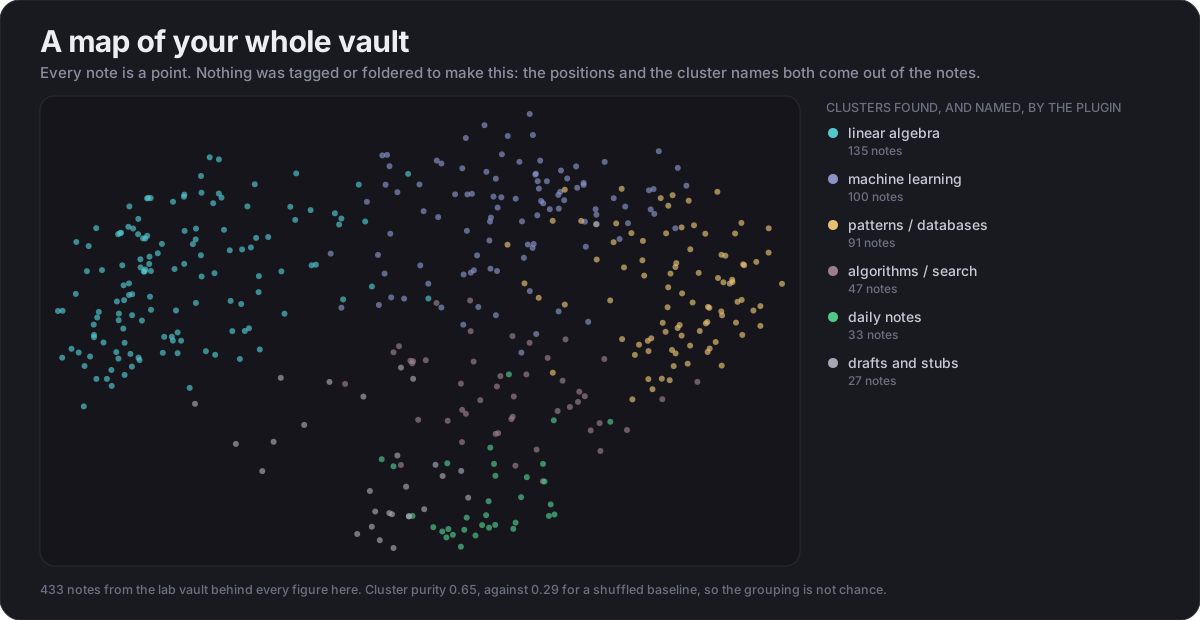
- Vault map: every note as a point, placed so notes about similar things sit together, coloured by cluster and labelled automatically from the notes themselves. Click a point to open it, click a cluster to hide it. Open it with the Open the vault map command.
Private, and it stays that way
- Fully local: embeddings run in-app on the CPU (WASM, multi-threaded; WebGPU optional). Notes are never sent anywhere, and it works offline after the one-time download.
- Multilingual: matches notes across German, English and 100+ other languages.
- Persisted index: vectors are saved to disk, so reopening the vault is instant.
- Incremental updates: changed, created and renamed notes are re-embedded on a 20-second idle pause, so typing never kicks off work mid-edit.
- Keyword fallback: while the index is still building, the panel falls back to a
cheap keyword ranking (shown with a
~pill) so it is never empty. - Clear status: a live status line shows progress, and surfaces an error rather than silently showing nothing.
Vault insights
Run "Vault insights (suggested links, orphans, duplicates)" from the command palette to generate a report note for the whole vault:
- Suggested links: the strongest related notes that you have not linked yet, ranked by similarity. The fastest way to grow a sparse graph.
- Suggested tags: notes that are missing a tag most of their semantic neighbours
share. The plugin infers a likely category (e.g. a character profile that lacks your
goa/charactertag) from similarity alone, only proposing discriminative tags. - Orphan notes: notes with no links in or out, each paired with its closest relative as a starting point.
- Possibly duplicate: near-identical pairs worth merging or cross-linking.
- Stale notes: the oldest-edited notes, for review.
It writes/refreshes Vault Insights (Smart Related Notes).md and opens it; every entry
is a clickable wikilink. Nothing is changed in your notes.
How it works
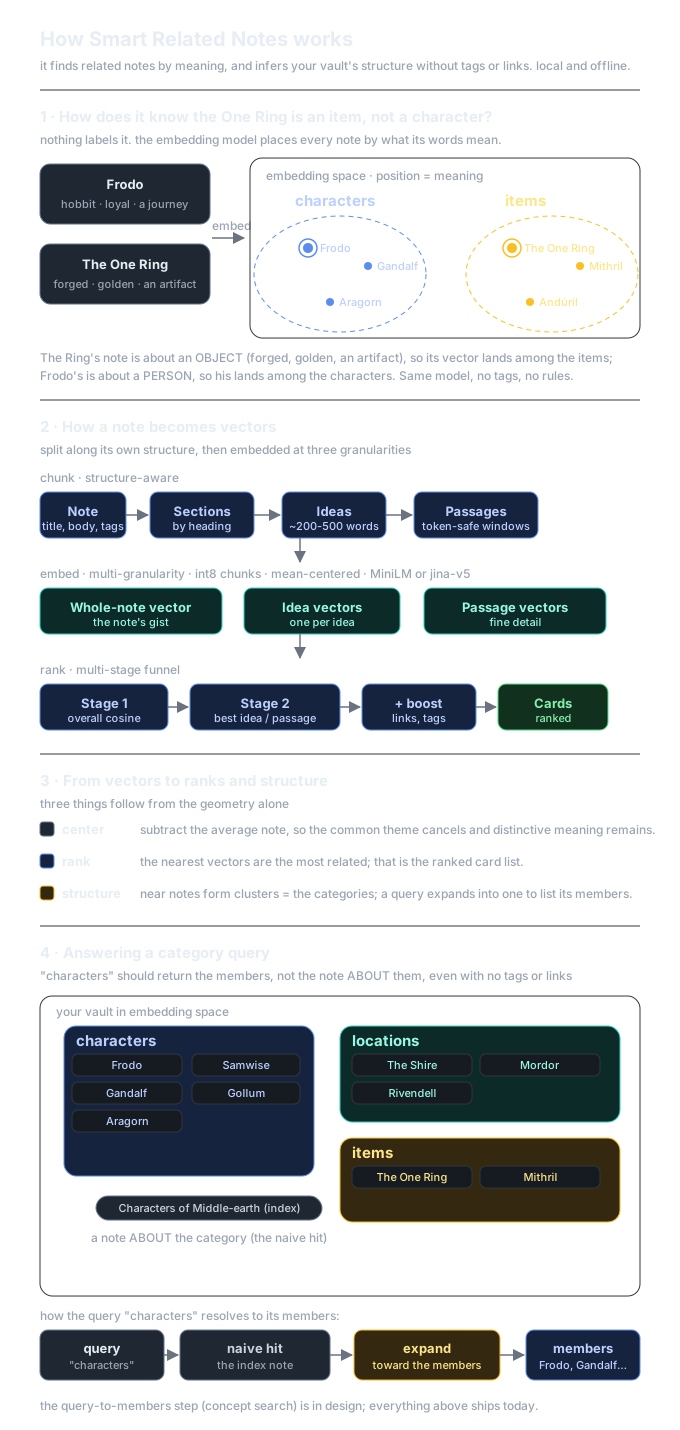
Each Markdown note is split into short passages (windows that fit the model's context), covering the whole note, and every passage is turned into a vector by the embedding model. Adjacent passages are then grouped into coherent ideas (~200-500 words, at heading and topic boundaries, with short atomic notes kept whole), so a note is represented at three levels: an overall vector, its idea vectors, and its passage vectors. For the note you're viewing, every other note is ranked by the best cosine similarity of their passages (with its title weighted), blended with how strongly the two notes share a whole idea, so a note related by one coherent idea spanning several paragraphs surfaces, not just one lucky passage match. The closest matches are shown as cards with a similarity percentage.
The model runs through @huggingface/transformers
on the local ONNX runtime, on the CPU via WASM by default, multi-threaded so a
full reindex is quick, and memory-stable. (A WebGPU option exists and is faster,
but its GPU backend can accumulate memory on large vaults, so it's an explicit opt-in.)
The whole engine lives in its own worker, which is shut down after an idle
period (configurable) — so when you're just reading and browsing, the model's
hundreds of MB to several GB are returned to the system instead of sitting resident;
it reloads transparently in a few seconds when next needed. An Indexing speed
setting trades CPU threads against reindex time. The only network traffic ever is
one-time: the model weights from the Hugging Face Hub, and the ONNX runtime
.wasm (version-pinned), which is cached into the plugin's own folder; afterwards
nothing is fetched again and the plugin works offline.
Vectors persist as compact JSON in the plugin's config dir, so the index survives restarts and only changed notes are re-embedded.
For the full picture, see ARCHITECTURE.md: the multi-granularity embeddings, the multi-stage ranking funnel, the measured model A/B, mean-centering, the structural channel that ranks by your link graph, template de-crowding, and where tag-free concept search stands.
Settings
Quality and speed
- Performance profile: one-click presets. Balanced is lighter and faster; Best quality uses a larger model and more context for the strongest matches.
- Model: the embedding model (a dropdown of vetted choices, or paste a custom
Hugging Face id). The default
paraphrase-multilingual-MiniLM-L12-v2is a symmetric sentence-similarity model, the right tool for ranking how alike two notes are.paraphrase-multilingual-mpnet-base-v2(Best quality) is stronger but larger. e5 models are retrieval-oriented and rank note similarity less well. - Compute device: Auto (recommended) runs on the CPU (WASM), which is memory-stable. WebGPU is faster but its GPU backend can accumulate memory on large vaults, so it's an explicit opt-in. Switching re-downloads the model.
- Indexing speed: how many CPU threads embed notes. Fast (all cores, quickest), Balanced (default), Light (1 thread, slowest). A CPU/speed knob — the engine's memory is dominated by the loaded model itself, not the thread count. Editing a note stays fast at any setting.
- Unload model when idle: after this long without indexing or searching (default 15 minutes; "Right after use" unloads 30 seconds after the last embed), the embedding engine is shut down and its memory returned to the system. It reloads automatically in a few seconds on the next use — no re-download. Ranking when switching notes never needs the engine and is unaffected.
The panel
- Number of results: how many cards to show.
- Minimum similarity: hide matches below this topical-similarity score (0-1). Scores are mean-centered (the embedding noise floor is removed), so unrelated notes sit near 0 and ~0.2 cleanly separates on-topic notes. Raise for a tighter list.
- Show snippet: toggle the per-card text preview.
Ranking
- Link-graph influence: how much the shape of your links counts alongside the wording (0-1, default 1). This is the 3.0 channel described above; 0 reverts to ranking by content only. A live knob, no re-index.
- Idea influence: how much idea-level matching blends into the score (0-0.6). Notes are grouped into coherent ideas (~200-500 words); this weights whether two notes share a whole idea, not just one passage. 0 is passage-only. It is a live ranking knob; changing it re-ranks instantly with no re-index, so you can compare.
- Isolated areas: self-contained areas, one tag namespace per line (e.g.
goa). A note tagged with an activated namespace (matchinggoaandgoa/character) only relates to, and takes tag suggestions from, other notes in that area, and never appears in any other note's cards. Notes in no activated area share one pool. A live ranking knob (no re-index). Use it to keep a self-contained project (a novel, a world) from bleeding into unrelated notes.
Scope
- Excluded folders: folders left out of the index entirely (and everything beneath them); not ranked and not suggested as links. One per line or comma-separated.
- Folders excluded from link suggestions: folders whose notes stay indexed and ranked in the panel, but are never suggested as inline wikilinks.
Advanced
- Max chunks per note: ceiling on passages embedded per note. The whole note is covered up to this cap; only very long notes approach it.
- Heading context: embeds each section's first chunk with its note + heading breadcrumb for context. On by default; toggle to compare.
- Rebuild index: force a full re-embed (also on the command palette and the panel's refresh icon).
Changing the model or compute device transparently rebuilds the index; unrelated changes (sliders, toggles) never trigger a re-embed.
Install
Settings -> Community plugins -> Browse -> "Smart Related Notes" -> Install. That is the whole thing, and it is how almost everyone should install it.
On first launch the model weights download from the Hugging Face Hub with a
progress notice, then cache. This happens once; after that the plugin works
offline. The WASM (CPU) path, the default, uses quantized weights (~110 MB); the
optional WebGPU path uses fp32 weights (~470 MB for the default model). The model
is downloaded once per backend, then cached. The plugin also fetches the
version-pinned ONNX runtime once, into its own ort/ folder.
Other ways
If the store has not caught up yet, or you want to track development, add this
repository in BRAT, or download
main.js, manifest.json and styles.css from the
latest release into
.obsidian/plugins/smart-related-notes/ yourself.
What the plugin touches, and why
An automated review of a release flags four capabilities; each is there on purpose:
- Filesystem access outside the vault: the reader's engine and models
(1 to 5 GB) live under
~/.cache/smart-related-notes/, never inside the vault, so sync tools and backups are not dragged through them. Nothing else outside the vault is read or written; the optional offline setup additionally reads your Downloads folder, only while its dialog is open. - Shell or process execution: the plugin itself never runs commands.
The flag comes from llama.cpp's Node bindings compiled into
main.js, which contain a self-test helper for their native binary. - Vault enumeration: ranking every note by meaning requires reading every note; that is the product.
- Clipboard: one button ("Copy links" in the offline setup) writes to it. Nothing reads it.
Releases carry GitHub artifact attestations, and the review's build
verification reproduces main.js from this repository byte for byte.
Requirements
- Desktop only (the embedding runtime needs a desktop Electron environment).
- Obsidian 1.7.2 or newer.
Development
A TypeScript project bundled with esbuild (entry src/main.ts → root main.js).
npm install          # install dev dependencies
npm run dev          # esbuild watch build (inline sourcemap, no minify)
npm run build        # gen-ort -> tsc --noEmit -> minified production bundle
npm run lint         # eslint (typescript-eslint + eslint-plugin-obsidianmd)
gen-ort.mjs runs before tsc/lint/esbuild: it writes src/ort-version.ts (the
pinned onnxruntime-web version + the CDN base the runtime is downloaded from)
and copies the matching onnxruntime-web .wasm/.mjs assets into ort/ for
local dev builds. Both are build artifacts and are gitignored. Releases ship only
main.js, manifest.json, and styles.css (exactly what Obsidian downloads);
at runtime the plugin caches the pinned ONNX runtime into its ort/ folder on
first use, validated against byte sizes pinned at build time so torn writes or a
plugin update carrying a different runtime build trigger a clean re-download
instead of mixing builds.
The embedding engine (transformers.js + onnxruntime-web) runs inside a dedicated
Web Worker bundled as a second esbuild stage and inlined into main.js (see
esbuild.config.mjs and src/worker/embed-worker.ts); terminating that worker is
what returns the engine's memory to the OS when idle. Environments that expose a
Node-like process would make transformers.js pick the (externalized,
unavailable) onnxruntime-node backend — src/ort-shim.ts (imported first in
the worker entry) flips the relevant process markers during module evaluation so
the web runtime is used and WebGPU/WASM work.
License
MIT © 2026 Saiki77
For plugin developers
Search results and similarity scores are powered by semantic analysis of your plugin's README. If your plugin isn't appearing for searches you'd expect, try updating your README to clearly describe your plugin's purpose, features, and use cases.