Simple Graph Builder
approvedby junhewk
Build a knowledge graph from your notes using LLM-powered entity extraction. Supports Claude, OpenAI, Gemini, and Ollama. - This plugin has not been manually reviewed by Obsidian staff.
Simple Graph Builder


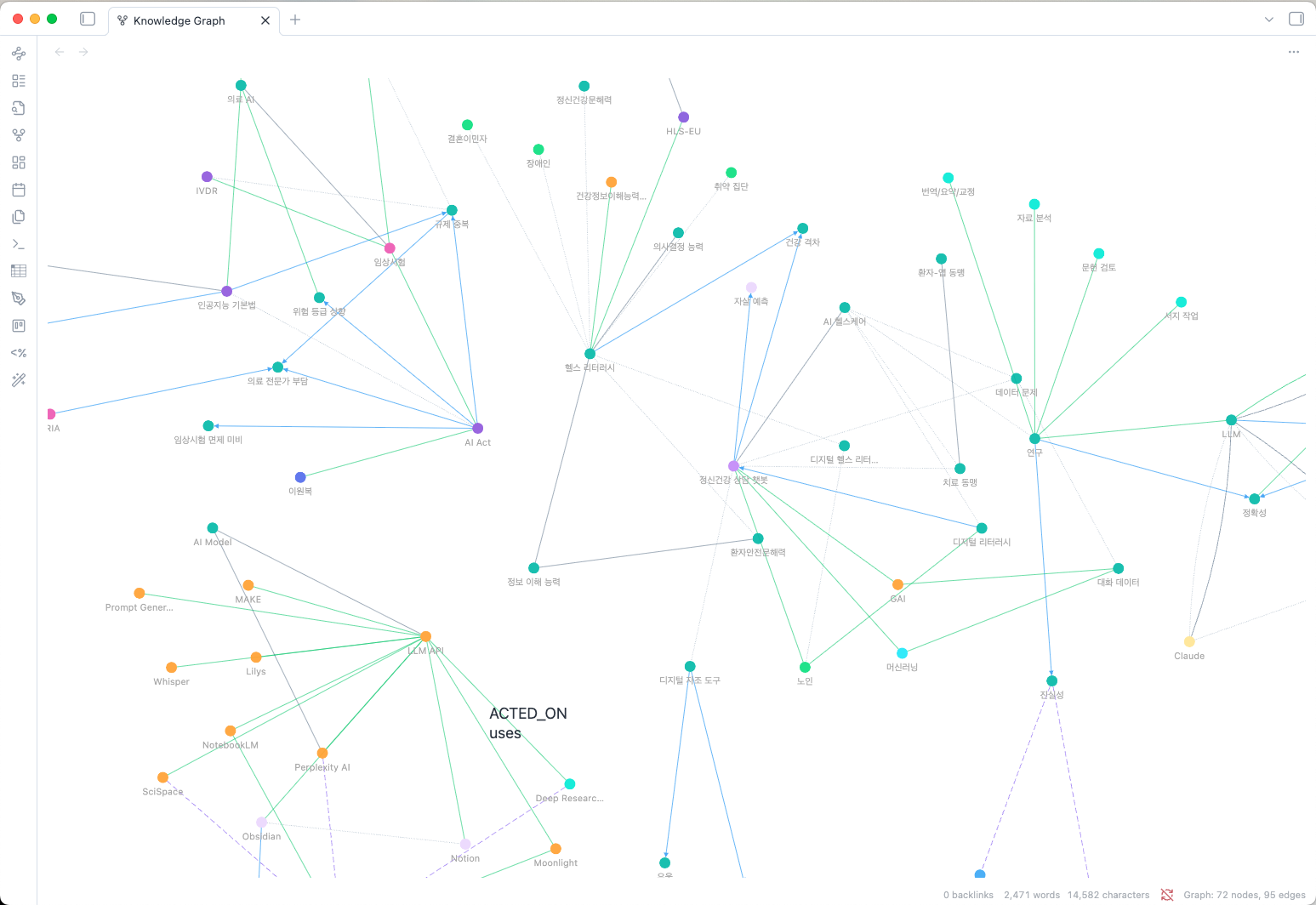
This plugin builds a lightweight knowledge graph from users' Obsidian notes using LLM-powered entity extraction with a simple yet expressive ontology model to provide knowledge extraction, exploration, and RAG search. Since Obsidian provides wonderful links between notes, implementing ontology model would meet users' (especially researchers') needs.
What's new in 0.6.1
Keep configuration files and other unwanted notes out of analysis with the new
Excluded files and folders setting under Analysis. For example, add
skills/** to skip that folder and everything beneath it.
- Exclusions apply everywhere: manual current-note analysis, vault analysis, and auto-analysis skip matching notes before reading their content or calling a provider.
- Optional Obsidian integration: turn on Respect Obsidian excluded files to also honor Files and links → Excluded files. This toggle is off by default.
- Clear feedback: vault analysis reports excluded notes separately, and manual analysis explains why a note was skipped.
- Existing graph data is kept: adding an exclusion affects future analysis without removing prior entities, relationships, or written links. Upgrading does not trigger re-analysis.
See Analysis Exclusions for supported patterns and Upgrading to 0.6.0 for the previous release’s write-back and storage improvements. Addresses issue #1.
Why Lightweight Ontology?
Traditional knowledge graphs often require complex schemas with dozens of entity and relationship types, making them difficult to maintain and query. Simple Graph Builder takes a different approach:
- 10 Fixed Entity Types: PERSON, ORGANIZATION, CONCEPT, PROJECT, TOOL, EVENT, PLACE, DOCUMENT, METHOD, TOPIC - covering all common knowledge domains
- Free-form Relationship Verbs: Express relationships naturally with active verbs like "develops", "uses", "causes", "cites"
- Detail Property: Each relationship includes a
detailfield for nuanced descriptions without schema explosion
This design provides structured entity classification with expressive relationships, making it easy to build, query, and maintain your personal knowledge graph.
Features
- Lightweight Ontology Model: Simple but expressive - 10 fixed entity types + free-form relationship verbs with detail annotations
- Hybrid Entity Resolution: Multi-stage deduplication pipeline combining fast lookups with embedding similarity and LLM verification (inspired by KGGen [3])
- Smart Search: AI-powered natural language queries over your knowledge graph with multi-path exploration
- Configurable Analysis Exclusions: Skip files and folders using paths or globs, with optional support for Obsidian’s own exclusion list
- Entity Extraction: Automatically extract entities from your notes using AI (configurable extraction depth)
- Schema-enforced Extraction: Every extraction request carries a JSON schema, and replies are validated against it — malformed entities are reported and dropped rather than silently polluting the graph
- Internal Link Support: Automatically processes
[[wikilinks]]to build note-to-note connections - Vault Write-Back (opt-in): Mirror the graph into your vault as real Obsidian links, so it also appears in the built-in graph view, backlinks and properties — entity notes carry the resolution aliases, which is what makes Obsidian treat "ML" and "머신러닝" as one note
- Multiple LLM Support: Works with Claude, OpenAI, Gemini, and local servers — Ollama plus anything OpenAI-compatible (llama.cpp, LM Studio, vLLM)
- Reasoning Effort Control: Tune how hard the model thinks, separately for extraction and Smart Search
- Korean Language Support: Bigram Jaccard similarity for robust Korean text matching (handles particles and spacing variations), with all names normalized to Unicode NFC so composed and decomposed Hangul resolve to the same entity
- Interactive Graph View: Visualize your knowledge graph with a ForceAtlas2 layout, connectivity-scaled nodes, and importance-weighted edges so hubs and clusters are immediately visible
- Large Graph Support: Optimized for thousands of nodes with fast rendering
- Note Neighborhood Panel: See connections for the current note in a sidebar
- Manual Entity Merge: Merge duplicate entities via graph view context menu
- Quick Access: Ribbon icon menu for common actions
- Status Bar: Real-time graph statistics display
Entity Resolution
A key insight from recent knowledge graph research is that entity resolution is critical for quality knowledge graphs [3]. Without proper deduplication, "AI", "artificial intelligence", and "Artificial Intelligence" appear as separate nodes, fragmenting your knowledge.
Simple Graph Builder uses a hybrid resolution pipeline (opt-in feature):
| Stage | Method | Speed |
|---|---|---|
| 1. Persistent cache | Previously resolved tokens | O(1) |
| 2. Session cache | Same name resolved this session | O(1) |
| 3. Exact name | Hash lookup on canonical name | O(1) |
| 4. Alias match | Hash lookup on stored aliases | O(1) |
| 5. Embedding similarity | Cosine similarity > 0.90 = auto-merge | O(n) |
| 6. LLM verification | Ambiguous matches (0.80-0.90) verified by LLM | API call |
| 7. Create new | No match found | - |
This approach resolves most entities via fast hash lookups, reserving expensive embedding searches and LLM calls for genuinely ambiguous cases.
Commands
| Command | Description |
|---|---|
Analyze current note | Extract entities from the active note |
Search related notes | Find notes by entity name (exact/fuzzy match) |
Smart Search (AI) | Natural language search using LLM to explore the graph |
Open graph view | Show the knowledge graph visualization |
Open note neighborhood panel | Show current note's connections in sidebar |
Remove current note from graph | Remove active note from the graph |
Rebuild note layer | Recreate note nodes and their links from existing data (no API calls) |
Write graph links into notes | Apply the graph to your vault as Obsidian links (no API calls) |
Remove graph links from notes | Take the link property back out of every note |
Clear all graph data | Reset the entire graph |
Data Model
Entity Types (10 Fixed Types)
The LLM must classify each entity into one of these types:
| Type | Description | Examples |
|---|---|---|
PERSON | People, individuals | Authors, researchers, team members |
ORGANIZATION | Companies, institutions | Google, MIT, research labs |
CONCEPT | Ideas, theories, principles | Machine learning, API design |
PROJECT | Projects, products, initiatives | Obsidian, GraphRAG |
TOOL | Software, hardware, instruments | Python, VS Code, Docker |
EVENT | Meetings, conferences, milestones | NeurIPS 2024, sprint review |
PLACE | Locations, venues, geography | San Francisco, AWS us-east-1 |
DOCUMENT | Papers, books, articles, notes | "Attention Is All You Need" |
METHOD | Techniques, approaches, workflows | Agile, TDD, fine-tuning |
TOPIC | Subjects, themes, fields, domains | NLP, distributed systems |
One further type, NOTE, is created by the plugin rather than the LLM. Each
analyzed note becomes a NOTE node that mentions the entities extracted from
it and links to the notes it wikilinks, which is what ties separate notes into
one graph. Turn them off with Show note nodes for an entity-only view.
Relationships (Free-form Verbs)
Relationships are expressed as active verbs describing how entities relate:
| Verb Examples | Meaning |
|---|---|
develops, creates, builds | Creation, authorship |
uses, applies, implements | Usage, application |
causes, leads to, enables | Causality, dependency |
contains, includes, has | Composition, membership |
cites, references, based on | Citation, source |
relates to, similar to | General association |
Each relationship also includes an optional detail field for additional context.
UI Elements
Ribbon Icon
Click the graph icon in the left ribbon to access:
- Analyze current note
- Open graph view
Status Bar
Shows real-time graph statistics with node counts by label.
Note Neighborhood Panel
A sidebar panel showing:
- Extracted Nodes: Entities from the current note with entity type badges
- Connected Nodes: Grouped by entity type (PERSON, CONCEPT, TOOL, etc.)
- Relationships: Shows relationship verb and detail for each connection
- Click nodes to see source notes and relationship details
Graph View Context Menu
Right-click a node to:
- Merge into...: Manually merge duplicate entities (source becomes alias of target)
Settings
API Configuration
- API Provider: Choose between Claude, OpenAI, Gemini, or Ollama (local)
- API Key: Stored per provider, so extraction and Smart Search can use different providers without one overwriting the other's key. Not needed for a local server unless it was started with
--api-key. - Server API (local only): Which API the local server speaks — Ollama (
/api/chat) or OpenAI-compatible (/v1/chat/completions). Use OpenAI-compatible for llama.cpp'sllama-server, LM Studio, vLLM and similar; set Host to the base address without the/v1suffix. - Model: Select or enter a custom model name
Analysis Settings
- Extraction Mode: Control extraction depth
- Standard: Max 15 entities per chunk (fast, low cost)
- Thorough: No limits per chunk (comprehensive extraction)
- Reasoning effort: How much the model thinks before extracting — Auto, Minimal, Low, Medium, High, or Max. Defaults to Minimal: notes are processed in many parallel chunks, so higher levels raise cost and latency noticeably. Models that don't support the setting (such as
claude-haiku-4-5) are flagged in settings and simply ignore it. - Chunked Processing: Long notes are automatically split into ~500 token chunks and processed in parallel (max 3 concurrent)
- Auto-analyze on save: Automatically analyze notes when you save them (2-second debounce)
- Analyze entire vault: Batch analyze all notes with progress tracking and cancellation support
Analysis Exclusions
Under Analysis, add one vault-relative path or pattern per line to Excluded files and folders. Exclusions apply to Analyze current note, Analyze entire vault, and Auto-analyze on save, before note content is read or sent to a provider. Vault analysis reports excluded notes separately from unchanged or short notes.
| Pattern | Excludes |
|---|---|
skills or skills/ | The root skills folder and all its descendants |
skills/** | Everything beneath the root skills folder |
templates/*.md | Markdown files immediately inside templates |
**/SKILL.md | Files named SKILL.md anywhere, including the vault root |
notes/draft.md | That exact file |
Patterns are anchored at the vault root. * matches characters within a path
segment, ? matches one character, and a whole ** segment crosses any number of
folders. Other characters are literal; regex, negation, and comment syntax are
not supported. Blank lines and surrounding whitespace are ignored. Matching is
case-insensitive and Unicode-normalized; both / and \ separators work.
Respect Obsidian excluded files additionally honors Files and links → Excluded files, using Obsidian’s matching rules rather than interpreting its entries as plugin globs. This toggle is off by default. If the native matcher is unavailable, the plugin stops opted-in analysis and asks you to turn the toggle off; your custom patterns continue to work with it off.
Changing exclusions affects queued and future analysis; a note already being analyzed finishes. Existing graph data, search results, and written links are kept. Use Remove current note from graph to remove prior contributions. Standalone write-back commands remain independent of analysis exclusions. Plugin-managed entity notes are always excluded from analysis.
Smart Search Model
You can configure a separate model for Smart Search queries, allowing you to use faster/cheaper models for extraction while using more capable models for search:
- Use separate model for smart search: Enable to configure a different model
- Smart search provider: Choose provider (Claude, OpenAI, Gemini, Ollama)
- Smart search model: Select or enter a custom model name
- Smart search reasoning effort: Set independently from extraction — searching benefits from more reasoning than extraction does
- API key: Shown when Smart Search uses a different provider than extraction, since that provider's own settings block is hidden
This is useful for optimizing cost vs. quality - e.g., use gpt-5.4-mini for extraction and gpt-5.6-luna for search.
Entity Resolution (Opt-in)
Enable embedding-based entity resolution for intelligent deduplication:
- Enable embeddings: Turn on the hybrid resolution pipeline
- Embedding provider: OpenAI, Gemini, or a local server — chosen independently of the chat provider, so a local chat model does not force local embeddings
- Embedding server API (local only): Ollama (
/api/embed) or OpenAI-compatible (/v1/embeddings), set separately from the chat provider's API - Embedding server host (local only): leave blank to reuse the chat provider's host; set it when embeddings run elsewhere
- Embedding API key: Separate key for embedding API calls
- Embedding model:
- OpenAI:
text-embedding-3-small(1536 dims),text-embedding-3-large(3072 dims) - Gemini:
gemini-embedding-001(768 / 1536 / 3072 dims) - Ollama:
nomic-embed-text(768 dims),mxbai-embed-large(1024 dims)
- OpenAI:
- High confidence threshold: Auto-merge above this similarity (default: 0.90)
- Low confidence threshold: LLM verification range floor (default: 0.80)
- Enable LLM verification: Verify ambiguous matches with LLM calls
- Compute embeddings: Generate embeddings for existing nodes
- Clear resolution cache: Reset learned token mappings
View Settings
- Open graph in main window: Toggle to open the graph visualization in a main tab instead of the right sidebar
- Show note nodes: Include your notes in the graph alongside the entities they mention. Turn off for an entity-only view
- Minimum connections: Hide nodes with fewer than this many connections
Vault Write-Back (Opt-in)
Off by default. This is the only part of the plugin that writes into your notes.
- Create entity notes: master toggle. Writes one note per entity, carrying its aliases, type and relationships
- Entity folder: where those notes live (default
Entities). Notes in this folder are never analyzed - List relationships in entity notes: adds a Relationships section linking each entity to the ones it connects to, so entity-to-entity edges show up in Obsidian's own graph
- Link notes to their entities: adds a property to each analyzed note listing the entities found in it
- Property name: which frontmatter property that is (default
related) - Write links for the whole vault / Remove written links: apply or undo across the vault; no API calls either way
What the plugin edits, exactly: in your own notes, only that one property — your prose is never touched. In entity notes, the aliases, entity-type and sgb-id properties and the text between the %% sgb:managed:start %% and %% sgb:managed:end %% markers. Anything you write outside those markers is kept through every regeneration, and a file that does not carry the plugin's sgb-id is never overwritten or deleted.
Data Management
- View graph statistics (nodes by entity type, total relationships)
- Clear all graph data
Supported Models
Note analysis requires a model that can return structured output (JSON schema). Models that cannot are refused with a message rather than silently producing a lower-quality graph, and the settings panel flags them as you select them.
| Provider | Models |
|---|---|
| Claude | claude-sonnet-5, claude-haiku-4-5 |
| OpenAI | gpt-5.6-luna, gpt-5.4-mini |
| Gemini | gemini-3.6-flash, gemini-3.5-flash-lite |
| Local | any model your server exposes — Ollama, or an OpenAI-compatible server such as llama.cpp's llama-server, LM Studio or vLLM |
Any other model can be typed into the Custom… field. Smart Search additionally needs tool calling; for local servers, start llama-server with --jinja, and prefer qwen3:* or gpt-oss:* on Ollama.
Upgrading to 0.6.0
This release adds vault write-back and makes the data file smaller. Nothing is re-analyzed, no API calls are made, and no existing data is lost.
- Your graph can now become Obsidian links. Turn on Create entity notes under Vault write-back to get one note per entity — with the aliases entity resolution found, so Obsidian itself resolves "ML", "머신러닝" and "기계학습" to a single note — plus an optional
related:property on each analyzed note. Both are off until you turn them on, and Remove written links undoes the property across the vault. - The data file shrinks — 44% on the 5,177-node vault this was tested against, 6.8 MB down to 3.8 MB. Note nodes and their
mentions/links toedges are no longer stored: they are rebuilt from your notes and Obsidian's link index every time the plugin loads, so keeping a second copy on disk only cost space.mentionsis one edge per note-entity pair, usually the largest single population in the file. Your graph loads with exactly the same nodes and edges as before; the saving is larger the more entities per note you extract. - Frontmatter is no longer analyzed or hashed. Tags and properties were being sent to the model as if they were prose. Notes are now compared by their body, so editing frontmatter — including the property this plugin writes — no longer costs an analysis. Notes analyzed by earlier versions are still recognized and will not be re-analyzed.
Upgrading to 0.5.4
- Connectivity is visible at a glance. Node diameter now scales logarithmically with the number of visible connections, while edge opacity reflects the importance of both endpoints. Hover and selection preserve those relative sizes.
- Settings are searchable on Obsidian 1.13+. The settings tab now publishes declarative setting definitions while retaining compatibility with older supported Obsidian versions.
- Popout windows are supported. Layout scheduling uses window-scoped animation frames and timers.
- Vault enumeration is user-triggered. Markdown file paths are enumerated only after confirming Analyze entire vault, rather than when the settings page opens.
Upgrading to 0.5.0
This release fixes a bug that made large graphs dense and slow to load, and repairs the damage automatically on first load. Nothing is re-analyzed and no API calls are made.
- Redundant link edges are removed. Wikilinks used to connect every entity in a note to every entity in each linked note, which grows as the square of the entities per note. One 141-note vault carried 188,097 such edges out of 191,436 — 98% of its graph, in a 115 MB data file. They are deleted on load.
- Notes become nodes. Each analyzed note now appears as a
NOTEnode thatmentionsits entities andlinks tothe notes it wikilinks — one edge per link, as intended. The note layer is rebuilt from Obsidian's own link index. Turn it off with Show note nodes, or rebuild it any time with the Rebuild note layer command. - Duplicate Korean entities are merged. Names were compared without Unicode normalization, so composed (NFC) and decomposed (NFD) Hangul — identical on screen, and what macOS puts in file paths — produced two separate nodes for one concept, and made Korean search miss. Names are now normalized to NFC everywhere, and existing duplicates are folded together, keeping both notes' references and the alternate spelling as an alias.
- Rendering is faster. The graph view uses WebGL where available, budgets edges as well as nodes, hides labels when zoomed out, and simplifies edges on large graphs.
The same vault above went from 191,436 edges / 115 MB to 7,449 edges / 6.3 MB, with average connections per node dropping from 178 to 6.6.
Upgrading to 0.4.0
This release moves to each provider's current API. Two things happen automatically on first load:
- Model IDs are migrated. Retired IDs are rewritten to their current equivalents (for example
claude-sonnet-4-5-20250929→claude-sonnet-5,gpt-4o→gpt-5.6-luna). Ollama model names are left alone, since those refer to models you have pulled locally. Check your model selection afterwards if you had a specific one configured. - Gemini embeddings are reset.
text-embedding-004was shut down in January 2026, so it is replaced bygemini-embedding-001. Stored embeddings from the old model are discarded and you will be prompted to recompute them; entity resolution is paused until you do. OpenAI and Ollama embeddings are unaffected.
Installation
From Obsidian Community Plugins
- Open Settings → Community plugins
- Search for "Simple Graph Builder"
- Click Install, then Enable
Using BRAT (Recommended for Beta)
- Install BRAT from Community Plugins
- Open command palette → "BRAT: Add a beta plugin"
- Enter:
junhewk/simple-graph-builder - Enable the plugin in Settings → Community plugins
Manual Installation
- Download
main.js,styles.css, andmanifest.jsonfrom the latest release - Create folder:
VaultFolder/.obsidian/plugins/simple-graph-builder/ - Copy the downloaded files into the folder
- Reload Obsidian and enable the plugin
Usage
Quick Start
- Configure your API key in Settings → Simple Graph Builder
- Open a note and run command:
Analyze current note - View results with command:
Open graph view
Graph View
- Click a node to highlight its connections
- Double-click a node to open search with that term
- Right-click a node to access merge options
- Hover on edges to see relationship type and detail
- Click the background to reset highlights
- Scroll to zoom in/out
- Drag to pan around the graph
Node colors are determined by entity type (10 predefined colors). Node diameter scales logarithmically with visible connections, and edge opacity reflects the average importance of its endpoints. Relationship verbs remain available on hover.
Layout
Graphs are laid out with fCoSE, then refined so the result is readable at vault scale:
- Above 1000 nodes fCoSE runs in its fast spectral mode and ForceAtlas2 — the force model Gephi uses — does the actual force work. Running fCoSE's own refinement at that size takes minutes; this takes about three seconds on a 2263-node vault.
- Every graph then gets a spacing pass that scales the layout out and separates whatever still overlaps. This matters below 1000 nodes too: fCoSE alone packs an 871-node graph tightly enough that only 5% of nodes have space for their label.
How much space that pass aims for depends on how big the graph is. Small graphs get the full width of a label, so nothing collides at the zoom they open at. Large ones get less: the whole layout is fitted to the pane, so spacing every node a label apart makes a 5000-node graph so wide that each node lands on a fraction of a pixel and the view looks empty. Those are read by zooming in, where the tighter spacing is still ample.
Edges follow the same logic. Zoomed out they are drawn bold, because a 1px line covers a fraction of a pixel there and only the mass of them registers; zoom in and they thin out so they sit behind the nodes and labels rather than across them.
The result is a graph of distinct clusters rather than one dense block. If yours still looks crowded, raise Minimum connections or turn off Show note nodes to thin it out.
Search
Two search modes are available:
Basic Search
- Run command:
Search related notes - Enter a concept or entity name
- Toggle Exact match for precise matching
- Click results to navigate to notes
Smart Search (AI)
- Run command:
Smart Search (AI) - Enter a natural language question (e.g., "What methods did we use for the recommendation project?")
- The LLM explores the graph using tool calls, following multiple paths
- View the AI-generated answer with relevant nodes and source notes
- Click source note links to navigate
Note: Smart Search requires models with tool calling support. Some Ollama models (deepseek-r1:*, gemma3:*) have limited support. Recommended: qwen3:*, gpt-oss:* for Ollama.
API Costs
This plugin makes API calls to extract entities from your notes.
- Claude, OpenAI, Gemini: Each note analysis and Smart Search query will incur API costs based on your provider's pricing
- Ollama: Free (runs locally on your machine)
Embedding Costs (if enabled)
- OpenAI: ~$0.02 per 1M tokens for
text-embedding-3-small - Gemini: Free tier available for
gemini-embedding-001 - Ollama: Free (local models like
nomic-embed-text)
Consider using Ollama for cost-free operation, or batch analyze during off-peak hours to manage costs.
Privacy
- Your notes are sent to the configured LLM provider for entity extraction
- Analyze entire vault enumerates markdown file paths only after you explicitly confirm the action, then reads changed notes one at a time through Obsidian's vault API
- Analyzing the current note and auto-analysis read only the individual note being processed
- No data is stored externally; all graph data stays in your vault
- Consider using Ollama for fully local, private processing
- Embeddings are stored locally in binary format (
embeddings.bin)
If you version-control your vault
Obsidian stores plugin settings — including your API keys — in
.obsidian/plugins/simple-graph-builder/data.json, together with the graph
itself. If your vault is a git repository, add this to your .gitignore:
.obsidian/plugins/simple-graph-builder/data.json
Pushing that file to a public repository publishes your keys in plaintext, and deleting it later does not help — git keeps the history. If it has already been pushed, revoke the key at your provider's console and issue a new one.
Technical Background
This plugin's entity resolution approach is inspired by recent advances in knowledge graph construction:
- LightRAG [1] demonstrated lightweight graph-based RAG but lacks entity resolution
- Microsoft GraphRAG [2] provides comprehensive extraction but at high cost ($50-100+ per corpus)
- KGGen [3] introduced the insight that entity resolution is critical for quality knowledge graphs
Simple Graph Builder combines the simplicity of LightRAG with KGGen's hybrid resolution approach, adapted for Obsidian's local-first architecture.
Development
npm install
npm run dev     # watch build
npm run build   # production build (typecheck + bundle)
npm test        # provider wire-level tests
npm test -- gemini   # run one suite
npm run eval    # live end-to-end check against the real provider APIs
npm test bundles each tests/*.test.ts with esbuild, stubbing Obsidian's requestUrl so outgoing requests can be captured, then asserts the exact JSON each provider adapter builds. No test framework is involved — esbuild is already a dev dependency, and the plugin ships its whole bundle.
These are deliberately wire-level, because that is where the bugs are: a parameter a model rejects, a tool result dropped from a loop, embeddings written at the wrong vector width. Each suite exits non-zero on failure, and the release workflow runs them before publishing.
tests/layout.test.ts is the exception: it scores the graph layout instead of asserting a payload. It generates a vault-shaped graph, lays it out headlessly, and measures how many nodes are individually visible, how many have room for their label, how long edges are relative to typical node spacing, and how well clusters separate — against thresholds and against the layout the previous release shipped. To see the numbers at real-vault scale, bundle it and run it directly:
npx esbuild tests/layout.test.ts --bundle --platform=node --outfile=/tmp/layout.cjs
SGB_LAYOUT_BENCH=1 node /tmp/layout.cjs
npm run eval is the opposite end: it bundles tests/*.eval.ts against a stub whose requestUrl performs real HTTP, then runs the full extraction pipeline against every provider you have a key for in the environment. Providers without a key are skipped, so it is safe to run with just one.
ANTHROPIC_API_KEY=... OPENAI_API_KEY=... GEMINI_API_KEY=... npm run eval
References
[1] Guo, Z., et al. (2024). "LightRAG: Simple and Fast Retrieval-Augmented Generation." https://github.com/HKUDS/LightRAG
[2] Edge, D., et al. (2024). "From Local to Global: A Graph RAG Approach to Query-Focused Summarization." arXiv:2404.16130. https://github.com/microsoft/graphrag
[3] Shu, Y., et al. (2025). "KGGen: Extracting Knowledge Graphs from Plain Text with Language Models." NeurIPS 2025. arXiv:2502.09956. https://github.com/stair-lab/kggen
[4] Neo4j, Inc. (2024). "Neo4j GraphRAG Package for Python." https://neo4j.com/docs/neo4j-graphrag-python/current/
[5] Veen, A. (2024). "pgvector: Open-source vector similarity search for Postgres." https://github.com/pgvector/pgvector
Support
License
MIT License - see LICENSE for details.
For plugin developers
Search results and similarity scores are powered by semantic analysis of your plugin's README. If your plugin isn't appearing for searches you'd expect, try updating your README to clearly describe your plugin's purpose, features, and use cases.