Karpathy LLM Wiki
approvedby gd4ai
Karpathy's LLM Wiki implementation plugin for Obsidian - turns notes and PDFs into a linked, LLM-powered knowledge base with entity pages, concept pages, graph-powered Q&A, and local-first privacy. - This plugin has not been manually reviewed by Obsidian staff.
🧠 Karpathy LLM Wiki Plugin for Obsidian
An Obsidian plugin that turns your notes into a connected, queryable knowledge base — the Karpathy LLM Wiki idea, built into the editor where you already write.
Obsidian Review Perfect Score • Zero-embedding graph retrieval • 11-language native • Native PDF + images + Office ingest • Works with every provider • Local-first • No backend • GDPR-Friendly











English | 简体中文 | 繁體中文 | 日本語 | 한국어 | Deutsch | Français | Español | Português | Italiano | Русский
Official Site | Obsidian Marketplace | Blog | Discussions
🤔 Why this plugin? | 🚀 Quick Start | ✨ Features | 🌐 Ecosystem | 🛠️ Headless CLI | 🔍 How Retrieval Works | 🤖 Models | ❓ FAQ
 ← If this plugin has helped you, feel free to buy me a coffee♥️ or drop a star🌟↗
🤔 Why this plugin?
You write notes. They sit in folders. Finding what relates to what means remembering threads you forgot months ago.
Other open-source reimplementations of Karpathy's LLM Wiki idea exist — but none ships as a one-click Obsidian plugin. Most are CLI tools, Claude Code skills, or separate desktop apps; this one runs inside Obsidian — Graph View, ribbons, command palette included.
How we compare
| Karpathy LLM Wiki (this plugin) | nashsu / llm_wiki | SamurAIGPT / llm-wiki-agent | atomicstrata / llm-wiki-compiler | |
|---|---|---|---|---|
| Delivery | ✅ One-click Obsidian plugin | 🟡 Tauri desktop app | 🟡 Claude Code / Codex / OpenCode / Gemini CLI skill | 🟡 TypeScript CLI pipeline |
| Dependencies | ✅ None — plugin only | 🟡 Python runtime + sqlite | 🟡 Claude Code / Codex / OpenCode runtime | ❌ Embedding model + vector DB (per their docs) |
| i18n (UI + wiki output) | ✅ 11 languages | 🟡 EN / 中文 | ❌ EN only | ❌ EN only |
| LLM providers | ✅ 16+ (Anthropic, OpenAI, Bedrock, Gemini, DeepSeek, Qwen, Grok, Kimi, GLM, MiniMax, Step, Hunyuan, MiMo, Gemma, Codex OAuth, Ollama, LM Studio, OpenRouter, Anthropic-Compatible, …) | 🟡 OpenAI-compatible | 🟡 Subscription via Claude Code / Codex | 🟡 OpenAI-compatible |
| Retrieval & query pipeline | ✅ PPR + Monte Carlo over [[wiki-link]] graph | 🟡 2-hop decay (4-signal heuristic) | 🟡 Louvain community detection | 🟡 BM25 + semantic over chunks |
| Graph visualization | ✅ Obsidian's native Graph View (built in, zero extra size) | 🟡 Custom sigma.js + graphology in desktop app | 🟡 vis.js graph.html (separate file) | ❌ Read-only browser viewer |
| Ingest formats | ✅ Markdown + PDF + images + Office (DOCX/PPTX/XLSX) — one switch flips between native PDF (Anthropic / OpenAI / Bedrock / Gemini) and the built-in MinerU multi-format backend | 🟡 Markdown + PDF | 🟡 Markdown / code files only | 🟡 Markdown only |
Three we left off the table: sdyckjq/llm-wiki-skill was a Codex skill that 404s today (deleted by author); atomicstrata is included even though its retrieval is chunk-based because it's the most active TypeScript alternative; nashsu ships the largest user base of the three (10k+ stars, others 2k+) but is a Tauri desktop app, not an Obsidian plugin.
Three things we chose on purpose, not by accident
- 🪟 Obsidian is the runtime. No terminal, no separate app, no Docker, no Python. Install from Community Plugins, click Ingest, the wiki lives in your vault from the first second. Obsidian's native Graph View renders your
[[wiki-link]]graph — built in, zero extra bundle size. - 🧭 Clean and self-contained. Zero dependencies. No embedding model, no vector database, no pip package — a single plugin that reads your notes, talks to an LLM, and writes wiki pages. Everything lives inside Obsidian.
- 🔌 Any model you already pay for. Anthropic, Bedrock, OpenAI, ChatGPT Plan (Codex OAuth), Gemini, DeepSeek, Qwen, Grok, Kimi, GLM, MiniMax, Step, Hunyuan, MiMo, Gemma, Ollama, LM Studio, OpenRouter, Anthropic-compatible, custom endpoint — sixteen-plus providers, none of them required to have an embedding endpoint.
🎯 Is it for me?
✅ Yes, if you:
- Want a 5-minute setup, not a 5-hour project. Install from Community Plugins → pick a provider → Ingest one note. No CLI, no Python, no separate runtime, no vector DB. You see wiki pages in
wiki/within seconds. - Want something clean and self-contained. The plugin has exactly zero external dependencies: no embedding model, no vector database, no pip package, no Docker container. It's a single Obsidian plugin that reads your notes, talks to an LLM, and writes wiki pages into your vault. Everything lives inside Obsidian.
- Want a queryable chat that answers from your notes — not the internet — with every answer carrying
[[wiki-links]]back into your knowledge graph. - Care about data sovereignty — runs fully local with Ollama or LM Studio, never touching the internet.
- Write in or read from any of 10 supported languages — the UI and wiki output language are independent (your wiki can be in Chinese while the interface is in English).
- Maintain the graph by writing
[[wiki-links]]— every link you write already enriches retrieval; no separate tagging/embedding/indexing step. - Want one-click maintenance — Lint health scan + Smart Fix All keep duplicates, dead links, and orphan pages in check without you hand-curating.
❌ No, if you:
- Want a general-purpose ChatGPT replacement — answers come from your vault only, not the internet.
- Need RAG over large external corpora (Confluence, Notion, arXiv, scraped web pages) — the plugin ingests your vault plus standalone PDF/Office files; bulk external-corpus RAG is out of scope by design.
- Want a hosted SaaS with team collaboration — there's no backend, no server, no shared state; everything runs locally inside your Obsidian.
🚀 Quick Start
-
Install. Obsidian → Settings → Community plugins → Browse → search "Karpathy LLM Wiki" → Install → Enable. Or visit the Community Plugin page and click Add to Obsidian.
-
Configure a provider. Open Settings → Karpathy LLM Wiki → pick a provider (OpenAI, Anthropic, Ollama, ChatGPT Plan (Codex OAuth), etc.) → enter API key (not needed for local) → click Test Connection → Save.
-
Ingest one note. Two ways:
- ⌨️ Keyboard:
Cmd+P/Ctrl+P→ "Ingest single source" → pick any Markdown (or PDF, v1.25.0+) file. - 🖱️ Toolbar icon: Click the sticker icon in Obsidian's left ribbon to instantly ingest the currently-open note — no menu hunting.
Your first wiki pages appear in
wiki/sources/,wiki/entities/,wiki/concepts/within seconds. - ⌨️ Keyboard:
-
Query your wiki. Two ways:
- ⌨️ Keyboard:
Cmd+P/Ctrl+P→ "Query wiki". - 🖱️ Toolbar icon: Click the message-circle icon in Obsidian's left ribbon.
A right-docked side panel opens (Copilot-style) where you can chat with your wiki. Answers carry
[[wiki-links]]back into your knowledge graph. - ⌨️ Keyboard:
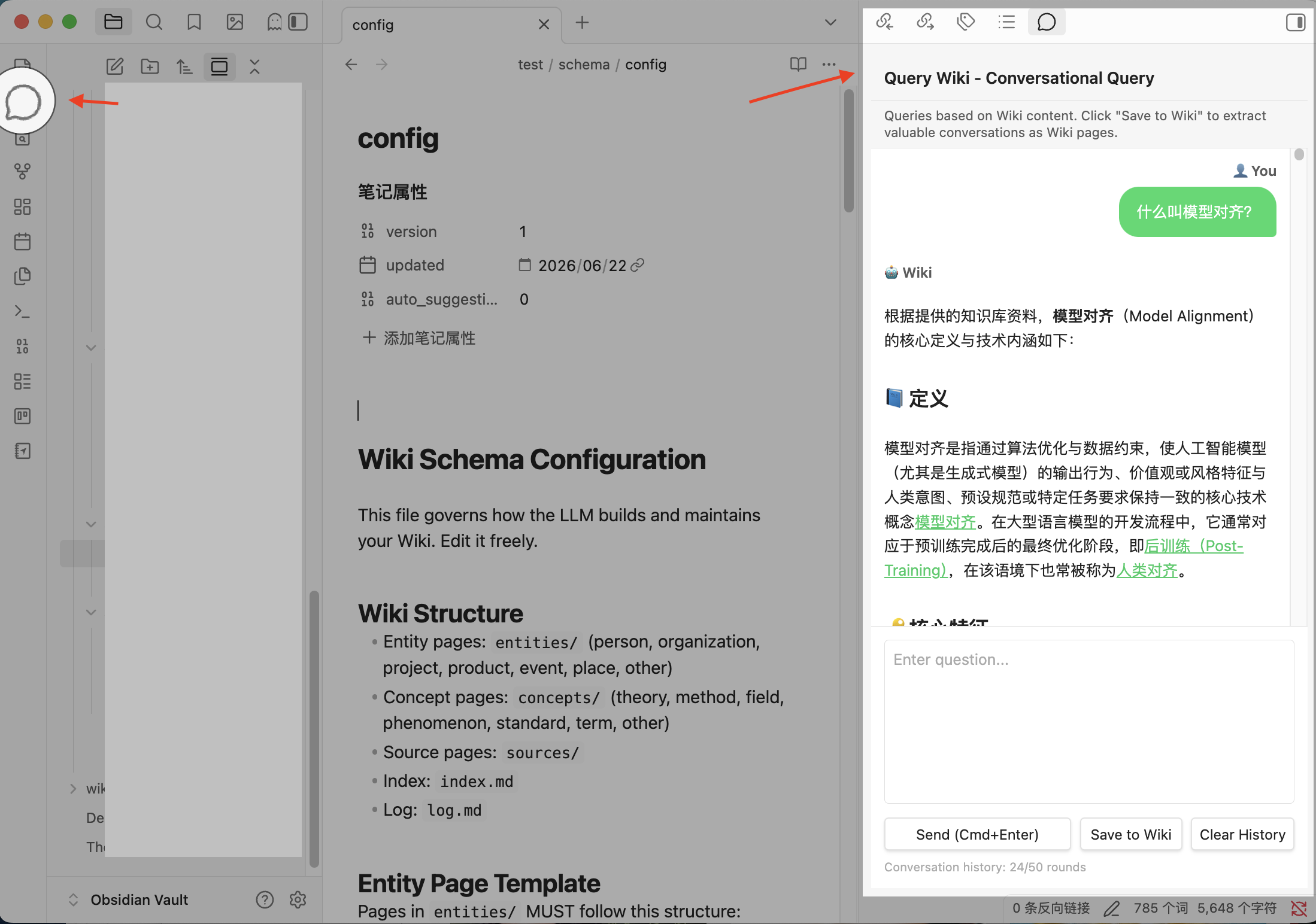
That's it. The plugin modifies nothing in your original notes — only creates new pages under wiki/. Both Ingest and Query wiki are pinned to the left ribbon for one-click access anytime. (Cmd on macOS, Ctrl on Windows/Linux.)
Core commands
| Command | What it does |
|---|---|
| 📥 Ingest single source | Cmd+P/Ctrl+P → "Ingest single source" — pick a Markdown or PDF (v1.25.0+) file, get entity/concept/wiki pages. Also: 🖱️ ribbon sticker icon on the active note. |
| 📂 Ingest from folder | Cmd+P/Ctrl+P → "Ingest from folder" — batch-ingest every note in a folder, with smart batch skip |
| 📑 Ingest multiple files | Cmd+P/Ctrl+P → "Ingest multiple files" — pick a subset via a two-pane file tree (with live queue + per-file cancel) |
| 🔍 Query wiki | Cmd+P/Ctrl+P → "Query wiki" — chat with your wiki in a right-docked side panel; answers carry [[wiki-links]]. Also: 🖱️ ribbon message-circle icon. |
| 🛠️ Lint wiki | Cmd+P/Ctrl+P → "Lint wiki" — full health scan: duplicates, dead links, empty pages, orphans, missing aliases, contradictions |
| ⚡ Smart Fix All | inside Lint Modal — one-click causal-order repair with per-phase report |
| 📋 Regenerate index | Cmd+P/Ctrl+P → "Regenerate index" — rebuild wiki/index.md with current pages and aliases |
| ⏹ Cancel | Cmd+P/Ctrl+P → "Cancel current ingestion" or click the status bar — stops cleanly at the next batch boundary |
| 📊 Ingestion history | Cmd+P/Ctrl+P → "View Ingestion History" — searchable UI for past ingestions, lint reports, maintenance runs |
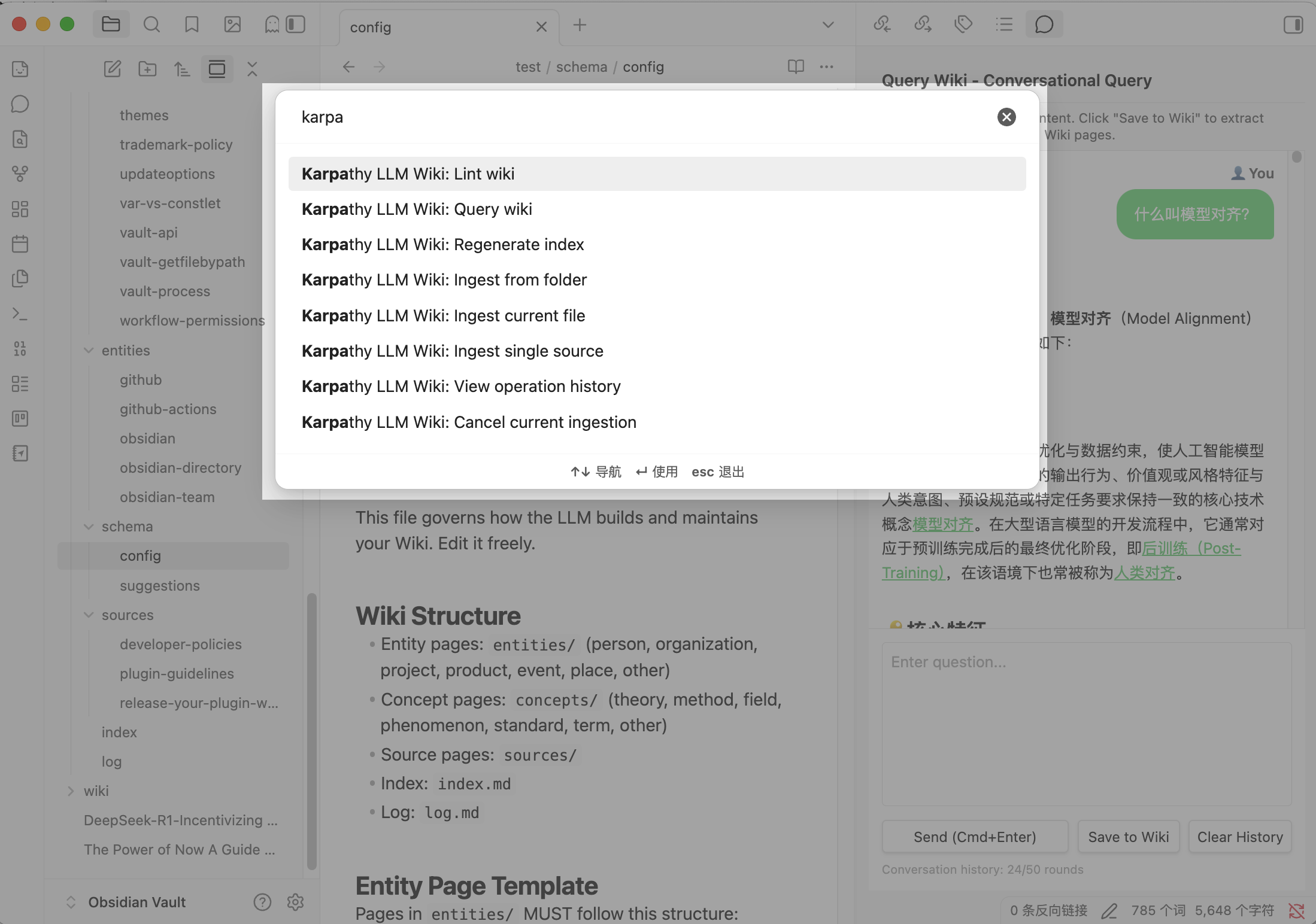
| Before | After |
|---|---|
notes/machine-learning.md (a flat file) | wiki/concepts/supervised-learning.md with [[bidirectional links]], aliases, source attribution, and an entry in wiki/index.md |
📖 Walkthroughs in GitHub Discussions → Guides. Found it useful? Star the repo to follow releases.
✨ Features
📚 Knowledge quality
- 🔍 Entity & concept extraction — LLM extracts entities (people, orgs, products, events) and concepts (theories, methods, terms) into standalone pages. Granularity is configurable (Minimal → Fine, plus Custom) so you trade cost vs. depth.
- 🏷️ Mandatory aliases — every page ships with at least one alias (translation, abbreviation, variant) so cross-language duplicate detection works.
- 🔄 Tiered duplicate detection — Tier 1 (direct name match: cross-language, abbreviation, high-similarity titles) is always verified; Tier 2 (shared links, medium similarity) fills remaining token budget.
- 🧩 Smart merge & contradiction state — duplicates merge while preserving aliases; contradictions are flagged with source attribution;
reviewed: truepages are protected from overwrite. - 🎨 Custom tag vocabulary — define your own entity-type and concept-type tags in Settings → Wiki → Tag Vocabulary → Custom. The vocabulary is a schema-injection hint, not a wire-level gate — small/local models may still drift (about one in ten returns the model's built-in taxonomy). Lint surfaces the rest. Design anchor for schema enforcement: Issue #328.
📄 Document / PDF / Image ingest
Five on-ramps, switchable per ingest:
- 🆕 Built-in MinerU backend (v1.27.0, #404) — Settings → Wiki Configuration → Markdown Conversion Backend → MinerU. PDF + images (PNG/JPG/JPEG/JP2/WebP/GIF/BMP) + Office (DOC/DOCX/PPT/PPTX/XLS/XLSX) through MinerU's Precise parser. Token in Obsidian SecretStorage. Best path for scientific papers, scanned documents, and Office files where layout preservation matters. Server caps: 200 MB / 200 pages per PDF, 256 MB / 10,000 files per archive.
- ☁️ Cloud providers with native PDF — Anthropic, OpenAI, Google Gemini, and AWS Bedrock (Anthropic + OpenAI variants) read PDFs as file parts out of the box. No setup beyond provider selection.
- 🖥️ Local OCR on Apple Silicon — oMLX bundles Microsoft Markitdown as a built-in PDF→Markdown backend. Enable Markitdown in oMLX, load Baidu Unlimited-OCR (3B / 570M-active, open-sourced 2026-06) as the vision model, point the plugin at oMLX as a Custom OpenAI-Compatible provider, turn on Force PDF Support, pick the multimodal model oMLX is serving. The PDF never leaves your machine.
- 🛠️ Third-party extractor (MinerU online UI) — use the MinerU Extractor online service for a quick manual UI when you don't want to wire up an API token. Download the converted
.md, drop it in your vault outside the wiki folder, and ingest as a regular Markdown note. - 🔌 Force PDF Support — for any other OpenAI/Anthropic-compatible endpoint that accepts file parts, the plugin attempts the call (Settings → LLM Configuration → Advanced). The endpoint decides; failures surface as a localized Notice.
Caveat for Office formats: Obsidian does not natively render .docx / .xlsx / .pptx (file-formats), so the practical workflow for Office files is: MinerU converts to .md, the plugin ingests that .md into wiki pages, and the original Office file is kept around for reference. Use a community plugin like Pandoc Plugin / Docxer / Md Importer / Office Reader if you need to inline-preview Office files.
Plumbing shared across all paths:
- 🗄️ Bounded cache —
.obsidian/plugins/karpathywiki/pdf-cache/stores converted Markdown keyed by content hash + model + converter version; 100 MB total / 1000 entries / 10 MB single-entry caps with LRU-by-mtime eviction. - 📝 Optional vault sidecar — Settings → Wiki Configuration → Wiki Folder → Write PDF Markdown to Vault writes
<basename>.pdf.mdnext to the source PDF (off by default — cache-only is the default). - 🛡️ Verbatim transcriber prompt — OCR-style conversion with
[illegible]/[figure: ...]anti-hallucination markers; markdown-fence-wrapping from small local models is auto-cleaned before cache write. - 🔁 Source-page verbatim quotes (v1.27.0, #496) — every generated
sources/<slug>.mdpage now carries aMentions in Sourcesection built from the same verbatim quotes the extraction captured per entity/concept (the prose the model already proved it could see), so the underlying document is the one wiki page with a real, grounded trail back to its source text.
📖 Full setup walkthroughs for all paths (cloud providers, oMLX hardware tiers, MinerU installation, cache housekeeping) → docs/PDF-OCR-GUIDE.md
💬 Query & maintenance
- 🧭 5-stage PPR cascade — see How retrieval works. Personalized PageRank over
[[wiki-link]]gives graph-aware multi-hop context. - 🪟 Right-docked side panel — Query Wiki opens in a Copilot-style right sidebar leaf (v1.22.1+) instead of a centered modal.
- 🔍 Lint health scan — single command catches: duplicates, dead links, empty pages, orphans, missing aliases, contradictions.
- ⚡ Smart Fix All — one-click causal-order repair: fill aliases → merge duplicates → fix dead links → link orphans → expand empty pages, with per-phase report.
- 🆕 Fix Dead Links leave-it outcome (v1.27.0, #485) — Settings → Advanced → Create Stubs for Unresolvable Links (default ON) lets you opt out of empty placeholder pages: when off, the dead link stays visible in every lint report until a real source defines it, and ingest creates pages through normal channels. The never-LLM-expand gate from #197 is unchanged — the new control only governs whether the stub page is written at all.
- 📊 Operation history panel — searchable, filterable UI for past ingestions, lint reports, and maintenance runs.
- 🛡️ Pre-ingest gate — empty / whitespace / frontmatter-only notes are rejected before any LLM call; content-hash dedup catches identical files across paths.
- 🆕 Ingest candidate gate (v1.27.0, #514 / PR #521) — opt-in toggle (
skipMentionOnlyCandidates, default off, Settings → Advanced). For sources whose language has a measured profile (de measured; en/fr/es/pt/nl/ko estimated with pinned edge cases; zh/ja character-script thresholds unmeasured), candidates named only inside parentheses / enumerations / short list items are pruned before they cost a page plus dedup and generation calls. Cross-language notes are not gated; wiki languages without a profile report once per ingest and never silently skip. - 🆕 Per-step task policies (v1.27.0, #525 / #490) — LLM Advanced → Task Policies field; override the per-step text-mode/thinking setting without code changes. Built-in baseline stays intact for steps you don't list.
🔒 Privacy
- 🚫 No backend, no tracking, no analytics. Runs entirely inside Obsidian. Network is used only to communicate with the LLM provider you configure.
- 📁 Source files are read-only. The plugin never modifies your original vault notes — only creates new pages under
wiki/. - 🦙 Full local mode. Ollama, LM Studio, or any local OpenAI-compatible endpoint → your notes never leave your machine.
- 🔐 Minimal permissions. Vault file access for wiki management. Clipboard access only when you click the "Copy" button in the Query modal.
🦙 Local-first
- 🖥️ Ollama, LM Studio, OpenRouter, custom endpoint — out-of-the-box. Local models work for query (smaller context windows); ingest on a 2,000-page vault usually needs a long-context cloud model.
- 📄 PDF OCR path is fully local on Apple Silicon — see Document / PDF / Image ingest above.
- 🔐 ChatGPT Plan (Codex OAuth) — desktop loopback or mobile device-code; credentials live only in Obsidian SecretStorage. (See Anthropic vs OpenAI vs Codex OAuth below for the full provider-boundary explanation.)
🌐 Language
- 🌍 11 UI languages — English, 简体中文, 繁體中文, 日本語, 한국어, Deutsch, Français, Español, Português, Italiano, Русский. UI and wiki-output language are independent — your wiki can be Chinese while the interface is English.
- 📚 11 wiki-output languages — same set; pick in Settings → Wiki Configuration. Custom input option for ad-hoc prompts.
- All UI strings translated per locale — every label, modal, and notice. Adding a 12th language is contributor-driven (PR #159 pattern).
🌐 Ecosystem
The plugin composes with the rest of your Obsidian stack — each tool below plugs into the [[wiki-link]] graph without code changes.
- 📄 MinerU multi-format backend (built-in since v1.27.0) — what used to be a separate CLI/UI step is now a plugin switch; see Document / PDF / Image ingest for the full path table. The MinerU online service remains available for users who prefer a quick UI over an API token; self-host MinerU is also an option.
- 🕸️ Obsidian Graph View — open the native graph on any wiki page; every
[[wiki-link]]becomes a node, every back-link an edge. Built in, zero extra bundle size. - ✂️ Obsidian Web Clipper — official browser extension. Save web pages (articles, blog posts, Reddit threads, Hacker News, recipes, research papers, YouTube transcripts via Interpreter) into any folder of your vault, then run the plugin's
Ingest from foldercommand to batch-extract entities and concepts. - 📊 Dataview — query the wiki like a database with DQL (
LIST FROM "wiki/entities" WHERE contains(tags, "person")) or JS API. The plugin writes standard frontmatter (tags:,type:,aliases:) on every page, so Dataview queries work out of the box. - 🌿 Git — version your vault (any Git client). The plugin never rewrites your source files; only creates new pages under
wiki/, sogit diffcleanly separates your edits from LLM-generated content. - 🎞️ Marp Slides — turn any Obsidian note into slide decks via Marp frontmatter (
marp: true). Wiki pages are pure Markdown, so they render as slides without extra conversion. - 🖼️ Canvas — Obsidian's native infinite canvas. Drag wiki cards onto a Canvas to assemble study guides, mind maps, or research overviews from
[[wiki-links]]without leaving the vault. - 🎤 Obsidian Nous — companion plugin for local voice memo and meeting capture (whisper.cpp on macOS; audio never leaves the machine). Generates speaker-labeled transcripts and its own wiki hub pages. Independent of this plugin — both can share the same vault without coupling.
🧰 Headless CLI
Most users should ignore this section. The plugin's user-facing CLI lives in the sibling repo green-dalii/obsidian-llm-wiki-cli — install with npm i -g karpathywiki-cli and run karpathywiki-cli ingest --sources <path> --wiki <path> --provider <id> --key <key>.
What ships in this repo at tools/dev-instrument/ is the dev-only headless measurement instrument for engine contributors — it runs the real WikiEngine.ingestSource against a vault on disk with no Obsidian runtime, prints per-task token + wall-clock accounting — same numbers that drive the perf evidence in CLAUDE.md and release notes. See tools/dev-instrument/README.md for the entry command, env vars, measurement modes, and exit-code spec.
🔍 How retrieval works
Most "AI search" plugins fragment your notes into chunks and embed them in a vector DB. We don't. Karpathy's argument against RAG is that chunking breaks the LLM's ability to reason across your whole knowledge graph — and that argument holds up in practice. Instead, we walk the graph you already maintain by writing [[wiki-links]].
The 5-stage seed-selection cascade
When you ask "Who founded Microsoft?", Query Wiki runs five stages before any answer generation:
- Lex fast path — straight token-overlap against every entity/concept title and aliases. Free, instant, and the gating step for everything that follows.
- LLM keyword generation — the LLM proposes 8–12 cross-language keywords from your query (handles synonyms, abbreviations, and token-overlap-resistant terms in one LLM call).
- Local substring scan — every generated keyword is re-matched locally against page titles, aliases, and body snippets. No extra LLM call; rounds out noise-tolerant recall.
- LLM KB fallback — when lex + keyword scan returns weak signals, the LLM re-seeds the top-N candidates against the full wiki for one semantic pass.
- PPR graph expansion — Personalized PageRank (Haveliwala 2002) over the
[[wiki-link]]graph starting from the candidate seed set. This is what gives graph-aware multi-hop context: "Bill Gates" → "Microsoft" → "competitors", not just literal title overlap.
The cascade truncates at whichever stage returned enough signal — no fixed 5-stage cost; no LLM calls when lex is sufficient; semantic fallback only when lex + keyword scan alone isn't enough.
Personalized PageRank at scale
We use Monte Carlo PPR (Fogaras 2005) — 3,000 random walks × 50 steps each — with the dead-end rule from Haveliwala 2002. Cost is O(K × L) (K = walks, L = steps per walk), independent of the number of pages, so a 2,000-page vault sees the same expansion latency as a 200-page one.
PPR @5 = 27.1% vs pure-kNN baseline 24.1% on the project's own benchmark corpus (the only published retrieval benchmark in this open-source LLM-Wiki space).
Why no embeddings
We deliberately rejected the embedding path in Issue #175. The graph signal is already there — every [[wiki-link]] is a hand-curated "these are related" edge, and most providers we support (Ollama, LM Studio, Anthropic, Bedrock, Kimi, GLM, MiniMax) don't ship a /v1/embeddings endpoint at all. Adding an embedding model would mean a per-page download, a per-provider adapter, and zero benefit on retrieval quality.
🤖 Models
Supported providers (16+, all from models.dev cross-check 2026-07):
| Provider | Series | Notes |
|---|---|---|
| Anthropic | Claude 5 series | Native PDF; /v1/messages protocol |
| OpenAI | GPT-5.6 series (Sol / Terra / Luna) | Native PDF; Platform API key |
| Google Gemini | Gemini 3.6 series | Native PDF (file parts since 1.5); OpenAI-compatible endpoint |
| DeepSeek | DeepSeek V4 series | OpenAI-compatible; lowest cost tier |
| Alibaba Qwen | Qwen3.7/3.8 series | OpenAI-compatible (DashScope) |
| xAI Grok | Grok 4 series | OpenAI-compatible; long context |
| Moonshot Kimi | Kimi K3 series | OpenAI-compatible; 2.8T MoE frontier |
| Zhipu GLM | GLM-5 series | OpenAI-compatible; strong bilingual |
| MiniMax | MiniMax M3 series | OpenAI-compatible; 1M context |
| Step (阶跃星辰) | Step 3 series (Flash) | OpenAI-compatible; fast inference |
| Tencent Hunyuan | Hy3 series | OpenAI-compatible; open-weight MoE |
| Xiaomi MiMo | MiMo V2.5 series | MIT open-source; flat pricing |
| Google Gemma | Gemma 4 series | Open-weight; 262K context |
| AWS Bedrock | Anthropic + OpenAI variants | Native PDF; VPC / compliance path; API key + SSO + IAM (v1.27.0, #425) |
| ChatGPT Plan (Codex OAuth) | Codex Responses API | Browser/device-code sign-in; SecretStorage |
| Local: Ollama, LM Studio, OpenRouter, Anthropic-Compatible | Any OpenAI-/Anthropic-protocol model | Custom OpenAI-Compatible + Anthropic-Compatible (Token Plan / Coding Plan) |
This plugin feeds the LLM your full Wiki context per query — so long-context models win. The full tiered table (cloud + local) lives in docs/MODEL-GUIDE.md, cross-checked against models.dev so the picks stay current.
What matters
- 🧠 Context window ≥ 200K tokens for vaults over ~500 pages. Below 200K the cascade may drop earlier stages to fit.
- ⚖️ Instruction-following quality matters more than raw IQ for the extraction task — pick a model that follows the schema template, not the biggest leaderboard number.
- 🔌 Embedding endpoint is irrelevant — we don't use embeddings. A provider that lacks
/v1/embeddingsis fine (most of our 16+ providers don't ship one). - 🦙 Local works for query, cloud for ingest — ingest on a 2,000-page vault usually needs a long-context cloud model; a 262K local model covers most queries.
For PDF / image / Office ingest, see Document / PDF / Image ingest in Features — Anthropic, OpenAI, Bedrock, and Gemini read PDFs as file parts natively; the built-in MinerU backend (v1.27.0+) and Force PDF Support cover everything else.
Anthropic vs OpenAI vs Codex OAuth — they are distinct providers
- Anthropic (and its Bedrock variant) — separately billed Anthropic Platform API key.
- OpenAI — separately billed OpenAI Platform API key.
- ChatGPT Plan (Codex OAuth) — experimental, distinct provider that uses eligible Codex allowance after browser or device-code sign-in; availability follows OpenAI Codex authentication and allowance policies, not plan name. Third-party Codex compatibility, not an OpenAI partnership or a general ChatGPT API.
AWS Bedrock — three auth modes (v1.27.0, #425)
Settings → Provider → Bedrock (Anthropic / OpenAI) now picks one of three auth modes; the provider row then asks for the inputs that mode actually needs:
- API key — the original Stage-1 bearer path; behavior is byte-for-byte identical to v1.26.4 and the recommended pick for users who already pay for a Bedrock API key.
- SSO — IAM Identity Center device flow. Click Sign in with AWS SSO, paste the verification URL code in the browser, the plugin receives an SSO token via
karpathywiki-bedrock-ssoin SecretStorage, exchanges it for temporary role credentials, and signs every request with hand-rolled SigV4 (no AWS SDK added). Account ID and role name are auto-detected when the SSO identity exposes exactly one of each; otherwise enter them in the provider settings. - IAM — static access keys for environments without SSO (CI, scheduled batch jobs). Stored in
karpathywiki-bedrock-iamin SecretStorage; the in-memory cache memoizes per access-key to keep SigV4 signing within expiry.
All three modes share the same Obsidian SecretStorage discipline (no credentials in data.json, logs, or docs) and the same zero-AWS-SDK hand-rolled OIDC + SigV4 path. Bedrock region is independent of auth mode and is configured in the same provider row.
📖 Full pick table (cloud + local + PDF OCR + Codex OAuth + quantization + hardware tiers) → docs/MODEL-GUIDE.md
❓ FAQ
What does the plugin actually do?
Pick any note, folder, or selection; the LLM extracts entities and concepts and generates an interlinked wiki with [[bidirectional links]]. Ask questions and get conversational answers grounded in your notes, not the internet. Your original vault notes are never modified.
How do I get started?
Install from Obsidian Community Plugins → pick a provider → Test Connection → run Ingest single source on any note. First wiki pages appear within seconds. See Quick Start.
Is my existing wiki safe?
✅ Backward compatible since v1.0.0. Set reviewed: true on any page to protect it from overwrite. Upgrading from v1.24.x doesn't rewrite your vault; v1.25.0's PDF ingest is cache-only by default, and v1.27.0 adds native PDF + images + Office ingest without changing the on-disk wiki layout.
Can I ingest PDFs, images, and Office documents?
✅ Yes. Anthropic, OpenAI, Bedrock, and Gemini read PDFs natively; the built-in MinerU backend (v1.27.0) covers everything else (PDF + images + Office). Full walkthrough — cloud providers, Apple Silicon OCR, Force PDF Support, cache housekeeping — in docs/PDF-OCR-GUIDE.md.
Is my data sent anywhere?
🚫 No backend, no analytics — the plugin runs entirely inside Obsidian. Only text you explicitly send for ingest/query leaves your device, and only to the LLM provider you configure. For complete data locality, use Ollama or LM Studio.
Can I use the plugin in my language?
🌍 11 languages for both UI and wiki output. UI and wiki language are independent. Adding a 12th language is contributor-driven (PR #159 pattern).
How is this different from a RAG chatbot?
🚫 No chunking. 🚫 No embeddings. 🚫 No vector DB. ✅ Personalized PageRank over your existing [[wiki-link]] graph — graph-aware multi-hop context, zero embedding cost, full local-model support.
Which LLM should I use?
Long-context models (≥200K tokens) work best. The Models section covers the principles; the full tiered table is in docs/MODEL-GUIDE.md.
Is there a published benchmark?
Yes — PPR @5 = 27.1% vs pure-kNN baseline 24.1% on the project's own corpus. The full pipeline and benchmark script are described in How retrieval works.
How do I control API costs?
Use Coarse or Minimal extraction granularity for batch ingest. Smart Batch Skip auto-detects already-ingested files. Auto-Maintenance is OFF by default. Lint shows counts before running fixes — nothing is charged without your approval.
How do I cancel a running operation?
Click the status bar (shows "Ingesting… click to cancel") or Cmd+P/Ctrl+P → "Cancel current ingestion". Stops cleanly at the next batch boundary.
Where do I get help?
GitHub Issues for bug reports · GitHub Discussions for questions and feature requests · Developer Console (Ctrl+Shift+I / Cmd+Option+I) for plugin logs.
🔒 Privacy
This plugin is listed on the Obsidian Community Plugin Market and undergoes automated review for security and permissions.
- 🚫 No backend of its own, no telemetry, no data collection. Pure local software running inside Obsidian. The plugin operates no server and reports nothing anywhere.
- 🔐 Network access is opt-in and explicit. It exists only to reach services you configure: your LLM provider, and — if you turn on the MinerU document backend —
mineru.net. That second one is the exception worth naming: it uploads the document to a jurisdiction you did not choose and that publishes no retention statement. Where your document is processed lists every path and where the file goes. - 📁 Vault file access is used for wiki management (reading notes, generating pages, scanning dead links, detecting duplicates). The plugin never modifies your source files.
- 📋 Clipboard access is used exclusively by the "Copy" button in the Query modal — and only when you click it.
For complete data locality, use Ollama or LM Studio. With a local provider, your data never leaves your machine.
💖 Support
If LLM-Wiki has become a meaningful part of your knowledge workflow:
- ☕ Buy me a Ko-fi — one-time or monthly
- 💳 Tip via PayPal — one-time tip
Thanks to the following for supporting the project:
@jameses-cyber, @issaqua, Dikson Choi
🔭 Other projects
- obsidian-llm-wiki-cli — the headless ingest CLI, sibling repo shipped as the
karpathywiki-clinpm package. Runs the sameWikiEngineagainst a vault on disk, no renderer. Install withnpm i -g karpathywiki-cli. The in-treetools/dev-instrument/is the dev-only measurement instrument that drives the per-task cost numbers in this plugin's release notes. - pi-shift-router — a task-level router for pi-coding-agent. Before each turn a small LLM judge marks your message routine or consequential, and the tier it picks drives the whole turn. Complex tasks go further: the Smart tier runs as a CTO that plans the work, delegates implementation to Fast subagents, reviews each result and iterates. Upgrades are instant, downgrades wait for a sustained trend; per-tier fallback chains ride out 429s and 5xx. Zero runtime deps, MIT. → shiftrouter.greenerai.top
- dsh-shift-router — DSH fork of pi-shift-router, same task-level routing design but targeted at the dsh-coding-agent runtime. Same judge-driven tier picks, same per-tier fallback chains, MIT.
- dsh-plugin-dev-skill — DSH companion to the Claude-side
obsidian-plugin-devworkflow: scaffolds an Obsidian plugin workspace, drives the Red→Green TDD loop, runs the Six-Gate quality closure (lint/tsc/test/build/css-lint), and prepares a release-ready branch onfeat/*orfix/*. Built so DSH-using contributors get the same scaffolding + gate experience without copy-pasting from CLAUDE.md.
📜 License & Credits
Apache License, Version 2.0 — see LICENSE and NOTICE.
Built on:
- 💡 Andrej Karpathy's LLM Wiki — the original concept
- 🛠️ Obsidian Plugin API
- 🔌 Vercel AI SDK v6 (
@ai-sdk/openai,@ai-sdk/anthropic,@ai-sdk/openai-compatible) via ObsidianrequestUrl - 🧮 Personalized PageRank (Haveliwala 2002) and Monte Carlo PPR (Fogaras 2005) — retrieval algorithms
Maintainers: @green-dalii (author) · @DocTpoint (co-maintainer since September 2026)
For plugin developers
Search results and similarity scores are powered by semantic analysis of your plugin's README. If your plugin isn't appearing for searches you'd expect, try updating your README to clearly describe your plugin's purpose, features, and use cases.