TODOseq
approvedby Stephen Cross
Lightweight keyword-based task tracker using Logseq style keywords.
TODOseq for Obsidian



Keyword-based task management for Obsidian. No checkboxes required.
TODOseq ("to-do-seek") scans your vault for plain lines that start with TODO, DOING, and DONE, then collects them into one Task List. Keep writing in ordinary notes — inspired by Emacs Org-mode and Logseq. Free and open source (MIT).
Install from Community Plugins · Documentation · Report an issue
Why TODOseq?
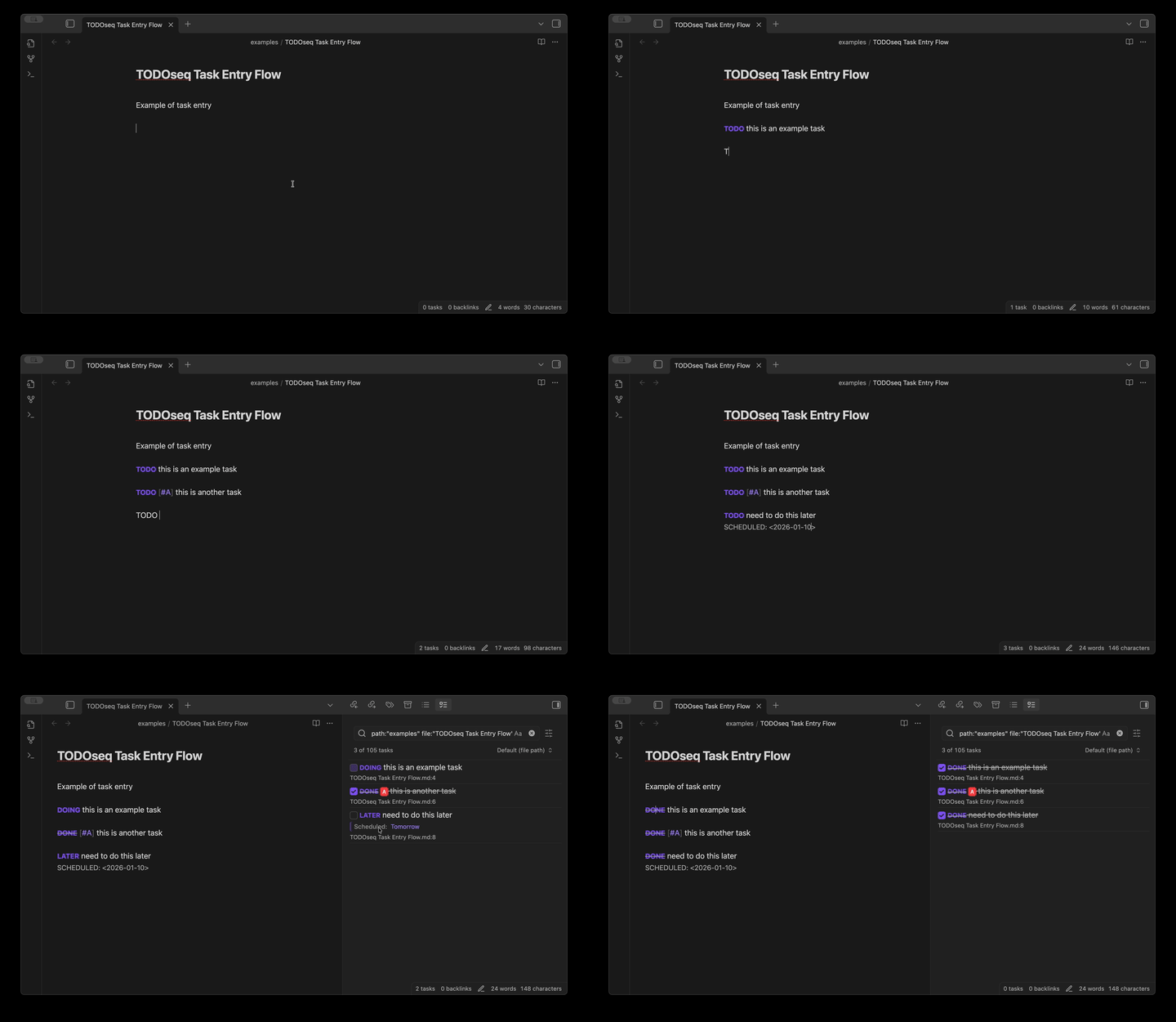
Most task managers force you into a separate system. TODOseq meets you where you already work — inside your Obsidian notes. Type TODO Write report anywhere, and it appears in the Task List. No second app, no checkbox ceremony.
- Plain keywords instead of
- [ ]checkbox syntax - Logseq / Org-mode compatible, including natural-language dates
- Vault-wide Task List: search, urgency, priorities, embedded lists
What you get
- Keywords
TODO/DOING/DONE/ … with[#A]priorities - Natural language dates converted to structured Org dates
- Unified Task List with filters, urgency sort, and advanced queries
- Works in Edit and Reading views; click a keyword or
Ctrl+Enter - Code-comment TODOs in 20+ languages
todoseqembedded lists in notes- Subtasks, repeating tasks, optional CLOSED dates
- Logseq-compatible format for dual-use vaults
More detail in the documentation.
Quick start
- Install: Settings → Community plugins → Browse → search TODOseq → Install → Enable
- Type a task in any note:
TODO [#A] Finish quarterly report #work tomorrow
DOING Review pull requests #coding
DONE Submit expense report
- Open the Task List — right sidebar, or Command Palette → “TODOseq: Show task list”
Documentation
Full guides: scross01.github.io/obsidian-todoseq
Start here:
- Introduction — approach and Logseq compatibility
- Task List — using the panel
- Task Entry — syntax and lifecycle
- Search — filters and advanced queries
Development
Requires Node.js 20+.
| Command | Purpose |
|---|---|
npm install | Install dependencies |
npm run dev | esbuild watch mode |
npm run build | Typecheck + production bundle |
npm test | Unit tests |
npm run lint / npm run format | ESLint / Prettier |
npm run docs:dev | VitePress docs dev server |
Integration tests, CDP debugging, and PR expectations: see CONTRIBUTING.md and AGENTS.md.
Contributing
Issues and pull requests are welcome. See CONTRIBUTING.md.
- Report issues or request features
- Star the repo if TODOseq is useful to you
License
MIT — see LICENSE.
For plugin developers
Search results and similarity scores are powered by semantic analysis of your plugin's README. If your plugin isn't appearing for searches you'd expect, try updating your README to clearly describe your plugin's purpose, features, and use cases.