Star Favorites
approvedby Bugra Sitemkar
Star your favorite notes and folders from the right-click menu and jump to them from a dedicated Favorites pane. - This plugin has not been manually reviewed by Obsidian staff.
Star Favorites
Star your favorite notes and folders straight from the right-click menu, and jump back to them from a dedicated Star Favorites pane.
Repository: github.com/bugrasitemkar/star-favorites Plugin-Page: Obsidian Community Plug-in Page
Features
- Right-click any note or folder (in the file explorer, or a note's tab) and choose Add to favorites. Once favorited, the same menu shows Remove from favorites.
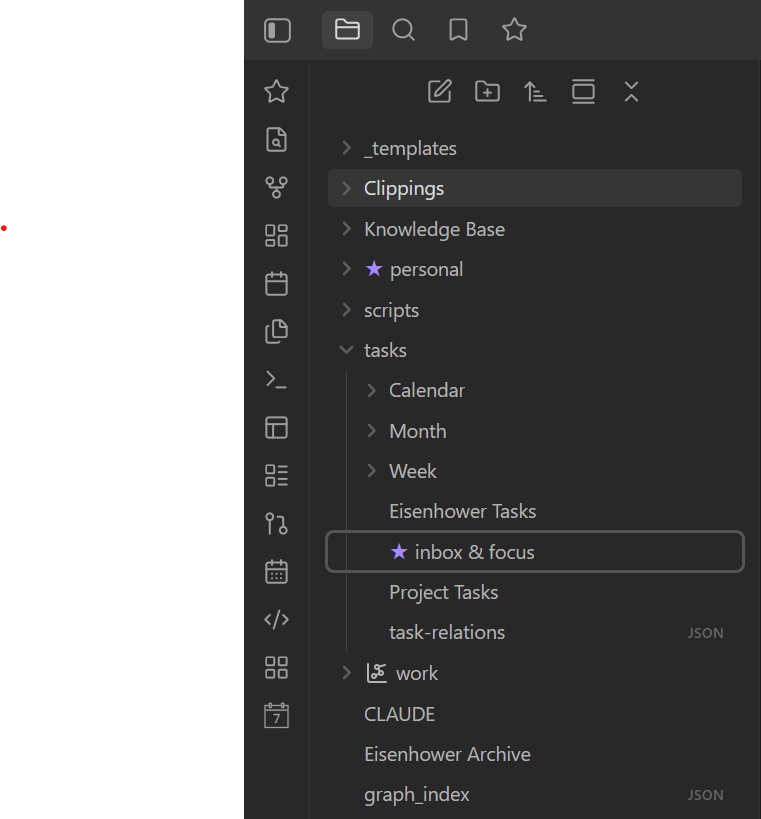
- Favorited notes and folders get a ★ prefixed to their name in the file explorer.
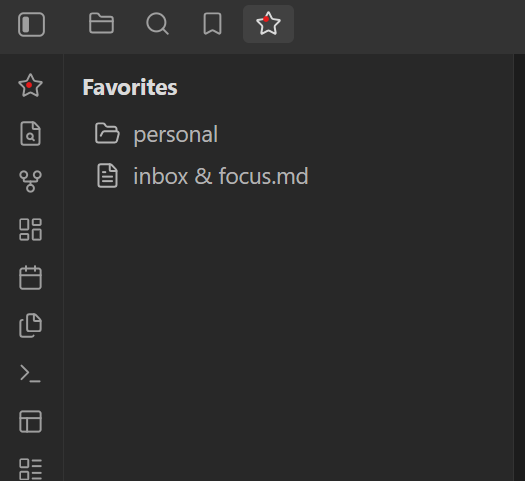
- Click the star icon in the left ribbon (or run the Open favorites view command) to open a Star Favorites pane in the left sidebar listing every starred note and folder. Click an entry to open the note or reveal the folder; right-click an entry to unfavorite it.
- Favorites follow renames and moves automatically, and are cleaned up when the underlying file or folder is deleted.
- Multi-select support: select several files/folders in the explorer and add or remove them from favorites in one click.
The ★ marker is shown in the file explorer only (not in tabs, search, or backlink panes).
Screenshots
| Starred items in the file explorer | Favorites pane |
|---|---|
 |  |
Installing for development
npm install
npm run dev
This watches main.ts and rebuilds main.js on save. To test inside a vault, either:
- Clone/copy this folder into
<YourVault>/.obsidian/plugins/star-favorites, or - Symlink this folder into
<YourVault>/.obsidian/plugins/star-favorites.
Then reload Obsidian (or use the "Reload app without saving" command) and enable Star Favorites under Settings → Community plugins.
Building for release
npm run build
This type-checks the project and produces a production main.js.
Publishing to the Community Plugins directory
- Push this repository to
github.com/bugrasitemkar/star-favorites. - Create a GitHub release whose tag matches
manifest.json'sversion(e.g.1.0.0, no leadingv), and attachmain.js,manifest.json, andstyles.cssas binary attachments to the release. - Fork
obsidianmd/obsidian-releases, add an entry forstar-favoritestocommunity-plugins.json, and open a pull request following their submission guidelines. - Bump future versions with
npm version <patch|minor|major>, which updatesmanifest.jsonandversions.jsonviaversion-bump.mjs.
License
MIT
For plugin developers
Search results and similarity scores are powered by semantic analysis of your plugin's README. If your plugin isn't appearing for searches you'd expect, try updating your README to clearly describe your plugin's purpose, features, and use cases.