Streakwise
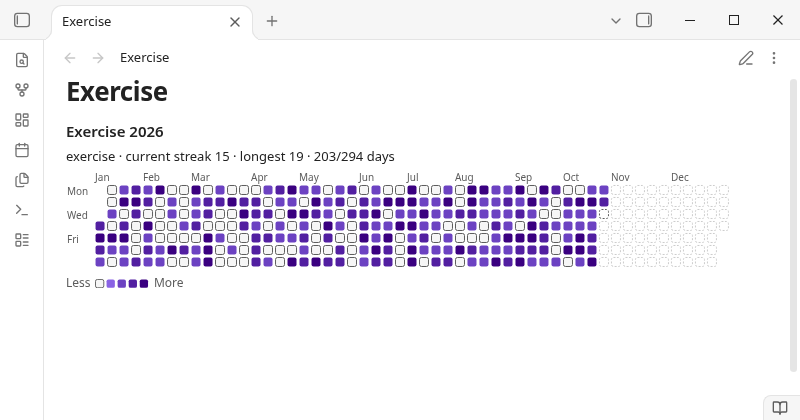
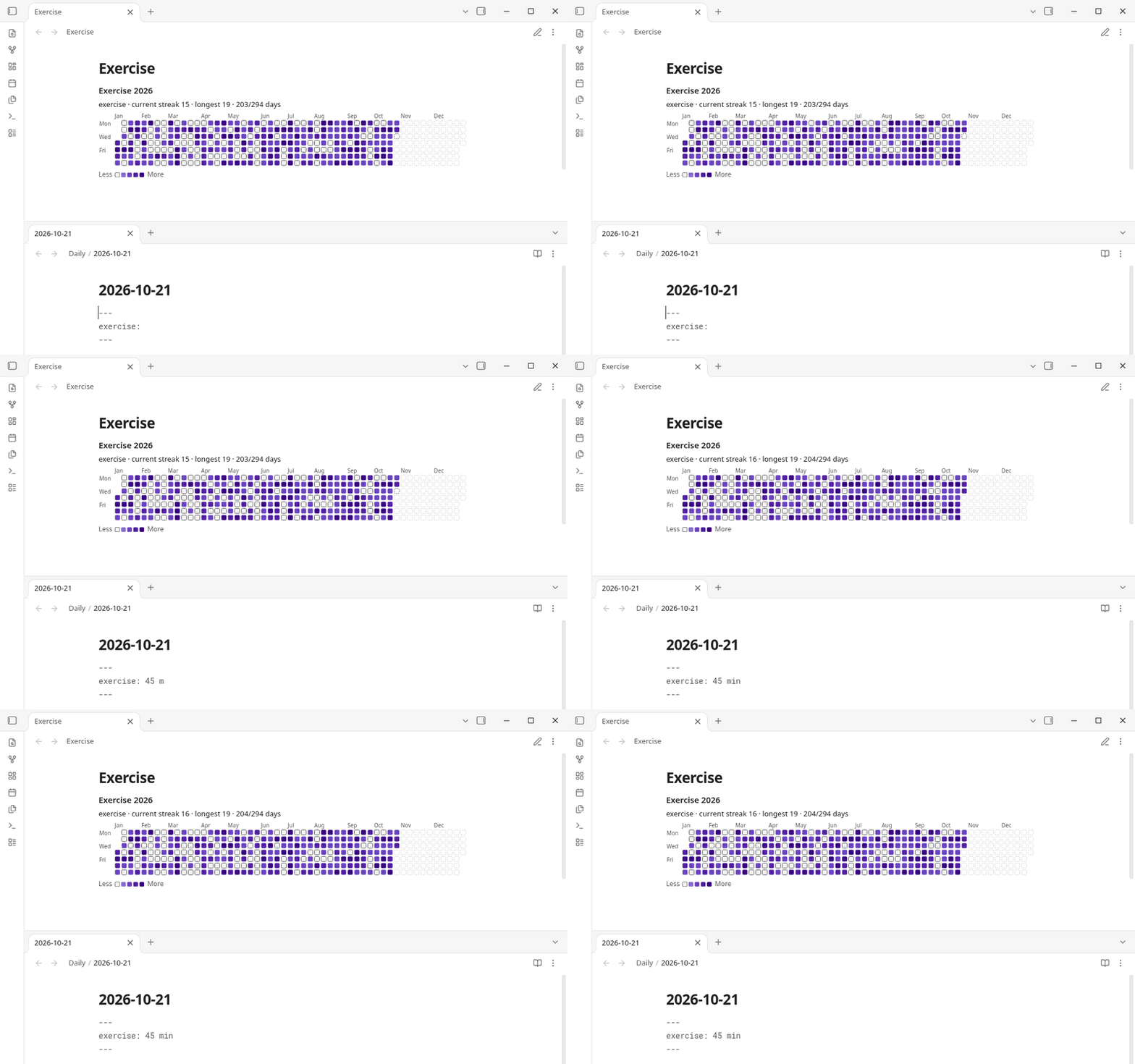
Turn the habit properties already in your daily notes, like exercise: 30 min or reading: true, into a GitHub-style yearly heatmap with your current and longest streak, with no new note format to learn.
For anyone who tracks habits in daily notes and wants a visual check without adding a separate app. Free, offline, no account.
Features
- Yearly heatmap of one habit per block, with current streak, longest streak and days done.
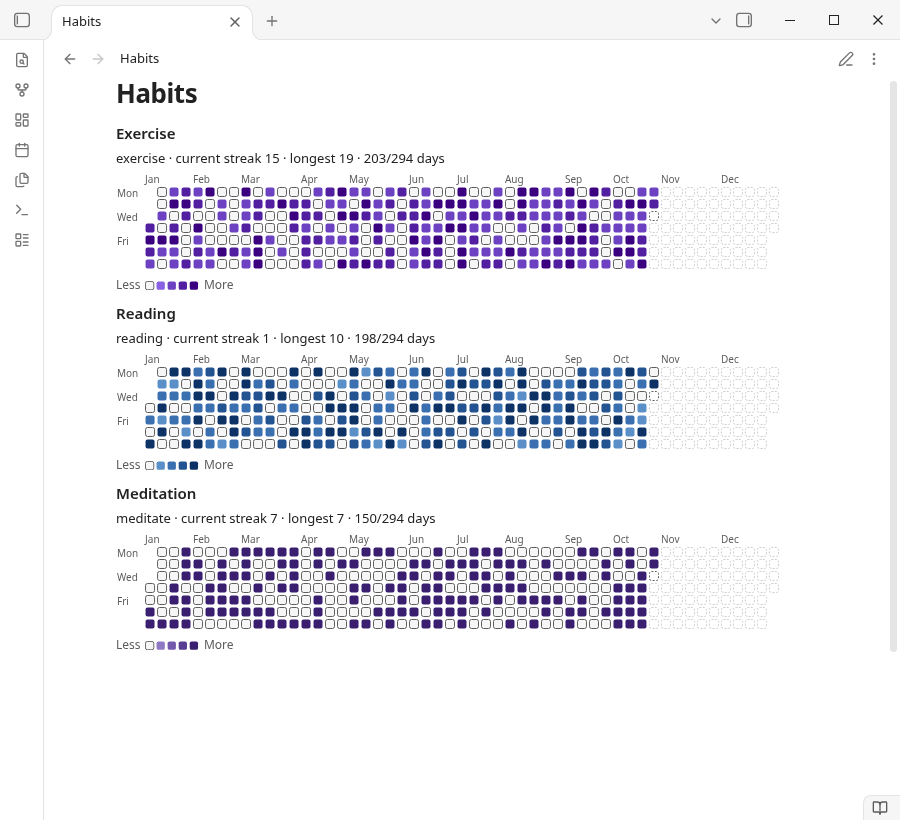
- Several blocks in one note, each with its own habit and colours.
- Follows your theme: the default "Accent" colours use your theme's accent colour; 4 fixed palettes (green, blue, purple, orange) are also available. Higher values get darker in light themes and brighter in dark themes, so levels can be read by lightness, not hue alone.
- Works in narrow panes: the grid scrolls to today, and the title and streak line wrap.
- Fully offline: no account, no network.
Planned for Streakwise Pro: month, week, quarter and year-to-date views; several habits in one block; PNG export.
Usage
Add exercise: true, reading: 30 min, meditate: yes (any property name) to daily notes, then:
```streakwise
habits: exercise
view: year
```
| Option | Values | Default |
|---|---|---|
habits | one frontmatter property (case-insensitive); several, comma-separated: Pro, planned | default habit from settings |
view | year (ytd, quarter, month, week: Pro, planned) | year |
date / year | YYYY-MM-DD / YYYY, which year to show | today |
colors | accent, green, blue, purple, orange | from settings (accent) |
max | value shown in the darkest colour | largest value in range |
title | any text | none |
weekstart | monday, sunday | from settings |
Values:
true/yes/done/x/✅= done;false/no/skipor empty = not done.- Numbers are amounts, also with units (
30 min,1.5h). Zero or negative numbers (-5) count as not done. - Comma: a comma followed by exactly three digits is a thousands separator (
1,000= 1000,12,500 steps= 12500); any other comma is a decimal comma (1,5= 1.5,1,50= 1.5,1,0000= 1). To avoid ambiguity, write decimals with a dot (1.50). - A missing daily note or property is shown faded as "no entry".
Where daily notes are found: Streakwise follows the folder and date format of the Periodic Notes plugin (daily notes) if enabled, otherwise the core Daily notes plugin, otherwise the folder/format in Streakwise settings. You can force the custom location in settings.
Only notes inside the daily-notes folder or its subfolders are counted. A note matches if its path relative to that folder (for formats like YYYY/MM/YYYY-MM-DD) or its file name (for notes archived in subfolders, e.g. Daily/2026/2026-10-17.md) matches the date format. Notes outside the folder (e.g. Archive/2026-10-17.md when the folder is Daily) are ignored. If no daily notes are found, the note shows one hint card with the folder and format it looked for and a button that opens Streakwise settings. If two notes still map to the same day (e.g. format YYYY-M-D with both 2026-10-7.md and 2026-10-07.md), the one with the shortest path is used (ties: alphabetical), and blocks whose date range includes that day show which note was ignored.
The command Insert heatmap block adds a starter block.
Network use disclosure
- Streakwise makes no network requests. All heatmap and streak features run locally.
- Nothing from your vault is sent anywhere. No telemetry, analytics or ads.
Data storage
- Settings are stored in
.obsidian/plugins/streakwise/data.jsonin your vault. - No files outside your vault are read or written.
Known limits
- Only frontmatter properties are read (not task checkboxes in the note body).
Development
The free build makes no network requests: the license code for the planned Pro version is removed from main.js at build time (FREE_BUILD=true), and npm test checks the bundle for it.
npm install
npm run build   # type-check + bundle to main.js
npm test        # unit tests (dates, values, streaks, settings validation, colour contrast) + a check that the
                # shipped free bundle (FREE_BUILD=true) contains no license or network code
npm run lint
Support
Bugs and questions: open an issue at https://github.com/smallbench-labs/streakwise/issues. Other questions: support@formchime.com.
Clean-room statement
Written from scratch; see REVIEW_NOTES.md.
License
MIT © 2026 Smallbench Labs (Roger Chang) (see LICENSE).
For plugin developers
Search results and similarity scores are powered by semantic analysis of your plugin's README. If your plugin isn't appearing for searches you'd expect, try updating your README to clearly describe your plugin's purpose, features, and use cases.