Symbol Stripper
approvedby Tacai
选中文本,一键剔除指定字符或正则匹配 / Select text and strip specified characters or regex matches with one click - This plugin has not been manually reviewed by Obsidian staff.
中文 | English
Symbol Stripper


选中文本,一键剔除指定字符或正则匹配。
Select text and strip specified characters or regex matches with one click.
预览 / Preview
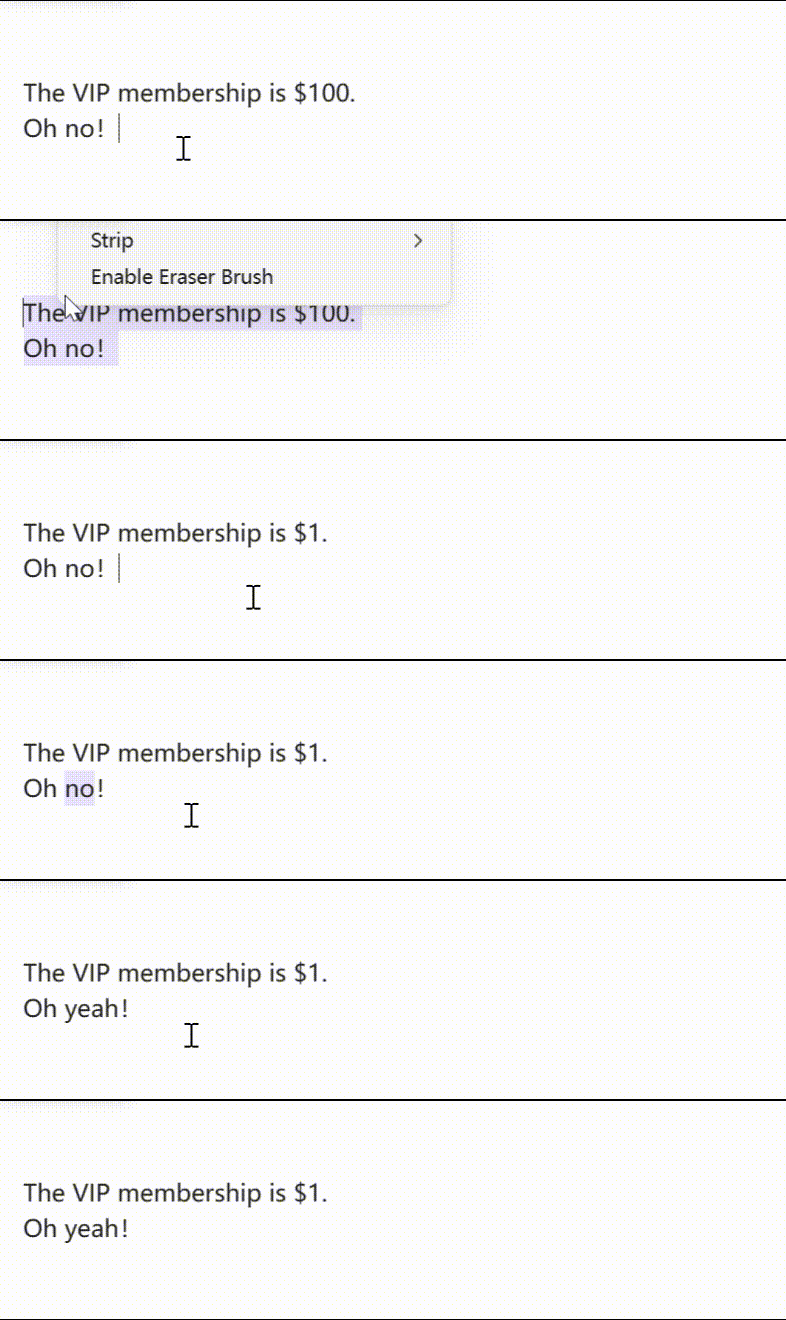
右键菜单 / Context Menu
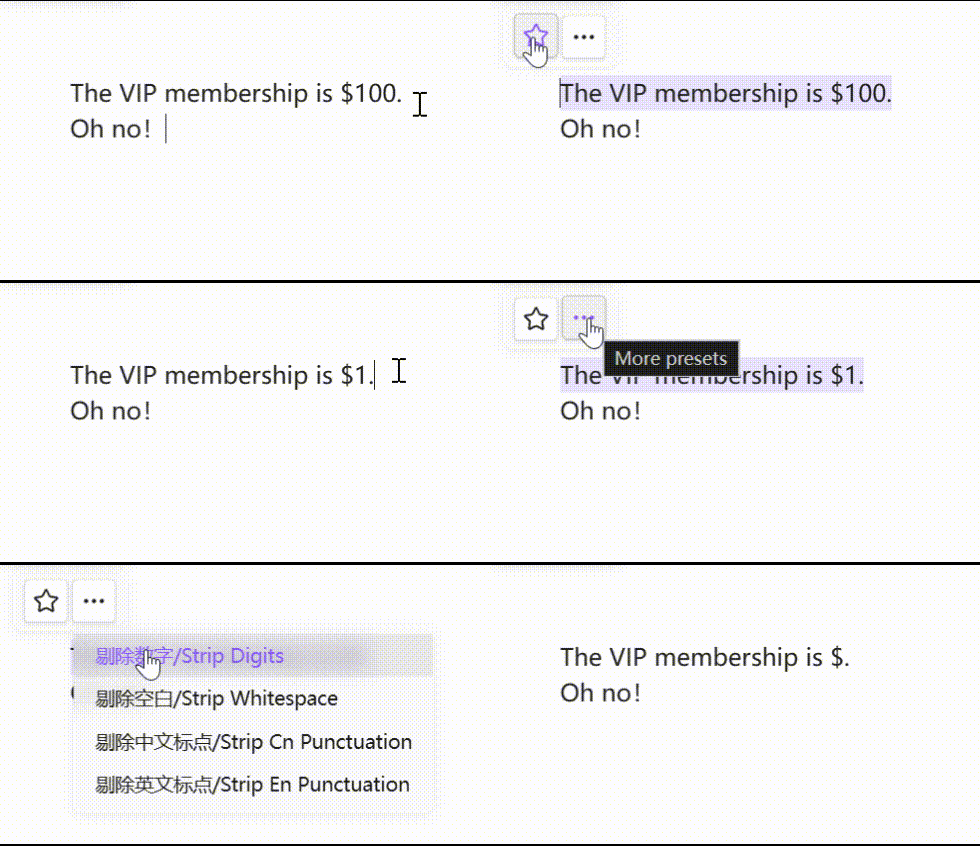
跟随栏 / Floating Toolbar
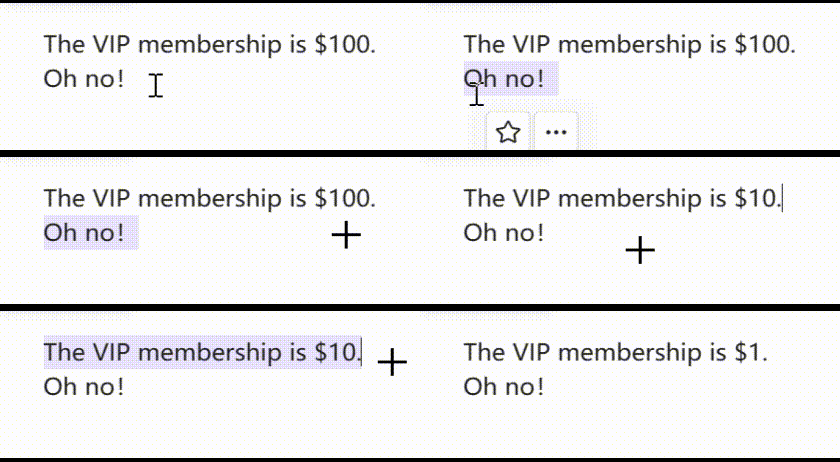
剔除刷 / Eraser Brush
中文
功能特性
- 🔤 字符模式 — 逐字符剔除,如剔除所有数字、标点
- 🔍 正则模式 — 按正则表达式匹配剔除,如剔除所有空白、中文标点
- 🎯 浮动工具栏 — 选中文本后自动出现跟随光标的工具栏,一键执行常用预设
- ✨ 剔除刷 — 双击工具栏星标按钮激活,连续选中文本自动应用预设
- 📋 右键菜单 — 选中文本 → 右键 → 选择预设
- ⌨️ 命令面板 —
Ctrl+P→ 搜索"剔除" → 选择预设执行 - ⚙️ 预设管理 — 在设置页自定义预设(增删改查、筛选、导入导出)
- 🌐 多语言 — 支持中文 / English,跟随系统语言自动切换
内置预设
| 预设名称 | 模式 | 内容 |
|---|---|---|
| 剔除数字 | 字符 | 0-9 |
| 剔除空白 | 正则 | \s+ |
| 剔除中文标点 | 正则 | 中文标点字符集 |
| 剔除英文标点 | 字符 | 常见英文标点 |
安装
Obsidian 社区插件(推荐)
- 设置 → 社区插件 → 浏览 → 搜索 "Symbol Stripper"
- 安装并启用
BRAT
- 安装 BRAT 插件
- BRAT 设置 →
Add Beta plugin with frozen version→ 输入仓库地址 - 搜索
Tacai/symbol-stripper,安装并启用
手动安装
- 从 Releases 下载
main.js、manifest.json、styles.css - 在 vault 中创建
.obsidian/plugins/symbol-stripper/目录 - 将三个文件复制到该目录
- 重启 Obsidian → 设置 → 社区插件 → 启用 Symbol Stripper
开发说明
本插件的代码部分全部使用 AI 编程完成,人工参与部分仅限于发行版测试和向 AI 提出更改要求。
致谢
浮动工具栏交互设计和设置界面分页设计参考了 editing-toolbar(MPL-2.0 License, by Cuman / PKM-er)。
许可证
MIT License, Copyright (c) 2026 Tacai
English
Features
- 🔤 Char Mode — Strip individual characters, e.g. remove all digits or punctuation
- 🔍 Regex Mode — Strip by regex match, e.g. remove all whitespace or Chinese punctuation
- 🎯 Floating Toolbar — Auto-appears next to the cursor on text selection for one-click preset execution
- ✨ Eraser Brush — Double-click the star button to activate; auto-applies preset on each selection
- 📋 Context Menu — Select text → Right-click → Choose a preset
- ⌨️ Command Palette —
Ctrl+P→ Search "strip" → Choose a preset to execute - ⚙️ Preset Management — Add, edit, delete, filter, import, and export presets in settings
- 🌐 i18n — Chinese / English support with auto language detection
Default Presets
| Preset Name | Mode | Content |
|---|---|---|
| Strip Digits | char | 0-9 |
| Strip Whitespace | regex | \s+ |
| Strip Cn Punctuation | regex | Chinese punctuation character set |
| Strip En Punctuation | char | Common English punctuation |
Installation
Obsidian Community Plugins (Recommended)
- Settings → Community Plugins → Browse → Search "Symbol Stripper"
- Install and enable
BRAT
- Install the BRAT plugin
- BRAT Settings →
Add Beta plugin with frozen version→ Enter repository URL - Search for
Tacai/symbol-stripper, install and enable
Manual Installation
- Download
main.js,manifest.json,styles.cssfrom Releases - Create
.obsidian/plugins/symbol-stripper/directory in your vault - Copy the three files into that directory
- Restart Obsidian → Settings → Community Plugins → Enable Symbol Stripper
Development Note
All code in this plugin was written entirely using AI programming. Human involvement was limited to release testing and providing change requests to the AI.
Acknowledgments
The floating toolbar interaction design and settings page tab design were inspired by editing-toolbar (MPL-2.0 License, by Cuman / PKM-er).
License
MIT License, Copyright (c) 2026 Tacai
For plugin developers
Search results and similarity scores are powered by semantic analysis of your plugin's README. If your plugin isn't appearing for searches you'd expect, try updating your README to clearly describe your plugin's purpose, features, and use cases.