by namhyun ko
Explore a tag hierarchy defined in a JSON dictionary inside the core graph view, with note counts and a dictionary check.
Tag Ontology



English | 한국어
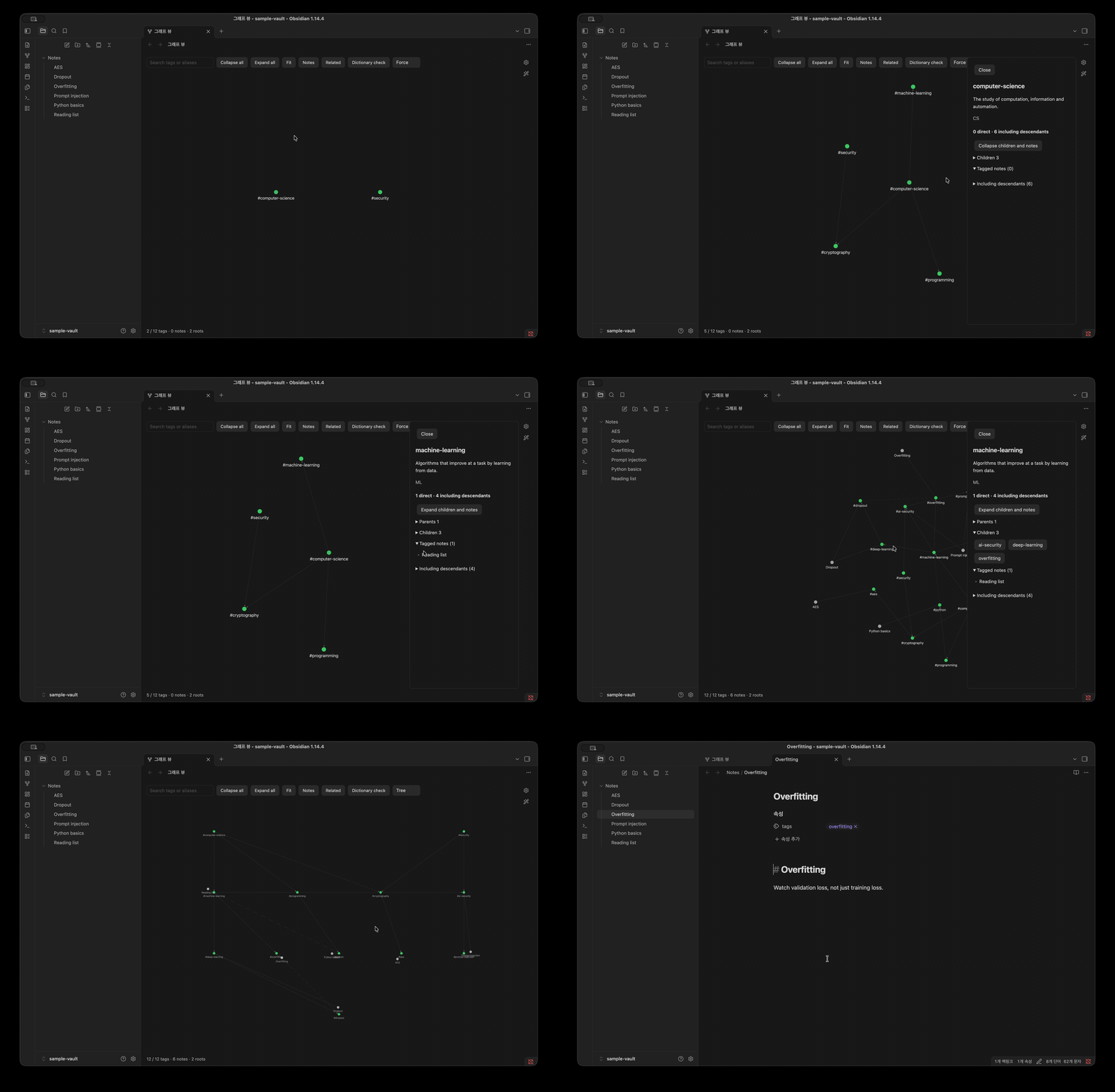
Tag Ontology turns Obsidian's core Graph view into a map of your tag hierarchy. You describe your tags in a JSON dictionary (definition, aliases, parents, related tags). The plugin draws that hierarchy with the built-in graph renderer and attaches your notes to the tags they use.
It is read-only. It never edits your notes or your dictionary.
Features
- Tag hierarchy in the core graph. Uses Obsidian's own Graph view renderer and physics, so it looks and pans like the graph you already know.
- Progressive disclosure. Starts with root tags only. Click a tag to reveal its child tags and the notes tagged with it.
- Note counts with roll-up. For each tag you see notes tagged directly and notes tagged with the tag or any descendant. Notes are de-duplicated across multiple tags and multiple parents.
- Multiple parents and related tags. Solid arrows go from parent to child. Dashed lines connect related tags.
- Three layouts. Force, Tree and Radial.
- Search by tag name or alias.
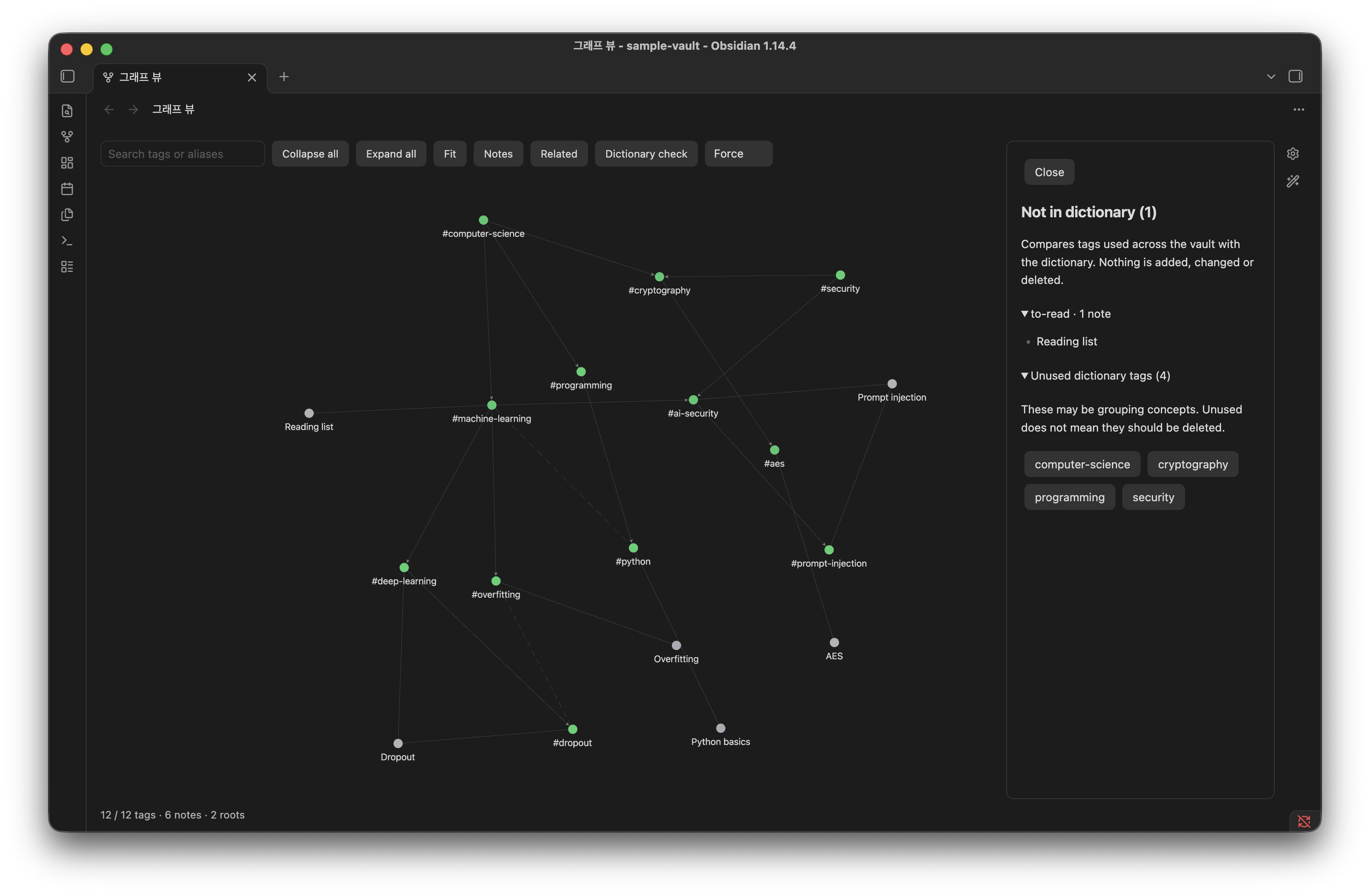
- Dictionary check. Lists tags used in your vault but missing from the dictionary, and dictionary tags no note uses yet. It only reports and never changes anything.
- Open notes by clicking note nodes or note lists.
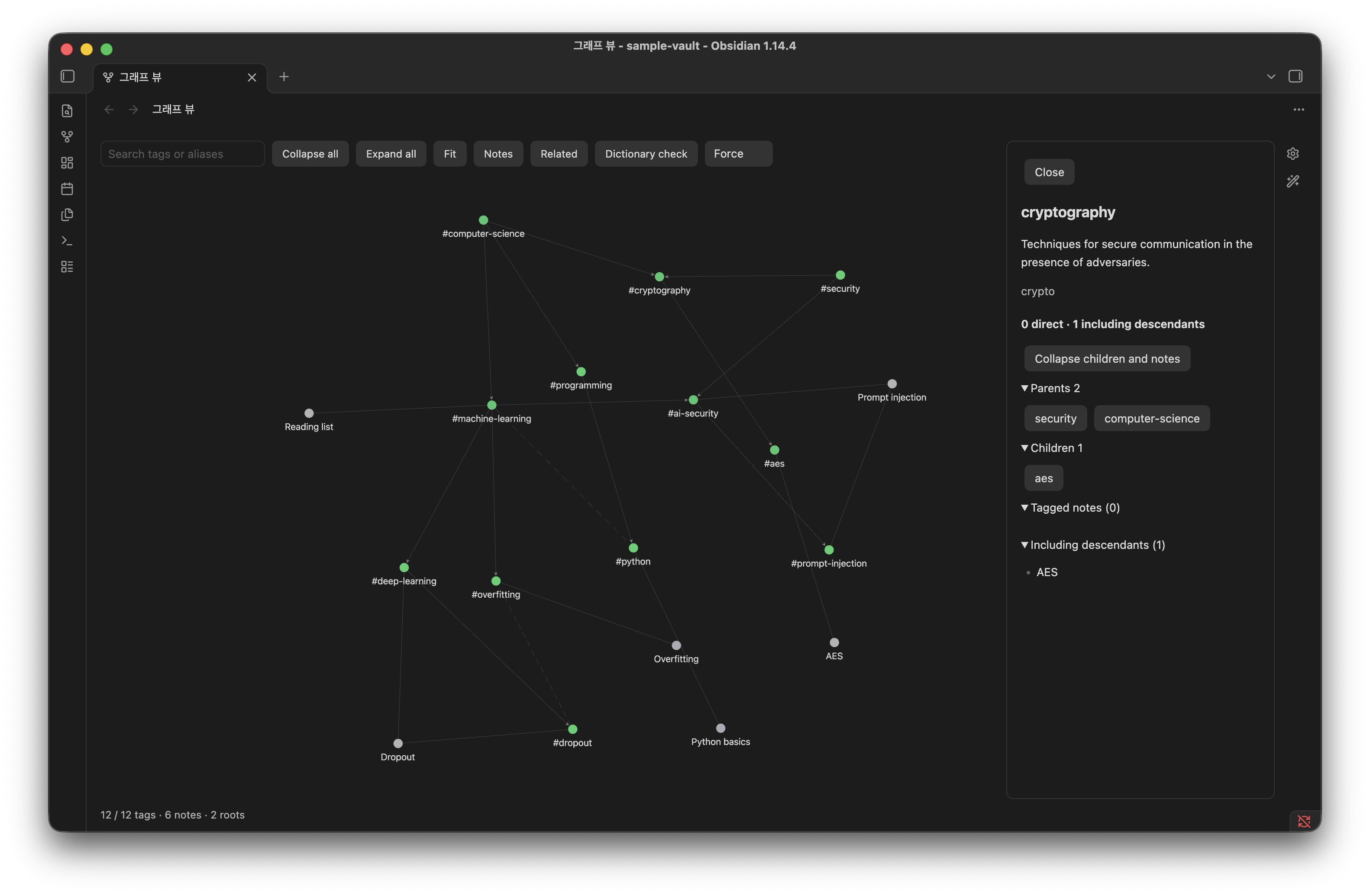
| Tag panel | Dictionary check |
|---|---|
 |  |
How it works
While the plugin is enabled, every core Graph view tab shows the tag ontology instead of the normal note graph. The local graph is not affected. Disable the plugin and the core Graph view goes back to normal: its data, click behavior and textures are restored.
Tag usage comes from Obsidian's metadata cache, which includes frontmatter tags and inline #tags in every Markdown note. Files and folders whose names start with . are skipped.
Installation
From Community plugins
Open Settings → Community plugins → Browse, search for "Tag Ontology", then install and enable it. You can also install it from its directory page.
With BRAT (beta)
- Install BRAT.
- Choose BRAT: Add a beta plugin and enter
NamhyeonKo/obsidian-tag-ontology.
Manually
- Download
main.js,manifest.jsonandstyles.cssfrom the latest release. - Copy them into
.obsidian/plugins/tag-ontology/inside your vault. If you changed the config folder in Obsidian, use that folder instead of.obsidian. - Reload Obsidian, then enable Tag Ontology in Settings → Community plugins.
The core Graph view plugin must be enabled.
Quick start with the sample vault
The repository includes a small vault in examples/sample-vault: a 12-tag dictionary and six notes.
- In Obsidian, choose Open folder as vault and select
examples/sample-vault. - Install the plugin into that vault using one of the methods above.
- Click the graph ribbon icon or run Tag Ontology: Open graph from the command palette.
You should see two roots, computer-science and security. cryptography and ai-security have two parents each. The dictionary check lists #to-read as unregistered.
Tag dictionary format
By default the plugin reads Tag-Dictionary.json at the vault root. You can change the path in the plugin settings.
The file is a single JSON object. Each key is a tag without #, written exactly as it appears in your notes (matching is case-sensitive, so lowercase keys are recommended). A nested tag such as #lang/python uses the key lang/python.
{
  "machine-learning": {
    "aliases": ["ML"],
    "description": "Algorithms that improve at a task by learning from data.",
    "broader": ["computer-science"]
  },
  "dropout": {
    "description": "Randomly disabling units during training to reduce overfitting.",
    "broader": ["deep-learning"],
    "related": ["overfitting"],
    "facet": "technique"
  },
  "computer-science": {
    "description": "The study of computation, information and automation.",
    "broader": []
  }
}
| Field | Required | Type | Meaning |
|---|---|---|---|
description | yes | string | Shown in the tag panel. |
aliases | no | string[] | Other names. Used by search and by the dictionary check to suggest a match for an unregistered tag. |
broader | no | string[] | Parent tags. [] marks a root tag. |
related | no | string[] | Non-hierarchical links, drawn as dashed lines. |
facet | no | string | Free-form category. Validated but not displayed yet. |
Rules:
- Roots need
"broader": []. A tag with nobroaderkey at all is treated as not yet placed and does not appear in the graph. - Every tag named in
broaderorrelatedmust exist in the dictionary. - A tag cannot reference itself, and
broaderlinks cannot form a cycle. - If the dictionary is invalid, opening the view shows a notice with the reason. Automatic refreshes keep the last valid graph.
See examples/sample-vault/Tag-Dictionary.json for a complete example.
Usage
Toolbar and tag panel
- Search tags or aliases: type an exact tag name or alias and press Enter. The graph expands down to that tag and selects it.
- Collapse all / Expand all: show root tags only, or every tag and note.
- Fit: fit the graph to the view.
- Notes / Related: show or hide note nodes and dashed related links. Tags always stay visible because they form the hierarchy.
- Dictionary check: list unregistered and unused tags.
- Layout: Force, Tree or Radial.
- Click a tag to expand it and open its panel: description, aliases, note counts (direct and including descendants), parents, children, related tags and note lists. Clicking an expanded tag only reopens the panel. Use Collapse children and notes in the panel to collapse it.
Commands
| Command | Description |
|---|---|
| Tag Ontology: Open graph | Open the ontology in the core Graph view. Reuses an open graph tab. |
| Tag Ontology: Reload dictionary | Reload the dictionary and the note index. |
| Tag Ontology: Open compatibility viewer | A standalone Cytoscape-based viewer kept for compatibility. Slower on large vaults. |
Settings
| Setting | Description |
|---|---|
| Dictionary path | Vault-relative path to a .json file. Default: Tag-Dictionary.json. Paths inside the vault's config folder (usually .obsidian/) or .git/ are rejected. |
| Layout | Force, Tree or Radial. |
At low zoom levels the core graph hides labels and arrows. Zoom in to see them.
Privacy
- No network requests, telemetry or accounts.
- Reads your notes' metadata and the dictionary file only.
- Writes only its own settings file (
plugins/tag-ontology/data.jsonin the config folder, usually.obsidian/), which holdsdictionaryPathandlayout.
Compatibility and known limitations
- Desktop only. Tested on Obsidian 1.14.4 (macOS).
- The plugin hooks into undocumented internals of the core Graph view (renderer, PIXI, layout worker). A future Obsidian update may break it. If the internals look unfamiliar, the plugin detaches and leaves the core graph alone.
- The core graph's own filters, color groups and arrow settings are hidden while the ontology is shown.
- Labels get dense when every tag is expanded, and switching Tree/Radial on a fully expanded graph takes a moment.
- Untested together with other plugins that patch the Graph view.
Roadmap
- Restore core graph settings while the ontology is shown: color groups, arrows, and tag/attachment/orphan toggles.
Bug reports and feature requests are welcome in Issues. Please include your Obsidian version and OS for bugs.
Development
Requires Node.js 22.18 or later. The tests run TypeScript directly with Node's built-in type stripping.
npm ci
npm run lint        # Obsidian review rules (eslint-plugin-obsidianmd)
npm test            # unit tests, no vault needed
npm run build       # type-check + bundle to main.js
npm run deploy -- "/path/to/vault"   # copy main.js, manifest.json, styles.css into the vault
deploy requires an existing .obsidian/ folder in the target vault and preserves an existing data.json. Reload the plugin in Obsidian afterwards.
npm run test:vault is the maintainer's integration test against a private vault (OBSIDIAN_VAULT_PATH). Other contributors don't need to run it.
Project structure
src/
├── main.ts         # Plugin entry: commands, settings tab, vault/metadata events
├── ontology.ts     # Dictionary validation, hierarchy, note roll-up, dictionary check
├── native.ts       # Hooks the core Graph view renderer (toolbar, panel, layouts)
├── native-data.ts  # Converts the visible ontology into the core graph's data format
├── layout.ts       # Tree/Radial positions (headless Cytoscape)
├── view.ts         # Compatibility viewer (standalone Cytoscape view)
├── renderer.ts     # Cytoscape setup for the compatibility viewer
└── settings.ts     # Settings shape and path validation
tests/              # node:test unit tests (tests/integration is maintainer-only)
examples/           # Sample vault with a Tag-Dictionary.json
scripts/deploy.mjs  # Copies the build into a local vault
Contributing and releasing
See CONTRIBUTING.md for the commit convention (Conventional Commits), pre-commit checks, testing in Obsidian, and the maintainer release checklist.
Acknowledgements
- The approach of feeding custom data to the core graph renderer was inspired by Nested tags graph. That plugin is not required.
- Cytoscape.js and d3-force are used for Tree/Radial layout computation and the compatibility viewer.
License
For plugin developers
Search results and similarity scores are powered by semantic analysis of your plugin's README. If your plugin isn't appearing for searches you'd expect, try updating your README to clearly describe your plugin's purpose, features, and use cases.