by siulved54
Converts the selection between upper, lower, title, sentence and capitalized case, or cycles through them. Also joins wrapped lines, rejoins words split across a line break, strips invisible characters and turns links into plain text.
Text Case and Cleanup


Change the case of the text you have selected, and clean up prose that came out of a PDF, a scan or a web page.
Everything runs on the text in front of you. There is no network access, no telemetry, and nothing runs on its own: a command only ever touches the selection you give it, and each one is a single undo step. The one optional exception is Tidy on paste, which is off until you turn it on.
Installing
In Obsidian, open Settings -> Community plugins -> Browse, search for Text Case and Cleanup, then install and enable it.
To install it by hand instead:
- Download
main.js,manifest.jsonandstyles.cssfrom the latest release. - Put the three files in
<your vault>/.obsidian/plugins/text-format/. - Reload Obsidian and turn the plugin on under Settings -> Community plugins.
It needs Obsidian 1.0.0 or newer, and works on desktop and mobile alike.
Commands
Each command works on every selection you have. With no selection it works on the current line, and on a blank line it does nothing.
Case
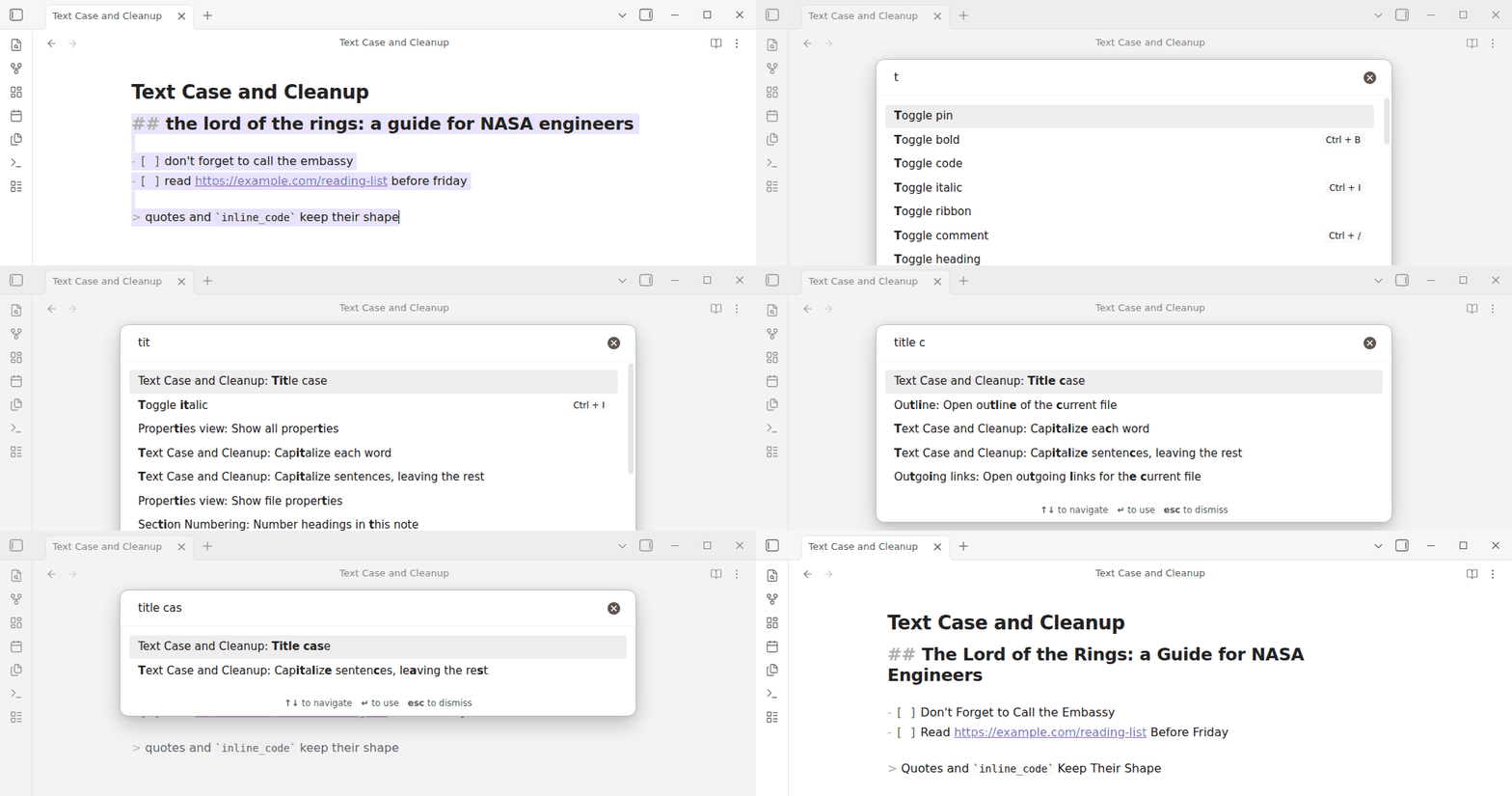
| Command | the lord of the rings becomes |
|---|---|
| Uppercase | THE LORD OF THE RINGS |
| Lowercase | the lord of the rings |
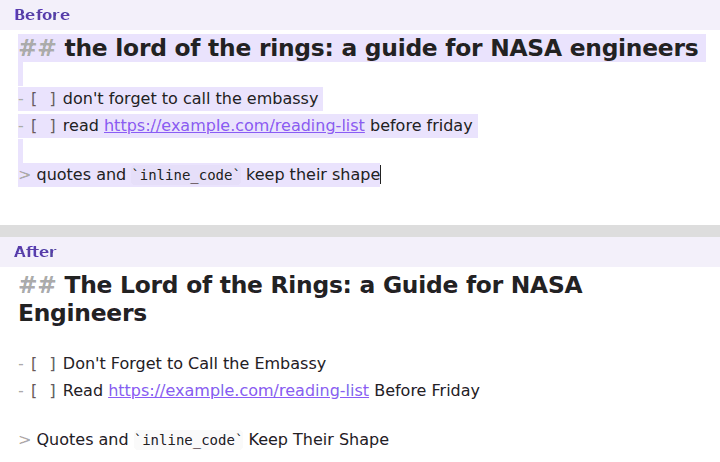
| Title case | The Lord of the Rings |
| Sentence case | The lord of the rings |
| Capitalize each word | The Lord Of The Rings |
| Capitalize sentences, leaving the rest | The lord of the rings |
| Cycle case | lowercase, then Title Case, then UPPERCASE, then round again |
Names: variables, file names, tags, anchors
| Command | user account ID becomes |
|---|---|
| camelCase | userAccountId |
| PascalCase | UserAccountId |
| snake_case | user_account_id |
| CONSTANT_CASE | USER_ACCOUNT_ID |
| kebab-case | user-account-id |
| dot.case | user.account.id |
| Train-Case | User-Account-Id |
| Pascal_Snake_Case | User_Account_Id |
| path/case | user/account/id |
| Capital Case | User Account Id |
| no case | user account id |
| Slug (lowercase, no accents, hyphens) | user-account-id, and Café Über Straße becomes cafe-uber-strasse |
They read each other as well as prose: userAccountId, user_account_id and
USER-ACCOUNT-ID all give the same words, XMLHttpRequest splits as
xml_http_request, and don't stays one word. Each line converts on its own
and keeps its bullet, task box or heading hashes, so a list of titles becomes a
list of slugs, not one long identifier. Links, URLs, inline code and maths are
left in place.
One hotkey for all of them
Change case… lists every case with a preview of what your selection would
become. Type a few letters to filter (snake, kebab), then Enter.
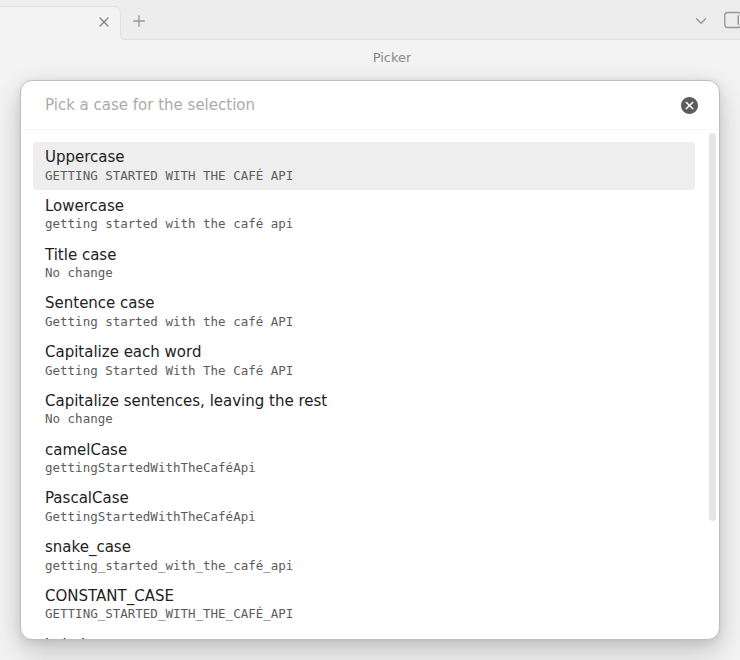
Sentence case lowers everything first and then raises the opening word of each sentence. Capitalize sentences only raises the opening word, so proper nouns you already typed survive.
Cleanup
| Command | What it does |
|---|---|
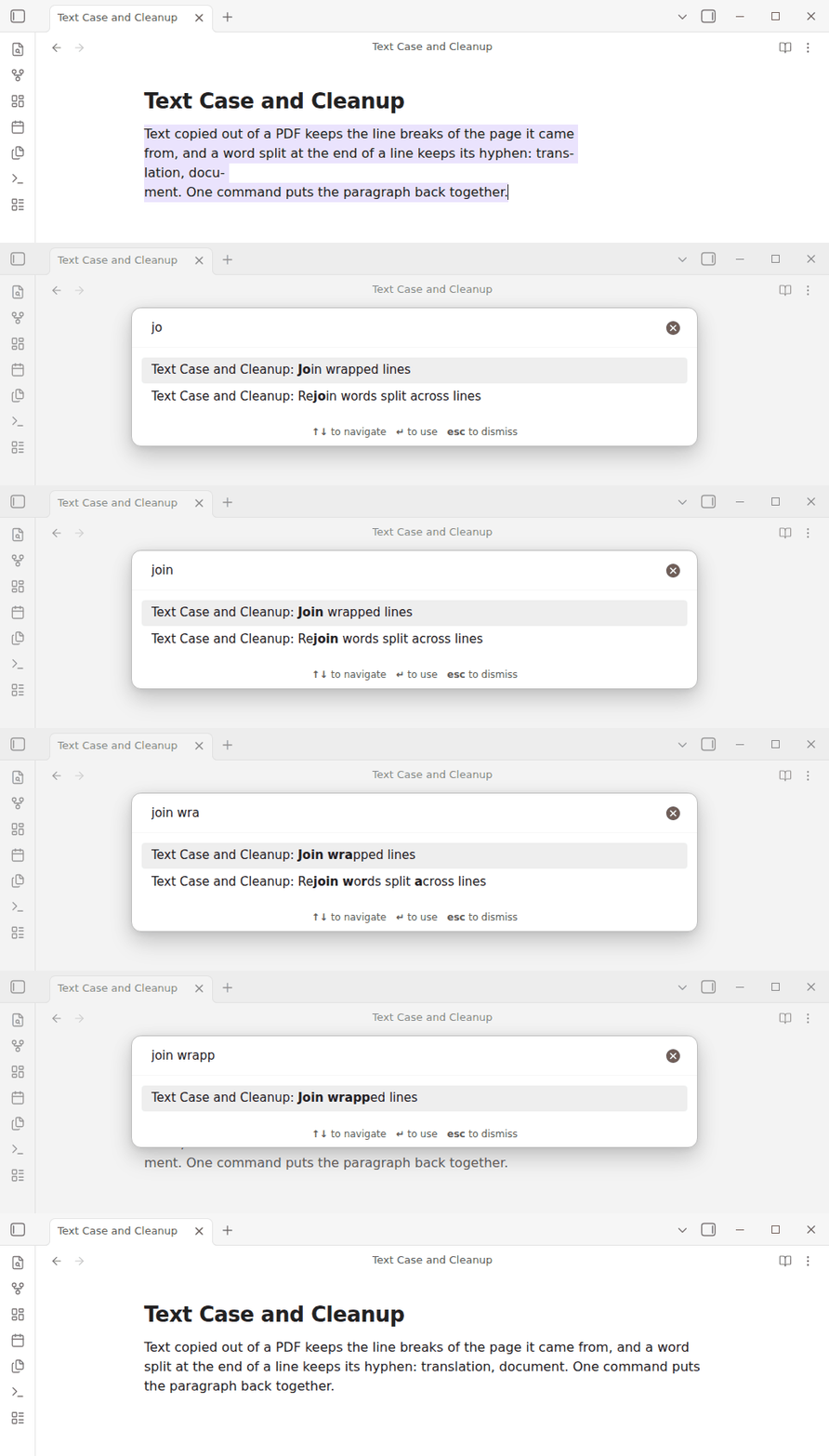
| Join wrapped lines | Merges a hard-wrapped paragraph back into one line, rejoining any word split across the break |
| Rejoin words split across lines | Undoes the hyphenation without touching the line breaks |
| Remove invisible characters | Strips soft hyphens, zero-width marks and byte order marks, and turns non-breaking and exotic spaces into ordinary ones |
| Replace ligatures | Turns the single-character ligatures a PDF copy leaves behind (fi, fl, ff, ffi, ffl, ſt, st) into plain letters, so file becomes file and search finds it. The Dutch IJ and ij are real letters and stay. Code and display maths are left alone |
| Straighten quotes and dashes | Turns curly quotes and primes into straight ones, dashes into hyphens (— into --) and … into three dots, for text headed into code, a terminal or a config file. Guillemets are left alone |
| Links to plain text | Replaces every link with the text it displays |
Tidy note
One command, Tidy note, runs the cleanups you pick in the settings over the selection, or the whole note when nothing is selected. A small window first says how many lines each step would change (and a notice says "Nothing to tidy" when it would change none); confirming applies everything as one undo step.
Steps: remove invisible characters, replace ligatures, join wrapped lines, collapse multiple spaces, remove trailing whitespace, remove extra blank lines. All but joining wrapped lines are on by default.
It leaves fenced code, inline code, display maths, front matter and tables alone, never touches indentation, list markers or blockquote depth, and keeps Markdown hard line breaks (two trailing spaces before another line of text).
Each of three steps is also a command of its own: Remove trailing whitespace, Collapse multiple spaces (indentation stays) and Remove extra blank lines (keep one).
Tidy on paste (off by default) runs the same steps on plain text you paste. It does nothing inside code or front matter, leaves pastes that carry formatting (HTML, files) to Obsidian, never changes the clipboard, steps aside if another plugin already handled the paste, and is one undo step.
Your own find-and-replace
For the fix you make again and again, keep it as a command. In the settings, under Saved replacements, add a replacement with a name, the text to find, the text to put in its place, and two options: Regular expression and Match case. Each one becomes its own command, Replace: , which you can give a hotkey, and is also listed in Run a saved replacement…. Adding, renaming or deleting one takes effect at once, without a reload.
A replacement works on the selection, or on the whole note when nothing is selected. It is one undo step, and a notice says how many replacements it made. Nothing is saved by default.
Example: a replacement named Dates to ISO, with Regular expression on,
that finds (\d{2})/(\d{2})/(\d{4}) and replaces it with $3-$2-$1, turns
31/12/2026 into 2026-12-31.
- Without Regular expression, the find and replace text are taken exactly as
typed, so
.and$mean themselves. - With it,
$1,$2... are the groups of the match,$&is the whole match, and\nin the replace text is a line break. An empty replace text deletes the matches. - Match case is off by default, so
catalso findsCat. - A regular expression that is not valid shows an error line under it in the settings, and its command only shows a notice; it never changes the note.
- Matches never span two lines. A selection that starts or ends inside code is left alone.
Lines
| Command | What it does |
|---|---|
| Sort lines A to Z | Sorts naturally (item 2 before item 10), ignoring case and accents. A list item moves with the lines indented under it, items are compared by their text rather than the bullet or checkbox, and an ordered list is renumbered |
| Sort lines Z to A | The same, in reverse |
| Remove duplicate lines | Keeps the first of each repeated line |
| Remove blank lines | Removes every empty line |
| Remove extra blank lines (keep one) | Leaves at most one empty line between paragraphs |
These work on every line the selection touches, or on the whole note when nothing is selected. The front matter is never included, lines inside code blocks are never removed, and one undo puts everything back.
What these commands will not touch
- Fenced code blocks and inline code are copied through untouched, as is inline maths. Saved replacements skip code and front matter too.
- URLs, wikilinks, autolinks and e-mail addresses keep their case, because lowering a URL can break it.
- A line's markdown prefix — quote markers, bullets, ordered numbers, task
checkboxes, heading hashes — is never rewritten.
- [x] buy milkbecomes- [x] Buy milk, never- [X] Buy Milk. - Abbreviations and decimals (
e.g.,U.S.A.,3.14) do not end a sentence and keep their own capitals.
Settings
| Setting | Default | What it is for |
|---|---|---|
| Language rules | System default | Turkish and Azerbaijani map the dotted and dotless i differently from every other language; Lithuanian keeps the dot over an accented lowercase i |
| Keep acronyms as they are | On | Leaves acronyms such as NASA and PDF, and mixed-case names such as iPhone, macOS and GitHub, alone. It is ignored when the whole selection is already uppercase, since then every word looks like an acronym |
| Words title case keeps lowercase | A practical list | No two style guides agree here, so the list is yours to edit. The first and last word of a title are always capitalized whatever the list says |
| Drop the hyphen when joining lines | On | A PDF breaks a word as trans- and lation. Turn this off for text where a real compound such as well-known is likelier than a broken word |
| With no selection, change case of | Whole line | Or only the word at the caret |
| Tidy steps | All on except Join wrapped lines | Which steps Tidy note and Tidy on paste run |
| Keep hard line breaks | On | Trailing whitespace removal keeps two trailing spaces before a line of text |
| Confirm before tidying | On | Shows the per-step counts before applying |
| Tidy on paste | Off | Runs the Tidy steps on plain text you paste |
| Saved replacements | None | Your own find-and-replace commands, described above |
| Keep image alt text | On | Leaves the description behind when an image becomes plain text |
Scope
This is a rebuild of the uncontested half of Text Format, whose last release was in July 2024. It deliberately leaves out:
- Automatic format-on-save. Whitespace cleanup is a command, and pasting can be tidied only if you opt in; nothing rewrites your notes unasked.
- The original's grab bag — callouts, Anki, LaTeX conversion, table to list, heading level shifting, API requests. Those are separate tools wearing one name.
Bugs it does not reproduce
These are open issues on the original. They are fixed here by design, and each one has a test naming it.
| Issue | Symptom there |
|---|---|
| #33 | don't became Don'T, because the apostrophe started a new word |
| #103 | Removing a wikilink failed when it contained a # |
| #110 | Uppercasing an empty line froze the app |
| #112 | Capitalizing a sentence rewrote the [x] of a task |
| #114 | Title case mangled Vietnamese |
| #115 | Removing a link left fragments when it held brackets or parentheses |
| #118 | Turkish i did not become İ |
| #120 | No way to unwrap a hard-wrapped paragraph |
| #121 | Title case lowered the first word when it was on the ignore list |
Building and testing
npm install
npm test     # the logic, under plain Node
npm run build
The logic lives in src/case.ts and src/cleanup.ts and imports nothing from
Obsidian, so it runs and is tested under plain Node. main.ts is the only file
that talks to the editor, and it edits by range inside one
editor.transaction, so a command is one undo step and never replaces the
document.
More plugins by Siulved54
| Plugin | What it does | Source |
|---|---|---|
| Shared Blocks | Write a block of text once and reuse it in any note. Edit the source and every reference re-renders live. | shared-blocks |
| Typography as You Type | Curly quotes, dashes and ellipses as you type, kept out of code and maths, with Backspace to take one back. | smart-typography-plugin |
| Section Numbering | Number headings as an outline (1, 1.1, 1.2) and keep every link to them working when they renumber. | section-numbering |
| Spreadsheet to Table | Paste cells from Excel or Google Sheets as a Markdown table with a real header, insert CSV files, and copy tables back out. | spreadsheet-to-table |
| Hybrid Line Numbers | Relative and hybrid line numbers for Vim-style jumps, where a folded section counts as one line. | hybrid-line-numbers |
| List Item Callouts | Colour a single list item as a callout by starting it with a character such as &, ! or ?. | list-item-callouts |
| Folder Counts | See how many notes or files each folder holds, right in the file explorer, with a vault total and folder exclusions. | folder-counts |
| Note Reading Time | Reading time of the current note or your selection in the status bar, optionally saved to a property. | note-reading-time |
| Task Rollover | Roll unfinished tasks from your last daily note into today's when it is created, with a real undo. | task-rollover |
| Zoom Into Section | Zoom into a heading or list item to see only it and its contents, with a breadcrumb bar to climb back out. | zoom-into-section |
| Link Title on Paste | Paste a web address and get a Markdown link with the page's title, fetched in the background and undone in one step. | link-title-on-paste |
| Update Radar | Checks your installed community plugins for updates in the background, shows what changed, and flags the ones that look abandoned. | community-update-checker |
| Dataview to Bases | Convert Dataview queries into Bases blocks, and see which queries in your vault can be converted. | dataview-to-bases |
| Line Editing Commands | Duplicate, join, sort and reverse lines, insert blank lines and jump to a line number, with multi-cursor support. | line-editing-commands |
| Note Mover Rules | Move notes into folders by ordered rules on tags, properties, titles and paths, with a preview before any bulk move. | note-mover-rules |
| Tab History | Keeps each tab's back and forward history across restarts, and adds commands to move, maximize and close tabs. | tab-history |
| URL Cards | Shows web addresses as cards with title, description and image, and reads existing cardlink blocks. | url-cards |
| Vim Config | Loads a vimrc-style file from your vault so your key mappings and editor commands are ready when vim mode starts. | vim-config |
| Task Archive | Moves completed tasks, with their sub-items, into an archive section or note. | task-archive |
All of them are in the community directory: Settings -> Community plugins -> Browse, then search for the name.
Licence
MIT, see LICENSE.
For plugin developers
Search results and similarity scores are powered by semantic analysis of your plugin's README. If your plugin isn't appearing for searches you'd expect, try updating your README to clearly describe your plugin's purpose, features, and use cases.